Update wont download the update

Dudex

New member
Local time
11:09 AM
Messages
30
Hello

I had my PC for about 5 months now, and suddenly now Update wont download any updates. Anyone got any tips or solutions to this problem? I rather not reinnstall windows, because I lost the CD xD I got a valid copy.


This is in norwegian but it says "looking for updates" :P
 

My Computer My Computer

At a glance

Windows 7 Home Premium x64
OS
Windows 7 Home Premium x64

My Computer My Computer

At a glance

Windows 7 Professional x64 PLAMD Athlon 4450eGoodRam DDR2 2x2048MB (FSB 800MHz)nVidia GeForce 9600GT (G94-300) 1024 MB
Computer Manufacturer/Model Number
Custom made
OS
Windows 7 Professional x64 PL
CPU
AMD Athlon 4450e
Motherboard
Giga-Byte GA-MA69G-S3H
Memory
GoodRam DDR2 2x2048MB (FSB 800MHz)
Graphics Card(s)
nVidia GeForce 9600GT (G94-300) 1024 MB
Monitor(s) Displays
SAMSUNG SyncMaster HS2P301688
Hard Drives
Seagate ST3750330AS 750GB
PSU
Corsair 550W
Cooling
AeroCool ExtremeEngine 3T
Will do thx you

It kinda worked thx

Ok. It found the updates, but wont download them :S I did the first option you gave me
 
Last edited by a moderator:

My Computer My Computer

At a glance

Windows 7 Home Premium x64
OS
Windows 7 Home Premium x64

My Computer My Computer

At a glance

Windows 7 Professional x64 PLAMD Athlon 4450eGoodRam DDR2 2x2048MB (FSB 800MHz)nVidia GeForce 9600GT (G94-300) 1024 MB
Computer Manufacturer/Model Number
Custom made
OS
Windows 7 Professional x64 PL
CPU
AMD Athlon 4450e
Motherboard
Giga-Byte GA-MA69G-S3H
Memory
GoodRam DDR2 2x2048MB (FSB 800MHz)
Graphics Card(s)
nVidia GeForce 9600GT (G94-300) 1024 MB
Monitor(s) Displays
SAMSUNG SyncMaster HS2P301688
Hard Drives
Seagate ST3750330AS 750GB
PSU
Corsair 550W
Cooling
AeroCool ExtremeEngine 3T
W u

You could try this

CREATE SYSTEM RESTORE POINT FIRST

1 go to services and STOP windows update service
2 click start/computer/local c/windows/ software distribution / datastore
3 delete both files and close
4 go back to your services and START Windows update sevice
5 now recheck for updates (it should say "never been checked")
 

My Computer My Computer

At a glance

Windows 7 X64 BitIntel(R) Core(TM)i7-4771 CPU @ 3.50GHCorsair 4x8 Vengeance (32GB)NVIDIA GeForce GTX780
Computer type
PC/Desktop
OS
Windows 7 X64 Bit
CPU
Intel(R) Core(TM)i7-4771 CPU @ 3.50GH
Motherboard
Asus Sabertooth Z87
Memory
Corsair 4x8 Vengeance (32GB)
Graphics Card(s)
NVIDIA GeForce GTX780
Monitor(s) Displays
LG
Screen Resolution
1920x1080
PSU
Corsair CX750
Case
Corsair 200 series
Cooling
H80i Liquid Cooler
Keyboard
Microsoft
Mouse
Microsoft
Internet Speed
good times-500-850 kbs bad times-50-100 kbs
It found the updates, it just wont download them
 

My Computer My Computer

At a glance

Windows 7 Home Premium x64
OS
Windows 7 Home Premium x64
1.Run cmd.exe with administrative previlliges (right click on cmd.exe and choose "run as admin") and type:

sfc /scannow

When it finish type in cmd.exe

findstr /c:"[SR]" %windir%\logs\cbs\cbs.log >%userprofile%\Desktop\sfcdetails.txt

on your desktop appear sfcdetails.txt file

2.Run Readiness Tool Download details: System Update Readiness Tool for Windows 7 for x64-based Systems (KB947821) [August 2010] when it finish it will generate CheckSur.log file in C:\Windows\Logs\CBS folder

Both files CheckSur.log and sfcdetails.txt attache to post
 

My Computer My Computer

At a glance

Windows 7 Professional x64 PLAMD Athlon 4450eGoodRam DDR2 2x2048MB (FSB 800MHz)nVidia GeForce 9600GT (G94-300) 1024 MB
Computer Manufacturer/Model Number
Custom made
OS
Windows 7 Professional x64 PL
CPU
AMD Athlon 4450e
Motherboard
Giga-Byte GA-MA69G-S3H
Memory
GoodRam DDR2 2x2048MB (FSB 800MHz)
Graphics Card(s)
nVidia GeForce 9600GT (G94-300) 1024 MB
Monitor(s) Displays
SAMSUNG SyncMaster HS2P301688
Hard Drives
Seagate ST3750330AS 750GB
PSU
Corsair 550W
Cooling
AeroCool ExtremeEngine 3T
findstr /c:"[SR]" %windir%\logs\cbs\cbs.log >%userprofile%\Desktop\sfcdetails.txt Will not work, it comes out blank:S

NVm I found the paste button :P BTW Thx for all the help :D

NVM I learned how to paste xD
 

Attachments

Last edited by a moderator:

My Computer My Computer

At a glance

Windows 7 Home Premium x64
OS
Windows 7 Home Premium x64
Don't bump post here! Please be patient!

You have small damages in your OS


Unavailable repair files:
servicing\packages\Package_for_KB979916_RTM~31bf3856ad364e35~amd64~~6.1.1.0.mum
servicing\packages\Package_for_KB979916_RTM~31bf3856ad364e35~amd64~~6.1.1.0.cat

Follow te below instruction:


1.I attached to post files to replace,please download them and upack on your desktop
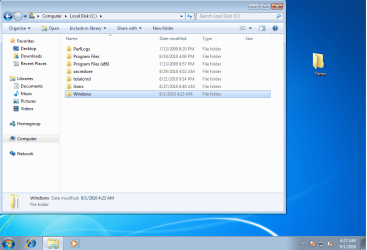
-on your desktop appear Temp folder

2.Please open explorer and go to root C:

CSS1.png

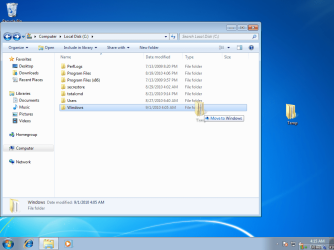
3.Left click on Temp folder,hold left mouse button and move it to explorer,when appear tip "move to Windows" (it's very important), release mouse button
CSS2.png

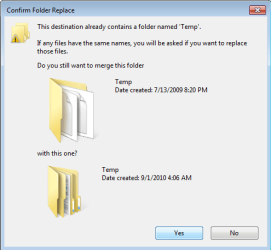
4.Next explorer ask do you want to merge folders,click "yes" to apply operation
CSS3.png
5.Run Readiness Tool again
6.If you still don't have installed KB979916 yet please download & install Windows6.1-KB979916-x64.msu from this site Download details: Microsoft .NET Framework 3.5.1 Security Update for Windows 7 and Windows Server 2008 R2 (not from Windows Update)


4
 
Last edited:

My Computer My Computer

At a glance

Windows 7 Professional x64 PLAMD Athlon 4450eGoodRam DDR2 2x2048MB (FSB 800MHz)nVidia GeForce 9600GT (G94-300) 1024 MB
Computer Manufacturer/Model Number
Custom made
OS
Windows 7 Professional x64 PL
CPU
AMD Athlon 4450e
Motherboard
Giga-Byte GA-MA69G-S3H
Memory
GoodRam DDR2 2x2048MB (FSB 800MHz)
Graphics Card(s)
nVidia GeForce 9600GT (G94-300) 1024 MB
Monitor(s) Displays
SAMSUNG SyncMaster HS2P301688
Hard Drives
Seagate ST3750330AS 750GB
PSU
Corsair 550W
Cooling
AeroCool ExtremeEngine 3T
What could this been caused by? Just woundering, while readiness is running
 

My Computer My Computer

At a glance

Windows 7 Home Premium x64
OS
Windows 7 Home Premium x64
What could this been caused by? Just woundering, while readiness is running
I don't know.I only specialize with fixing such kind of issuess.See some examples from our http://www.sevenforums.com/windows-updates-activation/106590-update-error-codes-800b0100-80073712-tried-everything-help.html
http://www.sevenforums.com/windows-updates-activation/104761-unable-install-updates-because-800b0100.html
http://www.sevenforums.com/windows-updates-activation/104537-unable-update-kb2079403-due-error-800b0100.html

you can find more of them such kind of guys on our forum.

Sometimes it caused by any application,hardware issue but sometimes it's really hard to explain


Don't forget install Windows6.1-KB979916-x64.msu from my link (probably you don't have installed yet) +restart,when you will do it then you can try run Windows Updates again
 

My Computer My Computer

At a glance

Windows 7 Professional x64 PLAMD Athlon 4450eGoodRam DDR2 2x2048MB (FSB 800MHz)nVidia GeForce 9600GT (G94-300) 1024 MB
Computer Manufacturer/Model Number
Custom made
OS
Windows 7 Professional x64 PL
CPU
AMD Athlon 4450e
Motherboard
Giga-Byte GA-MA69G-S3H
Memory
GoodRam DDR2 2x2048MB (FSB 800MHz)
Graphics Card(s)
nVidia GeForce 9600GT (G94-300) 1024 MB
Monitor(s) Displays
SAMSUNG SyncMaster HS2P301688
Hard Drives
Seagate ST3750330AS 750GB
PSU
Corsair 550W
Cooling
AeroCool ExtremeEngine 3T
Ok, it takes ages or it is suppost to take that long? Used around 20min + now.
 

My Computer My Computer

At a glance

Windows 7 Home Premium x64
OS
Windows 7 Home Premium x64
Ok, it takes ages or it is suppost to take that long? Used around 20min + now.
Wait at least 10 minutes more...
 

My Computer My Computer

At a glance

Windows 7 Professional x64 PLAMD Athlon 4450eGoodRam DDR2 2x2048MB (FSB 800MHz)nVidia GeForce 9600GT (G94-300) 1024 MB
Computer Manufacturer/Model Number
Custom made
OS
Windows 7 Professional x64 PL
CPU
AMD Athlon 4450e
Motherboard
Giga-Byte GA-MA69G-S3H
Memory
GoodRam DDR2 2x2048MB (FSB 800MHz)
Graphics Card(s)
nVidia GeForce 9600GT (G94-300) 1024 MB
Monitor(s) Displays
SAMSUNG SyncMaster HS2P301688
Hard Drives
Seagate ST3750330AS 750GB
PSU
Corsair 550W
Cooling
AeroCool ExtremeEngine 3T
Ok, it takes ages or it is suppost to take that long? Used around 20min + now.
Wait at least 10 more minutes...

Ok. I was just woundering if something was wrong + SC2 is down xD
If this method fail,restart computer ,download again my Temp.zip unpack it on your desktop
in your desktop>>Temp\CheckSur\Servicing\Packages you can find two files for substitute and replace corrupted files manually in following way.

1.Navigate to C:\Windows\Servicing\Packages,takeownership of this folder and add your account to have full control
2.Copy my files to this folder -if you have already any file then replace it.
3.Remove your account from permissions to Packages folder
4.Restore ownership of Packages folder back to "NT Service\TrustedInstaller"
5.install Windows6.1-KB979916-x64.msu
Useful links (please read them):Take Ownership of file
TrustedInstaller - Restore as Owner
Folder Permissions
 

My Computer My Computer

At a glance

Windows 7 Professional x64 PLAMD Athlon 4450eGoodRam DDR2 2x2048MB (FSB 800MHz)nVidia GeForce 9600GT (G94-300) 1024 MB
Computer Manufacturer/Model Number
Custom made
OS
Windows 7 Professional x64 PL
CPU
AMD Athlon 4450e
Motherboard
Giga-Byte GA-MA69G-S3H
Memory
GoodRam DDR2 2x2048MB (FSB 800MHz)
Graphics Card(s)
nVidia GeForce 9600GT (G94-300) 1024 MB
Monitor(s) Displays
SAMSUNG SyncMaster HS2P301688
Hard Drives
Seagate ST3750330AS 750GB
PSU
Corsair 550W
Cooling
AeroCool ExtremeEngine 3T
20 minutes now, and nothing have happend with the install thingy. Says "Copies the packets to the windows update cache"

Could it maby help to install SP1 beta?
 
Last edited by a moderator:

My Computer My Computer

At a glance

Windows 7 Home Premium x64
OS
Windows 7 Home Premium x64
20 minutes now, and nothing have happend with the install thingy. Says "Copies the packets to the windows update cache"
Have you tried method from post 19 too?It should pass.

Could it maby help to install SP1 beta?
Until you have damages in packages folder you can forget install SP1 beta too.It's not my fault it something hangs in your OS.
 

My Computer My Computer

At a glance

Windows 7 Professional x64 PLAMD Athlon 4450eGoodRam DDR2 2x2048MB (FSB 800MHz)nVidia GeForce 9600GT (G94-300) 1024 MB
Computer Manufacturer/Model Number
Custom made
OS
Windows 7 Professional x64 PL
CPU
AMD Athlon 4450e
Motherboard
Giga-Byte GA-MA69G-S3H
Memory
GoodRam DDR2 2x2048MB (FSB 800MHz)
Graphics Card(s)
nVidia GeForce 9600GT (G94-300) 1024 MB
Monitor(s) Displays
SAMSUNG SyncMaster HS2P301688
Hard Drives
Seagate ST3750330AS 750GB
PSU
Corsair 550W
Cooling
AeroCool ExtremeEngine 3T
Wait at least 10 more minutes...

Ok. I was just woundering if something was wrong + SC2 is down xD
If this method fail,restart computer ,download again my Temp.zip unpack it on your desktop
in your desktop>>Temp\CheckSur\Servicing\Packages you can find two files for substitute and replace corrupted files manually in following way.

1.Navigate to C:\Windows\Servicing\Packages,takeownership of this folder and add your account to have full control
2.Copy my files to this folder -if you have already any file then replace it.
3.Remove your account from permissions to Packages folder
4.Restore ownership of Packages folder back to "NT Service\TrustedInstaller"
5.install Windows6.1-KB979916-x64.msu
Useful links (please read them):Take Ownership of file
TrustedInstaller - Restore as Owner
Folder Permissions

Done ex that last part. It wont work :S
 

My Computer My Computer

At a glance

Windows 7 Home Premium x64
OS
Windows 7 Home Premium x64
[

Done ex that last part. It wont work :S
Still can't you raplace file or something another?

Delete C:\Windows\Temp\CheckSur folder and run Readiness tool again and then go to C:\Windows\Logs\CBS folder and attache new CheckSur.log to post

Besides I want to know what hell to hang in your system,download OTL http://oldtimer.geekstogo.com/OTL.exe (leave default settings),it will generate log -attache this log to post too.
 

My Computer My Computer

At a glance

Windows 7 Professional x64 PLAMD Athlon 4450eGoodRam DDR2 2x2048MB (FSB 800MHz)nVidia GeForce 9600GT (G94-300) 1024 MB
Computer Manufacturer/Model Number
Custom made
OS
Windows 7 Professional x64 PL
CPU
AMD Athlon 4450e
Motherboard
Giga-Byte GA-MA69G-S3H
Memory
GoodRam DDR2 2x2048MB (FSB 800MHz)
Graphics Card(s)
nVidia GeForce 9600GT (G94-300) 1024 MB
Monitor(s) Displays
SAMSUNG SyncMaster HS2P301688
Hard Drives
Seagate ST3750330AS 750GB
PSU
Corsair 550W
Cooling
AeroCool ExtremeEngine 3T
I got an error while running the readiness. "0x8024800c"

Here is the text
 

Attachments

Last edited by a moderator:

My Computer My Computer

At a glance

Windows 7 Home Premium x64
OS
Windows 7 Home Premium x64
Back
Top