Updated Network Frustration & Question...

Subsonic

New member
Pro User
VIP
Local time
12:06 PM
Messages
259
Location
Virginia, USA
I've found the solution to my network problem. In my other thread: ( http://www.sevenforums.com/network-sharing/23137-frustrating-network-problem.html ) I had a problem with an inconsistent ability to share between my desktop and my laptop. I can always get to my shares on my desktop from my laptop, but sometimes, I would not be able to access the shares on my laptop from my desktop. I have two other computers on the network, all running Windows 7 (3 computers running Ultimate, netbook running Pro). No problems with the other machines at all. All advanced sharing settings are set like this snip. If I change the laptop to "turn off password protected sharing" and "Use user accounts and passwords to connect to other computers", I have no more problem. I guess the question is, why do the defaults work great on 3 machines but not my laptop? I kinda like that I have to enter user and password to access shares, but if it just won't work for my laptop, I'll forgo it.
 

Attachments

  • Capture.JPG
    Capture.JPG
    112.1 KB · Views: 53

My Computer

Computer Manufacturer/Model Number
Dell / Studio xps
OS
Windows7 x64 7600 16385
CPU
Intel I7 920
Motherboard
Dell
Memory
6GB DDR3
Graphics Card(s)
ATI Radeon HD4350
Sound Card
Integrated 7.1 channel
Hard Drives
Hitachi HDT721064SLA360 (596 GB)
Keyboard
Logitech EX110
Mouse
Logitech LX8
I've found the solution to my network problem. In my other thread: ( http://www.sevenforums.com/network-sharing/23137-frustrating-network-problem.html ) I had a problem with an inconsistent ability to share between my desktop and my laptop. I can always get to my shares on my desktop from my laptop, but sometimes, I would not be able to access the shares on my laptop from my desktop. I have two other computers on the network, all running Windows 7 (3 computers running Ultimate, netbook running Pro). No problems with the other machines at all. All advanced sharing settings are set like this snip. If I change the laptop to "turn off password protected sharing" and "Use user accounts and passwords to connect to other computers", I have no more problem. I guess the question is, why do the defaults work great on 3 machines but not my laptop? I kinda like that I have to enter user and password to access shares, but if it just won't work for my laptop, I'll forgo it.
Hi Subsonic. I looked at the previous thread ... please clarify some things for me? I'm kinda dense sometimes and need the extra help?

Your 7 computers, all joined to the same "HomeGroup"?
Laptop wireless? Other computers wireless?
You are sharing the default "HomeGroup" folders?
Have you added any shared folders, manually?
How many "User" accounts on each computer? One Administrator, one or more User?
Do all "Users" have an account on all computers?

Your advanced sharing settings look OK, and I agree you should be able to allow "HomeGroup" to control sharing and should be able to use password protection.

Cheers!

Robert
 

My Computer

OS
...
Hi Subsonic. I looked at the previous thread ... please clarify some things for me? I'm kinda dense sometimes and need the extra help?

Your 7 computers, all joined to the same "HomeGroup"?
Laptop wireless? Other computers wireless?
You are sharing the default "HomeGroup" folders?
Have you added any shared folders, manually?
How many "User" accounts on each computer? One Administrator, one or more User?
Do all "Users" have an account on all computers?

Your advanced sharing settings look OK, and I agree you should be able to allow "HomeGroup" to control sharing and should be able to use password protection.


Cheers!

Robert

All computers joined to Homegroup.
3 wireless, one cabled.
I'm sharing d and e drives.
Yes
Only one User account on each machine and it is and admin account.
No. Two machines use my name and password, the other two use my wifes. However, this doesn't seem to be a problem. I have no problem at all with the two machines that my wife uses. They network between my machines both directions flawlessly. The only trouble I have occasionally is between my desktop not being able to access my laptop shares.
 

My Computer

Computer Manufacturer/Model Number
Dell / Studio xps
OS
Windows7 x64 7600 16385
CPU
Intel I7 920
Motherboard
Dell
Memory
6GB DDR3
Graphics Card(s)
ATI Radeon HD4350
Sound Card
Integrated 7.1 channel
Hard Drives
Hitachi HDT721064SLA360 (596 GB)
Keyboard
Logitech EX110
Mouse
Logitech LX8
I've found the solution to my network problem. In my other thread: ( http://www.sevenforums.com/network-sharing/23137-frustrating-network-problem.html ) I had a problem with an inconsistent ability to share between my desktop and my laptop. I can always get to my shares on my desktop from my laptop, but sometimes, I would not be able to access the shares on my laptop from my desktop. I have two other computers on the network, all running Windows 7 (3 computers running Ultimate, netbook running Pro). No problems with the other machines at all. All advanced sharing settings are set like this snip. If I change the laptop to "turn off password protected sharing" and "Use user accounts and passwords to connect to other computers", I have no more problem. I guess the question is, why do the defaults work great on 3 machines but not my laptop? I kinda like that I have to enter user and password to access shares, but if it just won't work for my laptop, I'll forgo it.

You have to make sure that in the security tab (not share tab) of the folder you want to share, the "Authenticated User" is present.

It's needed when you use password protection.

Greetz
 

My Computer

OS
Win7 Build 7600 x86
CPU
Pentium II 300MHz
Motherboard
Asus
Memory
32mb EDO RAM
Graphics Card(s)
Diamond Viper
Sound Card
Soundblaster 16
Monitor(s) Displays
14" AOC CRT 16K color
Screen Resolution
800x600
Hard Drives
300mb Quantum fireball
PSU
110 Watts
Cooling
Passive
Keyboard
Trust Ergonomic
Mouse
Generic
Internet Speed
256K u 128K d
You have to make sure that in the security tab (not share tab) of the folder you want to share, the "Authenticated User" is present.

It's needed when you use password protection.

Greetz

AHHHH, finally! Something I haven't tried! I'll give that a shot and let you know! THANKS.

I think that may have been the key! Seems to be working now with the password protection and let windows manage selections chosen! Thanks squonksc! I tried to rep you but I must have before cause it won't let me. I'll try again though!
 
Last edited:

My Computer

Computer Manufacturer/Model Number
Dell / Studio xps
OS
Windows7 x64 7600 16385
CPU
Intel I7 920
Motherboard
Dell
Memory
6GB DDR3
Graphics Card(s)
ATI Radeon HD4350
Sound Card
Integrated 7.1 channel
Hard Drives
Hitachi HDT721064SLA360 (596 GB)
Keyboard
Logitech EX110
Mouse
Logitech LX8
AHHHH, finally! Something I haven't tried! I'll give that a shot and let you know! THANKS.

I think that may have been the key! Seems to be working now with the password protection and let windows manage selections chosen! Thanks squonksc! I tried to rep you but I must have before cause it won't let me. I'll try again though!

Glad to have been of service.

I am not aware of receiving rep from you, and as far as I can look back I don't see it. Wish there was a way to see the whole history.

But it's no biggie, I will patiently wait. :D
 

My Computer

OS
Win7 Build 7600 x86
CPU
Pentium II 300MHz
Motherboard
Asus
Memory
32mb EDO RAM
Graphics Card(s)
Diamond Viper
Sound Card
Soundblaster 16
Monitor(s) Displays
14" AOC CRT 16K color
Screen Resolution
800x600
Hard Drives
300mb Quantum fireball
PSU
110 Watts
Cooling
Passive
Keyboard
Trust Ergonomic
Mouse
Generic
Internet Speed
256K u 128K d
Glad to have been of service.

I am not aware of receiving rep from you, and as far as I can look back I don't see it. Wish there was a way to see the whole history.

But it's no biggie, I will patiently wait. :D

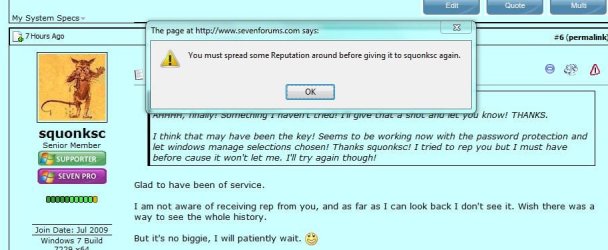
Very strange. I don't remember ever giving you rep before but when I hit the rep button, this is what I get.
 

Attachments

  • Capture.JPG
    Capture.JPG
    78.5 KB · Views: 286

My Computer

Computer Manufacturer/Model Number
Dell / Studio xps
OS
Windows7 x64 7600 16385
CPU
Intel I7 920
Motherboard
Dell
Memory
6GB DDR3
Graphics Card(s)
ATI Radeon HD4350
Sound Card
Integrated 7.1 channel
Hard Drives
Hitachi HDT721064SLA360 (596 GB)
Keyboard
Logitech EX110
Mouse
Logitech LX8
Very strange. I don't remember ever giving you rep before but when I hit the rep button, this is what I get.

I get them too sometimes, even though I am 100% sure I haven't repped that person before.

When I do spread some rep around, it will work again.
Must be a bug.

greetz
 

My Computer

OS
Win7 Build 7600 x86
CPU
Pentium II 300MHz
Motherboard
Asus
Memory
32mb EDO RAM
Graphics Card(s)
Diamond Viper
Sound Card
Soundblaster 16
Monitor(s) Displays
14" AOC CRT 16K color
Screen Resolution
800x600
Hard Drives
300mb Quantum fireball
PSU
110 Watts
Cooling
Passive
Keyboard
Trust Ergonomic
Mouse
Generic
Internet Speed
256K u 128K d
Disable your guest account, then you can turn off password protect on sharing. :)
 

My Computer

OS
Windows 7 Ultimate
Back
Top