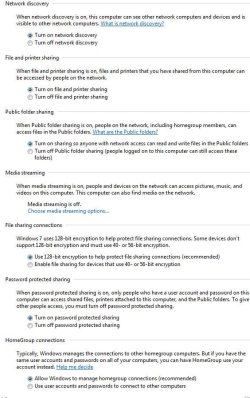
I've found the solution to my network problem. In my other thread: ( http://www.sevenforums.com/network-sharing/23137-frustrating-network-problem.html ) I had a problem with an inconsistent ability to share between my desktop and my laptop. I can always get to my shares on my desktop from my laptop, but sometimes, I would not be able to access the shares on my laptop from my desktop. I have two other computers on the network, all running Windows 7 (3 computers running Ultimate, netbook running Pro). No problems with the other machines at all. All advanced sharing settings are set like this snip. If I change the laptop to "turn off password protected sharing" and "Use user accounts and passwords to connect to other computers", I have no more problem. I guess the question is, why do the defaults work great on 3 machines but not my laptop? I kinda like that I have to enter user and password to access shares, but if it just won't work for my laptop, I'll forgo it.
Attachments
My Computer
- Computer Manufacturer/Model Number
- Dell / Studio xps
- OS
- Windows7 x64 7600 16385
- CPU
- Intel I7 920
- Motherboard
- Dell
- Memory
- 6GB DDR3
- Graphics Card(s)
- ATI Radeon HD4350
- Sound Card
- Integrated 7.1 channel
- Hard Drives
- Hitachi HDT721064SLA360 (596 GB)
- Keyboard
- Logitech EX110
- Mouse
- Logitech LX8