Solved Updated Rig, teething problems?

dorian hawkmoon

New member
Member
VIP
Local time
9:31 AM
Messages
398
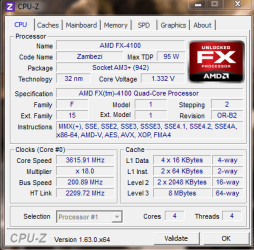
I updated my rig to :
AMD FX-4100
Gigabyte GA-78LMT-S2PT (BIOS: FC)
Everything else's the same, except no SP1 of Win 7.

I had some problems (while trying to run Win 7 of old install), for starters display kept going into standby, I discovered that the GPU was hot, I mean really hot! I took it out reseated and took the pesky wires out of the fan's way and re-formatted and clean installed the OS. I also enabled SMART & turned off something called Core Performance Boost (which I thought may cause problems, does it?).

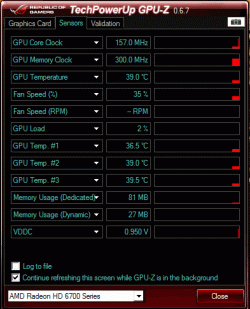
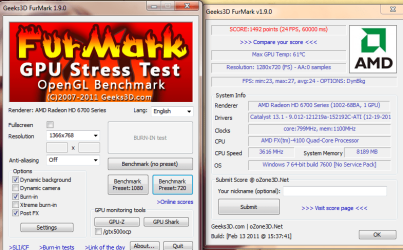
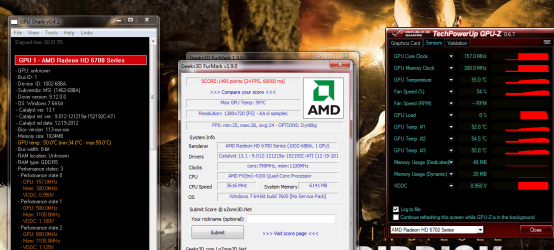
It's been running ok since, I ran prime 95 for 25 mins. (On CoreTemp I adjusted the offset to 11 - max temp. was 59 deg. C, lowest 25 degrees.) and later took a furmark 720p test with Post FX on & off. I'm posting the results.

Any thoughts on the stability of the system?
 

Attachments
  • Furmark.png
    Furmark.png
    143.3 KB · Views: 11
  • GPU-Z Sensor Log.txt
    GPU-Z Sensor Log.txt
    28.6 KB · Views: 1
  • 3.gif
    3.gif
    18.3 KB · Views: 12
  • 4.gif
    4.gif
    25.7 KB · Views: 11
  • Full Load.png
    Full Load.png
    20.1 KB · Views: 10
Last edited:

My Computer

Computer type
PC/Desktop
Computer Manufacturer/Model Number
Self built
OS
Windows 10 Pro (x64)
CPU
AMD RYZEN 7 1700+Stock Wraith Spire
Motherboard
ASUS PRIME B350M-A
Memory
Corsair 8GB (1 x 8 GB) DDR4 Vengeance LPX 2400Mhz
Graphics Card(s)
SAPPHIRE RX 470 4GB (Platinum Edition)
Monitor(s) Displays
BenQ VZ2250H
Screen Resolution
1920x1080
Hard Drives
120GB Samsung 750 Evo (OS/Programs)+1TB ST Firecuda (Games/Creative Applications)+1TB WD Green (Storage)
PSU
Antec VP650PM
Case
Coolermaster K380 Mid-Tower
Cooling
Side:Antec F19 120mm+Rear:Tt ISGC Fan12
Keyboard
Logitech K200
Mouse
Dragonwar Ele-G9 Thor
Internet Speed
Slow by 21st Century Standards :(
Antivirus
Bitdefender Internet Security and MBAM
Browser
Firefox
Other Info
Creative Inspire T3130
Let your graphics card chew on this for 15 minutes or so. Watch the temps carfully, if all is well, I'd call it stable. Keep an eye out for graphical artifacts and the like, odd shapes, colors etc.

Valley Benchmark | Unigine: real-time 3D engine (game, simulation, visualization and VR)

http://unigine.com/products/heaven/

You can also run it through 3dmark11 for extra confidence.

http://www.3dmark.com/3dmark11/download/

And if your processor can pass this on top of prime95, its probably ok.

http://www.xtremesystems.org/forums/showthread.php?201670-LinX-A-simple-Linpack-interface

Turbo CPB is just a boost clock (Same thing as Intel Turbo Boost). If your processor fails stress testing with it on, turn it off (It shouldn't) otherwise leave it be. It shouldn't cause any issues at all.
 
Last edited:

My Computer

OS
Win7/8 64 bit/
CPU
Intel I7 3930k C2 3.2Ghz (4.4ghz)
Motherboard
Asus Sabertoothx79
Memory
G.skill Ripjaw X 16GB (4x4) 1866mhz (2133)
Graphics Card(s)
EVGA GTX 670, GTS 450 Dedicated Physx
Sound Card
onboard
Monitor(s) Displays
Asus 24"
Screen Resolution
1920x1080
Hard Drives
1TB Western Digital SSD cached Corsair Force GT 120 GB. win7 boot/media
1 Corsair Force GT 120 win8 boot.
PSU
Corsair GS800
Case
Antec Skeleton
Cooling
Thermaltake Contac 30
Keyboard
Some old emachine keyboard lol
Mouse
Logitech M510
Internet Speed
slow
I'll try running Valley Benchmark, I've run Linpack...but haven't had time for full 15 passes- I gave it 5, no problems showed. P95 blend test ran for 25 mins or so. I'll run Linpack again.

I had turned off Turbo because I thought that this mobo isn't exactly the Ace of its kind :( ( I mean, it takes its own good time before going 'beep' and showing the Gigabyte logo! Is that okay?) So would it'd be able to handle the mild overclocking (voltage, temps etc.), even by AMD itself?

PS. I've run Valley Benchmark (18 passes) on High, my resolution, 2x AA...it ran fine, temp. was maximum 65 degrees C.
 
Last edited:

My Computer

Computer type
PC/Desktop
Computer Manufacturer/Model Number
Self built
OS
Windows 10 Pro (x64)
CPU
AMD RYZEN 7 1700+Stock Wraith Spire
Motherboard
ASUS PRIME B350M-A
Memory
Corsair 8GB (1 x 8 GB) DDR4 Vengeance LPX 2400Mhz
Graphics Card(s)
SAPPHIRE RX 470 4GB (Platinum Edition)
Monitor(s) Displays
BenQ VZ2250H
Screen Resolution
1920x1080
Hard Drives
120GB Samsung 750 Evo (OS/Programs)+1TB ST Firecuda (Games/Creative Applications)+1TB WD Green (Storage)
PSU
Antec VP650PM
Case
Coolermaster K380 Mid-Tower
Cooling
Side:Antec F19 120mm+Rear:Tt ISGC Fan12
Keyboard
Logitech K200
Mouse
Dragonwar Ele-G9 Thor
Internet Speed
Slow by 21st Century Standards :(
Antivirus
Bitdefender Internet Security and MBAM
Browser
Firefox
Other Info
Creative Inspire T3130
A few of my AMD PC's have long post times, so by my experience I would consider that normal.

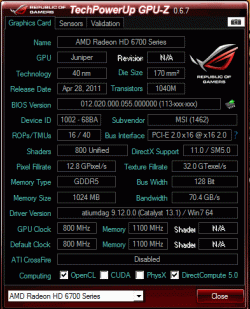
65c for a 6700 series radeon is flirting but acceptable. 70c is the threshold for those cards. Meaning it will throttle down to keep the GPU below 70c BUT they have a maximum safe temperature of like 85c and shut down at 100c (or die). I wouldn't go anywhere near that unless I was extreme benchmarking. Keep it under 70c and your 100% safe.

If by mild overclocking you mean not messing with voltages. You might be able to add 100 or 200 mhz to it. Varies from chip to chip. If you add 100mhz and it fails stress testing, it probably won't overclock at all with out more power.

A lucky FX 4100 can do 4.6ghz on 1.31v on good air cooling and has a maximum operating temp of 70c. don't go anywhere near that and over clocking should be fine. However, DO NOT exceed 1.4v. or you will blow that chip right off your board and it will fly into orbit.

You can leave the turbo boost on. The only reason it would cause a problem is if the MB or CPU is defective or the MB/cpu get to hot. If everything stays in the acceptable ranges it really doesn't matter what model/make the board is. They all get their parts from the same place.... most of the time. =P

P.S your mixed&matched ram may impact stability with over-clocking.
 
Last edited:

My Computer

OS
Win7/8 64 bit/
CPU
Intel I7 3930k C2 3.2Ghz (4.4ghz)
Motherboard
Asus Sabertoothx79
Memory
G.skill Ripjaw X 16GB (4x4) 1866mhz (2133)
Graphics Card(s)
EVGA GTX 670, GTS 450 Dedicated Physx
Sound Card
onboard
Monitor(s) Displays
Asus 24"
Screen Resolution
1920x1080
Hard Drives
1TB Western Digital SSD cached Corsair Force GT 120 GB. win7 boot/media
1 Corsair Force GT 120 win8 boot.
PSU
Corsair GS800
Case
Antec Skeleton
Cooling
Thermaltake Contac 30
Keyboard
Some old emachine keyboard lol
Mouse
Logitech M510
Internet Speed
slow
A lucky FX 4100 can do 4.6ghz on 1.31v on good air cooling and has a maximum operating temp of 70c. don't go anywhere near that and over clocking should be fine. However, DO NOT exceed 1.4v. or you will blow that chip right off your board and it will fly into orbit.
His may or may not be one of those, but it will never get that high on the motherboard he has. One big reason is that it doesn't have the power subsystems that the newer 970/990 based boards have, that is required to get the most out of FX CPU's.

it takes its own good time before going 'beep' and showing the Gigabyte logo
Wouldn't happen to have any external hard drives connected would you? Mine takes a bit longer to boot when I have mine connected, and is quite a bit quicker with it not.
 

My Computer

Computer type
PC/Desktop
Computer Manufacturer/Model Number
Me
OS
Win 7 Ultimate x64
CPU
FX-8350 @ 4.6 GHz so far
Motherboard
Asus M5A97 EVO
Memory
ADATA XPG V1 Series Black 8GB DDR3 1600
Graphics Card(s)
Sapphire R9 270x Dual-X
Sound Card
Xonar DGX w/ Corsair Vengence 1300
Monitor(s) Displays
Acer S232HL Abid
Screen Resolution
1920x1080
Hard Drives
120 GB OCZ Vertex 3
500 GB Seagate 7200.12
PSU
Antec Earthwatts 650W Green
Case
Antec Three Hundred
Cooling
Cooler Master 212 EVO
Keyboard
Logitech G510
Mouse
Logitech G500s
Internet Speed
35000/3000
I might add Prime95 need to run several hours, 8 or more, to get a good test.
 

My Computer

Computer type
PC/Desktop
Computer Manufacturer/Model Number
Home Built Desktop By DataTech
OS
Windows 7 Ultimate X64 SP1
CPU
Intel i5-2550K, Differing ~4.4-4.8GHz No built in GPU
Motherboard
ASUS P8Z68-V PRO/GEN3
Memory
16GB G.Skill Sniper 1866MHz @ 2133MHz 2x8GB
Graphics Card(s)
ASUS GTX650TIB-DC2OC-2GD5, (650TI Boost)
Sound Card
Onboard Realtek 5-1
Monitor(s) Displays
Samsung P2570HD
Screen Resolution
1920x1080
Hard Drives
Samsung 840 Pro 256GB SSD for OS, 500GB Seagate Constellation (Enterprise drive) for Data
PSU
Corsair HX650W
Case
Inwin Dragon Rider
Cooling
Hyper 212 EVO w/two Noctua fans, push-pull, @1300 RPM
Keyboard
E-Z Eyes, bright yellow keys with large characters
Mouse
steelseries SENSEI Laser Pro Gaming
Internet Speed
48-51Mbs Mbs down, 11 Mbs up Xfinity Cable
Antivirus
Norton Internet Security 2013
Browser
IE 10, Opera, Pale Moon if needed
Other Info
4 case fans, LG BluRay-RE, ASUS DVD-RW, Mr. Fusion power supply, 1.21 gigawatts.
A lucky FX 4100 can do 4.6ghz on 1.31v on good air cooling and has a maximum operating temp of 70c. don't go anywhere near that and over clocking should be fine. However, DO NOT exceed 1.4v. or you will blow that chip right off your board and it will fly into orbit.
His may or may not be one of those, but it will never get that high on the motherboard he has. One big reason is that it doesn't have the power subsystems that the newer 970/990 based boards have, that is required to get the most out of FX CPU's.

it takes its own good time before going 'beep' and showing the Gigabyte logo
Wouldn't happen to have any external hard drives connected would you? Mine takes a bit longer to boot when I have mine connected, and is quite a bit quicker with it not.

I didn't realize that about his MB. Thanks for the update. AMD chips leave a bad taste in my mouth so my experience with them is quite limited. I've RMA'd 9 of them over 6 years. So I stick to buying
Intel now. I've never even killed one with aggressive over clocking.
 

My Computer

OS
Win7/8 64 bit/
CPU
Intel I7 3930k C2 3.2Ghz (4.4ghz)
Motherboard
Asus Sabertoothx79
Memory
G.skill Ripjaw X 16GB (4x4) 1866mhz (2133)
Graphics Card(s)
EVGA GTX 670, GTS 450 Dedicated Physx
Sound Card
onboard
Monitor(s) Displays
Asus 24"
Screen Resolution
1920x1080
Hard Drives
1TB Western Digital SSD cached Corsair Force GT 120 GB. win7 boot/media
1 Corsair Force GT 120 win8 boot.
PSU
Corsair GS800
Case
Antec Skeleton
Cooling
Thermaltake Contac 30
Keyboard
Some old emachine keyboard lol
Mouse
Logitech M510
Internet Speed
slow
Hmm. No, I haven't any external HDDs present right now. My previous Asus mobo showed a blinking icon before going to logo screen, so I was a little perturbed. It takes about 23 seconds to get to the logo screen (then it says something sometimes before windows boot logo shows up about my resolution needs to be adjusted to match the LCD- though I have matched it in Windows!). I don't intend to overclock at all, in fact I think I'll let the Core performance Boost feature stay off, what say folks?

My GPU gave a scare the first time, but it's been running Dead Space 3 okay for half an hour on medium/High settings (temp. goes to 53/55 c. max), idles around 43 c. in this cool season (summer would be a different scenario in India!)
 
Last edited:

My Computer

Computer type
PC/Desktop
Computer Manufacturer/Model Number
Self built
OS
Windows 10 Pro (x64)
CPU
AMD RYZEN 7 1700+Stock Wraith Spire
Motherboard
ASUS PRIME B350M-A
Memory
Corsair 8GB (1 x 8 GB) DDR4 Vengeance LPX 2400Mhz
Graphics Card(s)
SAPPHIRE RX 470 4GB (Platinum Edition)
Monitor(s) Displays
BenQ VZ2250H
Screen Resolution
1920x1080
Hard Drives
120GB Samsung 750 Evo (OS/Programs)+1TB ST Firecuda (Games/Creative Applications)+1TB WD Green (Storage)
PSU
Antec VP650PM
Case
Coolermaster K380 Mid-Tower
Cooling
Side:Antec F19 120mm+Rear:Tt ISGC Fan12
Keyboard
Logitech K200
Mouse
Dragonwar Ele-G9 Thor
Internet Speed
Slow by 21st Century Standards :(
Antivirus
Bitdefender Internet Security and MBAM
Browser
Firefox
Other Info
Creative Inspire T3130
Hmm. No, I haven't any external HDDs present right now. My previous Asus mobo showed a blinking icon before going to logo screen, so I was a little perturbed. It takes about 23 seconds to get to the logo screen (then it says something sometimes before windows boot logo shows up about my resolution needs to be adjusted to match the LCD- though I have matched it in Windows!). I don't intend to overclock at all, in fact I think I'll let the Core performance Boost feature stay off, what say folks?

My GPU gave a scare the first time, but it's been running Dead Space 3 okay for half an hour on medium/High settings (temp. goes to 53/55 c. max), idles around 43 c. in this cool season (summer would be a different scenario in India!)

ok I was under the impression that there was a slightly longer post time than normal. 23 seconds would indicate something is wrong. That's huge. I have an Athlon 64 FX on a 30 dollar mother board that boots in 15 seconds to desktop.

For your GPU, the idle seems high but the temps under load are perfect.
 

My Computer

OS
Win7/8 64 bit/
CPU
Intel I7 3930k C2 3.2Ghz (4.4ghz)
Motherboard
Asus Sabertoothx79
Memory
G.skill Ripjaw X 16GB (4x4) 1866mhz (2133)
Graphics Card(s)
EVGA GTX 670, GTS 450 Dedicated Physx
Sound Card
onboard
Monitor(s) Displays
Asus 24"
Screen Resolution
1920x1080
Hard Drives
1TB Western Digital SSD cached Corsair Force GT 120 GB. win7 boot/media
1 Corsair Force GT 120 win8 boot.
PSU
Corsair GS800
Case
Antec Skeleton
Cooling
Thermaltake Contac 30
Keyboard
Some old emachine keyboard lol
Mouse
Logitech M510
Internet Speed
slow
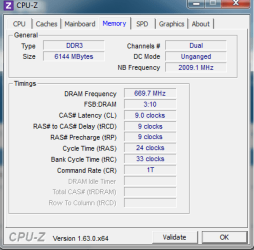
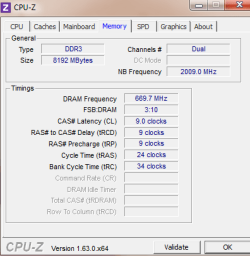
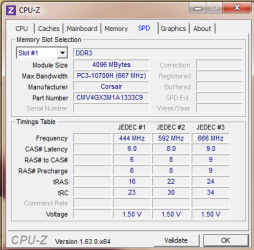
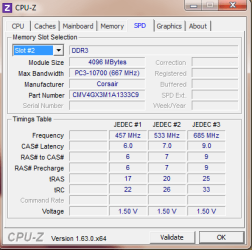
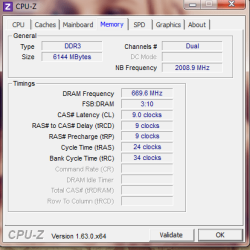
Yes, once it gets to the logo part it boots up nice and fast, but before that...! Could RAM be the cause? You know, being not the same pair. I'm giving some previous/after upgrade specs.
 

Attachments

  • Memory on FX.png
    Memory on FX.png
    15.2 KB · Views: 1
  • Mem on x2.png
    Mem on x2.png
    11.9 KB · Views: 2
Last edited:

My Computer

Computer type
PC/Desktop
Computer Manufacturer/Model Number
Self built
OS
Windows 10 Pro (x64)
CPU
AMD RYZEN 7 1700+Stock Wraith Spire
Motherboard
ASUS PRIME B350M-A
Memory
Corsair 8GB (1 x 8 GB) DDR4 Vengeance LPX 2400Mhz
Graphics Card(s)
SAPPHIRE RX 470 4GB (Platinum Edition)
Monitor(s) Displays
BenQ VZ2250H
Screen Resolution
1920x1080
Hard Drives
120GB Samsung 750 Evo (OS/Programs)+1TB ST Firecuda (Games/Creative Applications)+1TB WD Green (Storage)
PSU
Antec VP650PM
Case
Coolermaster K380 Mid-Tower
Cooling
Side:Antec F19 120mm+Rear:Tt ISGC Fan12
Keyboard
Logitech K200
Mouse
Dragonwar Ele-G9 Thor
Internet Speed
Slow by 21st Century Standards :(
Antivirus
Bitdefender Internet Security and MBAM
Browser
Firefox
Other Info
Creative Inspire T3130

My Computer

Computer type
PC/Desktop
Computer Manufacturer/Model Number
Home Built Desktop By DataTech
OS
Windows 7 Ultimate X64 SP1
CPU
Intel i5-2550K, Differing ~4.4-4.8GHz No built in GPU
Motherboard
ASUS P8Z68-V PRO/GEN3
Memory
16GB G.Skill Sniper 1866MHz @ 2133MHz 2x8GB
Graphics Card(s)
ASUS GTX650TIB-DC2OC-2GD5, (650TI Boost)
Sound Card
Onboard Realtek 5-1
Monitor(s) Displays
Samsung P2570HD
Screen Resolution
1920x1080
Hard Drives
Samsung 840 Pro 256GB SSD for OS, 500GB Seagate Constellation (Enterprise drive) for Data
PSU
Corsair HX650W
Case
Inwin Dragon Rider
Cooling
Hyper 212 EVO w/two Noctua fans, push-pull, @1300 RPM
Keyboard
E-Z Eyes, bright yellow keys with large characters
Mouse
steelseries SENSEI Laser Pro Gaming
Internet Speed
48-51Mbs Mbs down, 11 Mbs up Xfinity Cable
Antivirus
Norton Internet Security 2013
Browser
IE 10, Opera, Pale Moon if needed
Other Info
4 case fans, LG BluRay-RE, ASUS DVD-RW, Mr. Fusion power supply, 1.21 gigawatts.
Oh, no no! I see the tables got jumbled when I imported it from Excel format, just noticed it now :p . I'll give a link to the proper Excel format log stored by CTemp
FileSwap.com : CT-Log 2013-02-19 20-19-45.csv download free
And I timed the power button press to power to display and/or Gigabyte Boot logo appearance, it's 15/16 seconds each time. Except when I reboot the pc from win 7 restart option--then it just starts up okay.
 

My Computer

Computer type
PC/Desktop
Computer Manufacturer/Model Number
Self built
OS
Windows 10 Pro (x64)
CPU
AMD RYZEN 7 1700+Stock Wraith Spire
Motherboard
ASUS PRIME B350M-A
Memory
Corsair 8GB (1 x 8 GB) DDR4 Vengeance LPX 2400Mhz
Graphics Card(s)
SAPPHIRE RX 470 4GB (Platinum Edition)
Monitor(s) Displays
BenQ VZ2250H
Screen Resolution
1920x1080
Hard Drives
120GB Samsung 750 Evo (OS/Programs)+1TB ST Firecuda (Games/Creative Applications)+1TB WD Green (Storage)
PSU
Antec VP650PM
Case
Coolermaster K380 Mid-Tower
Cooling
Side:Antec F19 120mm+Rear:Tt ISGC Fan12
Keyboard
Logitech K200
Mouse
Dragonwar Ele-G9 Thor
Internet Speed
Slow by 21st Century Standards :(
Antivirus
Bitdefender Internet Security and MBAM
Browser
Firefox
Other Info
Creative Inspire T3130

My Computer

Computer type
PC/Desktop
Computer Manufacturer/Model Number
Home Built Desktop By DataTech
OS
Windows 7 Ultimate X64 SP1
CPU
Intel i5-2550K, Differing ~4.4-4.8GHz No built in GPU
Motherboard
ASUS P8Z68-V PRO/GEN3
Memory
16GB G.Skill Sniper 1866MHz @ 2133MHz 2x8GB
Graphics Card(s)
ASUS GTX650TIB-DC2OC-2GD5, (650TI Boost)
Sound Card
Onboard Realtek 5-1
Monitor(s) Displays
Samsung P2570HD
Screen Resolution
1920x1080
Hard Drives
Samsung 840 Pro 256GB SSD for OS, 500GB Seagate Constellation (Enterprise drive) for Data
PSU
Corsair HX650W
Case
Inwin Dragon Rider
Cooling
Hyper 212 EVO w/two Noctua fans, push-pull, @1300 RPM
Keyboard
E-Z Eyes, bright yellow keys with large characters
Mouse
steelseries SENSEI Laser Pro Gaming
Internet Speed
48-51Mbs Mbs down, 11 Mbs up Xfinity Cable
Antivirus
Norton Internet Security 2013
Browser
IE 10, Opera, Pale Moon if needed
Other Info
4 case fans, LG BluRay-RE, ASUS DVD-RW, Mr. Fusion power supply, 1.21 gigawatts.
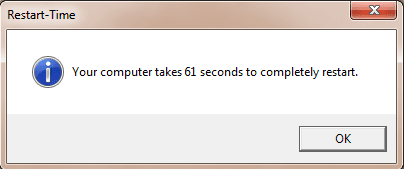
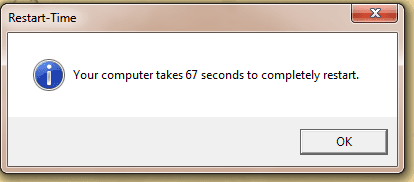
Okay, followed the instructions & posting the result below (btw, since installing BDIS 2012 64 bit, boot times have slowed down-from windows loading logo to showing welcome for some time than normal).

I have been thinking about applying Coolermaster IC Essential E2, and replacing the Corsair with Gskill 4Gb to match the other slot. But how do I know it's not the MB, or even the gpu (although I have stress tested the gpu withFurmark and EUnigine_Valley-1.0)? I'm in a proper fix now :cry:
 

Attachments

  • Restart time.png
    Restart time.png
    6.4 KB · Views: 2
Last edited:

My Computer

Computer type
PC/Desktop
Computer Manufacturer/Model Number
Self built
OS
Windows 10 Pro (x64)
CPU
AMD RYZEN 7 1700+Stock Wraith Spire
Motherboard
ASUS PRIME B350M-A
Memory
Corsair 8GB (1 x 8 GB) DDR4 Vengeance LPX 2400Mhz
Graphics Card(s)
SAPPHIRE RX 470 4GB (Platinum Edition)
Monitor(s) Displays
BenQ VZ2250H
Screen Resolution
1920x1080
Hard Drives
120GB Samsung 750 Evo (OS/Programs)+1TB ST Firecuda (Games/Creative Applications)+1TB WD Green (Storage)
PSU
Antec VP650PM
Case
Coolermaster K380 Mid-Tower
Cooling
Side:Antec F19 120mm+Rear:Tt ISGC Fan12
Keyboard
Logitech K200
Mouse
Dragonwar Ele-G9 Thor
Internet Speed
Slow by 21st Century Standards :(
Antivirus
Bitdefender Internet Security and MBAM
Browser
Firefox
Other Info
Creative Inspire T3130
Yes, once it gets to the logo part it boots up nice and fast, but before that...! Could RAM be the cause? You know, being not the same pair. I'm giving some previous/after upgrade specs.

I would definitely remove unmatched ram and see if that fixes it. mix/matching ram can cause all kinds of issues if your MB wasn't designed for it, even when they are its not always problem free.

@britton30 Agree, that is pretty warm.

If the GPU passed the bench mark then its fine. Britton30 seems to be a lot more familiar with your particular hardware then I do, so I think it best to defer to him.

There is the possibility of a defective MB but typically the system will crash/random restart or not boot at all when that is the case.
 

My Computer

OS
Win7/8 64 bit/
CPU
Intel I7 3930k C2 3.2Ghz (4.4ghz)
Motherboard
Asus Sabertoothx79
Memory
G.skill Ripjaw X 16GB (4x4) 1866mhz (2133)
Graphics Card(s)
EVGA GTX 670, GTS 450 Dedicated Physx
Sound Card
onboard
Monitor(s) Displays
Asus 24"
Screen Resolution
1920x1080
Hard Drives
1TB Western Digital SSD cached Corsair Force GT 120 GB. win7 boot/media
1 Corsair Force GT 120 win8 boot.
PSU
Corsair GS800
Case
Antec Skeleton
Cooling
Thermaltake Contac 30
Keyboard
Some old emachine keyboard lol
Mouse
Logitech M510
Internet Speed
slow
Your GPU is a mid-low end and just may be getting over taxed for its ability. Absolutely get some matched RAM as was stated.

The reboot time is very good for a Zambezi system, I doubt if you'd be able to lower it more than 5-6 seconds. My system takes 59-65 seconds, see my specs.
 

My Computer

Computer type
PC/Desktop
Computer Manufacturer/Model Number
Home Built Desktop By DataTech
OS
Windows 7 Ultimate X64 SP1
CPU
Intel i5-2550K, Differing ~4.4-4.8GHz No built in GPU
Motherboard
ASUS P8Z68-V PRO/GEN3
Memory
16GB G.Skill Sniper 1866MHz @ 2133MHz 2x8GB
Graphics Card(s)
ASUS GTX650TIB-DC2OC-2GD5, (650TI Boost)
Sound Card
Onboard Realtek 5-1
Monitor(s) Displays
Samsung P2570HD
Screen Resolution
1920x1080
Hard Drives
Samsung 840 Pro 256GB SSD for OS, 500GB Seagate Constellation (Enterprise drive) for Data
PSU
Corsair HX650W
Case
Inwin Dragon Rider
Cooling
Hyper 212 EVO w/two Noctua fans, push-pull, @1300 RPM
Keyboard
E-Z Eyes, bright yellow keys with large characters
Mouse
steelseries SENSEI Laser Pro Gaming
Internet Speed
48-51Mbs Mbs down, 11 Mbs up Xfinity Cable
Antivirus
Norton Internet Security 2013
Browser
IE 10, Opera, Pale Moon if needed
Other Info
4 case fans, LG BluRay-RE, ASUS DVD-RW, Mr. Fusion power supply, 1.21 gigawatts.
Hmmm, okay. Then I will try my best to get a pair of 4gb Gskill to match and remove old thermal paste & apply IC Essential E2 if available on the market.
 

My Computer

Computer type
PC/Desktop
Computer Manufacturer/Model Number
Self built
OS
Windows 10 Pro (x64)
CPU
AMD RYZEN 7 1700+Stock Wraith Spire
Motherboard
ASUS PRIME B350M-A
Memory
Corsair 8GB (1 x 8 GB) DDR4 Vengeance LPX 2400Mhz
Graphics Card(s)
SAPPHIRE RX 470 4GB (Platinum Edition)
Monitor(s) Displays
BenQ VZ2250H
Screen Resolution
1920x1080
Hard Drives
120GB Samsung 750 Evo (OS/Programs)+1TB ST Firecuda (Games/Creative Applications)+1TB WD Green (Storage)
PSU
Antec VP650PM
Case
Coolermaster K380 Mid-Tower
Cooling
Side:Antec F19 120mm+Rear:Tt ISGC Fan12
Keyboard
Logitech K200
Mouse
Dragonwar Ele-G9 Thor
Internet Speed
Slow by 21st Century Standards :(
Antivirus
Bitdefender Internet Security and MBAM
Browser
Firefox
Other Info
Creative Inspire T3130
Firstly changed RAM, got the Corsair value 4gb kit that was on for discount, posting specs, also new restart test.

Okay, cleaned & applied IC Essential E2, ran prime 95. Also ran another Furmark test with burn-in enabled, posting here.

FileSwap.com : CT-Log 2013-02-21 16-46-10.csv download free
 

Attachments

  • 2.png
    2.png
    5.4 KB · Views: 1
  • 8gbkit_1.png
    8gbkit_1.png
    9.8 KB · Views: 1
  • 8gbkit_2.png
    8gbkit_2.png
    13.6 KB · Views: 1
  • 8gbkit_3.png
    8gbkit_3.png
    12.7 KB · Views: 1
  • Burn-in.png
    Burn-in.png
    48.9 KB · Views: 6

My Computer

Computer type
PC/Desktop
Computer Manufacturer/Model Number
Self built
OS
Windows 10 Pro (x64)
CPU
AMD RYZEN 7 1700+Stock Wraith Spire
Motherboard
ASUS PRIME B350M-A
Memory
Corsair 8GB (1 x 8 GB) DDR4 Vengeance LPX 2400Mhz
Graphics Card(s)
SAPPHIRE RX 470 4GB (Platinum Edition)
Monitor(s) Displays
BenQ VZ2250H
Screen Resolution
1920x1080
Hard Drives
120GB Samsung 750 Evo (OS/Programs)+1TB ST Firecuda (Games/Creative Applications)+1TB WD Green (Storage)
PSU
Antec VP650PM
Case
Coolermaster K380 Mid-Tower
Cooling
Side:Antec F19 120mm+Rear:Tt ISGC Fan12
Keyboard
Logitech K200
Mouse
Dragonwar Ele-G9 Thor
Internet Speed
Slow by 21st Century Standards :(
Antivirus
Bitdefender Internet Security and MBAM
Browser
Firefox
Other Info
Creative Inspire T3130
Well your CPU temp dropped somewhat and may get lower as the thermal paste cures, but I think you are OK now. You might have a look in msconfig/Startup and disable all but you security program(s).
 

My Computer

Computer type
PC/Desktop
Computer Manufacturer/Model Number
Home Built Desktop By DataTech
OS
Windows 7 Ultimate X64 SP1
CPU
Intel i5-2550K, Differing ~4.4-4.8GHz No built in GPU
Motherboard
ASUS P8Z68-V PRO/GEN3
Memory
16GB G.Skill Sniper 1866MHz @ 2133MHz 2x8GB
Graphics Card(s)
ASUS GTX650TIB-DC2OC-2GD5, (650TI Boost)
Sound Card
Onboard Realtek 5-1
Monitor(s) Displays
Samsung P2570HD
Screen Resolution
1920x1080
Hard Drives
Samsung 840 Pro 256GB SSD for OS, 500GB Seagate Constellation (Enterprise drive) for Data
PSU
Corsair HX650W
Case
Inwin Dragon Rider
Cooling
Hyper 212 EVO w/two Noctua fans, push-pull, @1300 RPM
Keyboard
E-Z Eyes, bright yellow keys with large characters
Mouse
steelseries SENSEI Laser Pro Gaming
Internet Speed
48-51Mbs Mbs down, 11 Mbs up Xfinity Cable
Antivirus
Norton Internet Security 2013
Browser
IE 10, Opera, Pale Moon if needed
Other Info
4 case fans, LG BluRay-RE, ASUS DVD-RW, Mr. Fusion power supply, 1.21 gigawatts.
Thank you, Britton30,stormy13, Jerlys for your time, patience and guidance! Much, much appreciated. Hoping for the best hereon :)
 

My Computer

Computer type
PC/Desktop
Computer Manufacturer/Model Number
Self built
OS
Windows 10 Pro (x64)
CPU
AMD RYZEN 7 1700+Stock Wraith Spire
Motherboard
ASUS PRIME B350M-A
Memory
Corsair 8GB (1 x 8 GB) DDR4 Vengeance LPX 2400Mhz
Graphics Card(s)
SAPPHIRE RX 470 4GB (Platinum Edition)
Monitor(s) Displays
BenQ VZ2250H
Screen Resolution
1920x1080
Hard Drives
120GB Samsung 750 Evo (OS/Programs)+1TB ST Firecuda (Games/Creative Applications)+1TB WD Green (Storage)
PSU
Antec VP650PM
Case
Coolermaster K380 Mid-Tower
Cooling
Side:Antec F19 120mm+Rear:Tt ISGC Fan12
Keyboard
Logitech K200
Mouse
Dragonwar Ele-G9 Thor
Internet Speed
Slow by 21st Century Standards :(
Antivirus
Bitdefender Internet Security and MBAM
Browser
Firefox
Other Info
Creative Inspire T3130
Back
Top