Updates KB4519976 and KB915597 constantly failing

3OaksJules

New member
Local time
9:43 PM
Messages
6
Hello out there,
Please can someone help me out of this update "stalemate". It's getting to the stage where the laptop won't shut down after each attempt.
When I look back at my update history i can see many more important updates that had failed - too many to list here. Any idea how this can be resolved?

Thanks for listening

Jules
 

My Computer My Computer

At a glance

Windows 7 Home Premium 64bitIntel Core i54GB RAM
Computer type
Laptop
Computer Manufacturer/Model Number
Dell
OS
Windows 7 Home Premium 64bit
CPU
Intel Core i5
Memory
4GB RAM
Antivirus
Kaspersky
Browser
google chrome
Hi 3OaksJules,

Welcome to SevenForums!

Please can someone help me out of this update "stalemate". It's getting to the stage where the laptop won't shut down after each attempt.
When I look back at my update history i can see many more important updates that had failed - too many to list here. Any idea how this can be resolved?

I don't know if this will help initially . . .

I have put this together which has worked for a few members. The latest WU’s require that the following are installed FIRST . . .

KB4490628 [SSU]
KB4474419 [SHA-2]
KB4516655 [NEW SSU]

If any of the above WU’s are NOT installed, then download the .msu files below in the same order to the desktop and install them =>

KB4490628 => KB4490628 [SSU] - Servicing stack update for Windows 7 SP1 - [12-Mar-2019].
KB4474419 => KB4474419 [SHA-2] - Code signing support update for Windows 7 SP1 - [10-Sep-2019].
KB4516655 => KB4516655 [NEW SSU] - Servicing stack update for Windows 7 SP1 - [10-Sep-2019].

Reboot and Run WU's again!

I hope this helps!
 

My Computer My Computer

At a glance

Win 7 HP SP1 64-bit Vista HB SP2 32-bit Linux...Intel(R) Pentium(R) CPU P6200 @ 2.13GHz4.00 GBIntel(R) Graphics Media Accelerator HD
Computer type
Laptop
Computer Manufacturer/Model Number
Fujitsu LIFEBOOK
OS
Win 7 HP SP1 64-bit Vista HB SP2 32-bit Linux Mint 18.3
CPU
Intel(R) Pentium(R) CPU P6200 @ 2.13GHz
Motherboard
FUJITSU FJNBB06
Memory
4.00 GB
Graphics Card(s)
Intel(R) Graphics Media Accelerator HD
Sound Card
[1] Realtek High Definition Audio [2] Intel(R) Display Audio
Screen Resolution
1366 x 768 x 32 bits (4294967296 colors) @ 59 Hz
Hard Drives
TOSHIBA MK5076GSX
Antivirus
AVG FREE
Thanks Paul.
I have checked and all three have been installed already.
Any other possible solutions?
Jules
 

My Computer My Computer

At a glance

Windows 7 Home Premium 64bitIntel Core i54GB RAM
Computer type
Laptop
Computer Manufacturer/Model Number
Dell
OS
Windows 7 Home Premium 64bit
CPU
Intel Core i5
Memory
4GB RAM
Antivirus
Kaspersky
Browser
google chrome
Yes, always
please run
sfc /scannow
AutoSURT64
from my OneDrive.
when they complete, please open the CBS folder, delete the .cab files, zip/compress the CBS folder and upload to SevenForums

Bill
 

My Computer My Computer

At a glance

Win 10 x64, Linux Lite, Win 7 x64, BlackArch,...
Computer type
PC/Desktop
Computer Manufacturer/Model Number
HP Desktop & Compaq Laptop
OS
Win 10 x64, Linux Lite, Win 7 x64, BlackArch, & Kali
Hard Drives
Samsung 850 Pro 256Gb,
Hitachi HDD 1Tb,
Crucial MX SSD 250Gb
Segate 3Tb USB 3.0 Ext. Backup HDD
Internet Speed
150Mbps dn, 20Mbps up
Antivirus
Avast Free, Malwarebytes Anti-Exploit & Anti-Ransomware
Browser
Firefox, Chrome, Opera, & VPN
F

Thanks Snick.

I think i followed your instructions ok as the CBS zip file is attached. I am not sure the sfc/scannow came back with any result text (I checked occasionally to see progress and it finished but didn't result in any report at the end).

If you need me to re-do it let me know.

Much appreciated,
Jules
 

My Computer My Computer

At a glance

Windows 7 Home Premium 64bitIntel Core i54GB RAM
Computer type
Laptop
Computer Manufacturer/Model Number
Dell
OS
Windows 7 Home Premium 64bit
CPU
Intel Core i5
Memory
4GB RAM
Antivirus
Kaspersky
Browser
google chrome
Summary:
Seconds executed: 10527
Found 353 errors
Fixed 120 errors
CSI Missing Winning Component Key Total count: 353
Fixed: CSI Missing Winning Component Key. Total count: 120

Too many remaining errors, peruse please, easy, I just did my desktop last evening
Repair Install/In Place Upgrade
 

My Computer My Computer

At a glance

Win 10 x64, Linux Lite, Win 7 x64, BlackArch,...
Computer type
PC/Desktop
Computer Manufacturer/Model Number
HP Desktop & Compaq Laptop
OS
Win 10 x64, Linux Lite, Win 7 x64, BlackArch, & Kali
Hard Drives
Samsung 850 Pro 256Gb,
Hitachi HDD 1Tb,
Crucial MX SSD 250Gb
Segate 3Tb USB 3.0 Ext. Backup HDD
Internet Speed
150Mbps dn, 20Mbps up
Antivirus
Avast Free, Malwarebytes Anti-Exploit & Anti-Ransomware
Browser
Firefox, Chrome, Opera, & VPN
Hi 3OaksJules,

Too many remaining errors . . . please . . . Repair Install/In Place Upgrade.

I agree with Snick!

What you could try first is installing this => KB4523206 Servicing stack update for Windows 7 - Nov. 12, and then running WU [Windows Update] again.

If you are NOT comfortable with performing a Repair Install then please let us know and we will walk you through it. I have instructions of tasks that need to be performed PRIOR to the repair install, the repair install itself, and post repair install.

Repair Install - Overview

A repair install differs from a clean install in the fact that it ONLY replaces the corrupted OS with a new fresh copy. This means that ALL your User Accounts, Folders, Files, Documents, Pictures, Music, Videos, Data Files, Icons, and any installed programs are left intact. It does however, DELETE ALL the WU's [Window updates] installed, and could possibly affect, sounds, services, visual effect settings and device drivers by re-setting them to default [unusual though]. You CANNOT do a repair install at boot, in Safe Mode, using a system repair disk, or using an integrated Windows update disk. Basically, this process can ONLY be performed from within the LIVE OS.

I hope this helps!
 

My Computer My Computer

At a glance

Win 7 HP SP1 64-bit Vista HB SP2 32-bit Linux...Intel(R) Pentium(R) CPU P6200 @ 2.13GHz4.00 GBIntel(R) Graphics Media Accelerator HD
Computer type
Laptop
Computer Manufacturer/Model Number
Fujitsu LIFEBOOK
OS
Win 7 HP SP1 64-bit Vista HB SP2 32-bit Linux Mint 18.3
CPU
Intel(R) Pentium(R) CPU P6200 @ 2.13GHz
Motherboard
FUJITSU FJNBB06
Memory
4.00 GB
Graphics Card(s)
Intel(R) Graphics Media Accelerator HD
Sound Card
[1] Realtek High Definition Audio [2] Intel(R) Display Audio
Screen Resolution
1366 x 768 x 32 bits (4294967296 colors) @ 59 Hz
Hard Drives
TOSHIBA MK5076GSX
Antivirus
AVG FREE

My Computer My Computer

At a glance

Win 10 x64, Linux Lite, Win 7 x64, BlackArch,...
Computer type
PC/Desktop
Computer Manufacturer/Model Number
HP Desktop & Compaq Laptop
OS
Win 10 x64, Linux Lite, Win 7 x64, BlackArch, & Kali
Hard Drives
Samsung 850 Pro 256Gb,
Hitachi HDD 1Tb,
Crucial MX SSD 250Gb
Segate 3Tb USB 3.0 Ext. Backup HDD
Internet Speed
150Mbps dn, 20Mbps up
Antivirus
Avast Free, Malwarebytes Anti-Exploit & Anti-Ransomware
Browser
Firefox, Chrome, Opera, & VPN
Thanks Snick and Paul. I tried the update you recommended first and that update KB4523206 seemed fine but others failed when i ran WU - i have attached a snippet of the update history (screenshot).

If the next step is the "Repair Install" i would be very interested in a walk through as sounds quite scary since i guess it's like a total stripping back process? Step by step guide would be really helpful if you can?

Much appreciated
Julia
 

Attachments

My Computer My Computer

At a glance

Windows 7 Home Premium 64bitIntel Core i54GB RAM
Computer type
Laptop
Computer Manufacturer/Model Number
Dell
OS
Windows 7 Home Premium 64bit
CPU
Intel Core i5
Memory
4GB RAM
Antivirus
Kaspersky
Browser
google chrome
Hi 3OaksJules,

If the next step is the "Repair Install" i would be very interested in a walk through as sounds quite scary since i guess it's like a total stripping back process? Step by step guide would be really helpful if you can?

[1] Have you got an installation DVD/USB/ISO?
[2] Does your CD/DVD drive work?
[3] Do your USB Ports work?
 

My Computer My Computer

At a glance

Win 7 HP SP1 64-bit Vista HB SP2 32-bit Linux...Intel(R) Pentium(R) CPU P6200 @ 2.13GHz4.00 GBIntel(R) Graphics Media Accelerator HD
Computer type
Laptop
Computer Manufacturer/Model Number
Fujitsu LIFEBOOK
OS
Win 7 HP SP1 64-bit Vista HB SP2 32-bit Linux Mint 18.3
CPU
Intel(R) Pentium(R) CPU P6200 @ 2.13GHz
Motherboard
FUJITSU FJNBB06
Memory
4.00 GB
Graphics Card(s)
Intel(R) Graphics Media Accelerator HD
Sound Card
[1] Realtek High Definition Audio [2] Intel(R) Display Audio
Screen Resolution
1366 x 768 x 32 bits (4294967296 colors) @ 59 Hz
Hard Drives
TOSHIBA MK5076GSX
Antivirus
AVG FREE
Thanks Paul.

Yes to all 3 of those ...although just checked the installation of the Windows DVD and it states it is 32-bit (?!.. my operating system states 64-bit so slightly hesitant on the yes for question (1)
 

My Computer My Computer

At a glance

Windows 7 Home Premium 64bitIntel Core i54GB RAM
Computer type
Laptop
Computer Manufacturer/Model Number
Dell
OS
Windows 7 Home Premium 64bit
CPU
Intel Core i5
Memory
4GB RAM
Antivirus
Kaspersky
Browser
google chrome
Hi 3OaksJules,

Yes to all 3 of those ...although just checked the installation of the Windows DVD and it states it is 32-bit (my operating system states 64-bit so slightly hesitant on the yes for question [1]).

I see that you have a Dell!

[1] Is the OS installation the original installation that cane with the computer, or did you perform a clean install at some stage?

[2] Disk Management

Post a screenshot of the Disk Management => Disk Management - Post a Screen Capture Image.
Pay special attention to Step 5.

I hope this helps!
 

My Computer My Computer

At a glance

Win 7 HP SP1 64-bit Vista HB SP2 32-bit Linux...Intel(R) Pentium(R) CPU P6200 @ 2.13GHz4.00 GBIntel(R) Graphics Media Accelerator HD
Computer type
Laptop
Computer Manufacturer/Model Number
Fujitsu LIFEBOOK
OS
Win 7 HP SP1 64-bit Vista HB SP2 32-bit Linux Mint 18.3
CPU
Intel(R) Pentium(R) CPU P6200 @ 2.13GHz
Motherboard
FUJITSU FJNBB06
Memory
4.00 GB
Graphics Card(s)
Intel(R) Graphics Media Accelerator HD
Sound Card
[1] Realtek High Definition Audio [2] Intel(R) Display Audio
Screen Resolution
1366 x 768 x 32 bits (4294967296 colors) @ 59 Hz
Hard Drives
TOSHIBA MK5076GSX
Antivirus
AVG FREE
Hi Paul,
Thanks for the further advice. In answer to your questions:

1) I had upgraded the OS since I bought the laptop (a clean install as you describe it).
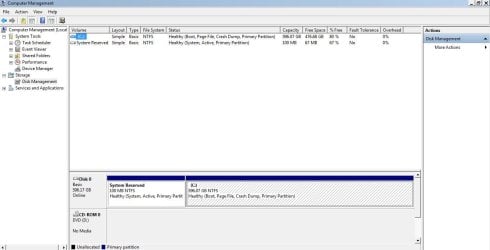
2) The screenshot is attached - all details were snipped (panels maximized as instructed).

Noted that "System reserved" was listed...no Windows OS listed as per the example ..is that the problem?
 

Attachments

  • Capture.JPG
    Capture.JPG
    77.4 KB · Views: 2

My Computer My Computer

At a glance

Windows 7 Home Premium 64bitIntel Core i54GB RAM
Computer type
Laptop
Computer Manufacturer/Model Number
Dell
OS
Windows 7 Home Premium 64bit
CPU
Intel Core i5
Memory
4GB RAM
Antivirus
Kaspersky
Browser
google chrome

My Computer My Computer

At a glance

Win 10 x64, Linux Lite, Win 7 x64, BlackArch,...
Computer type
PC/Desktop
Computer Manufacturer/Model Number
HP Desktop & Compaq Laptop
OS
Win 10 x64, Linux Lite, Win 7 x64, BlackArch, & Kali
Hard Drives
Samsung 850 Pro 256Gb,
Hitachi HDD 1Tb,
Crucial MX SSD 250Gb
Segate 3Tb USB 3.0 Ext. Backup HDD
Internet Speed
150Mbps dn, 20Mbps up
Antivirus
Avast Free, Malwarebytes Anti-Exploit & Anti-Ransomware
Browser
Firefox, Chrome, Opera, & VPN
Back
Top