Updates without rollups

townsbg

тσωηsвg
Guru
Gold Member
VIP
Local time
10:45 AM
Messages
2,091
Last month all I got other than a few office updates and a MSE definition update where the rollups. No individual hotfixes. I ignored the rollups since I am desperately trying to avoid the telemetry updates that M$ has posted but they seem to now only use rollups. Is that correct? Is it now impossible to avoid the telemetry updates? Should I be concerned about these rollups? Is it possible to get individual updates without the rollups?:confused:
 
Last edited:

My Computers

System One System Two

Hi:

Sorry, but I'm not going to step into the whole "MS telemetry is spying on me" paranoia mess. :(
I am no apologist for Redmond and I do not advocate posting one's SSN on the internet.
However, I have always found it ironic that the same folks who complain so vehemently about "telemetry" (aggregate data collection that includes information on how Windows and MS software perform in the wild) are the same folks to line up every month to berate MS for a "bad patch".

Having said that, yes, MS changed back in October to a "Windows as a service" model for Win7 updates, similar to that for Win10.
Then they changed it again a month or so ago (for the better).
See here:

MS Announces Changes to Massive Monthly Patches (7/8/8.1)

Monthly updates are delivered via WU as a "Security+ Quality" roll-up, rather than as individual patches.

The only user control (other than to refuse all updates -- not recommended!!!) is to take the "Security Only" roll-up, rather than the "Security+Quality" rollup.
If you wish to manually install only the Security rollup, Brink publishes the links to the S+Q and the S-only rollups every month.
Here is the thread for December:

KB3207752 and KB3205394 Update for Windows 7 SP1

So, in brief, it is possible to manually install only the Security portion of the monthly updates, if one wishes to do so. At the very least, this is strongly recommended in order to help patch security vulnerabilities.

Whether or not to take the full "Security+ Quality" rollup is up to the user.

Cheers,
MM
 

My Computer

Computer type
PC/Desktop
Computer Manufacturer/Model Number
Dell Studio XPS 8500
OS
OEM Windows 7 Ult (x64) SP1
CPU
Intel Core-i7 3770 @ 3.4 GHz
Motherboard
"Dell" branded
Memory
16 GB DDR3 SDRAM @ 1333 MHz
Graphics Card(s)
NVidia GeForce GT620 1 GB
Sound Card
THX TruStudio PC
Monitor(s) Displays
Dell U2410 Full HD
Hard Drives
2.0 TB SATA2 @ 7200 RPM
PSU
350W
Keyboard
MS 4000 Ergon - Wired
Mouse
Logitech Anywhere MX
Internet Speed
Cable HSI w/Turbo (router)
Antivirus
KIS-MBAM Premium-MBAE Premium
Browser
Fx (current version); IE
Other Info
And a Win7/64 Pro laptop; And a Win10/64 Pro desktop.
Do the security rollups contain telemetry updates? When I built the system I avoided the ones I found on a thread here so I don't want to find that they have been slipped into a rollup.
 

My Computers

System One System Two

Last edited:

My Computer

Computer type
PC/Desktop
Computer Manufacturer/Model Number
Dell Studio XPS 8500
OS
OEM Windows 7 Ult (x64) SP1
CPU
Intel Core-i7 3770 @ 3.4 GHz
Motherboard
"Dell" branded
Memory
16 GB DDR3 SDRAM @ 1333 MHz
Graphics Card(s)
NVidia GeForce GT620 1 GB
Sound Card
THX TruStudio PC
Monitor(s) Displays
Dell U2410 Full HD
Hard Drives
2.0 TB SATA2 @ 7200 RPM
PSU
350W
Keyboard
MS 4000 Ergon - Wired
Mouse
Logitech Anywhere MX
Internet Speed
Cable HSI w/Turbo (router)
Antivirus
KIS-MBAM Premium-MBAE Premium
Browser
Fx (current version); IE
Other Info
And a Win7/64 Pro laptop; And a Win10/64 Pro desktop.
Hi,
Yea I wouldn't worry about it security only is the way a lot of us are going
Just opt out or make sure you're opted out of ceip for windows and various MS programs like office/ MSE/ windows live essentials/....
There is also this method
Callenders post on disable CEIP
Whatever happened to that promised Windows 7 convenience rollup?
 

My Computer

Computer type
PC/Desktop
Computer Manufacturer/Model Number
Custom assembled by me :}
OS
Win-7-Pro64bit 7-H-Prem-64bit
CPU
i7-5930K 2nd i9-9940x both water blocked VRM's too
Motherboard
ASUS SABERTOOTH X99 2nd ASUS x299 Apex
Memory
Trident-z 3200C14 2nd Trident-z 3600C16
Graphics Card(s)
EVGA 1080ti ftw3 2nd Titan Xp both water blocked
Sound Card
Built-in Realtek
Monitor(s) Displays
1-AOC G2460PG 24"G-Sync 144Hz/ 2nd 1-ASUS VG248QE 24" 144Hz
Screen Resolution
1920 x 1080 144Hz
Hard Drives
2-Samsung M.2 Evo & Evo Plus
2-Samsung 850 EVO 500GB SSD's/ 3-2.5 W.D. Black 1tb-&3-1tb/3-3.5 WD Black 1tb hdd's
PSU
EVGA SuperNOVA 1000-P2 2nd 1200-P2
Case
2-Corsair Obsidian Series 450D Black ATX Mid Tower
Cooling
Custom water loops
Keyboard
Logitech G710+/ 2nd Logitech G910
Mouse
2-RedDragon M901 Perdition 16400 dpi Gaming mouse = wired
Internet Speed
Comcast Ping 19ms 89.31mbps download speed 6.12mbps upload
Antivirus
Malwarebytes Pro/ Superantispyware Pro
Browser
FireFox & Pale moon
Other Info
2nd ASUS X299 Apex/Intel i9-9940x with Custom water loop/7H-Prem-x64/Corsair 450D case/Ram Trident-z 3600C16 4x8gb / Samsung970Evo plus 500gb SSD/Dual ssd EZ swap evo/PSU EVGA SuperNova 1200w-P2 80+Platinum/GPU Titan Xp /8-ML-140 on push-pull on 2-280GTX rads
I disabled CEIP under action center but I didn't even think to check task scheduler. I suppose I'll go with the security only updates but I'd rather not install the telemetry updates at all even if I turn off CEIP. As a side note I have the task VistaSP1CEIP in task scheduler. Could that be because I did a Vista upgrade? It has never run so perhaps it is no longer applicable.
 

My Computers

System One System Two

Hi,
Yep I'm surprised you never clean installed :)
I believe all my upgrades went okay too but with all the preinstalled factory crapware I clean installed finally and I never regretted that because 7 was so much better
I believe my last clean install "not my only" was about 18 months ago on my acer.

Again like I said many MS programs have opt in/ out ceip options you might post or review them too to see what they are set at.
 

My Computer

Computer type
PC/Desktop
Computer Manufacturer/Model Number
Custom assembled by me :}
OS
Win-7-Pro64bit 7-H-Prem-64bit
CPU
i7-5930K 2nd i9-9940x both water blocked VRM's too
Motherboard
ASUS SABERTOOTH X99 2nd ASUS x299 Apex
Memory
Trident-z 3200C14 2nd Trident-z 3600C16
Graphics Card(s)
EVGA 1080ti ftw3 2nd Titan Xp both water blocked
Sound Card
Built-in Realtek
Monitor(s) Displays
1-AOC G2460PG 24"G-Sync 144Hz/ 2nd 1-ASUS VG248QE 24" 144Hz
Screen Resolution
1920 x 1080 144Hz
Hard Drives
2-Samsung M.2 Evo & Evo Plus
2-Samsung 850 EVO 500GB SSD's/ 3-2.5 W.D. Black 1tb-&3-1tb/3-3.5 WD Black 1tb hdd's
PSU
EVGA SuperNOVA 1000-P2 2nd 1200-P2
Case
2-Corsair Obsidian Series 450D Black ATX Mid Tower
Cooling
Custom water loops
Keyboard
Logitech G710+/ 2nd Logitech G910
Mouse
2-RedDragon M901 Perdition 16400 dpi Gaming mouse = wired
Internet Speed
Comcast Ping 19ms 89.31mbps download speed 6.12mbps upload
Antivirus
Malwarebytes Pro/ Superantispyware Pro
Browser
FireFox & Pale moon
Other Info
2nd ASUS X299 Apex/Intel i9-9940x with Custom water loop/7H-Prem-x64/Corsair 450D case/Ram Trident-z 3600C16 4x8gb / Samsung970Evo plus 500gb SSD/Dual ssd EZ swap evo/PSU EVGA SuperNova 1200w-P2 80+Platinum/GPU Titan Xp /8-ML-140 on push-pull on 2-280GTX rads
I disabled CEIP under action center but I didn't even think to check task scheduler. I suppose I'll go with the security only updates but I'd rather not install the telemetry updates at all even if I turn off CEIP. As a side note I have the task VistaSP1CEIP in task scheduler. Could that be because I did a Vista upgrade? It has never run so perhaps it is no longer applicable.

Suggest: Grab a copy of this and run it to easily see all info on scheduled tasks.

Download TaskSchedulerView - MajorGeeks

Also see: Any Windows Update patches with privacy or telemetry issues?

Anyway telemetry is coming to Windows 7 like it or not. I try to keep it off my system. I don't have much of an issue with it but nobody clearly explained exactly what data is being collected.

VoodooShield ? | Page 452 | Wilders Security Forums

On any program crash the system reports the crash data to a server (although it is not connected with any scheduled task) - okay if it just reports the crash but does it record personal files in use at the time? I don't know so I disable. Personally I'd prefer it if telemetry was explained in terms of exactly what personal information (if any) gets collected with opt in / out options.

Check for any of these using Elevated Command Prompt then type PS to switch to Powershell.

Code:
get-hotfix -id KB2505438,KB2670838,KB2882822,KB2902907,KB2952664,KB2976978,KB2977759,KB2990214,KB3012973,KB3015249,KB3021917,KB3022345,KB3035583,KB3044374,KB3050267,KB3046480,KB3050265,KB3050267,KB3064683,KB3065987,KB3065988,KB3068708,KB3072318,KB3074677,KB3075249,KB3075851,KB3075853,KB3078667,KB3080149,KB3081437,KB3081454,KB3083324,KB3083325,KB3083710,KB3083711,KB3112336,KB3123862

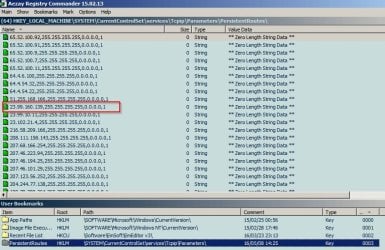
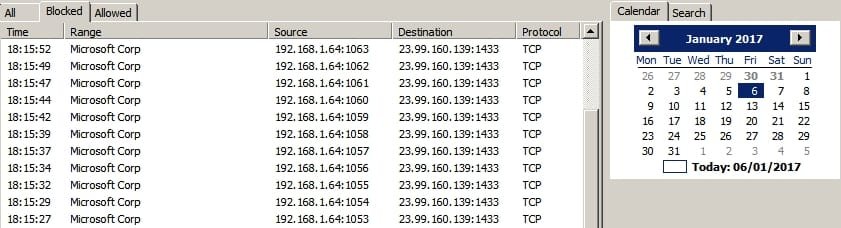
For me - some telemetry has crept back in but it's blocked either by software or by redirecting packets by remapping router table. See Post #27 and onwards here: Static Routes - Create or Remove

Telemetry 1.jpg

Telemetry 2.jpg

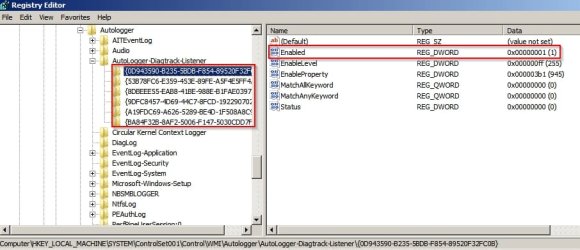
HKEY_LOCAL_MACHINE\SYSTEM\ControlSet001\Control\WMI\AutoLogger\AutoLogger-Diagtrack-Listener

Set "Enabled" value in subkeys to 0 (security only telemetry)

Telemetry 3.jpg

Then you need to add this to registry:

[HKEY_LOCAL_MACHINE\SOFTWARE\Policies\Microsoft\Windows\DataCollection]
"AllowTelemetry"=dword:00000000
"DisableEnterpriseAuthProxy"=dword:00000001

December 2016 - one of these:

View update history.jpg

Added this (I log all file changes during Windows Updates)

Code:
C:\Windows\SoftwareDistribution\Download\1f3d99e62ba907ed768b08c0e5cf3b0b\amd64_microsoft-windows-lua_31bf3856ad364e35_6.1.7601.23593_none_04a2504c8cca91cf\consent.exe
C:\Windows\winsxs\amd64_microsoft-windows-lua_31bf3856ad364e35_6.1.7601.23593_none_04a2504c8cca91cf\consent.exe
C:\Windows\winsxs\Temp\a970394a7e55d201db0c0000d409500e\a05cba4a7e55d201390d0000d409500e_consent.exe

Certain updates add telemetry points to consent.exe and this time around a completely new consent.exe was installed.

Basically if you want to stop it you will be fighting a losing battle.

RE: Security only updates. If you go down that route expect stuff to stop working eventually. How about all those Windows 7 users who only installed security patches and thus got the infamous Windows Update high RAM usage or not working problem?
 
Last edited:

My Computer

Computer type
Laptop
Computer Manufacturer/Model Number
ASUS
OS
Microsoft Windows 7 Home Premium 64-bit 7601 Multiprocessor Free Service Pack 1
CPU
AMD C-60 APU with Radeon(tm) HD Graphics
Motherboard
ASUSTeK COMPUTER INC. X501U
Memory
4.00 GB
Graphics Card(s)
AMD Radeon HD 6290 Graphics
Sound Card
(1) AMD High Definition Audio Device (2) Realtek High Defi
Screen Resolution
1366 x 768 x 32 bits (4294967296 colors) @ 60 Hz
Hard Drives
Hitachi HTS545050A7E380 SATA Disk Device
Antivirus
Comodo CIS & FW, SecureAplus App Whitelisting, Threatfire
Browser
Cyberfox 64bit, Opera 64bit, Airfox
Other Info
Spy-The-Spy, HitmanPro.Alert, Norton Connect Safe, MJRegWatcher, BitDefender TrafficLight, Voodoo Shield, Zemana AntiMalware
Back
Top