Upgrade from Home to Ultimate

It is a good idea to first try the repair install. As you say, you can always do a clean install later.

It is getting hard to find a retail version of Windows 7 from a legitimate dealer. However, you can get a retail version of Windows 8.1. The three types of Windows 8.1 that are available are: "8.1"; "8.1 Pro"; and "8.1 Enterprise". "Pro" will have everything you need. The version I linked to at Newegg is "Pro".

What version of Word and Excel do you have? You can probably get them to work; but keep in mind that anything older than 2010 is no longer receiving security patches from Microsoft. Another option is to use Microsoft Office Online, which is free, and which is a stripped down version of the latest Microsoft Office. (Does not include Outlook.) You can find it here:
https://products.office.com/en-us/office-online/documents-spreadsheets-presentations-office-online

You can turn off automatic updates both in 7 and in 8.1. Then do your research; and when the experts say it is safe to update, update your computer. As long as you do that, you don't need to have automatic updates turned on.

Thank you! Great information!
 

My Computer My Computer

Computer type
PC/Desktop
Computer Manufacturer/Model Number
custom build
OS
Win 7 64 bit Home Premium
CPU
AMD A6 6400K
Motherboard
Gigabyte
Memory
8 bg
Hard Drives
SSD plus HDD
SIW2, MRJIMPHELPS,

I have a plan which might work and keep me in Windows 7 SP1 at least until it is no longer supported. Please tell me what you think.

First, read the underlined passages from post #12. They indicate the 3 "issues" that I have been having with my installation. Again, all works fine and fast, and the missing/corrupted files have been that way for a very long time, and frankly this doesn't bother me. It is only the F8 and registry cleaner "stalling" which I would like to address.

I have images going back 18 months of the Windows partition (C: drive). Using Macrium to restore an image from 6 months ago fixes the Eusing "stalling" issue, but does not fix F8. Installing a 12 month old image has same results. This tells me that the F8 problem does not lie within the Windows partition. Would you agree?

I also have an 18 month-old clone of the entire master drive, created with Macrium. I would like to restore the entire master drive (which includes 3 UBUNTU partitions, a pagefile/memory partition, and the Win 7 partition. No changes have been made to UBUNTU since I built this machine 3-4 years ago.

The plan is this:

1. Create a brand new clone as of today, in case there is a screw up.
2. Restore the 18 month old clone of the master SSD.
3. Restore the C: drive Win 7 image from 6 months ago.
4. Carefully update the C: drive to present day, and install recent programs.
5. Uninstall Eusing Registry cleaner, and never again try to clean the registry.

This SHOULD fix the registry and give me F8 back. I don't care about the sfc/scannow unfixable files, but if that's fixed as well, then that would be a bonus.

What do you think?
Thanks again!
 

My Computer My Computer

Computer type
PC/Desktop
Computer Manufacturer/Model Number
custom build
OS
Win 7 64 bit Home Premium
CPU
AMD A6 6400K
Motherboard
Gigabyte
Memory
8 bg
Hard Drives
SSD plus HDD
I think your plan to restore the 18 month old clone of the entire master drive is a good plan. You're right; it may fix everything. And if it does, you won't have to purchase another copy of Windows.

And if it doesn't fix things to your satisfaction, all you have lost is a little time. You can always proceed with a newer restore or with a fresh install of Windows.

Quite frankly, the only explanation I can come up with for F8 not working is a bad keyboard; you could swap keyboards to test this. In my opinion, it is very unlikely a Windows issue. You have almost proved it by restoring the 6 and 12 month backups; but you have not absolutely proved it, because there could have been a Windows issue back when those backups were done; if so, that issue would be saved into the backups. Still, I doubt that the problem with F8 is somehow caused by Windows, and I base that on my decades of experience in this field. But you have to at least consider that possibility if you can't find any other possible cause.

I read something a few months ago which spoke of the key codes that the keyboard transmits for the various keys. Perhaps the F8 key code is somehow being rejected or blocked by Windows. Again, I doubt this is the case; but that is the direction I would search on if I couldn't find any other answer for why the F8 key doesn't work.
 

My Computer My Computer

Computer type
PC/Desktop
Computer Manufacturer/Model Number
Dell
OS
Linux Mint 18.2 xfce 64-bit (VMWare host) / Windows 8.1 Pro 32-bit (VMWare guest)
CPU
Haswell
Memory
4 GB
Monitor(s) Displays
Acer 23"
Screen Resolution
1920 x 1080
Hard Drives
Two hard drives, 1TB each: One for Linux, one for my data.
Keyboard
IBM Model M
Antivirus
Sophos (Linux), Trend Micro (Windows)
Browser
Firefox, Opera
Other Info
I use Samba to share my data drive with the other computers at my house and with my guest session in VMWare Workstation Player.
I think your plan to restore the 18 month old clone of the entire master drive is a good plan. You're right; it may fix everything. And if it does, you won't have to purchase another copy of Windows.

And if it doesn't fix things to your satisfaction, all you have lost is a little time. You can always proceed with a newer restore or with a fresh install of Windows.

Quite frankly, the only explanation I can come up with for F8 not working is a bad keyboard; you could swap keyboards to test this. In my opinion, it is very unlikely a Windows issue. You have almost proved it by restoring the 6 and 12 month backups; but you have not absolutely proved it, because there could have been a Windows issue back when those backups were done; if so, that issue would be saved into the backups. Still, I doubt that the problem with F8 is somehow caused by Windows, and I base that on my decades of experience in this field. But you have to at least consider that possibility if you can't find any other possible cause.

Another keyboard offers the same results. This is the third USB keyboard I have tried. Last time I had a successful F8 boot menu was with a PS2 keyboard, maybe 9 months or so ago.

I read something a few months ago which spoke of the key codes that the keyboard transmits for the various keys. Perhaps the F8 key code is somehow being rejected or blocked by Windows. Again, I doubt this is the case; but that is the direction I would search on if I couldn't find any other answer for why the F8 key doesn't work.

Yes, it apparently might not be a Windows issue. There is one possibly important point which I have failed to mention because I have not until now, attached any significance to it: I updated UBUNTU some months ago, and maybe this somehow affected boot menu. I am totally speculating now, but I do recall that there is a very specific order to be followed when installing Linux and Windows. I do not have enough expertise to intuitively know the answer, so I will have to back up and install older things, without a full understanding of the why's and wherefores.

I connected another new USB (the third one) keyboard just now with the same results: no F8 response. The last time that I got a F8 response was from a defunct PS2 keyboard which i junked three months ago.

I have a feeling that the UBUNTU update had an affect on something, somewhere. My feeling is that I ought to now proceed with the PLAN as previously stated. Thoughts?
 

My Computer My Computer

Computer type
PC/Desktop
Computer Manufacturer/Model Number
custom build
OS
Win 7 64 bit Home Premium
CPU
AMD A6 6400K
Motherboard
Gigabyte
Memory
8 bg
Hard Drives
SSD plus HDD
This tells me that the F8 problem does not lie within the Windows partition. Would you agree?

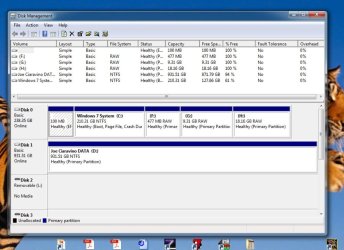
Where is the bcd store? If you have a 100mb system partition it is probabaly there.
 

My Computers My Computers

System One System Two

  • Computer type
    PC/Desktop
    OS
    7 X64
    CPU
    i5 8400
    Motherboard
    gigabyte b365m ds3h
    Memory
    2x8gb 3200mhz
    Hard Drives
    various
    PSU
    pure power 11 400w cm
    Case
    Coolermaster
    Cooling
    cryorig m9i
  • Computer type
    PC/Desktop
    OS
    7x64
    CPU
    g5400
    Motherboard
    ga b365m ds3h
    Memory
    8gb ddr4 2400
    PSU
    xfx pro 450w
Where is the bcd store? If you have a 100mb system partition it is probabaly there.

My drives
I stated earlier that I had a separate partition for pagefiles. I was mistaken. That was a previous build, not on this machine.
How can I find the BCD store, and can I fix/edit it?
I have MiniTool Partition Wizard.
I also have EasyBCD
 

Attachments

  • 1.JPG
    1.JPG
    110.4 KB · Views: 0

My Computer My Computer

Computer type
PC/Desktop
Computer Manufacturer/Model Number
custom build
OS
Win 7 64 bit Home Premium
CPU
AMD A6 6400K
Motherboard
Gigabyte
Memory
8 bg
Hard Drives
SSD plus HDD
Here are the entries shown by EasyBCD in the BCD partition:

Entry #1
Name: ubuntu
BCD ID: {61357f51-68fd-11e7-9a26-806e6f6e6963}
Device: \Device\HarddiskVolume1
Bootloader Path: \EFI\ubuntu\shimx64.efi

Entry #2
Name: ubuntu
BCD ID: {61357f52-68fd-11e7-9a26-806e6f6e6963}
Device: \Device\HarddiskVolume1
Bootloader Path: \EFI\Ubuntu\grubx64.efi

Entry #3
Name: Generic-SD/MMC 1.00
BCD ID: {cbffcc51-e19e-11e6-a66c-806e6f6e6963}
Device: Unknown
Bootloader Path:

Entry #4
Name: Hard Drive
BCD ID: {3395ced2-affd-11e4-b9d4-806e6f6e6963}
Device: Unknown
Bootloader Path:

Entry #5
Name: CD/DVD Drive
BCD ID: {b6b7f3cf-c67c-11e3-9a0c-806e6f6e6963}
Device: Unknown
Bootloader Path:

Entry #6
Name: Windows 7 Home Premium
BCD ID: {current}
Drive: C:\
 
Last edited:

My Computer My Computer

Computer type
PC/Desktop
Computer Manufacturer/Model Number
custom build
OS
Win 7 64 bit Home Premium
CPU
AMD A6 6400K
Motherboard
Gigabyte
Memory
8 bg
Hard Drives
SSD plus HDD
I installed Visual BCD Editor. The problem lies within there, but I don't know what I should do.
 

My Computer My Computer

Computer type
PC/Desktop
Computer Manufacturer/Model Number
custom build
OS
Win 7 64 bit Home Premium
CPU
AMD A6 6400K
Motherboard
Gigabyte
Memory
8 bg
Hard Drives
SSD plus HDD
Back
Top