Upgrade from Windows Xp to Windows 7, Lag spikes, high Cpu Usage

So should i just ignore the heat my graphics card is generating and continue to play the games?
Because i don't want my new graphics card nor my cpu to ovearheat and stop working.
 

My Computer My Computer

At a glance

windows 7 64bitAMD Athlon II X2 250 Proccesor 3.0 GHZNVIDIA GeForce GTX 560Ti
OS
windows 7 64bit
CPU
AMD Athlon II X2 250 Proccesor 3.0 GHZ
Graphics Card(s)
NVIDIA GeForce GTX 560Ti
Sound Card
Realtek High Definition Audio
Screen Resolution
1920 X 1080
So should i just ignore the heat my graphics card is generating and continue to play the games?
Because i don't want my new graphics card nor my cpu to ovearheat and stop working.

Your CPU temps are normal and very very unlikely to ever be an issue.

Graphics cards run hot when gaming. You haven't shown us that your temps are excessively high.

Heat has some affect on the life expectancy of computer components, but it's hard to say how much in any given instance. Does it matter if your graphics card fails in 4 years rather than 4.5, 5, or 10 years? If it does fail, you replace it.

If you can't stand that prospect, you can quit gaming or doing whatever is causing it to run at those temps. Take your pick. Most gamers just plunge on and replace failed components as necessary.

You could make changes in your internal cooling/airflow setup, but I wouldn't expect it to make a major difference.

Or just live with it.
 

My Computer My Computer

At a glance

Windows 7 Home Premium SP1, 64-bitIntel Skylake i5-6600K, not overclocked8 GB HyperX DDR4-2666 (2 x 4 GB)none; graphics are integrated on CPU
Computer type
PC/Desktop
Computer Manufacturer/Model Number
Ignatz Special; 4 speed manual gearbox; factory air conditioning; one of one
OS
Windows 7 Home Premium SP1, 64-bit
CPU
Intel Skylake i5-6600K, not overclocked
Motherboard
AsRock Z170M Extreme 4, micro ATX
Memory
8 GB HyperX DDR4-2666 (2 x 4 GB)
Graphics Card(s)
none; graphics are integrated on CPU
Sound Card
onboard: Realtek ALC1150; external: USB Behringer UF0-202
Monitor(s) Displays
Dell S2340M 23 inch IPS
Screen Resolution
1600 x 900
Hard Drives
System: Crucial MX100 series SSD, 128 GB;
Data: Samsung Spinpoint 103SJ, 1 TB;
Backup: WD Caviar Green WD30EZRX-00D8PB0, 3 TB
PSU
Rosewill SilentNight 500 watt fanless, semi-modular
Case
Antec Solo II
Cooling
Noctua NH-U12S; Noctua F12 intake, Noctua S12A exhaust
Keyboard
Microsoft 200 6JH-00001 USB
Mouse
Dell or Microsoft optical wired; USB
Antivirus
Microsoft Security Essentials and Malwarebytes Premium
Browser
Pale Moon
Other Info
All fans PWM; speeds at idle: CPU circa 500 rpm; intake circa 600 rpm; exhaust circa 600 rpm; CPU temps 27 idle and 47 C load in a warm room (27 C/81 F) when running Intel Extreme Tuning Utility stress test.
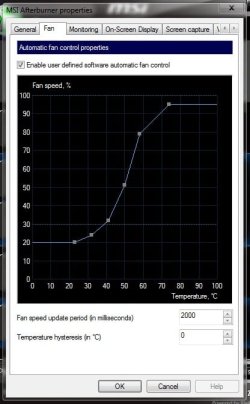
In the case that you want to avoid the life-span shortenning of the gpu, you should install the utility called Afterburner and then use a custom fan speed control.
( this is a multifunctional utility for nvidia cards, it is mainly used for overclocking )

Once you installed it, open afterburner and click on settings.
Now go to the Fan tab and tick the box saying 'Enable user defined....'. Now you can manually determine the fan speed for the temperature value.

Here are my settings as a reference. I recommend you to set the fan to around 40% for your idle temps, and let it spin up to 70-90% under full load which is the 70-80°C region in your case (some might say that they wouldn't spin the fan that much, and this is definetely more than what the card would spin it in auto mode)

dsadsafasdfasdf.jpg

When you have done this, play some games and then measure the temperatures again please, so we will see how much it might have improoved.
 

My Computer My Computer

At a glance

Windows 7 Ultimate 64 bit SP1Intel(R) Core(TM) i5-2500K12GB Kingston Hyperx 1600MHzAsus GTS 450
Computer type
PC/Desktop
Computer Manufacturer/Model Number
Custom Built PC
OS
Windows 7 Ultimate 64 bit SP1
CPU
Intel(R) Core(TM) i5-2500K
Motherboard
Gigabyte Technology Co., Ltd. Z68X-UD3-B3
Memory
12GB Kingston Hyperx 1600MHz
Graphics Card(s)
Asus GTS 450
PSU
500W Coolink
Other Info
Genius G-Pen F610 (PenPad)
I did not install it orignally because it said it didn't work so i restarted my computer and when it restarted it came up a text saying press any thing or something like that and i followed the instruction and booted my computer and saw a windows 7 screen and from there was just easy.
Thats how i upgraded my Windows Xp 32bit to Windows 7 64bit.
All my old things like programs,documents and so forth were collected and a map called Windows.old

I hope you understood me, english isn't my best subject

You actually did do a clean install, you just didn't realize you did, thus the windows.old.

Anyway I agree with the thought here that you're not over heating and the high temps you experience during gaming is normal.

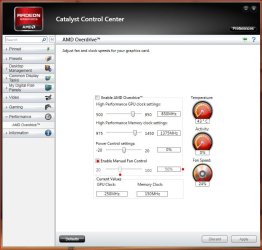
I have to disagree with the need for afterburner as it's not something you really need. It's more suited for tweaking, but basic fan tweaks may be included in your video card software. For example here's ATI's tweak.....

ATI Tweak tab.JPG

As for increasing the lifespan of the card, if the card is used as intended, it will last as designed. Yes, heat does shorten the lifespan of any component, but let's not forget the card is designed to run at high temps anyway so....

Anyway I have nothing against Afterburner, just making you aware that it is a tweak program, and something that isn't needed.

My two cents.
 

My Computer My Computer

At a glance

Windows 10 ProIntel Core i7-4770K (3.5Ghz)32 gig Corsair Dominator Platinum (4x8Gig)Sapphire Tri-X R9 Fury
Computer type
PC/Desktop
Computer Manufacturer/Model Number
Custom built by me.
OS
Windows 10 Pro
CPU
Intel Core i7-4770K (3.5Ghz)
Motherboard
Gigabyte G1 Sniper 5 (F10 Bios)
Memory
32 gig Corsair Dominator Platinum (4x8Gig)
Graphics Card(s)
Sapphire Tri-X R9 Fury
Sound Card
Soundblaster ZXR
Monitor(s) Displays
NEC PA242W 24" LCD Monitor
Screen Resolution
1920 x 1200
Hard Drives
Primary - Samsung 850 Pro (512gig), Samsung 840 Pro (256gig), 2TB WD Caviar Black.
PSU
EVGA Supernova 1000 G2
Case
Cooler Master HAF X
Cooling
Corsair H100i with Corsair Air Series SP120 Quiet Fans
Keyboard
Logitech Wireless Wave
Mouse
Logitech Performance MX
Internet Speed
High Speed Cable
Antivirus
Norton Security
Browser
IE11
Other Info
Memory Timings - 1866MHz @ 9-9-9-27-1T @ 1.5 volts
I don't actually see why Catalyst is better than Afterburner. Yes, nvidia has it's own software built into the drivers which you can oc and control fans with.. but afterburner has become many's favourite due to the visual tweaking ability and the several functions. Once afterburner's fan control is set up correctly you have nothing to do with that, it is equal work to set up a similar behaviour in the driver's utility.
 

My Computer My Computer

At a glance

Windows 7 Ultimate 64 bit SP1Intel(R) Core(TM) i5-2500K12GB Kingston Hyperx 1600MHzAsus GTS 450
Computer type
PC/Desktop
Computer Manufacturer/Model Number
Custom Built PC
OS
Windows 7 Ultimate 64 bit SP1
CPU
Intel(R) Core(TM) i5-2500K
Motherboard
Gigabyte Technology Co., Ltd. Z68X-UD3-B3
Memory
12GB Kingston Hyperx 1600MHz
Graphics Card(s)
Asus GTS 450
PSU
500W Coolink
Other Info
Genius G-Pen F610 (PenPad)
Nowhere did I say, or allude, that CCC is better than Afterburner.

My point is that unless he's overclocking I don't see the need for a third party program.

As for the popularity of the program, yeah it's popular, but that doesn't make it a necessity where it isn't needed.

My suggestion is to look at his problem, make sure he's comfortable and stable before dealing with any third party apps.

My two cents.
 

My Computer My Computer

At a glance

Windows 10 ProIntel Core i7-4770K (3.5Ghz)32 gig Corsair Dominator Platinum (4x8Gig)Sapphire Tri-X R9 Fury
Computer type
PC/Desktop
Computer Manufacturer/Model Number
Custom built by me.
OS
Windows 10 Pro
CPU
Intel Core i7-4770K (3.5Ghz)
Motherboard
Gigabyte G1 Sniper 5 (F10 Bios)
Memory
32 gig Corsair Dominator Platinum (4x8Gig)
Graphics Card(s)
Sapphire Tri-X R9 Fury
Sound Card
Soundblaster ZXR
Monitor(s) Displays
NEC PA242W 24" LCD Monitor
Screen Resolution
1920 x 1200
Hard Drives
Primary - Samsung 850 Pro (512gig), Samsung 840 Pro (256gig), 2TB WD Caviar Black.
PSU
EVGA Supernova 1000 G2
Case
Cooler Master HAF X
Cooling
Corsair H100i with Corsair Air Series SP120 Quiet Fans
Keyboard
Logitech Wireless Wave
Mouse
Logitech Performance MX
Internet Speed
High Speed Cable
Antivirus
Norton Security
Browser
IE11
Other Info
Memory Timings - 1866MHz @ 9-9-9-27-1T @ 1.5 volts
Back
Top