
Solved Upgrade from XP to win7 without clean install

plaurits;[URL="tel:3510128" said:
3510128[/URL]]Hi
Finally I think it’s time to upgrade my old XP to win7.
However I have a number of old programs which I am not sure will run on win7.
So I am trying to use windows7 upgrade advisor.
However getting attached error.
Any other way to check if you can upgrade *without* clean install?
Peter

View attachment 421709
well you can downgrade to vista and do the upgrade option, then upgrade to 7 and do the upgrade option, but that’s the only way there’s no way to do a windows xp to 7 upgrade without clean installation
 

My Computers My Computers

  • At a glance

    Windows 7 Home Premium x64i5 9400F16GB DDR4 4X4GB 3200MHzNvidia GeForce GTX 970
    Computer type
    PC/Desktop
    Computer Manufacturer/Model Number
    ASUS
    OS
    Windows 7 Home Premium x64
    CPU
    i5 9400F
    Motherboard
    ASUS Prime Z390-P
    Memory
    16GB DDR4 4X4GB 3200MHz
    Graphics Card(s)
    Nvidia GeForce GTX 970
    Monitor(s) Displays
    Dell Ultrasharp 2007WFPb
    Screen Resolution
    1600x1200
    Hard Drives
    1TB Samsung 870 evo
    PSU
    EVGA Supernova 1000 GT
    Case
    Viper GX ATX
    Cooling
    Noctua NH-D15
    Keyboard
    Frutiger Aero
    Mouse
    HP M-UAE96
    Internet Speed
    900 MBPS download l 880 MBPS upload
    Antivirus
    Microsoft Security Essentials
    Browser
    Supermium
  • Computer type
    PC/Desktop
see my previous post

You might try copying the vista installation media onto your os partition (C:) . Rt click the usb stick select copy, then rt click the c partition and select paste.
Then you can unplug the usb stick and try running setup.exe that is inside the sources folder .

Does your vista media already include sp2 ?

You could also make sure the mbr and pbr are the NT6 versions. you can check with bootice.
View attachment 421734
 

My Computers My Computers

  • At a glance

    7 X64i5 84002x8gb 3200mhz
    Computer type
    PC/Desktop
    OS
    7 X64
    CPU
    i5 8400
    Motherboard
    gigabyte b365m ds3h
    Memory
    2x8gb 3200mhz
    Hard Drives
    various
    PSU
    pure power 11 400w cm
    Case
    Coolermaster
    Cooling
    cryorig m9i
  • At a glance

    7x64g54008gb ddr4 2400
    Computer type
    PC/Desktop
    OS
    7x64
    CPU
    g5400
    Motherboard
    ga b365m ds3h
    Memory
    8gb ddr4 2400
    PSU
    xfx pro 450w
Hi
  1. You might try copying the vista installation media onto your os partition (C:) . Rt click the usb stick select copy, then rt click the c partition and select paste.Then you can unplug the usb stick and try running setup.exe that is inside the sources folder
  2. Does your vista media already include sp2 ?
  3. nt6
ad 1: already done so
ad 2: yes
ad 3: yes

ad driver genius: latest version for xp is 16 https://www.driver-soft.com/download/DG_16.0.0.249.exe
 

My Computers My Computers

  • At a glance

    windows XP
    OS
    windows XP
  • Computer type
    PC/Desktop
I dont know what driver genius is.

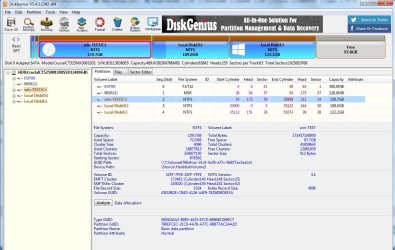
There is a program called diskgenius that I use. Download DGEngSetup5431342.exe


Not connected in any way to the link you posted..

It looks like this:

dg-main-window.jpg
 

My Computers My Computers

  • At a glance

    7 X64i5 84002x8gb 3200mhz
    Computer type
    PC/Desktop
    OS
    7 X64
    CPU
    i5 8400
    Motherboard
    gigabyte b365m ds3h
    Memory
    2x8gb 3200mhz
    Hard Drives
    various
    PSU
    pure power 11 400w cm
    Case
    Coolermaster
    Cooling
    cryorig m9i
  • At a glance

    7x64g54008gb ddr4 2400
    Computer type
    PC/Desktop
    OS
    7x64
    CPU
    g5400
    Motherboard
    ga b365m ds3h
    Memory
    8gb ddr4 2400
    PSU
    xfx pro 450w
Thanks, will try to find the 32 bit version of disk genius.
Meanwhile is there anything else I should check?
 

My Computers My Computers

  • At a glance

    windows XP
    OS
    windows XP
  • Computer type
    PC/Desktop

My Computers My Computers

  • At a glance

    7 X64i5 84002x8gb 3200mhz
    Computer type
    PC/Desktop
    OS
    7 X64
    CPU
    i5 8400
    Motherboard
    gigabyte b365m ds3h
    Memory
    2x8gb 3200mhz
    Hard Drives
    various
    PSU
    pure power 11 400w cm
    Case
    Coolermaster
    Cooling
    cryorig m9i
  • At a glance

    7x64g54008gb ddr4 2400
    Computer type
    PC/Desktop
    OS
    7x64
    CPU
    g5400
    Motherboard
    ga b365m ds3h
    Memory
    8gb ddr4 2400
    PSU
    xfx pro 450w
I already tried this version, but it does not work on XP. So I have asked disk genius for a link.
Anyway: Any suggestion for getting on with this or should we stop and conclude that xp -> vista migration does not work in my case?
 

My Computers My Computers

  • At a glance

    windows XP
    OS
    windows XP
  • Computer type
    PC/Desktop
I dont know what the problem is in your case. There is a possibility that diskgenius might find a partition table error and if so that might be part of the problem.

Why are trying to upgrade rather than clean install ?
 

My Computers My Computers

  • At a glance

    7 X64i5 84002x8gb 3200mhz
    Computer type
    PC/Desktop
    OS
    7 X64
    CPU
    i5 8400
    Motherboard
    gigabyte b365m ds3h
    Memory
    2x8gb 3200mhz
    Hard Drives
    various
    PSU
    pure power 11 400w cm
    Case
    Coolermaster
    Cooling
    cryorig m9i
  • At a glance

    7x64g54008gb ddr4 2400
    Computer type
    PC/Desktop
    OS
    7x64
    CPU
    g5400
    Motherboard
    ga b365m ds3h
    Memory
    8gb ddr4 2400
    PSU
    xfx pro 450w
Hi
Main reason is that I remember from the point in time where win7/vista upgrade advisor was available that a large number of my programs could not run in win7.
So if I make a clean install of XP I manually have to reinstall 50+ programs, which is quite cumbersome even if I happen to find the original install files. These are typically no longer available on internet, hence I have to dig them out from my backups....
 

My Computers My Computers

  • At a glance

    windows XP
    OS
    windows XP
  • Computer type
    PC/Desktop
It might take less time than you are spending trying to upgrade.

There are a couple of programs that claim to be able to transfer your programs from one os to another..

laplink and easeus pctrans
 

My Computers My Computers

  • At a glance

    7 X64i5 84002x8gb 3200mhz
    Computer type
    PC/Desktop
    OS
    7 X64
    CPU
    i5 8400
    Motherboard
    gigabyte b365m ds3h
    Memory
    2x8gb 3200mhz
    Hard Drives
    various
    PSU
    pure power 11 400w cm
    Case
    Coolermaster
    Cooling
    cryorig m9i
  • At a glance

    7x64g54008gb ddr4 2400
    Computer type
    PC/Desktop
    OS
    7x64
    CPU
    g5400
    Motherboard
    ga b365m ds3h
    Memory
    8gb ddr4 2400
    PSU
    xfx pro 450w
Last time I looked the free version is limited to transferring 5 programs.
 

My Computers My Computers

  • At a glance

    7 X64i5 84002x8gb 3200mhz
    Computer type
    PC/Desktop
    OS
    7 X64
    CPU
    i5 8400
    Motherboard
    gigabyte b365m ds3h
    Memory
    2x8gb 3200mhz
    Hard Drives
    various
    PSU
    pure power 11 400w cm
    Case
    Coolermaster
    Cooling
    cryorig m9i
  • At a glance

    7x64g54008gb ddr4 2400
    Computer type
    PC/Desktop
    OS
    7x64
    CPU
    g5400
    Motherboard
    ga b365m ds3h
    Memory
    8gb ddr4 2400
    PSU
    xfx pro 450w
yes, but I have the pro version already. Let's see if it works, problem with easeus is that support is not good, which I have documented on trustpilot. Last time they dialled in they (inadvertently) reformatted my backup disk, since they used that target for restore.
so may be I should try laplink instead.

I have inserted the conclusion in the initial post for this thread.
 
Last edited:

My Computers My Computers

  • At a glance

    windows XP
    OS
    windows XP
  • Computer type
    PC/Desktop
OK, I will try the similar tool for upgrade xp to vista

- - - Updated - - -

Hi
Following
I have checked the compatibility option from the vista iso file.
This produces "TPM20-ACPITABL.zip" file. Does anybody know how to interpret that?
View attachment 421713

wth is is that?
[vista compat check] is http://go.microsoft.com/fwlink/?LinkId=60497 which directs to this file that seems like it may should be secure?https://download.microsoft.com/down...3D3-4E29-9E8E-401F8160BB71/TPM20-ACPITABL.zip
 

My Computer My Computer

At a glance

Windows 8Intel Core 2 Duo T7200 (2 GHz)4 GBnVidia GeForce GO 7700
Computer type
Laptop
Computer Manufacturer/Model Number
Asus G1
OS
Windows 8
CPU
Intel Core 2 Duo T7200 (2 GHz)
Memory
4 GB
Graphics Card(s)
nVidia GeForce GO 7700
Antivirus
Windows Defender
Browser
IE10 or Chrome, depending on mood
Back
Top