Solved Upgrade from XP to win7 without clean install

plaurits

New member
Local time
1:05 AM
Messages
16
Hi
Finally I think it’s time to upgrade my old XP to win7.
However I have a number of old programs which I am not sure will run on win7.
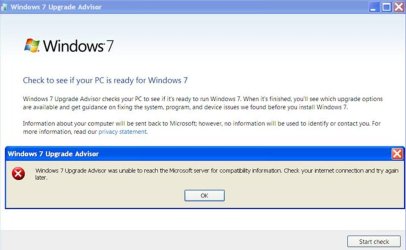
So I am trying to use windows7 upgrade advisor.
However getting attached error.
Any other way to check if you can upgrade *without* clean install?
Peter

2022-07-12_09-11-36.jpg


Hi SIW2
Just to conclude this case:

Conclusion: Two ways to move programs and data from XP SP3 to Windows 10
  1. Make a fresh install of windows 10 32 bit and use Laplink PCmover to move OR
  2. Make a fresh windows 10 64 bit and manually reinstall the programs you need.

Details:


  1. My current XP SP3 install is fully updated.
  2. To upgrade to Vista I use this tutorial Tutorial: How to upgrade from Windows XP to Windows Vista (links updated as of May 2018) - YouTube
  3. However I am getting error
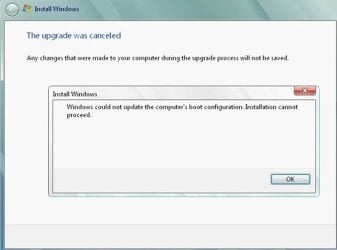
    “Windows could not update the computer’s boot configuration. Installation cannot proceed”
    .
  4. Hence I was suspecting that there may be was an error in my setup.
  5. So I made a clean install of XP SP3 and transferred files from old setup to new setup using the “file and transfer settings wizard” available in XP.
  6. Alternatively you may use PCmover tool from Laplink to move files to new XP SP3 setup.
  7. Then I tried the Vista procedure above on new the new setup.
  8. However I did not get as far as earlier on since windows powershell (part of KB926139) was required to be removed.
  9. This component was not found probably because the fresh XP SP3 was not updated (and could not since updates are no longer available)
  10. So this was a dead end, hence I decided to try PCmover tool from Laplink to move my old XP SP3 to fresh WIN10 32 bit install.
  11. This move went OK, out of 270 programs 250 were transferred – i.e. you have to move remaining ones manually if you need them.

Thanks a lot for your support for this case.

Br
Peter Lauritzen
 
Last edited:

My Computers My Computers

System One System Two

  • OS
    windows XP
  • Computer type
    PC/Desktop
It could be that the win7 upgrade advisor is no longer being run at the microsoft end, which is why you get that message.

It would be wise to make a backup image image of your xp system beforehand, which can be restored in case some of your precious programs dont work afterwards. And/or clone it onto another disk, then use the cloned disk as your upgrade disk.

I vaguely recall you could go xp>vista>win7. You could try that.

Some people used easy transfer and did a migration xp>win7 . But if I remember correctly that is for settings and user files and not for programs.
Step-By-Step: How To "Upgrade" from Windows XP to Windows 7 - Scott Hanselman's Blog
 

My Computers My Computers

System One System Two

  • Computer type
    PC/Desktop
    OS
    7 X64
    CPU
    i5 8400
    Motherboard
    gigabyte b365m ds3h
    Memory
    2x8gb 3200mhz
    Hard Drives
    various
    PSU
    pure power 11 400w cm
    Case
    Coolermaster
    Cooling
    cryorig m9i
  • Computer type
    PC/Desktop
    OS
    7x64
    CPU
    g5400
    Motherboard
    ga b365m ds3h
    Memory
    8gb ddr4 2400
    PSU
    xfx pro 450w
Hi SIW2
Thanks for comments. You are quite right, easy transfer does not transfer programs.
Also I checked this article about the error message I am getting Redirecting.
I tried the suggestions here, but no success, i.e. advisor still does not run on my XP SP3.
Also I tried XP -> VISTA some years back, but also that failed.
Hence my main point is to check which of my XP programs can not run in windows 7, so I can see if I can find some WA for these once in win7.
 

My Computers My Computers

System One System Two

  • OS
    windows XP
  • Computer type
    PC/Desktop

My Computers My Computers

System One System Two

  • Computer type
    PC/Desktop
    OS
    7 X64
    CPU
    i5 8400
    Motherboard
    gigabyte b365m ds3h
    Memory
    2x8gb 3200mhz
    Hard Drives
    various
    PSU
    pure power 11 400w cm
    Case
    Coolermaster
    Cooling
    cryorig m9i
  • Computer type
    PC/Desktop
    OS
    7x64
    CPU
    g5400
    Motherboard
    ga b365m ds3h
    Memory
    8gb ddr4 2400
    PSU
    xfx pro 450w
Finally I think it’s time to upgrade my old XP to win7.
I vaguely recall you could go xp>vista>win7...
I can confirm that you have to upgrade to Vista first.

I had to do that when I rescued the XP OS and its intalled and activated Office 2003 from a dead XP machine where only the HDD had survived. I took a system image of the HDD and restored it to a VM for the upgrade(s). I took it all the way from XP up to Windows 10. XP > Vista > Win7 > Win10. All my installed software and settings were retained at each upgrade, Office still ran and was activated in each OS.

There was a free upgrade from XP to Vista, so that retained activation. There was no free upgrade from Vista to Win7, so I then needed a W7 key to activate it (I had a spare CoA key I could use). There is a free upgrade from Win7 to Win10, so activation was retained.
 

My Computers My Computers

System One System Two

  • Computer type
    Laptop
    Computer Manufacturer/Model Number
    Toshiba satellite C650D
    OS
    Windows 7 Home Premium x64
    CPU
    AMD V120
    Memory
    4GB
    Internet Speed
    150 Mbps
    Antivirus
    MSE
    Browser
    IE11, Edge, Firefox
    Other Info
    I also have W7 Pro on my System Two, and several W7 Hyper-V VMs. My other machines run Windows 10/11. Their specs are in my Ten Forums & Eleven Forum profiles.
  • Computer type
    Laptop
    System Manufacturer/Model Number
    Lenovo Thinkpad T430
    OS
    Windows 7 Pro x64
    CPU
    Intel i5-3320M
    Memory
    8 GB
    Hard Drives
    250GB Samsung SSD 860 EVO
    Antivirus
    MSE
Thanks Bree.
If I can not make advisor to work, I will retry upgrade from XP to Vista. As far as I remember last time I tried this upgrade was not possible because of some XP programs I have on the disk.
So before reattempting XP -> Vista I will see if I can make upgrade advisor to work.
WuaDiagnostics.log file from XP SP3 attached here
Code:
WUA is running on: PETER-XP-DESK
[12-07-2022 14:59:02] Updater caught a general Exception:

[12-07-2022 14:59:02] Exception: Object reference not set to an instance of an object.
   at Microsoft.WUA.Data.Utilities.DownloadContent(String downloadSite)
   at Microsoft.WUA.Data.UpdatesChecker.PerformCheckForUpdates()
[12-07-2022 14:59:02] MaxConnectionAttempts = 3
[12-07-2022 14:59:02] ConnectionTimeout = 60000
[12-07-2022 14:59:02] Using web service: http://aeos.microsoft.com/compatibilityexchange/compatibilityexchange.svc
[12-07-2022 14:59:03] Exception: The request failed with an empty response.
   at  System.Web.Services.Protocols.SoapHttpClientProtocol.ReadResponse(SoapClientMessage  message, WebResponse response, Stream responseStream, Boolean  asyncCall)
   at System.Web.Services.Protocols.SoapHttpClientProtocol.Invoke(String methodName, Object[] parameters)
   at Microsoft.WUA.Data.CompatibilityExchangeService.GetServiceInformation(ClientInfo clientInfo)
   at Microsoft.WUA.Data.ApplicationExperienceWebService.GetServiceInformation(ClientInfo clientInfo)
   at Microsoft.WUA.Data.ServiceFacade.GetWebServiceConfiguration()
   at  Microsoft.WUA.Data.ServiceFacade.Initialize(IWebServiceCompatibilityDataProvider  webServiceIn, ISystemDataProvider systemDataProvider)
[12-07-2022 14:59:03] WebExceptionStatus: ProtocolError
[12-07-2022 14:59:03] Checking to see if Internet connection exists.
[12-07-2022 14:59:03] WebExceptionCode: MovedPermanently
[12-07-2022 14:59:03] Protocol Error: Check webservice url.
[12-07-2022  14:59:03] Microsoft.WUA.Data.WebServiceException: Unable to initialize  the webservice. ---> System.Net.WebException: The request failed with  an empty response.
   at  System.Web.Services.Protocols.SoapHttpClientProtocol.ReadResponse(SoapClientMessage  message, WebResponse response, Stream responseStream, Boolean  asyncCall)
   at System.Web.Services.Protocols.SoapHttpClientProtocol.Invoke(String methodName, Object[] parameters)
   at Microsoft.WUA.Data.CompatibilityExchangeService.GetServiceInformation(ClientInfo clientInfo)
   at Microsoft.WUA.Data.ApplicationExperienceWebService.GetServiceInformation(ClientInfo clientInfo)
   at Microsoft.WUA.Data.ServiceFacade.GetWebServiceConfiguration()
   at  Microsoft.WUA.Data.ServiceFacade.Initialize(IWebServiceCompatibilityDataProvider  webServiceIn, ISystemDataProvider systemDataProvider)
   --- End of inner exception stack trace ---
[12-07-2022 14:59:03]    at System.Environment.GetStackTrace(Exception e, Boolean needFileInfo)
   at System.Environment.get_StackTrace()
   at Microsoft.WUA.Data.ExceptionBuilder.Trace(Exception e)
   at Microsoft.WUA.Data.ExceptionBuilder.UnableToInitializeWebservice(Exception inner)
   at  Microsoft.WUA.Data.ServiceFacade.Initialize(IWebServiceCompatibilityDataProvider  webServiceIn, ISystemDataProvider systemDataProvider)
   at Microsoft.WUA.Data.Scanner.InitializeWebServiceConnection()
   at Microsoft.WUA.Data.Scanner.PerformScan()
   at System.Threading.ThreadHelper.ThreadStart_Context(Object state)
   at System.Threading.ExecutionContext.Run(ExecutionContext executionContext, ContextCallback callback, Object state)
   at System.Threading.ThreadHelper.ThreadStart()
[12-07-2022  14:59:03] Microsoft.WUA.Data.WebServiceException: Unable to initialize  the webservice. ---> Microsoft.WUA.Data.WebServiceException: Unable  to initialize the webservice. ---> System.Net.WebException: The  request failed with an empty response.
   at  System.Web.Services.Protocols.SoapHttpClientProtocol.ReadResponse(SoapClientMessage  message, WebResponse response, Stream responseStream, Boolean  asyncCall)
   at System.Web.Services.Protocols.SoapHttpClientProtocol.Invoke(String methodName, Object[] parameters)
   at Microsoft.WUA.Data.CompatibilityExchangeService.GetServiceInformation(ClientInfo clientInfo)
   at Microsoft.WUA.Data.ApplicationExperienceWebService.GetServiceInformation(ClientInfo clientInfo)
   at Microsoft.WUA.Data.ServiceFacade.GetWebServiceConfiguration()
   at  Microsoft.WUA.Data.ServiceFacade.Initialize(IWebServiceCompatibilityDataProvider  webServiceIn, ISystemDataProvider systemDataProvider)
   --- End of inner exception stack trace ---
   at  Microsoft.WUA.Data.ServiceFacade.Initialize(IWebServiceCompatibilityDataProvider  webServiceIn, ISystemDataProvider systemDataProvider)
   --- End of inner exception stack trace ---
[12-07-2022 14:59:03]    at System.Environment.GetStackTrace(Exception e, Boolean needFileInfo)
   at System.Environment.get_StackTrace()
   at Microsoft.WUA.Data.ExceptionBuilder.Trace(Exception e)
   at Microsoft.WUA.Data.ExceptionBuilder.UnableToInitializeWebservice(Exception inner)
   at  Microsoft.WUA.Data.ServiceFacade.Initialize(IWebServiceCompatibilityDataProvider  webServiceIn, ISystemDataProvider systemDataProvider)
   at Microsoft.WUA.Data.Scanner.InitializeWebServiceConnection()
   at Microsoft.WUA.Data.Scanner.PerformScan()
   at System.Threading.ThreadHelper.ThreadStart_Context(Object state)
   at System.Threading.ExecutionContext.Run(ExecutionContext executionContext, ContextCallback callback, Object state)
   at System.Threading.ThreadHelper.ThreadStart()
[12-07-2022 14:59:03] Web service contact failed:

[12-07-2022 14:59:03] Exception: Unable to initialize the webservice.
   at  Microsoft.WUA.Data.ServiceFacade.Initialize(IWebServiceCompatibilityDataProvider  webServiceIn, ISystemDataProvider systemDataProvider)
   at Microsoft.WUA.Data.Scanner.InitializeWebServiceConnection()
[12-07-2022 14:59:03] Inner Exception: Unable to initialize the webservice.
   at  Microsoft.WUA.Data.ServiceFacade.Initialize(IWebServiceCompatibilityDataProvider  webServiceIn, ISystemDataProvider systemDataProvider)
[12-07-2022 14:59:03] Inner Inner Exception: The request failed with an empty response.
   at  System.Web.Services.Protocols.SoapHttpClientProtocol.ReadResponse(SoapClientMessage  message, WebResponse response, Stream responseStream, Boolean  asyncCall)
   at System.Web.Services.Protocols.SoapHttpClientProtocol.Invoke(String methodName, Object[] parameters)
   at Microsoft.WUA.Data.CompatibilityExchangeService.GetServiceInformation(ClientInfo clientInfo)
   at Microsoft.WUA.Data.ApplicationExperienceWebService.GetServiceInformation(ClientInfo clientInfo)
   at Microsoft.WUA.Data.ServiceFacade.GetWebServiceConfiguration()
   at  Microsoft.WUA.Data.ServiceFacade.Initialize(IWebServiceCompatibilityDataProvider  webServiceIn, ISystemDataProvider systemDataProvider)
[12-07-2022 14:59:03] Scanner caught WebServiceException:

[12-07-2022 14:59:03] Exception: Unable to initialize the webservice.
   at  Microsoft.WUA.Data.ServiceFacade.Initialize(IWebServiceCompatibilityDataProvider  webServiceIn, ISystemDataProvider systemDataProvider)
   at Microsoft.WUA.Data.Scanner.InitializeWebServiceConnection()
   at Microsoft.WUA.Data.Scanner.PerformScan()
[12-07-2022 14:59:03] Inner Exception: Unable to initialize the webservice.
   at  Microsoft.WUA.Data.ServiceFacade.Initialize(IWebServiceCompatibilityDataProvider  webServiceIn, ISystemDataProvider systemDataProvider)
[12-07-2022 14:59:03] Inner Inner Exception: The request failed with an empty response.
   at  System.Web.Services.Protocols.SoapHttpClientProtocol.ReadResponse(SoapClientMessage  message, WebResponse response, Stream responseStream, Boolean  asyncCall)
   at System.Web.Services.Protocols.SoapHttpClientProtocol.Invoke(String methodName, Object[] parameters)
   at Microsoft.WUA.Data.CompatibilityExchangeService.GetServiceInformation(ClientInfo clientInfo)
   at Microsoft.WUA.Data.ApplicationExperienceWebService.GetServiceInformation(ClientInfo clientInfo)
   at Microsoft.WUA.Data.ServiceFacade.GetWebServiceConfiguration()
   at  Microsoft.WUA.Data.ServiceFacade.Initialize(IWebServiceCompatibilityDataProvider  webServiceIn, ISystemDataProvider systemDataProvider)
[12-07-2022 14:59:03] Cancelling scan

 

My Computers My Computers

System One System Two

  • OS
    windows XP
  • Computer type
    PC/Desktop
I am pretty sure the microsoft online part of win7 upgrade advisor has been terminated.

It is trying to connect to something that is no longer there. It has been switched off, deceased, gorn.
 

My Computers My Computers

System One System Two

  • Computer type
    PC/Desktop
    OS
    7 X64
    CPU
    i5 8400
    Motherboard
    gigabyte b365m ds3h
    Memory
    2x8gb 3200mhz
    Hard Drives
    various
    PSU
    pure power 11 400w cm
    Case
    Coolermaster
    Cooling
    cryorig m9i
  • Computer type
    PC/Desktop
    OS
    7x64
    CPU
    g5400
    Motherboard
    ga b365m ds3h
    Memory
    8gb ddr4 2400
    PSU
    xfx pro 450w

My Computers My Computers

System One System Two

  • OS
    windows XP
  • Computer type
    PC/Desktop
no. Those files are dated 2015. In the video he says ignore it and carry on.
 

My Computers My Computers

System One System Two

  • Computer type
    PC/Desktop
    OS
    7 X64
    CPU
    i5 8400
    Motherboard
    gigabyte b365m ds3h
    Memory
    2x8gb 3200mhz
    Hard Drives
    various
    PSU
    pure power 11 400w cm
    Case
    Coolermaster
    Cooling
    cryorig m9i
  • Computer type
    PC/Desktop
    OS
    7x64
    CPU
    g5400
    Motherboard
    ga b365m ds3h
    Memory
    8gb ddr4 2400
    PSU
    xfx pro 450w
I expect there are plenty of vids on yochob.

It isnt necessary. Just run win7 setup from within vista select upgrade and off it goes. Not dissmilar to the vista upgrade process

there is probably something in the tutorial section of this site.
 

My Computers My Computers

System One System Two

  • Computer type
    PC/Desktop
    OS
    7 X64
    CPU
    i5 8400
    Motherboard
    gigabyte b365m ds3h
    Memory
    2x8gb 3200mhz
    Hard Drives
    various
    PSU
    pure power 11 400w cm
    Case
    Coolermaster
    Cooling
    cryorig m9i
  • Computer type
    PC/Desktop
    OS
    7x64
    CPU
    g5400
    Motherboard
    ga b365m ds3h
    Memory
    8gb ddr4 2400
    PSU
    xfx pro 450w
OK, still struggling with the xp -> vista procedure...

- - - Updated - - -

OK, still struggling with the xp -> vista procedure...
Have tried two times now and still getting below error “Windows could not update the computer’s boot configuration. Installation cannot proceed” even after resetting system as well as bootcfg /rebuild from XP recovery console.
There is no UEFI in bios for this dell optiplex 745 I am using.
Any suggestions?
btw: Should this issue be raised in Vista forum?
boot configuration error.jpg
 

My Computers My Computers

System One System Two

  • OS
    windows XP
  • Computer type
    PC/Desktop
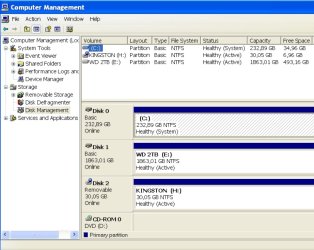
post a screen shot of disk management window and diskgenius ( free version) window
Free Download DiskGenius Online

one possibilty maybe if you create the vista bootmgr and boot folder and contents on the active partition, it will be able to proceed. Also create nt6 mbr

first try this manual method ( doubt the auto fix is still available):

When I try to upgrade an earlier version of Windows to Windows Vista, I receive an error message: "Windows could not update the computer'''s boot configuration"
 

My Computers My Computers

System One System Two

  • Computer type
    PC/Desktop
    OS
    7 X64
    CPU
    i5 8400
    Motherboard
    gigabyte b365m ds3h
    Memory
    2x8gb 3200mhz
    Hard Drives
    various
    PSU
    pure power 11 400w cm
    Case
    Coolermaster
    Cooling
    cryorig m9i
  • Computer type
    PC/Desktop
    OS
    7x64
    CPU
    g5400
    Motherboard
    ga b365m ds3h
    Memory
    8gb ddr4 2400
    PSU
    xfx pro 450w
Here is the info after applying your suggestions - still same issue though

  1. fixmbr performed from recovery console
  2. manual procedure mentioned above performed
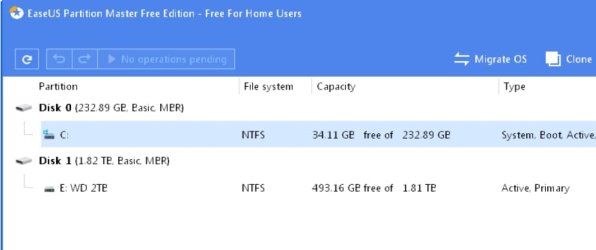
  3. I was not able to find a version of driver genius for XP, so I used easeus partition manager instead.
View attachment disk manager.pdf
View attachment disk layout.pdf
 
Last edited:

My Computers My Computers

System One System Two

  • OS
    windows XP
  • Computer type
    PC/Desktop
I never tried an xp to vista upgrade I believe. XP sp3 is 32 bit. Make sure you are upgrading to Vista 32-bit. You can't upgrade to 64 bit due to the architectural differences.
 

My Computers My Computers

System One System Two

Hi SIW2
I have now tried to reinstall XP SP3 32 bit from the original installation disk using the upgrade option, but still same negative result.
Any suggestions?
br Peter
 

My Computers My Computers

System One System Two

  • OS
    windows XP
  • Computer type
    PC/Desktop
so everybody can have a look easily:

Did you try detaching the WD 2b disk and attempt the upgrade with only the xp disk plugged in ?

xp-diskmgmt.jpg

xp-diskmgmt2.jpg
 

My Computers My Computers

System One System Two

  • Computer type
    PC/Desktop
    OS
    7 X64
    CPU
    i5 8400
    Motherboard
    gigabyte b365m ds3h
    Memory
    2x8gb 3200mhz
    Hard Drives
    various
    PSU
    pure power 11 400w cm
    Case
    Coolermaster
    Cooling
    cryorig m9i
  • Computer type
    PC/Desktop
    OS
    7x64
    CPU
    g5400
    Motherboard
    ga b365m ds3h
    Memory
    8gb ddr4 2400
    PSU
    xfx pro 450w
I was not able to find a version of driver genius for XP

Says it supports xp

Free Disk Partition Software for Windows 10/8/7/Vista/XP

You might try copying the vista installation media onto your os partition (C:) . Rt click the usb stick select copy, then rt click the c partition and select paste.

Then you can unplug the usb stick and try running setup.exe that is inside the sources folder .

Does your vista media already include sp2 ?

You could also make sure the mbr and pbr are the NT6 versions. you can check with bootice.
View attachment BOOTICE-1.3.4x86.zip
 

My Computers My Computers

System One System Two

  • Computer type
    PC/Desktop
    OS
    7 X64
    CPU
    i5 8400
    Motherboard
    gigabyte b365m ds3h
    Memory
    2x8gb 3200mhz
    Hard Drives
    various
    PSU
    pure power 11 400w cm
    Case
    Coolermaster
    Cooling
    cryorig m9i
  • Computer type
    PC/Desktop
    OS
    7x64
    CPU
    g5400
    Motherboard
    ga b365m ds3h
    Memory
    8gb ddr4 2400
    PSU
    xfx pro 450w
Re disk genius: All of the versions I tried yesterday could not install on XP.
Anyway: Any more debug to do?
 

My Computers My Computers

System One System Two

  • OS
    windows XP
  • Computer type
    PC/Desktop
Back
Top