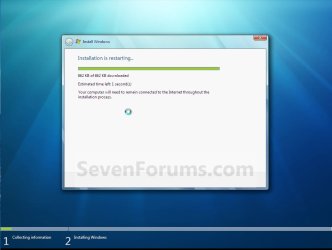
Upgrade Install with Windows 7

How to Do an Inplace Upgrade Installation from Vista to Windows 7


   Information
A upgrade installation allows you to keep intact the files, settings, and programs from your current version of Vista SP1 or SP2. This will show you how to do a upgrade installation with a Upgrade version of Windows 7 from Vista. XP users will now be able to upgrade to Windows 7, but will have to do a clean install or custom install of Windows 7 instead.

Yes, you can do a clean install from a upgrade Windows 7 version. :)
NOTE: See this tutorial for how: Clean Install with a Upgrade Windows 7 Version
   Note
Do a Upgrade installation if:

  • Your computer is running Windows Vista with Service Pack 1.
    NOTE: To see if you are: Open the Start Menu, right click on Computer, and then click on Properties. Under Windows edition, look for Service Pack 1 next to your Windows Vista edition name. If you don’t have Vista Service Pack 1 installed, or your computer is running an earlier version of Windows, then you can’t perform an upgrade installation to Windows 7.
  • You DO want to preserve your user accounts, data, programs, and system drivers.
  • You want to do a in place upgrade from either a 32-bit version of Windows Vista to a 32-bit version of Windows 7, or a 64-bit version of Windows Vista to a 64-bit version of Windows 7. You cannot upgrade from 32-bit to 64-bit. You can only do a clean install from 32-bit to 64-bit, or from 64-bit to 32-bit.
  • You’re upgrading to the same Windows language. For example, from English to English.
   Tip
Before doing this upgrade install, you should run the Windows 7 Upgrade Advisor to see if you might have any issues before upgrading.

If everything checks out, then be sure to download and save all of your device drivers to DVD, or some other media, to have them handy to make setting up Windows 7 easier after the installation. Sometimes using the Vista drivers in Windows 7, you will need to use Compatibility Mode on the driver for it to install.

I would also recommend that you backup anything that you do not want to lose to be extra safe.

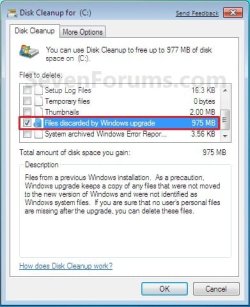
After you do a upgrade install, you will also see the option Files discarded by Windows upgrade option in Disk Cleanup. This would be for the C:\Windows.old , C:\$INPLACE.~TR , and C:\$WINDOWS.~Q files left over from the previous operating system.

You can also get more great information about upgrading Windows 7 at this link below:
Windows: Windows 7 Upgrade Option

   Warning
Windows 7 Minimum Hardware Requirements:


NOTE: See also: Windows 7 system requirements
  • 1 GHz 32-bit or 64-bit processor
  • 1 GB RAM for 32-bit Windows 7 OR 2 GB RAM for 64-bit Windows 7
  • 16 GB available disk space 32-bit Windows 7 OR 20 GB for 64-bit Windows 7
  • Support for DirectX 9 graphics with 128 MB memory (in order to enable Aero theme)
  • DVD-R/W Drive
  • Internet access (to download the Beta and get updates)
Supported Upgrade Paths to Window 7 without doing a Clean Install:
NOTE: You can only upgrade from a 32-bit (x86) Vista to 32-bit (x86) Windows 7 or 64-bit (x64) Vista to 64-bit (x64) Windows 7. Going from a 32-bit to 64-bit, or 64-bit to 32-bit, will require a clean install instead.

From Windows Vista (SP1, SP2) | Upgrade to Windows 7
Home Basic|Home Basic, Home Premium, Ultimate
Home Premium|Home Premium, Ultimate
Business|Professional, Enterprise, Ultimate
Ultimate|Ultimate
Enterprise|Enterprise

From Windows 7 | Repair -In-Place Upgrade to Windows 7
Starter (x86 only)|Starter (x86)
Home Basic|Home Basic
Home Premium|Home Premium
Professional|Professional
Ultimate|Ultimate
Enterprise|Enterprise

From Windows 7 | Anytime Upgrade to Windows 7
Starter|Home Premium, Professional, Ultimate
Home Basic|Home Premium, Professional, Ultimate
Home Premium|Professional, Ultimate
Professional|Ultimate
EXAMPLE: Windows 7 Upgrade Chart by Microsoft
NOTE: In-Place Upgrade is upgrading your currently installed OS to Windows 7 without losing anything. A Custom Install is doing a clean install without formatting the hard drive and selecting the current os to install Windows 7 on top of it to place the current OS in a C:\Windows.old folder as a backup.
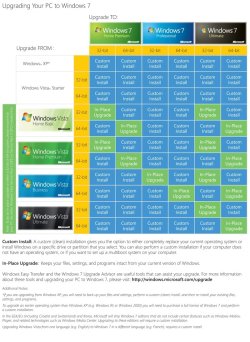
windows7-upgrade-chart.jpg
Here's How:
1. Start Vista, and log on to an administrator account.
NOTE: If you wanted to do a clean install with an upgrade Windows 7, then you would be doing this tutorial to do a upgrade install of Windows 7 from within a clean install of Windows 7 instead of from within Vista.

2. Disable any 3rd party firewall, antivirus, or other security program to avoid it from possibly preventing the upgrade installation to Windows 7.

3. You should run the Windows 7 Upgrade Advisor to see if you may have any issues before upgrading. Correct any issues found before continuing.
NOTE: Skip this step if you are doing a clean install with a upgrade Windows 7, then you would be doing this tutorial to do a upgrade install of Windows 7 inside a clean install of Windows 7 instead.

4. Place your Windows 7 installation DVD into the DVD drive and click on the Run setup.exe option in the AutoPlay window from within Vista. (See screenshot below)
NOTE: If the AutoPlay window does not open, then open the drive folder in Computer and run the setup.exe file.
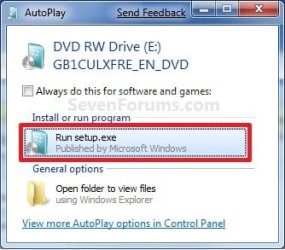
AutoPlay.jpg
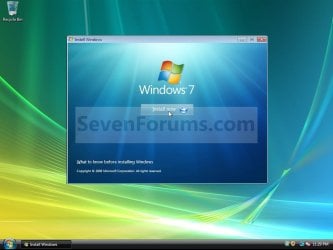
5. Click on the Install Now button to start the installation. (See screenshot below)
Step1.jpg
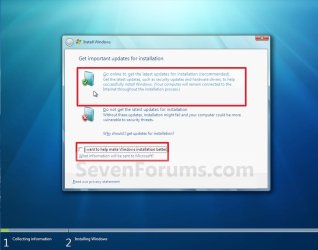
6. Uncheck the I want to help make Windows installation better box (unless you want to), and click on the Go online to get the latest updates for installation option. (See screenshot below)
Step2.jpg
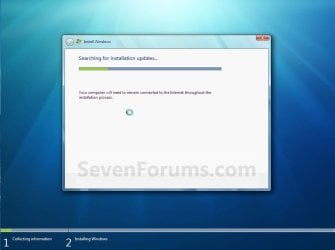
7. Windows 7 will now check online for and install any available installation updates. (See screenshots below)
Step3.jpg

Step4.jpg

8. Check the I accept the license terms box and click on Next. (See screenshot below)
Step5.jpg
9. For a In-place Upgrade Install
NOTE: Do this option if you are currently running Vista and want to keep your files, programs, and settings and install (upgrade to) Windows 7. See the warning box at the top of the tutorial for upgrade options. Do this step if you are doing a clean install with a upgrade Windows 7, then you would be doing this tutorial to do a upgrade install of Windows 7 inside a clean install of Windows 7 instead.
A) Click on the Upgrade option. (See screenshot below)
Step6.jpg
B) Go to step 11.
10. For a Custom Install
NOTE: Do this option if you are running XP or want to completely replace your current version of Windows with Windows 7. You will need to reinstall your programs after installation. This will be like doing a clean install without formating. Your previous installation will be placed in the C:\Windows.old folder (step 19) so you can copy any files back.
A) Click on the Custom option. (See screenshot above)

B) Continue on to step 11.
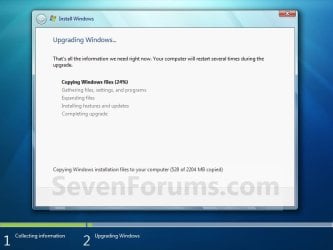
11. The installation of Windows 7 will now begin. (See screenshot below)
NOTE: During the installation process, your screen may flash and computer will restart a few times.
Step7.jpg
12. After the final restart, you will see this screen for a moment. (See screenshot below)
Step8.jpg
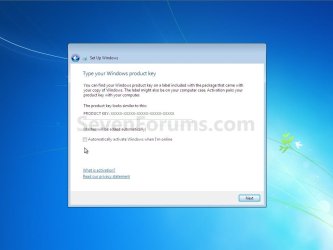
13. Type in your Windows 7 product key number. (See screenshot below step 14)

14. Uncheck the Automatically activate Windows when I'm online box unchecked, then click on the Next button. (See screenshot below)
NOTE: You can activate Windows 7 later after you make sure it is running properly. (See step 21 below)
If you chose to automatically activate Windows online when you set up your computer, automatic activation begins trying to activate your copy of Windows three days after you log on for the first time.
Step9.jpg
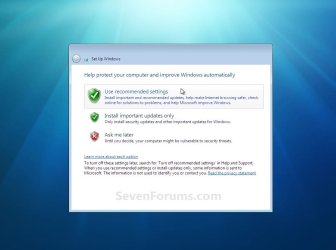
15. Click on Use recommended settings to allow automatic Windows Updates and proper security settings. (See screenshot below)
NOTE: For more information about these recommended settings, click on the Learn more about each option link in this window.
Step10.jpg
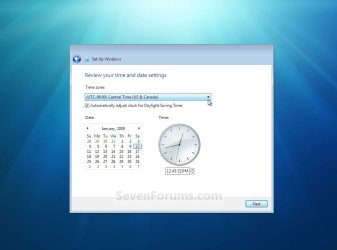
16. Select your time zone and set your time and date settings, then click on the Next button. (See screenshot below)
Step11.jpg
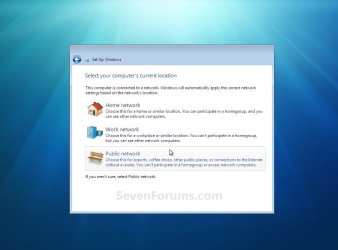
17. Click on your computer's correct network location type location to select it and have the settings for that location automatically applied. (See screenshot below)
Step12.jpg
18. Windows 7 will now prepare your desktop to startup. (See screenshots below)
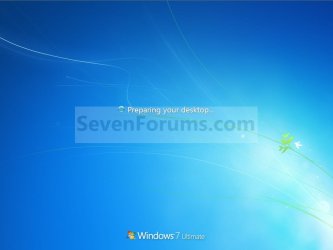
Step13A.jpg

Desktop.jpg

19. Check to see if you are missing any user files. If you are, then you can copy them from the C:\Windows.old or the hidden protected operating system C:\$INPLACE.~TR and C:\WINDOWS.~Q backup folders.

20. If everything checks out in step 19, then you can run Disk Cleanup (step 6 at this link). You will need to click on the Clean up system files button first, and then check the Files discarded by Windows upgrade box. (See screenshot below)
NOTE: This will delete the C:\Windows.old, C:\$INPLACE.~TR and C:\WINDOWS.~Q folders from step 17 above.
Disk_Cleanup.jpg
21. Install all of your device drivers if needed, then all Windows Updates.

22. Refresh your Windows Experience Index (WEI) score.

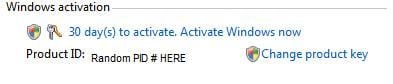
23. When done, all you will need to do is to activate Windows 7. (See screenshot below)
Activate.jpg
That's it,
Shawn


Last edited:
Many thanks Brink, your response is much appreciated I now know which way to proceed.:cool:
 

My Computer

Computer Manufacturer/Model Number
Custom Built
OS
Windows 7 Pro 64-Bit
CPU
INTEL Pentium D950 (2x3.4GHZ) 800mhz FSB/2 x 2MB Cache
Motherboard
ASUS P5WD2 Premuim: Dual Core DDR2, 16VGA - 3 PCI/2 PCI-EX
Memory
4GB DDR2-533 PC4200
Graphics Card(s)
ATI Radeon HD3800 Series
Sound Card
Realtek ALC882D 8 Channel
Monitor(s) Displays
No1 = ACER P223w / No2 = ACER A1751
Hard Drives
Main 250GB Weston Digital 5400rpm (XP sp3)
Back-Up 750GB Weston Digital 'Caviar Green' 7400rpm
Windows7 64Bit on a separate 750mb Weston Digital
PSU
Silent 500 Watts + 120mm Fan
Cooling
2x120mm case fans, 100mm CPU fan
Keyboard
Logitec LX710
Mouse
Logitec Laser
Internet Speed
4.8Mbps
You're most welcome. Please keep us posted on how it went. :)
 

My Computer

Computer type
PC/Desktop
Computer Manufacturer/Model Number
Self built custom
OS
64-bit Windows 11 Pro for Workstations
CPU
Intel i7-8700K OC'd to 5 GHz
Motherboard
ASUS ROG Maximus XI Formula Z390
Memory
64 GB (4x16GB) G.SKILL TridentZ RGB DDR4 3600 MHz
Graphics Card(s)
ASUS ROG-STRIX-GTX1080TI-O11G-GAMING
Sound Card
Integrated
Monitor(s) Displays
2 x Samsung Odyssey G7 27"
Screen Resolution
2560x1440
Hard Drives
1TB Samsung 990 PRO M.2,
4TB Samsung 990 PRO PRO M.2,
TerraMaster F8 SSD Plus NAS
PSU
Seasonic Prime Titanium 850W
Case
Thermaltake Core P3
Cooling
Corsair Hydro H115i
Keyboard
Logitech wireless K800
Mouse
Logitech MX Master 4
Internet Speed
2 Gb/s Download and 100 Mb/s Upload
Antivirus
Malwarebyte Anti-Malware Premium
Browser
Google Chrome
Other Info
Logitech Z625 speaker system,
Logitech BRIO 4K Pro webcam,
HP Color LaserJet Pro MFP M477fdn,
APC SMART-UPS RT 1000 XL - SURT1000XLI,
Galaxy S23 Plus phone
It went extremely well and all is fine.:D

I backed up all the files, software etc and as instructed did a separate back up of the 'settings' before starting the update even though it took some 5 hours to do:shock:

Installing Windows 7 went like a dream albeit a long dream - 2.5hours. It did suggest I remove i-Tunes, the display drivers, Office.org suit and a couple of other things, however I ignored this and apart from it loosing the Office.org suit everthing else seemed to work.

Have to say that I needed none of the items I backed up and saved including the settings as Windows 7 Ultimate transferred everything over.

It took a number of start-ups for the system to settle down in the terms of time to load and shut down but now after a week or so it is a whole world better than Vista.

The only downside is that I have had to settle for the 32bit version rather than the 64bit as my daughter wanted to keep all the Sony 'factory loaded' stuff'

Thanks again for your help.

By the way is there anything I should clean off the HD that has been left over from Vista and if so HOW - please:)
 

My Computer

Computer Manufacturer/Model Number
Custom Built
OS
Windows 7 Pro 64-Bit
CPU
INTEL Pentium D950 (2x3.4GHZ) 800mhz FSB/2 x 2MB Cache
Motherboard
ASUS P5WD2 Premuim: Dual Core DDR2, 16VGA - 3 PCI/2 PCI-EX
Memory
4GB DDR2-533 PC4200
Graphics Card(s)
ATI Radeon HD3800 Series
Sound Card
Realtek ALC882D 8 Channel
Monitor(s) Displays
No1 = ACER P223w / No2 = ACER A1751
Hard Drives
Main 250GB Weston Digital 5400rpm (XP sp3)
Back-Up 750GB Weston Digital 'Caviar Green' 7400rpm
Windows7 64Bit on a separate 750mb Weston Digital
PSU
Silent 500 Watts + 120mm Fan
Cooling
2x120mm case fans, 100mm CPU fan
Keyboard
Logitec LX710
Mouse
Logitec Laser
Internet Speed
4.8Mbps
That's great news Topspin.

You'll have the stuff in steps 18 and 19 that can be safely deleted to regain more HDD space.
 

My Computer

Computer type
PC/Desktop
Computer Manufacturer/Model Number
Self built custom
OS
64-bit Windows 11 Pro for Workstations
CPU
Intel i7-8700K OC'd to 5 GHz
Motherboard
ASUS ROG Maximus XI Formula Z390
Memory
64 GB (4x16GB) G.SKILL TridentZ RGB DDR4 3600 MHz
Graphics Card(s)
ASUS ROG-STRIX-GTX1080TI-O11G-GAMING
Sound Card
Integrated
Monitor(s) Displays
2 x Samsung Odyssey G7 27"
Screen Resolution
2560x1440
Hard Drives
1TB Samsung 990 PRO M.2,
4TB Samsung 990 PRO PRO M.2,
TerraMaster F8 SSD Plus NAS
PSU
Seasonic Prime Titanium 850W
Case
Thermaltake Core P3
Cooling
Corsair Hydro H115i
Keyboard
Logitech wireless K800
Mouse
Logitech MX Master 4
Internet Speed
2 Gb/s Download and 100 Mb/s Upload
Antivirus
Malwarebyte Anti-Malware Premium
Browser
Google Chrome
Other Info
Logitech Z625 speaker system,
Logitech BRIO 4K Pro webcam,
HP Color LaserJet Pro MFP M477fdn,
APC SMART-UPS RT 1000 XL - SURT1000XLI,
Galaxy S23 Plus phone
Shawn if someone has an upgrade from Vista and has problems is it possible to use Greg's tutorial on a clean factory OEM work by using the upgrade activation code? so leaving the machine with only a 7 OS on it? I ask because someone has asked me and knowing the problems I have had with upgrades dragging stuff over and mucking up the new system I would rather go the extra and get a straight forward OEM.
 

My Computer

Computer type
PC/Desktop
Computer Manufacturer/Model Number
Own build (new) Desk1 / Asus ROG Win 7 / Desk2 1st build
OS
Desk1 7 Home Prem / Desk2 10 Pro / Main lap Asus ROG 10 Pro 2 laptop Toshiba 7 Pro Asus P2520 7 & 10
CPU
Desk1 i5 3750K / Laptop i7 GTX 860M / Desk2 i5 2500
Motherboard
Desk1 Asus P877-V / Desk2 Gigabyte H67 UD3H / Laptop ?
Memory
Desk1 8GB (1866) / Desk2 16GB (1333) / Laptop 8Gb DDR3
Graphics Card(s)
Desk 1& 2NVidia GTX 650 & Laptops on board Intel
Sound Card
Desk 1 & 2 -XONAR DG Realtek High Def audio Laptop
Monitor(s) Displays
Desk 1 Benq HD 2450 / Desk2 Philips 24" / Laptop 17.5"
Screen Resolution
1920x1080 D1 & D2 & Laptop 1
Hard Drives
Desk1 Samsung 120GB 830 SSD
Asus ROG 256GB 850 Pro SSD
Desk2 Samsung 840 256 SSD
Toshiba 120GB EVO
PSU
Desk 1 Corsair HX 1050/ Laptop ? / Desk 2 Corsair HX 650
Case
Desk 1 Cooler HAF XM ? Toshiba laptop / Desk2 Coolermaster
Cooling
Fans on all Desk1 -2 Desk2 - all Coolermasters 5 Laptop ?
Keyboard
Desk 1 MS Sidewinder X6 Desk 2 MS Sidewinder X 4
Mouse
Desk 1&2 - Gigabyte MS 900 gamer - laptop - Logitec wireless
Internet Speed
ADSL2+
Other Info
One other Desktop (tester) and spare Toshba laptop both with SSD's
Running Kaspersky 2016 ISS on all machines config'd identically
Logitec audio stereo systems on each machine (x3)
Canon MG5250MFC
Router/modem TP-Link running WPA2SK
Greg's tutorial is more for doing a clean install with an OEM copy of Windows.
 

My Computer

Computer type
PC/Desktop
Computer Manufacturer/Model Number
Self built custom
OS
64-bit Windows 11 Pro for Workstations
CPU
Intel i7-8700K OC'd to 5 GHz
Motherboard
ASUS ROG Maximus XI Formula Z390
Memory
64 GB (4x16GB) G.SKILL TridentZ RGB DDR4 3600 MHz
Graphics Card(s)
ASUS ROG-STRIX-GTX1080TI-O11G-GAMING
Sound Card
Integrated
Monitor(s) Displays
2 x Samsung Odyssey G7 27"
Screen Resolution
2560x1440
Hard Drives
1TB Samsung 990 PRO M.2,
4TB Samsung 990 PRO PRO M.2,
TerraMaster F8 SSD Plus NAS
PSU
Seasonic Prime Titanium 850W
Case
Thermaltake Core P3
Cooling
Corsair Hydro H115i
Keyboard
Logitech wireless K800
Mouse
Logitech MX Master 4
Internet Speed
2 Gb/s Download and 100 Mb/s Upload
Antivirus
Malwarebyte Anti-Malware Premium
Browser
Google Chrome
Other Info
Logitech Z625 speaker system,
Logitech BRIO 4K Pro webcam,
HP Color LaserJet Pro MFP M477fdn,
APC SMART-UPS RT 1000 XL - SURT1000XLI,
Galaxy S23 Plus phone
Ok Shawn will have to try and work through the problem as I think the member has been sold a pup - the problem is not that great but from what he says about the machine and form what I can find out about it sounds like he has bought a used machine which is a bit older than he thinks it is and the upgrade it came with is not playing the game.
 

My Computer

Computer type
PC/Desktop
Computer Manufacturer/Model Number
Own build (new) Desk1 / Asus ROG Win 7 / Desk2 1st build
OS
Desk1 7 Home Prem / Desk2 10 Pro / Main lap Asus ROG 10 Pro 2 laptop Toshiba 7 Pro Asus P2520 7 & 10
CPU
Desk1 i5 3750K / Laptop i7 GTX 860M / Desk2 i5 2500
Motherboard
Desk1 Asus P877-V / Desk2 Gigabyte H67 UD3H / Laptop ?
Memory
Desk1 8GB (1866) / Desk2 16GB (1333) / Laptop 8Gb DDR3
Graphics Card(s)
Desk 1& 2NVidia GTX 650 & Laptops on board Intel
Sound Card
Desk 1 & 2 -XONAR DG Realtek High Def audio Laptop
Monitor(s) Displays
Desk 1 Benq HD 2450 / Desk2 Philips 24" / Laptop 17.5"
Screen Resolution
1920x1080 D1 & D2 & Laptop 1
Hard Drives
Desk1 Samsung 120GB 830 SSD
Asus ROG 256GB 850 Pro SSD
Desk2 Samsung 840 256 SSD
Toshiba 120GB EVO
PSU
Desk 1 Corsair HX 1050/ Laptop ? / Desk 2 Corsair HX 650
Case
Desk 1 Cooler HAF XM ? Toshiba laptop / Desk2 Coolermaster
Cooling
Fans on all Desk1 -2 Desk2 - all Coolermasters 5 Laptop ?
Keyboard
Desk 1 MS Sidewinder X6 Desk 2 MS Sidewinder X 4
Mouse
Desk 1&2 - Gigabyte MS 900 gamer - laptop - Logitec wireless
Internet Speed
ADSL2+
Other Info
One other Desktop (tester) and spare Toshba laptop both with SSD's
Running Kaspersky 2016 ISS on all machines config'd identically
Logitec audio stereo systems on each machine (x3)
Canon MG5250MFC
Router/modem TP-Link running WPA2SK
I hope it goes well.
 

My Computer

Computer type
PC/Desktop
Computer Manufacturer/Model Number
Self built custom
OS
64-bit Windows 11 Pro for Workstations
CPU
Intel i7-8700K OC'd to 5 GHz
Motherboard
ASUS ROG Maximus XI Formula Z390
Memory
64 GB (4x16GB) G.SKILL TridentZ RGB DDR4 3600 MHz
Graphics Card(s)
ASUS ROG-STRIX-GTX1080TI-O11G-GAMING
Sound Card
Integrated
Monitor(s) Displays
2 x Samsung Odyssey G7 27"
Screen Resolution
2560x1440
Hard Drives
1TB Samsung 990 PRO M.2,
4TB Samsung 990 PRO PRO M.2,
TerraMaster F8 SSD Plus NAS
PSU
Seasonic Prime Titanium 850W
Case
Thermaltake Core P3
Cooling
Corsair Hydro H115i
Keyboard
Logitech wireless K800
Mouse
Logitech MX Master 4
Internet Speed
2 Gb/s Download and 100 Mb/s Upload
Antivirus
Malwarebyte Anti-Malware Premium
Browser
Google Chrome
Other Info
Logitech Z625 speaker system,
Logitech BRIO 4K Pro webcam,
HP Color LaserJet Pro MFP M477fdn,
APC SMART-UPS RT 1000 XL - SURT1000XLI,
Galaxy S23 Plus phone
I don't think all is well on the other thread Shawn I had an idea that the member had bought something suspect and Greg chipped in with much the same feeling.
The machine bought on Ebay - yes I know - apparently has two disks for the installation media and the only thing that I can think of is that he has been sold some store manufacturers stuff maybe the original Vista and the upgrade because all OS's I have installed have been on the one disk.

I think I advised him to just get a new OEM and have done with it but I suppose it is his choice now.
 

My Computer

Computer type
PC/Desktop
Computer Manufacturer/Model Number
Own build (new) Desk1 / Asus ROG Win 7 / Desk2 1st build
OS
Desk1 7 Home Prem / Desk2 10 Pro / Main lap Asus ROG 10 Pro 2 laptop Toshiba 7 Pro Asus P2520 7 & 10
CPU
Desk1 i5 3750K / Laptop i7 GTX 860M / Desk2 i5 2500
Motherboard
Desk1 Asus P877-V / Desk2 Gigabyte H67 UD3H / Laptop ?
Memory
Desk1 8GB (1866) / Desk2 16GB (1333) / Laptop 8Gb DDR3
Graphics Card(s)
Desk 1& 2NVidia GTX 650 & Laptops on board Intel
Sound Card
Desk 1 & 2 -XONAR DG Realtek High Def audio Laptop
Monitor(s) Displays
Desk 1 Benq HD 2450 / Desk2 Philips 24" / Laptop 17.5"
Screen Resolution
1920x1080 D1 & D2 & Laptop 1
Hard Drives
Desk1 Samsung 120GB 830 SSD
Asus ROG 256GB 850 Pro SSD
Desk2 Samsung 840 256 SSD
Toshiba 120GB EVO
PSU
Desk 1 Corsair HX 1050/ Laptop ? / Desk 2 Corsair HX 650
Case
Desk 1 Cooler HAF XM ? Toshiba laptop / Desk2 Coolermaster
Cooling
Fans on all Desk1 -2 Desk2 - all Coolermasters 5 Laptop ?
Keyboard
Desk 1 MS Sidewinder X6 Desk 2 MS Sidewinder X 4
Mouse
Desk 1&2 - Gigabyte MS 900 gamer - laptop - Logitec wireless
Internet Speed
ADSL2+
Other Info
One other Desktop (tester) and spare Toshba laptop both with SSD's
Running Kaspersky 2016 ISS on all machines config'd identically
Logitec audio stereo systems on each machine (x3)
Canon MG5250MFC
Router/modem TP-Link running WPA2SK
Agreed. That's about all you can do at that point.
 

My Computer

Computer type
PC/Desktop
Computer Manufacturer/Model Number
Self built custom
OS
64-bit Windows 11 Pro for Workstations
CPU
Intel i7-8700K OC'd to 5 GHz
Motherboard
ASUS ROG Maximus XI Formula Z390
Memory
64 GB (4x16GB) G.SKILL TridentZ RGB DDR4 3600 MHz
Graphics Card(s)
ASUS ROG-STRIX-GTX1080TI-O11G-GAMING
Sound Card
Integrated
Monitor(s) Displays
2 x Samsung Odyssey G7 27"
Screen Resolution
2560x1440
Hard Drives
1TB Samsung 990 PRO M.2,
4TB Samsung 990 PRO PRO M.2,
TerraMaster F8 SSD Plus NAS
PSU
Seasonic Prime Titanium 850W
Case
Thermaltake Core P3
Cooling
Corsair Hydro H115i
Keyboard
Logitech wireless K800
Mouse
Logitech MX Master 4
Internet Speed
2 Gb/s Download and 100 Mb/s Upload
Antivirus
Malwarebyte Anti-Malware Premium
Browser
Google Chrome
Other Info
Logitech Z625 speaker system,
Logitech BRIO 4K Pro webcam,
HP Color LaserJet Pro MFP M477fdn,
APC SMART-UPS RT 1000 XL - SURT1000XLI,
Galaxy S23 Plus phone

My Computer

Computer type
PC/Desktop
Computer Manufacturer/Model Number
Own build (new) Desk1 / Asus ROG Win 7 / Desk2 1st build
OS
Desk1 7 Home Prem / Desk2 10 Pro / Main lap Asus ROG 10 Pro 2 laptop Toshiba 7 Pro Asus P2520 7 & 10
CPU
Desk1 i5 3750K / Laptop i7 GTX 860M / Desk2 i5 2500
Motherboard
Desk1 Asus P877-V / Desk2 Gigabyte H67 UD3H / Laptop ?
Memory
Desk1 8GB (1866) / Desk2 16GB (1333) / Laptop 8Gb DDR3
Graphics Card(s)
Desk 1& 2NVidia GTX 650 & Laptops on board Intel
Sound Card
Desk 1 & 2 -XONAR DG Realtek High Def audio Laptop
Monitor(s) Displays
Desk 1 Benq HD 2450 / Desk2 Philips 24" / Laptop 17.5"
Screen Resolution
1920x1080 D1 & D2 & Laptop 1
Hard Drives
Desk1 Samsung 120GB 830 SSD
Asus ROG 256GB 850 Pro SSD
Desk2 Samsung 840 256 SSD
Toshiba 120GB EVO
PSU
Desk 1 Corsair HX 1050/ Laptop ? / Desk 2 Corsair HX 650
Case
Desk 1 Cooler HAF XM ? Toshiba laptop / Desk2 Coolermaster
Cooling
Fans on all Desk1 -2 Desk2 - all Coolermasters 5 Laptop ?
Keyboard
Desk 1 MS Sidewinder X6 Desk 2 MS Sidewinder X 4
Mouse
Desk 1&2 - Gigabyte MS 900 gamer - laptop - Logitec wireless
Internet Speed
ADSL2+
Other Info
One other Desktop (tester) and spare Toshba laptop both with SSD's
Running Kaspersky 2016 ISS on all machines config'd identically
Logitec audio stereo systems on each machine (x3)
Canon MG5250MFC
Router/modem TP-Link running WPA2SK
Hey Brink (or other thread responder)

Do you know if doing an in place upgrade from vista to 7 will install a brand new set of drivers and remove all the old driver files. My reason for asking:

I have a system running vista, formerly with an AMD CPU and an nVidia GPU, but has had a replacement motherboard, and now uses an AMD APU and new RAM. There are as expected a few issues as a result of this, especially where drivers are concerned. A creative sound card has also been added, which is still intermittent even though I have now disabled the onboard realtek sound and removed the realtek drivers (although jack detection is working on this card).

Basically this vista system is a driver mess, I have removed the nvidia drivers (which were not removed before installing catalyst) and there are graphics and sound issues. I suspect I may need to perform a clean install (my recommendation) of 7, however the system owner would prefer an upgrade installation, brining me back to the question asked above.
 

My Computer

Computer type
PC/Desktop
Computer Manufacturer/Model Number
Self Build
OS
Windows 7 Ultimate x64
CPU
Intel Core2 Quad Q8300 2.5Ghz
Motherboard
Asus P5QD Turbo
Memory
Kingston HyperX 4x1GB DDR2 1066Mhz
Graphics Card(s)
Asus/Nvidia 9500GT 1GB
Sound Card
On-Board HD
Monitor(s) Displays
22" Widescreen TFT
Screen Resolution
1920x1080
Hard Drives
2x 320Gb Seagate SATAII RAID 0
2x 80Gb Seagate SATAII RAID 0
1x 1tb hybrid (8gb ssd)
PSU
650w
Case
ATX
Cooling
140mm front, 120mm Rear, 80mm Chipset + stock CPU and GPU
Keyboard
Plastic one
Mouse
Plastic one
Internet Speed
4Mbps
Other Info
Laptop: HP Elitebook 2560p
i5 @2.7Ghz 4GB DDR3
Hello Ryan, :)

Usually during an upgrade install, all incompatible drivers are removed during the process and the generic drivers that come with Windows 7 will be installed until you update or install new versions.

Yeah, it does sound like a clean install would be best, but hopefully the upgrade will iron it out.
 

My Computer

Computer type
PC/Desktop
Computer Manufacturer/Model Number
Self built custom
OS
64-bit Windows 11 Pro for Workstations
CPU
Intel i7-8700K OC'd to 5 GHz
Motherboard
ASUS ROG Maximus XI Formula Z390
Memory
64 GB (4x16GB) G.SKILL TridentZ RGB DDR4 3600 MHz
Graphics Card(s)
ASUS ROG-STRIX-GTX1080TI-O11G-GAMING
Sound Card
Integrated
Monitor(s) Displays
2 x Samsung Odyssey G7 27"
Screen Resolution
2560x1440
Hard Drives
1TB Samsung 990 PRO M.2,
4TB Samsung 990 PRO PRO M.2,
TerraMaster F8 SSD Plus NAS
PSU
Seasonic Prime Titanium 850W
Case
Thermaltake Core P3
Cooling
Corsair Hydro H115i
Keyboard
Logitech wireless K800
Mouse
Logitech MX Master 4
Internet Speed
2 Gb/s Download and 100 Mb/s Upload
Antivirus
Malwarebyte Anti-Malware Premium
Browser
Google Chrome
Other Info
Logitech Z625 speaker system,
Logitech BRIO 4K Pro webcam,
HP Color LaserJet Pro MFP M477fdn,
APC SMART-UPS RT 1000 XL - SURT1000XLI,
Galaxy S23 Plus phone
Great posting

Thank you very much for the Upgrade Tutorial. It's been a while since I messed about with my PC,s. I was a little nervous to say the least as the PC I have just upgraded has all my work documents etc on it.

Much appreciated :D
 

My Computer

Computer type
Laptop
Computer Manufacturer/Model Number
Acer Aspire 5738Z
OS
Windows 7 (SP 1)
CPU
Pentium Dual Core CPU T4200 @2.00GHz
Motherboard
ACPI x86
Memory
3.0GB
Graphics Card(s)
Mobile Intel 4 series chipset family
Hard Drives
IDE ATA/ATAPI Controllers
I'm glad it could help xldeane. :)
 

My Computer

Computer type
PC/Desktop
Computer Manufacturer/Model Number
Self built custom
OS
64-bit Windows 11 Pro for Workstations
CPU
Intel i7-8700K OC'd to 5 GHz
Motherboard
ASUS ROG Maximus XI Formula Z390
Memory
64 GB (4x16GB) G.SKILL TridentZ RGB DDR4 3600 MHz
Graphics Card(s)
ASUS ROG-STRIX-GTX1080TI-O11G-GAMING
Sound Card
Integrated
Monitor(s) Displays
2 x Samsung Odyssey G7 27"
Screen Resolution
2560x1440
Hard Drives
1TB Samsung 990 PRO M.2,
4TB Samsung 990 PRO PRO M.2,
TerraMaster F8 SSD Plus NAS
PSU
Seasonic Prime Titanium 850W
Case
Thermaltake Core P3
Cooling
Corsair Hydro H115i
Keyboard
Logitech wireless K800
Mouse
Logitech MX Master 4
Internet Speed
2 Gb/s Download and 100 Mb/s Upload
Antivirus
Malwarebyte Anti-Malware Premium
Browser
Google Chrome
Other Info
Logitech Z625 speaker system,
Logitech BRIO 4K Pro webcam,
HP Color LaserJet Pro MFP M477fdn,
APC SMART-UPS RT 1000 XL - SURT1000XLI,
Galaxy S23 Plus phone
Back
Top