Upgrade to Windows 7-Nividia 7600 GS not recognized

Ok, took me awhile but here you go:

PCI Input Device:

PCI\VEN_1102&DEV_7003&SUBSYS_00401102&REV_04
PCI\VEN_1102&DEV_7003&SUBSYS_00401102
PCI\VEN_1102&DEV_7003&CC_098000
PCI\VEN_1102&DEV_7003&CC_0980

PCI Serial Port:

PCI\VEN_8086&DEV_2997&SUBSYS_5058107B&REV_02
PCI\VEN_8086&DEV_2997&SUBSYS_5058107B
PCI\VEN_8086&DEV_2997&CC_070002
PCI\VEN_8086&DEV_2997&CC_0700

PCI Simple Communications Controller:

PCI\VEN_8086&DEV_2994&SUBSYS_5058107B&REV_02
PCI\VEN_8086&DEV_2994&SUBSYS_5058107B
PCI\VEN_8086&DEV_2994&CC_078000
PCI\VEN_8086&DEV_2994&CC_0780
 

My Computer My Computer

At a glance

Windows 7Intel Core 2 Duo 1.86Ghz2 gigsNvidia 7600 GS, Intel Q965/Q963 Express
Computer Manufacturer/Model Number
Gateway E4610 SB
OS
Windows 7
CPU
Intel Core 2 Duo 1.86Ghz
Memory
2 gigs
Graphics Card(s)
Nvidia 7600 GS, Intel Q965/Q963 Express
Sound Card
SoundBlaster Audigy 2ZS
Monitor(s) Displays
Gateway 22" HD LCD
I believe the input device is my Creative Soundblaster 2ZS gamport which does not seem to be supported by windows 7, so that is not a problem. I think the serial port is an Intel Active Management Technology something or other...not sure about the communications controller...or maybe I have that backwards...either way, I do not think any of these are my Nvidia card...now what?
 

My Computer My Computer

At a glance

Windows 7Intel Core 2 Duo 1.86Ghz2 gigsNvidia 7600 GS, Intel Q965/Q963 Express
Computer Manufacturer/Model Number
Gateway E4610 SB
OS
Windows 7
CPU
Intel Core 2 Duo 1.86Ghz
Memory
2 gigs
Graphics Card(s)
Nvidia 7600 GS, Intel Q965/Q963 Express
Sound Card
SoundBlaster Audigy 2ZS
Monitor(s) Displays
Gateway 22" HD LCD
The first set is your game port indeed

The second is an intel serial port

The third is an intel management console...

Can you click the arrow beside Display Adapters and tell me what it lists?
 

My Computer My Computer

At a glance

Windows 7 Home Premium x64 - Mac OS X 10.6.4 x64Intel Core 2 Duo T9300 2.5 GHz4GB Kingston DDR2-800NVIDIA Geforce 8600M GT (512MB Model)
Computer Manufacturer/Model Number
Compal JFT02 (Custom Build Laptop)
OS
Windows 7 Home Premium x64 - Mac OS X 10.6.4 x64
CPU
Intel Core 2 Duo T9300 2.5 GHz
Motherboard
JFT02
Memory
4GB Kingston DDR2-800
Graphics Card(s)
NVIDIA Geforce 8600M GT (512MB Model)
Sound Card
Realtek HD Audio
Monitor(s) Displays
WUXGA Standard Laptop Display
Screen Resolution
1680*1050
Hard Drives
Toshiba 320GB 5400RPM Laptop HD
PSU
Standard Laptop Power Supply
Case
Standard Laptop Case
Cooling
Standard Laptop Cooling
Keyboard
Standard Laptop 105 Key-Keyboard
Mouse
Synaptics Touchpad
Internet Speed
Verizion Online DSL 3360/864 kbs (dl/up)
It lists My Intel Chipset Q965/963 express now after re-installing Windows 7...clean install.
 

My Computer My Computer

At a glance

Windows 7Intel Core 2 Duo 1.86Ghz2 gigsNvidia 7600 GS, Intel Q965/Q963 Express
Computer Manufacturer/Model Number
Gateway E4610 SB
OS
Windows 7
CPU
Intel Core 2 Duo 1.86Ghz
Memory
2 gigs
Graphics Card(s)
Nvidia 7600 GS, Intel Q965/Q963 Express
Sound Card
SoundBlaster Audigy 2ZS
Monitor(s) Displays
Gateway 22" HD LCD
It lists My Intel Chipset Q965/963 express now after re-installing Windows 7...clean install.
Can you open up the desktop...remove the GFX card...plug it back in and boot back to Windows?

The fact that Vista doesn't see it anymore is not promising
 

My Computer My Computer

At a glance

Windows 7 Home Premium x64 - Mac OS X 10.6.4 x64Intel Core 2 Duo T9300 2.5 GHz4GB Kingston DDR2-800NVIDIA Geforce 8600M GT (512MB Model)
Computer Manufacturer/Model Number
Compal JFT02 (Custom Build Laptop)
OS
Windows 7 Home Premium x64 - Mac OS X 10.6.4 x64
CPU
Intel Core 2 Duo T9300 2.5 GHz
Motherboard
JFT02
Memory
4GB Kingston DDR2-800
Graphics Card(s)
NVIDIA Geforce 8600M GT (512MB Model)
Sound Card
Realtek HD Audio
Monitor(s) Displays
WUXGA Standard Laptop Display
Screen Resolution
1680*1050
Hard Drives
Toshiba 320GB 5400RPM Laptop HD
PSU
Standard Laptop Power Supply
Case
Standard Laptop Case
Cooling
Standard Laptop Cooling
Keyboard
Standard Laptop 105 Key-Keyboard
Mouse
Synaptics Touchpad
Internet Speed
Verizion Online DSL 3360/864 kbs (dl/up)
I tried that...no change. Again it was strange, the other day after fighting with this for hours, I left, came back and the card was showing in device manager, I updated the latest drivers from Windows Update and the monitor automatically switched to DVI, then I tried to run a game and the picture went black...no signal. I had to reboot and the situation went right back to where we are now...do you think the upgrade fried my card somehow?
 

My Computer My Computer

At a glance

Windows 7Intel Core 2 Duo 1.86Ghz2 gigsNvidia 7600 GS, Intel Q965/Q963 Express
Computer Manufacturer/Model Number
Gateway E4610 SB
OS
Windows 7
CPU
Intel Core 2 Duo 1.86Ghz
Memory
2 gigs
Graphics Card(s)
Nvidia 7600 GS, Intel Q965/Q963 Express
Sound Card
SoundBlaster Audigy 2ZS
Monitor(s) Displays
Gateway 22" HD LCD
I tried that...no change. Again it was strange, the other day after fighting with this for hours, I left, came back and the card was showing in device manager, I updated the latest drivers from Windows Update and the monitor automatically switched to DVI, then I tried to run a game and the picture went black...no signal. I had to reboot and the situation went right back to where we are now...do you think the upgrade fried my card somehow?
I don't think the update fried your card, do you have a vga option. If you do turn off the monitor, connect to vga and then reboot and turn the monitor on.
 

My Computer My Computer

At a glance

Windows 7 7600 1 X64AMD PHENOM II X 550 PROCESSOR 3.1 ghzCorsair 4 gig ddr 3ati radeon 3300
Computer Manufacturer/Model Number
Custom Build
OS
Windows 7 7600 1 X64
CPU
AMD PHENOM II X 550 PROCESSOR 3.1 ghz
Motherboard
ASUS M4A78-TE
Memory
Corsair 4 gig ddr 3
Graphics Card(s)
ati radeon 3300
Sound Card
ati hd
Monitor(s) Displays
syncmaster 2033sw
Screen Resolution
1600X900 60 hz refresh
Hard Drives
twin_seagates SATA's 1 TB & 500 Gig, hitachi_slimline 160 gig
PSU
antec_550 watt
Case
cooler master GLite
Cooling
stock_heat sink
Internet Speed
20mbs up/ 1.5mbs down
Other Info
favorite child "stewie"
favorite dog "brian"
I tried that...no change. Again it was strange, the other day after fighting with this for hours, I left, came back and the card was showing in device manager, I updated the latest drivers from Windows Update and the monitor automatically switched to DVI, then I tried to run a game and the picture went black...no signal. I had to reboot and the situation went right back to where we are now...do you think the upgrade fried my card somehow?
I don't think the update fried your card, do you have a vga option. If you do turn off the monitor, connect to vga and then reboot and turn the monitor on.


Yes, of course, since my Nvidia card only has dvi outputs, the only waay I can get a signal is by connecting to the VGA input from my onboard chipset.
 

My Computer My Computer

At a glance

Windows 7Intel Core 2 Duo 1.86Ghz2 gigsNvidia 7600 GS, Intel Q965/Q963 Express
Computer Manufacturer/Model Number
Gateway E4610 SB
OS
Windows 7
CPU
Intel Core 2 Duo 1.86Ghz
Memory
2 gigs
Graphics Card(s)
Nvidia 7600 GS, Intel Q965/Q963 Express
Sound Card
SoundBlaster Audigy 2ZS
Monitor(s) Displays
Gateway 22" HD LCD
have you reseated the card AFTER the w7 install...??

sometimes the new OS fails to detect existing H/W, just pull it out & put it back, see if the OS is able to detect it. :)
 

My Computer My Computer

At a glance

SEVEN x64Q9450 @ 3.6GHZ 1.34v8GB 1066 buffalo firestix @ 1152mhz CL5Sapphire HD 5970 + GTX260 (physX)
Computer Manufacturer/Model Number
myself
OS
SEVEN x64
CPU
Q9450 @ 3.6GHZ 1.34v
Motherboard
ASUS P5K PREMIUM P35
Memory
8GB 1066 buffalo firestix @ 1152mhz CL5
Graphics Card(s)
Sapphire HD 5970 + GTX260 (physX)
Sound Card
Creative X-FI Xtreme Gamer
Monitor(s) Displays
SAMSUNG 20'' & SAMSUNG 23'' (dual screens)
Screen Resolution
2048x1152 & 1680x1050
Hard Drives
1x seagate 160gb IDE & 1x seagate 160gb SATA
PSU
XCILIO 850w (78A)
Case
CM590 1x 120x38mm & 2x92x38mm / 4x 120x25mm
Cooling
AC7 PRO @ 92x38mm blower, Lamptron military bus bay controll
Keyboard
LOGITECH E110
Mouse
logitech NX5
Internet Speed
2MB
Other Info
its a continual ''work in progress''....
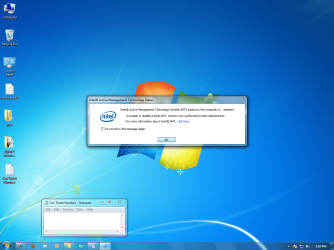
Just out of curiosity...is this a problem? And how do I fix it?
 

Attachments

  • Intel AMT.png
    Intel AMT.png
    325.3 KB · Views: 149

My Computer My Computer

At a glance

Windows 7Intel Core 2 Duo 1.86Ghz2 gigsNvidia 7600 GS, Intel Q965/Q963 Express
Computer Manufacturer/Model Number
Gateway E4610 SB
OS
Windows 7
CPU
Intel Core 2 Duo 1.86Ghz
Memory
2 gigs
Graphics Card(s)
Nvidia 7600 GS, Intel Q965/Q963 Express
Sound Card
SoundBlaster Audigy 2ZS
Monitor(s) Displays
Gateway 22" HD LCD
I reseatted my card, rebooted...nothing. I guess I am pretty much done with this unitl I can get another card...
 

My Computer My Computer

At a glance

Windows 7Intel Core 2 Duo 1.86Ghz2 gigsNvidia 7600 GS, Intel Q965/Q963 Express
Computer Manufacturer/Model Number
Gateway E4610 SB
OS
Windows 7
CPU
Intel Core 2 Duo 1.86Ghz
Memory
2 gigs
Graphics Card(s)
Nvidia 7600 GS, Intel Q965/Q963 Express
Sound Card
SoundBlaster Audigy 2ZS
Monitor(s) Displays
Gateway 22" HD LCD
To OS cannot detect the card...I have pulled it out and put it back in so many times...I am ready for a cigarette...any other suggestions...?
 

My Computer My Computer

At a glance

Windows 7Intel Core 2 Duo 1.86Ghz2 gigsNvidia 7600 GS, Intel Q965/Q963 Express
Computer Manufacturer/Model Number
Gateway E4610 SB
OS
Windows 7
CPU
Intel Core 2 Duo 1.86Ghz
Memory
2 gigs
Graphics Card(s)
Nvidia 7600 GS, Intel Q965/Q963 Express
Sound Card
SoundBlaster Audigy 2ZS
Monitor(s) Displays
Gateway 22" HD LCD
So, upon further review, I think either my card may be bad, my pci-e slot may be bad, or my cpu is going out. I noticed the small heatsink by the battery on the motherboard is now getting very hot. From what I understand, there is nothing but bad stuff coming and the graphics card may just have been the first thing to go. Is there something in the new Windows management system that has caused a mis-management of my power on my motherboard? AHHHHHHHH! How upsetting!
 

My Computer My Computer

At a glance

Windows 7Intel Core 2 Duo 1.86Ghz2 gigsNvidia 7600 GS, Intel Q965/Q963 Express
Computer Manufacturer/Model Number
Gateway E4610 SB
OS
Windows 7
CPU
Intel Core 2 Duo 1.86Ghz
Memory
2 gigs
Graphics Card(s)
Nvidia 7600 GS, Intel Q965/Q963 Express
Sound Card
SoundBlaster Audigy 2ZS
Monitor(s) Displays
Gateway 22" HD LCD
sonikdreem,
Do you have a DVI connection on your monitor or a TV because I'm thinking your problem might be from using the VGA connection on the motherboard. Esp. if you have a built in video on the motherboard. You enabled the PCI express in the bios which would disable the onboard video and connections. If you wanted to check your video card for life you could connect it in another computer and see what happens.
 

My Computer My Computer

At a glance

Windows 7 Ultimate 64 bit versionIntel core 2 Duo CPU e7500 @2.93 GHZ4 gb 1066 MHZEVGA Ge Force GT430
OS
Windows 7 Ultimate 64 bit version
CPU
Intel core 2 Duo CPU e7500 @2.93 GHZ
Motherboard
ASUS Formula Rampage
Memory
4 gb 1066 MHZ
Graphics Card(s)
EVGA Ge Force GT430
Sound Card
Creative SB XFI Xtreme Audio
Monitor(s) Displays
Acer 22" HD Monitor and Samsung 62" HD TV
Hard Drives
1.5 TB WD Green HD
500 gb Seagate HD
1TB WD Green HD
PSU
Antec 650 eathwatts
Case
Haf
Cooling
5-Fans
Keyboard
PS2
Mouse
creative Fatality
Internet Speed
10-12 MB
Other Info
Sony Blu Ray DVD
ASUS R/W DVD
I think there is an adapter you can by to connect vga to Dvi or vice versa
 

My Computer My Computer

At a glance

Windows 7 Ultimate 64 bit versionIntel core 2 Duo CPU e7500 @2.93 GHZ4 gb 1066 MHZEVGA Ge Force GT430
OS
Windows 7 Ultimate 64 bit version
CPU
Intel core 2 Duo CPU e7500 @2.93 GHZ
Motherboard
ASUS Formula Rampage
Memory
4 gb 1066 MHZ
Graphics Card(s)
EVGA Ge Force GT430
Sound Card
Creative SB XFI Xtreme Audio
Monitor(s) Displays
Acer 22" HD Monitor and Samsung 62" HD TV
Hard Drives
1.5 TB WD Green HD
500 gb Seagate HD
1TB WD Green HD
PSU
Antec 650 eathwatts
Case
Haf
Cooling
5-Fans
Keyboard
PS2
Mouse
creative Fatality
Internet Speed
10-12 MB
Other Info
Sony Blu Ray DVD
ASUS R/W DVD
I had the same issue - upgraded to win 7 and found that my nvidia 7600 gs was no longer recognized, and that I had a 'standard VGA Adapter" instead. I now have the display driver working properly. Here's how:

Step 1:

go to the following link, and select "ge force 7 series" and "GeForce 7600 Gs" from the dropdown menus

Click on the link for version 197.45, named "GeForce Release 197 whql"

Download the file

NVIDIA Driver Downloads - Advanced Search

Step 2:

Run the installation file. It will fail, but we need to have the files extracted. Do not change the default location the driver is extracted to. Eventually, you will get an error message telling you the installation failed.

Step 3:

Open up the device manager (start -> control panel -> Hardware and Sound -> device manager)

under "display adapters" you should see the standard vga adapter.
right click the standard vga adapter, select 'properties' -> update driver
click "browse my computer for driver software"
click "let me pick from device drivers on my computer"
click "have disk"
click "browse"
navigate to "C:\NVIDIA\DisplayDriver\197.45\WinVista_Win7\English"
select "NV_DISP"

Step 4:
click "ok"
You should now be in a dialogue box labelled "update driver software - nvidia 7600 gs"
on the left, select the lowermost "NVIDIA" under manufacturer
scroll to and select the uppermost "7600 gs" if you are running 32 bit, and the lowermost one if you are running 64 bit

hit nexts and oks until the driver installs and the computer restarts with graphics component.


Hope this helps!
 

My Computer My Computer

At a glance

Windows 7 Professional 32 bit
OS
Windows 7 Professional 32 bit
not to be the bringer of bad tiding but i tried a clean install of 7 on a vista laptop on another HD with aid from the hp website and i must say the link was great all the drivers and step by step instructions and everything ....right up to the point where most of my hardware didnt have full functionality and many just never worked. I am trying to get back to factory vista from the the recovery partition on the original HD to start the upgrade fresh but even that seems a mission. I would say try starting with a fresh vista install with all hardware working and try troubleshooting from there.
 

My Computer My Computer

At a glance

Windows7 home premium 32 bit upgraded from fa...2ghz Core 2 duo T72502gbnvidia gforce 8400m gs
Computer Manufacturer/Model Number
Hp pavilion dv 6735en
OS
Windows7 home premium 32 bit upgraded from factory vista OS
CPU
2ghz Core 2 duo T7250
Memory
2gb
Graphics Card(s)
nvidia gforce 8400m gs
Monitor(s) Displays
sieko monitor
Back
Top