
Upgrading CPU - will this one fit in?

ish4d0w

New member
Member
VIP
Local time
10:37 PM
Messages
179
Hi

I want to upgrade my CPU. I picked a possible replacement one, can you please help me to see if it will fit in?

Current CPU
Intel Pentium T2310
Package: Socket P (478)
Technology: 65 nm
Code name: Merom
(These are according to CPU-Z)
This is a dualcore 1,46 Ghz CPU and it is in a notebook. I did a google search to look up it's TDP and it seems to be 35W.

I'd like a Core 2 Duo processor. So I found this one:
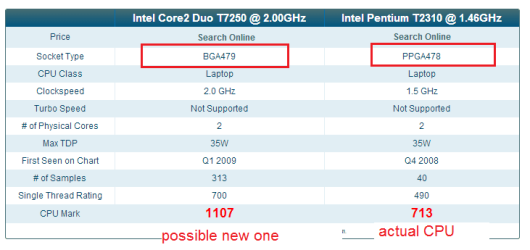
Intel Core 2 Duo 2.0GHz T7250

It also seems to be socket P, but that's not so sure since when I looked them up in comparison view at cpubenchmark there's a different socket noted that is giving me a red alert light. :D
socket.png


I'm not sure if that socket data on cpubenchmark is correct so we shouldn't rely on that. What we know for sure is that according to CPU-Z, the current socket is "Socket P (478)" and I need a replacement for that one.


Please help me find a Core 2 Duo processor that will fit. Thank you!
 
Last edited:

My Computer

Computer type
Laptop
Computer Manufacturer/Model Number
HP Compaq 6720s
OS
Microsoft® Windows 7 Professional 64-bit
CPU
Intel(R) Pentium(R) Dual CPU T2310 @ 1.46GHz
Motherboard
Hewlett-Packard 30D8
Memory
4,00 GB
Graphics Card(s)
(1) Mobile Intel(R) 965 Express Chipset Family (2) Mobile
Sound Card
(1) Bluetooth Hands-free Audio (2) Bluetooth Stereo Audio
Screen Resolution
1280 x 800 x 32 bits (4294967296 colors) @ 59 Hz
Hard Drives
(1) Hitachi HTS542516K9SA00 ATA Device (2) Multi Flash Reader USB Device
Hey, Can we have the make and model of your motherboard? Makes it easy for us to match processors to motherboards:D! Cheers
 

My Computer

Computer type
Laptop
Computer Manufacturer/Model Number
Packard Bell
OS
Windows 7 Home Premium 64Bit
CPU
AMD A6-3420M 1.5GHZ OC - 2.0GHZ
Memory
4GB DDR3 1600MHZ
Graphics Card(s)
AMD RADEON 6520G+AMD RADEON HD7470M 1GB DDR3
Screen Resolution
1366x768
Hard Drives
500GB SATA
Internet Speed
18Mb Unlimited
Antivirus
AVAST!
Browser
MOZILLA FIREFOX
Thanks for your reply :)

Yeah, sure :)
The notebook type is HP Compaq 6720s

So the make/manufacturer of the motherboard is: Hewlett-Packard
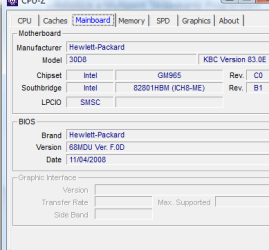
And model is 30D8 (according to CPU-Z). See this screenshot:
cpuz motherboard jo2.png
 

My Computer

Computer type
Laptop
Computer Manufacturer/Model Number
HP Compaq 6720s
OS
Microsoft® Windows 7 Professional 64-bit
CPU
Intel(R) Pentium(R) Dual CPU T2310 @ 1.46GHz
Motherboard
Hewlett-Packard 30D8
Memory
4,00 GB
Graphics Card(s)
(1) Mobile Intel(R) 965 Express Chipset Family (2) Mobile
Sound Card
(1) Bluetooth Hands-free Audio (2) Bluetooth Stereo Audio
Screen Resolution
1280 x 800 x 32 bits (4294967296 colors) @ 59 Hz
Hard Drives
(1) Hitachi HTS542516K9SA00 ATA Device (2) Multi Flash Reader USB Device
This is from the Intel site. Your socket seems to be supported.
 

Attachments

  • 2014-12-26_1511.png
    2014-12-26_1511.png
    8.4 KB · Views: 0

My Computer

Computer Manufacturer/Model Number
HP, Dell, Gateway, Toshiba - 4 laptops and 2 desktops
OS
Vista, Windows7, Mint Mate, Zorin, Windows 8
CPU
from 1.6GHz Duo to i7
Monitor(s) Displays
2x HP w2207
Hard Drives
5x HDD, 7x SSD, 12x Externals
Keyboard
with trackball - no mices
Mouse
Trackball mice
Internet Speed
DSL 6000
Even if the socket supports it the BIOS also has to support it. If the BIOS can't ID it properly it may not work at the rated speed or not work at all. I don't know how it works for laptops, but my desktop motherboards have a supported CPU list available from the manufacturer. It's lists all the supported CPU's and the BIOS revision needed for that support.
 

My Computer

Computer type
PC/Desktop
Computer Manufacturer/Model Number
Home Built
OS
Windows 10 Education 64 bit
CPU
AMD Phenom II X4 980 Black Edition Deneb 3.7GHz
Motherboard
Asus M4N68T-M V2 µATX Motherboard
Memory
8GB 4GBx2 Kingston PC10600 DDR3 1333 Memory
Graphics Card(s)
Zotac NVIDIA Geforce GT640 2 Gig DDR3 PCIe
Sound Card
VIA VT1708s High Definition Audio 8-channel Onboard
Monitor(s) Displays
22" LG E2242 1080p and 2 19" I-INC AG191D
Screen Resolution
1280x1024 - 1920x1080 - 1280x1024
Hard Drives
Crucial M100 256 GB SSD and 500 GB WD Blue SATA
PSU
Thermaltake TR 620
Case
Power Up Black ATX Mid-Tower Case
Cooling
Stock heatsink and fan
Keyboard
Logitech Wireless K350 Wave
Mouse
Logitech Wireless M570 Trackman Wheel
Internet Speed
80 Mbps Down 30 Mbps Up
Antivirus
Windows Defender
Browser
Internet Explorer 11
Other Info
HP DVD1040e Lightscribe - External USB2
  • Like
Reactions: whs
Great site for figuring this kind of stuff out:
Pick Parts, Build Your PC, Compare and Share - PCPartPicker

Look up your current motherboard, add it to your system build, then go to CPUs; it will show you only CPUs that are compatible with it (both socket and BIOS, although it doesn't preclude needing to update your BIOS before installing the new CPU).
 

My Computer

Computer type
PC/Desktop
Computer Manufacturer/Model Number
custom build
OS
Windows 7 Ultimate 64-bit
CPU
AMD FX 8370
Motherboard
Asus M5A99 Pro R2.0
Memory
32GB G.Skill DDR3 @ 1866MHz
Graphics Card(s)
GeForce GTX Titan
Sound Card
Sound Blaster X-Fi Titanium
Monitor(s) Displays
3x BenQ 24" (nVidia Surround), 46" Samsung TV
Screen Resolution
4x 1920x1080
Hard Drives
1x 256GB SSD
1x 1TB SSD
1x 250GB HDD
1x 1TB HDD
1x 1TB external HDD
PSU
Seasonic 860W
Case
CoolerMaster Storm Trooper
Cooling
Corsair H80i
Keyboard
Logitech K800
Mouse
Logitech M705
Internet Speed
30Mbps down/5Mbps up
Antivirus
Microsoft Security Essentials
Browser
Waterfox

My Computer

Computer type
PC/Desktop
Computer Manufacturer/Model Number
ASUS X550ZE
OS
Windows 7 Home Premium 64-BIT
CPU
AMD A8 7200P
Motherboard
N/A
Memory
8GB 1600mhz
Graphics Card(s)
Radeon R5 (APU) + Radeon R5 M230 2GB Dual Graphics
Sound Card
Realtek ALC269 with SonicMaster
Monitor(s) Displays
Laptop Display
Screen Resolution
1920 x 1080 @60hz
Hard Drives
WDC WD50 00LPVX-80V0TT0 (500GB)
PSU
Laptop Charger
Mouse
ARMAGGEDON TEXTRON SCORPION 7
Internet Speed
100 mbps DOWN / 50 mbps UP
Antivirus
Windows Defender
Browser
Mozzila FireFox, Valve Steam in-game internet browser
Ah, laptops. Laptop hardware upgrades always seemed like more trouble than they're worth to me.
 

My Computer

Computer type
PC/Desktop
Computer Manufacturer/Model Number
custom build
OS
Windows 7 Ultimate 64-bit
CPU
AMD FX 8370
Motherboard
Asus M5A99 Pro R2.0
Memory
32GB G.Skill DDR3 @ 1866MHz
Graphics Card(s)
GeForce GTX Titan
Sound Card
Sound Blaster X-Fi Titanium
Monitor(s) Displays
3x BenQ 24" (nVidia Surround), 46" Samsung TV
Screen Resolution
4x 1920x1080
Hard Drives
1x 256GB SSD
1x 1TB SSD
1x 250GB HDD
1x 1TB HDD
1x 1TB external HDD
PSU
Seasonic 860W
Case
CoolerMaster Storm Trooper
Cooling
Corsair H80i
Keyboard
Logitech K800
Mouse
Logitech M705
Internet Speed
30Mbps down/5Mbps up
Antivirus
Microsoft Security Essentials
Browser
Waterfox
Upgrading a laptop processor isn't something you would normally do. A lot can go wrong. Cooling could be an issue, even if the factory heat sink fits the new processor.
 

My Computer

Computer type
PC/Desktop
Computer Manufacturer/Model Number
Home Built
OS
Windows 10 Education 64 bit
CPU
AMD Phenom II X4 980 Black Edition Deneb 3.7GHz
Motherboard
Asus M4N68T-M V2 µATX Motherboard
Memory
8GB 4GBx2 Kingston PC10600 DDR3 1333 Memory
Graphics Card(s)
Zotac NVIDIA Geforce GT640 2 Gig DDR3 PCIe
Sound Card
VIA VT1708s High Definition Audio 8-channel Onboard
Monitor(s) Displays
22" LG E2242 1080p and 2 19" I-INC AG191D
Screen Resolution
1280x1024 - 1920x1080 - 1280x1024
Hard Drives
Crucial M100 256 GB SSD and 500 GB WD Blue SATA
PSU
Thermaltake TR 620
Case
Power Up Black ATX Mid-Tower Case
Cooling
Stock heatsink and fan
Keyboard
Logitech Wireless K350 Wave
Mouse
Logitech Wireless M570 Trackman Wheel
Internet Speed
80 Mbps Down 30 Mbps Up
Antivirus
Windows Defender
Browser
Internet Explorer 11
Other Info
HP DVD1040e Lightscribe - External USB2
Thank you everyone for your help! :) I really appreciate it.


alphanumeric: Do you think this could still be a problem if they have the same TDP?
 

My Computer

Computer type
Laptop
Computer Manufacturer/Model Number
HP Compaq 6720s
OS
Microsoft® Windows 7 Professional 64-bit
CPU
Intel(R) Pentium(R) Dual CPU T2310 @ 1.46GHz
Motherboard
Hewlett-Packard 30D8
Memory
4,00 GB
Graphics Card(s)
(1) Mobile Intel(R) 965 Express Chipset Family (2) Mobile
Sound Card
(1) Bluetooth Hands-free Audio (2) Bluetooth Stereo Audio
Screen Resolution
1280 x 800 x 32 bits (4294967296 colors) @ 59 Hz
Hard Drives
(1) Hitachi HTS542516K9SA00 ATA Device (2) Multi Flash Reader USB Device
Thank you everyone for your help! :) I really appreciate it.


alphanumeric: Do you think this could still be a problem if they have the same TDP?

If the two processors are physically the same size it may be OK. The heat sink fan setup on a laptop is quit different from what you see in a desktop PC. It's often unique to that specific model of laptop. You also have to be concerned with whether it uses thermal pads or thermal past. Past is easy to reapply, thermal pads aren't. Thermal pads are often damaged when the heat sink is removed. Then you have to source new ones. Have you ever disassembled a laptop? If you haven't already, you may want to hunt up a service manual and have a look at what's involved to do a CPU swap.
 

My Computer

Computer type
PC/Desktop
Computer Manufacturer/Model Number
Home Built
OS
Windows 10 Education 64 bit
CPU
AMD Phenom II X4 980 Black Edition Deneb 3.7GHz
Motherboard
Asus M4N68T-M V2 µATX Motherboard
Memory
8GB 4GBx2 Kingston PC10600 DDR3 1333 Memory
Graphics Card(s)
Zotac NVIDIA Geforce GT640 2 Gig DDR3 PCIe
Sound Card
VIA VT1708s High Definition Audio 8-channel Onboard
Monitor(s) Displays
22" LG E2242 1080p and 2 19" I-INC AG191D
Screen Resolution
1280x1024 - 1920x1080 - 1280x1024
Hard Drives
Crucial M100 256 GB SSD and 500 GB WD Blue SATA
PSU
Thermaltake TR 620
Case
Power Up Black ATX Mid-Tower Case
Cooling
Stock heatsink and fan
Keyboard
Logitech Wireless K350 Wave
Mouse
Logitech Wireless M570 Trackman Wheel
Internet Speed
80 Mbps Down 30 Mbps Up
Antivirus
Windows Defender
Browser
Internet Explorer 11
Other Info
HP DVD1040e Lightscribe - External USB2
Back
Top