Upgrading from HDD to SSD on Dell T7500

Molds2014

New member
Local time
4:24 AM
Messages
12
Hello all;
I want to breathe a bit of new life into this old workhorse, and wonder if it can be done.
1. Approximate cost
2. Level of difficulty & time.
System: Xeon W5580 @3.2GHz (twin CPU's); RAM: 12GB; W7 Pro 64 bit, SP1; WinExp index: 7.1
Owner: SolidWorks junkie :-)
 

My Computer My Computer

At a glance

Windows 7 Professional 64 bit2X Intel Xeon W5580 @3.20GHz12GBNVIDIA Quadro FX 4800
Computer type
PC/Desktop
Computer Manufacturer/Model Number
Dell T7500
OS
Windows 7 Professional 64 bit
CPU
2X Intel Xeon W5580 @3.20GHz
Memory
12GB
Graphics Card(s)
NVIDIA Quadro FX 4800
Cooling
OEM std
Internet Speed
3mbps
Antivirus
Kaspersky Pure 3.0
Browser
MSIE 11
Other Info
WinExp index: 7.1
0. can be done
1. 80-180$
2. easy, 6 hours installing windows and software.

buy an intel ssd to be on the safe side, dell, hp are picky. 535 or 730 series 120-240GB
 

My Computer My Computer

At a glance

Windows 7 Ultimate x64Xeon E5-1650 v2Kingston ECCQuadro fx 580
Computer type
PC/Desktop
Computer Manufacturer/Model Number
Custom Build
OS
Windows 7 Ultimate x64
CPU
Xeon E5-1650 v2
Motherboard
Asus p9x79 ws
Memory
Kingston ECC
Graphics Card(s)
Quadro fx 580
Hard Drives
Samsung 850 pro
Corsair Force Gt
Seagate Enterprise 6TB on 3ware 9750
Antivirus
avira
Time and difficulty dependent on whether or not you would also do a clean install when you move to the SSD.

You could simply "clone" the existing system to the SSD without doing a clean install.

Or you could "image" the existing system to the SSD without doing a clean install.

Clone or image can be done at no charge with free tools.

There's some learning curve involved in using these free tools, so from a time standpoint you may be just as well off to do a clean install. If you knew how to use the tools, you could image the HDD system to the SSD in no more than an hour.
 

My Computer My Computer

At a glance

Windows 7 Home Premium SP1, 64-bitIntel Skylake i5-6600K, not overclocked8 GB HyperX DDR4-2666 (2 x 4 GB)none; graphics are integrated on CPU
Computer type
PC/Desktop
Computer Manufacturer/Model Number
Ignatz Special; 4 speed manual gearbox; factory air conditioning; one of one
OS
Windows 7 Home Premium SP1, 64-bit
CPU
Intel Skylake i5-6600K, not overclocked
Motherboard
AsRock Z170M Extreme 4, micro ATX
Memory
8 GB HyperX DDR4-2666 (2 x 4 GB)
Graphics Card(s)
none; graphics are integrated on CPU
Sound Card
onboard: Realtek ALC1150; external: USB Behringer UF0-202
Monitor(s) Displays
Dell S2340M 23 inch IPS
Screen Resolution
1600 x 900
Hard Drives
System: Crucial MX100 series SSD, 128 GB;
Data: Samsung Spinpoint 103SJ, 1 TB;
Backup: WD Caviar Green WD30EZRX-00D8PB0, 3 TB
PSU
Rosewill SilentNight 500 watt fanless, semi-modular
Case
Antec Solo II
Cooling
Noctua NH-U12S; Noctua F12 intake, Noctua S12A exhaust
Keyboard
Microsoft 200 6JH-00001 USB
Mouse
Dell or Microsoft optical wired; USB
Antivirus
Microsoft Security Essentials and Malwarebytes Premium
Browser
Pale Moon
Other Info
All fans PWM; speeds at idle: CPU circa 500 rpm; intake circa 600 rpm; exhaust circa 600 rpm; CPU temps 27 idle and 47 C load in a warm room (27 C/81 F) when running Intel Extreme Tuning Utility stress test.
Hi,
Best way to improve an install is switching to a ssd
Doubt brand makes a diff but Samsung evo even crucial mx100 are good and pretty cheap for a 250-256gb. 100.us

I would install as a clean install and not transfer for less garbage transferring to the ssd
Start fresh for best results ;)

Install times well that will depend on your install media having sp1 on the install will reduce time a lot.
 

My Computer My Computer

At a glance

Win-7-Pro64bit 7-H-Prem-64biti7-5930K 2nd i9-9940x both water blocked VRM'...Trident-z 3200C14 2nd Trident-z 3600C16EVGA 1080ti ftw3 2nd Titan Xp both water blocked
Computer type
PC/Desktop
Computer Manufacturer/Model Number
Custom assembled by me :}
OS
Win-7-Pro64bit 7-H-Prem-64bit
CPU
i7-5930K 2nd i9-9940x both water blocked VRM's too
Motherboard
ASUS SABERTOOTH X99 2nd ASUS x299 Apex
Memory
Trident-z 3200C14 2nd Trident-z 3600C16
Graphics Card(s)
EVGA 1080ti ftw3 2nd Titan Xp both water blocked
Sound Card
Built-in Realtek
Monitor(s) Displays
1-AOC G2460PG 24"G-Sync 144Hz/ 2nd 1-ASUS VG248QE 24" 144Hz
Screen Resolution
1920 x 1080 144Hz
Hard Drives
2-Samsung M.2 Evo & Evo Plus
2-Samsung 850 EVO 500GB SSD's/ 3-2.5 W.D. Black 1tb-&3-1tb/3-3.5 WD Black 1tb hdd's
PSU
EVGA SuperNOVA 1000-P2 2nd 1200-P2
Case
2-Corsair Obsidian Series 450D Black ATX Mid Tower
Cooling
Custom water loops
Keyboard
Logitech G710+/ 2nd Logitech G910
Mouse
2-RedDragon M901 Perdition 16400 dpi Gaming mouse = wired
Internet Speed
Comcast Ping 19ms 89.31mbps download speed 6.12mbps upload
Antivirus
Malwarebytes Pro/ Superantispyware Pro
Browser
FireFox & Pale moon
Other Info
2nd ASUS X299 Apex/Intel i9-9940x with Custom water loop/7H-Prem-x64/Corsair 450D case/Ram Trident-z 3600C16 4x8gb / Samsung970Evo plus 500gb SSD/Dual ssd EZ swap evo/PSU EVGA SuperNova 1200w-P2 80+Platinum/GPU Titan Xp /8-ML-140 on push-pull on 2-280GTX rads
Hi,
Best way to improve an install is switching to a ssd
Doubt brand makes a diff but Samsung evo even crucial mx100 are good and pretty cheap for a 250-256gb. 100.us

I would install as a clean install and not transfer for less garbage transferring to the ssd
Start fresh for best results ;)

Install times well that will depend on your install media having sp1 on the install will reduce time a lot.

Thank you, Trashzone;
I originally learned about this forum when wanting to migrate from XP to W7, and was more than thankful for all of the support from everyone involved. :cry: The experience was pure fun and I LOVE this place.
On to my project & a bit more history:
1.The machine has recently had a clean install, and is working perfectly.
2.Is there a way to take a system image, create a rescue disk to go with it and move the opsys over to the new SSD while leaving all of the data on the HDD?
3.The goal is to continue using this system for another year and think about a new platform.

Keeping all of this in mind, I could really make use of some detailed instructions.
All the best, Steve :cool::cool:
 

My Computer My Computer

At a glance

Windows 7 Professional 64 bit2X Intel Xeon W5580 @3.20GHz12GBNVIDIA Quadro FX 4800
Computer type
PC/Desktop
Computer Manufacturer/Model Number
Dell T7500
OS
Windows 7 Professional 64 bit
CPU
2X Intel Xeon W5580 @3.20GHz
Memory
12GB
Graphics Card(s)
NVIDIA Quadro FX 4800
Cooling
OEM std
Internet Speed
3mbps
Antivirus
Kaspersky Pure 3.0
Browser
MSIE 11
Other Info
WinExp index: 7.1
1.The machine has recently had a clean install, and is working perfectly.
2.Is there a way to take a system image, create a rescue disk to go with it and move the opsys over to the new SSD while leaving all of the data on the HDD?


Did you see my earlier post in this thread regarding imaging and cloning?

There are tutorials on this site about both.

Your situation would be complicated by wanting to leave the data on the HDD.

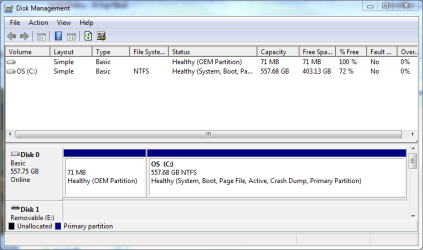
Is your data on its own partition? Or is it on the same partition as the OS--the C partition.

How you would proceed would depend on your current partitioning scheme, which would be revealed by Windows Disk Management. So you might want to post a screen shot of that.
 

My Computer My Computer

At a glance

Windows 7 Home Premium SP1, 64-bitIntel Skylake i5-6600K, not overclocked8 GB HyperX DDR4-2666 (2 x 4 GB)none; graphics are integrated on CPU
Computer type
PC/Desktop
Computer Manufacturer/Model Number
Ignatz Special; 4 speed manual gearbox; factory air conditioning; one of one
OS
Windows 7 Home Premium SP1, 64-bit
CPU
Intel Skylake i5-6600K, not overclocked
Motherboard
AsRock Z170M Extreme 4, micro ATX
Memory
8 GB HyperX DDR4-2666 (2 x 4 GB)
Graphics Card(s)
none; graphics are integrated on CPU
Sound Card
onboard: Realtek ALC1150; external: USB Behringer UF0-202
Monitor(s) Displays
Dell S2340M 23 inch IPS
Screen Resolution
1600 x 900
Hard Drives
System: Crucial MX100 series SSD, 128 GB;
Data: Samsung Spinpoint 103SJ, 1 TB;
Backup: WD Caviar Green WD30EZRX-00D8PB0, 3 TB
PSU
Rosewill SilentNight 500 watt fanless, semi-modular
Case
Antec Solo II
Cooling
Noctua NH-U12S; Noctua F12 intake, Noctua S12A exhaust
Keyboard
Microsoft 200 6JH-00001 USB
Mouse
Dell or Microsoft optical wired; USB
Antivirus
Microsoft Security Essentials and Malwarebytes Premium
Browser
Pale Moon
Other Info
All fans PWM; speeds at idle: CPU circa 500 rpm; intake circa 600 rpm; exhaust circa 600 rpm; CPU temps 27 idle and 47 C load in a warm room (27 C/81 F) when running Intel Extreme Tuning Utility stress test.
Hi,
ignatzatsonic is a pro at this sort of process plus a lot more ;)
I'm sure he can guide you :)
 

My Computer My Computer

At a glance

Win-7-Pro64bit 7-H-Prem-64biti7-5930K 2nd i9-9940x both water blocked VRM'...Trident-z 3200C14 2nd Trident-z 3600C16EVGA 1080ti ftw3 2nd Titan Xp both water blocked
Computer type
PC/Desktop
Computer Manufacturer/Model Number
Custom assembled by me :}
OS
Win-7-Pro64bit 7-H-Prem-64bit
CPU
i7-5930K 2nd i9-9940x both water blocked VRM's too
Motherboard
ASUS SABERTOOTH X99 2nd ASUS x299 Apex
Memory
Trident-z 3200C14 2nd Trident-z 3600C16
Graphics Card(s)
EVGA 1080ti ftw3 2nd Titan Xp both water blocked
Sound Card
Built-in Realtek
Monitor(s) Displays
1-AOC G2460PG 24"G-Sync 144Hz/ 2nd 1-ASUS VG248QE 24" 144Hz
Screen Resolution
1920 x 1080 144Hz
Hard Drives
2-Samsung M.2 Evo & Evo Plus
2-Samsung 850 EVO 500GB SSD's/ 3-2.5 W.D. Black 1tb-&3-1tb/3-3.5 WD Black 1tb hdd's
PSU
EVGA SuperNOVA 1000-P2 2nd 1200-P2
Case
2-Corsair Obsidian Series 450D Black ATX Mid Tower
Cooling
Custom water loops
Keyboard
Logitech G710+/ 2nd Logitech G910
Mouse
2-RedDragon M901 Perdition 16400 dpi Gaming mouse = wired
Internet Speed
Comcast Ping 19ms 89.31mbps download speed 6.12mbps upload
Antivirus
Malwarebytes Pro/ Superantispyware Pro
Browser
FireFox & Pale moon
Other Info
2nd ASUS X299 Apex/Intel i9-9940x with Custom water loop/7H-Prem-x64/Corsair 450D case/Ram Trident-z 3600C16 4x8gb / Samsung970Evo plus 500gb SSD/Dual ssd EZ swap evo/PSU EVGA SuperNova 1200w-P2 80+Platinum/GPU Titan Xp /8-ML-140 on push-pull on 2-280GTX rads
i've seen problems with non intel ssds in hp and sompermicro worksations.
compatability lists of gear like this are full of intel, micron ssds.
just my 2 cents.
 

My Computer My Computer

At a glance

Windows 7 Ultimate x64Xeon E5-1650 v2Kingston ECCQuadro fx 580
Computer type
PC/Desktop
Computer Manufacturer/Model Number
Custom Build
OS
Windows 7 Ultimate x64
CPU
Xeon E5-1650 v2
Motherboard
Asus p9x79 ws
Memory
Kingston ECC
Graphics Card(s)
Quadro fx 580
Hard Drives
Samsung 850 pro
Corsair Force Gt
Seagate Enterprise 6TB on 3ware 9750
Antivirus
avira
1.The machine has recently had a clean install, and is working perfectly.
2.Is there a way to take a system image, create a rescue disk to go with it and move the opsys over to the new SSD while leaving all of the data on the HDD?

How you would proceed would depend on your current partitioning scheme, which would be revealed by Windows Disk Management. So you might want to post a screen shot of that.

As you can see, there is not a lot of data on the disc at all :
 

Attachments

  • diskmgmt.PNG
    diskmgmt.PNG
    19.5 KB · Views: 1

My Computer My Computer

At a glance

Windows 7 Professional 64 bit2X Intel Xeon W5580 @3.20GHz12GBNVIDIA Quadro FX 4800
Computer type
PC/Desktop
Computer Manufacturer/Model Number
Dell T7500
OS
Windows 7 Professional 64 bit
CPU
2X Intel Xeon W5580 @3.20GHz
Memory
12GB
Graphics Card(s)
NVIDIA Quadro FX 4800
Cooling
OEM std
Internet Speed
3mbps
Antivirus
Kaspersky Pure 3.0
Browser
MSIE 11
Other Info
WinExp index: 7.1
As you can see, there is not a lot of data on the disc at all :

Yeah, but your data is all on C, which complicates things.

You could make an image of C, which would include data.

Or you could move data to another partition and then your images of C would not include data and would be smaller.

Either will work.
 

My Computer My Computer

At a glance

Windows 7 Home Premium SP1, 64-bitIntel Skylake i5-6600K, not overclocked8 GB HyperX DDR4-2666 (2 x 4 GB)none; graphics are integrated on CPU
Computer type
PC/Desktop
Computer Manufacturer/Model Number
Ignatz Special; 4 speed manual gearbox; factory air conditioning; one of one
OS
Windows 7 Home Premium SP1, 64-bit
CPU
Intel Skylake i5-6600K, not overclocked
Motherboard
AsRock Z170M Extreme 4, micro ATX
Memory
8 GB HyperX DDR4-2666 (2 x 4 GB)
Graphics Card(s)
none; graphics are integrated on CPU
Sound Card
onboard: Realtek ALC1150; external: USB Behringer UF0-202
Monitor(s) Displays
Dell S2340M 23 inch IPS
Screen Resolution
1600 x 900
Hard Drives
System: Crucial MX100 series SSD, 128 GB;
Data: Samsung Spinpoint 103SJ, 1 TB;
Backup: WD Caviar Green WD30EZRX-00D8PB0, 3 TB
PSU
Rosewill SilentNight 500 watt fanless, semi-modular
Case
Antec Solo II
Cooling
Noctua NH-U12S; Noctua F12 intake, Noctua S12A exhaust
Keyboard
Microsoft 200 6JH-00001 USB
Mouse
Dell or Microsoft optical wired; USB
Antivirus
Microsoft Security Essentials and Malwarebytes Premium
Browser
Pale Moon
Other Info
All fans PWM; speeds at idle: CPU circa 500 rpm; intake circa 600 rpm; exhaust circa 600 rpm; CPU temps 27 idle and 47 C load in a warm room (27 C/81 F) when running Intel Extreme Tuning Utility stress test.
As you can see, there is not a lot of data on the disc at all :

Yeah, but your data is all on C, which complicates things.

You could make an image of C, which would include data.

Or you could move data to another partition and then your images of C would not include data and would be smaller.

Either will work.

Thank you, ignatzatsonic and countzero;
I just put one in my Amazon cart. (Intel 535 Series Solid State Drive 240GB 240 2.5-Inch SSDSC2BW240H601) Are there any cables needed, or mounting gadgets as well?
After that, I would love to learn about what kind of partitioning scheme you might choose if this were your own machine.
Over to you for comment.
 

My Computer My Computer

At a glance

Windows 7 Professional 64 bit2X Intel Xeon W5580 @3.20GHz12GBNVIDIA Quadro FX 4800
Computer type
PC/Desktop
Computer Manufacturer/Model Number
Dell T7500
OS
Windows 7 Professional 64 bit
CPU
2X Intel Xeon W5580 @3.20GHz
Memory
12GB
Graphics Card(s)
NVIDIA Quadro FX 4800
Cooling
OEM std
Internet Speed
3mbps
Antivirus
Kaspersky Pure 3.0
Browser
MSIE 11
Other Info
WinExp index: 7.1
I just put one in my Amazon cart. (Intel 535 Series Solid State Drive 240GB 240 2.5-Inch SSDSC2BW240H601) Are there any cables needed, or mounting gadgets as well?
After that, I would love to learn about what kind of partitioning scheme you might choose if this were your own machine.
Over to you for comment.

That looks to be a 2.5 inch drive with no mounting brackets and no cables, which is fine.

Good brand, good tools downloadable for it.

Whether you need "mounting gadgets" depends on your case.

Some cases include brackets to convert a 3.5 inch drive bay to 2.5 inch to accommodate SSDs.

Other cases don't include such brackets.

Other cases have special 2.5 inch drive bays intended to hold SSDs.

I have no idea what kind of case you have.

Worst case scenario: your case has no special 2.5 inch drive bay and no brackets to help you.

That would mean you'd have to do one of 2 things:

1: buy mounting brackets at Amazon or Newegg for 5 or 10 bucks.

2: ignore the whole bracket thing and just tape the drive in your chosen location with duct tape or something like that. Works fine. Did it myself for a year or so until I changed cases.

Cables: SSDs use standard SATA cable just like any regular hard drive. You can use the cables from your hard drive or buy spares if you need them.

Partitioning scheme:

Typically, you'd just make the whole drive a single C partition and store your data somewhere under C:\users.

Or you could use the SSD for JUST Windows and applications and store all data on a regular hard drive. This is what I do.

It all depends on your individual requirements.

Normally, there's no reason to partition an SSD into C, D, E, etc. SSDs are relatively small and if you start splitting them up like that you risk filling up a partition sooner than you figured and then you've got a problem.
 

My Computer My Computer

At a glance

Windows 7 Home Premium SP1, 64-bitIntel Skylake i5-6600K, not overclocked8 GB HyperX DDR4-2666 (2 x 4 GB)none; graphics are integrated on CPU
Computer type
PC/Desktop
Computer Manufacturer/Model Number
Ignatz Special; 4 speed manual gearbox; factory air conditioning; one of one
OS
Windows 7 Home Premium SP1, 64-bit
CPU
Intel Skylake i5-6600K, not overclocked
Motherboard
AsRock Z170M Extreme 4, micro ATX
Memory
8 GB HyperX DDR4-2666 (2 x 4 GB)
Graphics Card(s)
none; graphics are integrated on CPU
Sound Card
onboard: Realtek ALC1150; external: USB Behringer UF0-202
Monitor(s) Displays
Dell S2340M 23 inch IPS
Screen Resolution
1600 x 900
Hard Drives
System: Crucial MX100 series SSD, 128 GB;
Data: Samsung Spinpoint 103SJ, 1 TB;
Backup: WD Caviar Green WD30EZRX-00D8PB0, 3 TB
PSU
Rosewill SilentNight 500 watt fanless, semi-modular
Case
Antec Solo II
Cooling
Noctua NH-U12S; Noctua F12 intake, Noctua S12A exhaust
Keyboard
Microsoft 200 6JH-00001 USB
Mouse
Dell or Microsoft optical wired; USB
Antivirus
Microsoft Security Essentials and Malwarebytes Premium
Browser
Pale Moon
Other Info
All fans PWM; speeds at idle: CPU circa 500 rpm; intake circa 600 rpm; exhaust circa 600 rpm; CPU temps 27 idle and 47 C load in a warm room (27 C/81 F) when running Intel Extreme Tuning Utility stress test.
**** mounting brackets. gaffa tape all the way.
or just cram it anywhere. ssds don't weigh anything, don't get hot. no hazard.
 

My Computer My Computer

At a glance

Windows 7 Ultimate x64Xeon E5-1650 v2Kingston ECCQuadro fx 580
Computer type
PC/Desktop
Computer Manufacturer/Model Number
Custom Build
OS
Windows 7 Ultimate x64
CPU
Xeon E5-1650 v2
Motherboard
Asus p9x79 ws
Memory
Kingston ECC
Graphics Card(s)
Quadro fx 580
Hard Drives
Samsung 850 pro
Corsair Force Gt
Seagate Enterprise 6TB on 3ware 9750
Antivirus
avira

My Computer My Computer

At a glance

Win-7-Pro64bit 7-H-Prem-64biti7-5930K 2nd i9-9940x both water blocked VRM'...Trident-z 3200C14 2nd Trident-z 3600C16EVGA 1080ti ftw3 2nd Titan Xp both water blocked
Computer type
PC/Desktop
Computer Manufacturer/Model Number
Custom assembled by me :}
OS
Win-7-Pro64bit 7-H-Prem-64bit
CPU
i7-5930K 2nd i9-9940x both water blocked VRM's too
Motherboard
ASUS SABERTOOTH X99 2nd ASUS x299 Apex
Memory
Trident-z 3200C14 2nd Trident-z 3600C16
Graphics Card(s)
EVGA 1080ti ftw3 2nd Titan Xp both water blocked
Sound Card
Built-in Realtek
Monitor(s) Displays
1-AOC G2460PG 24"G-Sync 144Hz/ 2nd 1-ASUS VG248QE 24" 144Hz
Screen Resolution
1920 x 1080 144Hz
Hard Drives
2-Samsung M.2 Evo & Evo Plus
2-Samsung 850 EVO 500GB SSD's/ 3-2.5 W.D. Black 1tb-&3-1tb/3-3.5 WD Black 1tb hdd's
PSU
EVGA SuperNOVA 1000-P2 2nd 1200-P2
Case
2-Corsair Obsidian Series 450D Black ATX Mid Tower
Cooling
Custom water loops
Keyboard
Logitech G710+/ 2nd Logitech G910
Mouse
2-RedDragon M901 Perdition 16400 dpi Gaming mouse = wired
Internet Speed
Comcast Ping 19ms 89.31mbps download speed 6.12mbps upload
Antivirus
Malwarebytes Pro/ Superantispyware Pro
Browser
FireFox & Pale moon
Other Info
2nd ASUS X299 Apex/Intel i9-9940x with Custom water loop/7H-Prem-x64/Corsair 450D case/Ram Trident-z 3600C16 4x8gb / Samsung970Evo plus 500gb SSD/Dual ssd EZ swap evo/PSU EVGA SuperNova 1200w-P2 80+Platinum/GPU Titan Xp /8-ML-140 on push-pull on 2-280GTX rads
OK !!
I got it installed, assigned it a drive letter (I) and did a simple read/write test which worked fine.
This is what I bought:
($119.99) Intel 535 SeriesSSDSC2BW240H6R5 2.5" 240GB SATA I
Also got a bracket "Sabrent 2.5SSD to 3.5" bracket ~$10.00.
The install was a snap. :party:

Now, on to the BIOS & opsys:
On bootup, I hit F12 for boot options and selected my usual drive from old & went on from there.
My system is currently set up with the 2 physical drives set up in a raid 0 configuration.
Here is what it looks like:
Capture 0807.PNG

And here is the end of my knowledge base. :o
The end goal is to move the entire contents of the old drive (C) to the new drive (I) and start booting/operating entirely from the new SSD and use the old HDD for data.
FYI:
I did create a backup to an external drive and selected 'create system image' and made a rescue/repair disc. So theoretically, I could restore the opsys to the new drive? Then swap letters through some tomfoolery? Simply do a SATA cable swap? Then, of course there is the ubiquitous SAS6ir utility during bootup.

What is the best path forward?

Thanks for the patience and kind help.
Steve
 

My Computer My Computer

At a glance

Windows 7 Professional 64 bit2X Intel Xeon W5580 @3.20GHz12GBNVIDIA Quadro FX 4800
Computer type
PC/Desktop
Computer Manufacturer/Model Number
Dell T7500
OS
Windows 7 Professional 64 bit
CPU
2X Intel Xeon W5580 @3.20GHz
Memory
12GB
Graphics Card(s)
NVIDIA Quadro FX 4800
Cooling
OEM std
Internet Speed
3mbps
Antivirus
Kaspersky Pure 3.0
Browser
MSIE 11
Other Info
WinExp index: 7.1
Normally, you'd just image or clone from the old OS drive to the new OS drive.

Or do a clean install.

But you are off in RAID land, so I'll bow out.
 

My Computer My Computer

At a glance

Windows 7 Home Premium SP1, 64-bitIntel Skylake i5-6600K, not overclocked8 GB HyperX DDR4-2666 (2 x 4 GB)none; graphics are integrated on CPU
Computer type
PC/Desktop
Computer Manufacturer/Model Number
Ignatz Special; 4 speed manual gearbox; factory air conditioning; one of one
OS
Windows 7 Home Premium SP1, 64-bit
CPU
Intel Skylake i5-6600K, not overclocked
Motherboard
AsRock Z170M Extreme 4, micro ATX
Memory
8 GB HyperX DDR4-2666 (2 x 4 GB)
Graphics Card(s)
none; graphics are integrated on CPU
Sound Card
onboard: Realtek ALC1150; external: USB Behringer UF0-202
Monitor(s) Displays
Dell S2340M 23 inch IPS
Screen Resolution
1600 x 900
Hard Drives
System: Crucial MX100 series SSD, 128 GB;
Data: Samsung Spinpoint 103SJ, 1 TB;
Backup: WD Caviar Green WD30EZRX-00D8PB0, 3 TB
PSU
Rosewill SilentNight 500 watt fanless, semi-modular
Case
Antec Solo II
Cooling
Noctua NH-U12S; Noctua F12 intake, Noctua S12A exhaust
Keyboard
Microsoft 200 6JH-00001 USB
Mouse
Dell or Microsoft optical wired; USB
Antivirus
Microsoft Security Essentials and Malwarebytes Premium
Browser
Pale Moon
Other Info
All fans PWM; speeds at idle: CPU circa 500 rpm; intake circa 600 rpm; exhaust circa 600 rpm; CPU temps 27 idle and 47 C load in a warm room (27 C/81 F) when running Intel Extreme Tuning Utility stress test.
Normally, you'd just image or clone from the old OS drive to the new OS drive.

Or do a clean install.

But you are off in RAID land, so I'll bow out.

Anybody out there in RAID land feel like jumping in?
 

My Computer My Computer

At a glance

Windows 7 Professional 64 bit2X Intel Xeon W5580 @3.20GHz12GBNVIDIA Quadro FX 4800
Computer type
PC/Desktop
Computer Manufacturer/Model Number
Dell T7500
OS
Windows 7 Professional 64 bit
CPU
2X Intel Xeon W5580 @3.20GHz
Memory
12GB
Graphics Card(s)
NVIDIA Quadro FX 4800
Cooling
OEM std
Internet Speed
3mbps
Antivirus
Kaspersky Pure 3.0
Browser
MSIE 11
Other Info
WinExp index: 7.1
Yep better bring a big can ;)
tumblr_m175eai4Wi1r9u960o1_500.gif
 

My Computer My Computer

At a glance

Win-7-Pro64bit 7-H-Prem-64biti7-5930K 2nd i9-9940x both water blocked VRM'...Trident-z 3200C14 2nd Trident-z 3600C16EVGA 1080ti ftw3 2nd Titan Xp both water blocked
Computer type
PC/Desktop
Computer Manufacturer/Model Number
Custom assembled by me :}
OS
Win-7-Pro64bit 7-H-Prem-64bit
CPU
i7-5930K 2nd i9-9940x both water blocked VRM's too
Motherboard
ASUS SABERTOOTH X99 2nd ASUS x299 Apex
Memory
Trident-z 3200C14 2nd Trident-z 3600C16
Graphics Card(s)
EVGA 1080ti ftw3 2nd Titan Xp both water blocked
Sound Card
Built-in Realtek
Monitor(s) Displays
1-AOC G2460PG 24"G-Sync 144Hz/ 2nd 1-ASUS VG248QE 24" 144Hz
Screen Resolution
1920 x 1080 144Hz
Hard Drives
2-Samsung M.2 Evo & Evo Plus
2-Samsung 850 EVO 500GB SSD's/ 3-2.5 W.D. Black 1tb-&3-1tb/3-3.5 WD Black 1tb hdd's
PSU
EVGA SuperNOVA 1000-P2 2nd 1200-P2
Case
2-Corsair Obsidian Series 450D Black ATX Mid Tower
Cooling
Custom water loops
Keyboard
Logitech G710+/ 2nd Logitech G910
Mouse
2-RedDragon M901 Perdition 16400 dpi Gaming mouse = wired
Internet Speed
Comcast Ping 19ms 89.31mbps download speed 6.12mbps upload
Antivirus
Malwarebytes Pro/ Superantispyware Pro
Browser
FireFox & Pale moon
Other Info
2nd ASUS X299 Apex/Intel i9-9940x with Custom water loop/7H-Prem-x64/Corsair 450D case/Ram Trident-z 3600C16 4x8gb / Samsung970Evo plus 500gb SSD/Dual ssd EZ swap evo/PSU EVGA SuperNova 1200w-P2 80+Platinum/GPU Titan Xp /8-ML-140 on push-pull on 2-280GTX rads
Back
Top