Upgrading to SSDs in RAID 0

snit3

New member
Member
Local time
12:06 AM
Messages
24
I'm currently running a homebuilt machine with a pair of 150G Velocirapters in RAID 0. It's a fast array, but I'm looking at nearly doubling the read/write speed with the SSDs. I'm using WIN 7, 64 Pro.

I use Acronis True Image to back up to an external HD daily, so that's covered. Here's the question:

If I was to remove the current RAID HDs and replace them with the new SSD drives, would the system boot up in the RAID 0 configuration, ready for a restore from the external drive, or, would I have to re-configure the new SSDs in BIOS to RAID 0?

If this was a new build I wouldn't be concerned. However, I've been using and adding to this system for almost a year and would hate to lose everything.
 

My Computer My Computer

Computer type
PC/Desktop
Computer Manufacturer/Model Number
home built
OS
win 7 pro 64 bit
CPU
Intel Corei7-6700K 4.0 GHz
Motherboard
ASUS Z170I Pro Gaming
Memory
Crucial Ballistix Sport 16GB 2400MHz
Graphics Card(s)
Gigabyte GeForce GTX 970 Mini ITX
Sound Card
SoundBlaster THX Pro
Monitor(s) Displays
ASUS VE278 27" + AOC 2769 27"
Screen Resolution
1920 x 1080
Hard Drives
Samsung 950 Pro NVMe M.2 512GB SSD
Intel A2M160G2GN 160GB SSD
OCZ SSD Vertex-2 120GB SSD
WD 2 TB External
PSU
Corsair RM550
Case
Cooler Master Elite 130 Mini ITX
Cooling
Corsair H60 CPU Liquid Cooler + Front 120mm fan
Keyboard
Logitech wireless
Mouse
Logitech wireless
Internet Speed
7 mbps down, 768 kbps up
Antivirus
Various
Browser
Various
Although I have never tried this setup myself (because I think an SSD Raid is pretty useless in real life), I would think that this should work. You have to make sure that you properly align the SSDs because you restore from an image. http://www.sevenforums.com/tutorials/113967-ssd-alignment.html?ltr=S You also have to define a primary, active partition to which you restore the OS. And if you have a 100MB active partition, things get a bit more complicated. You find some guidance here: http://www.sevenforums.com/tutorials/149969-ssd-install-transfer-operating-system.html

With all that being said, I would recommend to install only one SSD for the OS and leave the user data on the rapters. For the OS, the R/W speeds are pretty irrelevant because the OS deals with small blocks or 4K and 8K. It is the access time that accounts for the superb performance - and that is the same for a single SSD or a Raid. Thus there is nothing to be gained and you only complicate your life.

But if you think that Raid is your life, get a Revo drive ( Newegg.com - ocz revodrive x2 ) - provided you have a PCI-e x4 on your board.
 

My Computer My Computer

Computer Manufacturer/Model Number
HP, Dell, Gateway, Toshiba - 4 laptops and 2 desktops
OS
Vista, Windows7, Mint Mate, Zorin, Windows 8
CPU
from 1.6GHz Duo to i7
Monitor(s) Displays
2x HP w2207
Hard Drives
5x HDD, 7x SSD, 12x Externals
Keyboard
with trackball - no mices
Mouse
Trackball mice
Internet Speed
DSL 6000
whs: Thanks for the links and info. That's what I was looking for. You're probably right about the RAID and SSDs, but the Raptors in RAID 0 went from ~100 MBs stand alone to 190 MBs in Raid 0 configuration. That's practically the same as the individual SSDs!

As for Raid being my life, not. I enjoy building and learning about systems, and SSd's in Raid 0 is something I've never tried. Just having fun. Thanks again!
 

My Computer My Computer

Computer type
PC/Desktop
Computer Manufacturer/Model Number
home built
OS
win 7 pro 64 bit
CPU
Intel Corei7-6700K 4.0 GHz
Motherboard
ASUS Z170I Pro Gaming
Memory
Crucial Ballistix Sport 16GB 2400MHz
Graphics Card(s)
Gigabyte GeForce GTX 970 Mini ITX
Sound Card
SoundBlaster THX Pro
Monitor(s) Displays
ASUS VE278 27" + AOC 2769 27"
Screen Resolution
1920 x 1080
Hard Drives
Samsung 950 Pro NVMe M.2 512GB SSD
Intel A2M160G2GN 160GB SSD
OCZ SSD Vertex-2 120GB SSD
WD 2 TB External
PSU
Corsair RM550
Case
Cooler Master Elite 130 Mini ITX
Cooling
Corsair H60 CPU Liquid Cooler + Front 120mm fan
Keyboard
Logitech wireless
Mouse
Logitech wireless
Internet Speed
7 mbps down, 768 kbps up
Antivirus
Various
Browser
Various
FORGET the R/W speeds when it comes to the OS. Access time rules the OS - and that is 0.1ms for an SSD versus appr. 12 to 15ms for your rapters.

R/W speed buys you something if you shove a lot of data - but the OS does not do that. Keep your rapters for the data and one SSD for the system. It is cheaper and more efficient-
 

My Computer My Computer

Computer Manufacturer/Model Number
HP, Dell, Gateway, Toshiba - 4 laptops and 2 desktops
OS
Vista, Windows7, Mint Mate, Zorin, Windows 8
CPU
from 1.6GHz Duo to i7
Monitor(s) Displays
2x HP w2207
Hard Drives
5x HDD, 7x SSD, 12x Externals
Keyboard
with trackball - no mices
Mouse
Trackball mice
Internet Speed
DSL 6000
whs: Thanks for the links and info. That's what I was looking for. You're probably right about the RAID and SSDs, but the Raptors in RAID 0 went from ~100 MBs stand alone to 190 MBs in Raid 0 configuration. That's practically the same as the individual SSDs!
From a read perspective that is correct. However, the value of the SSD is really it's ultra low random access time of 0.1ms across the entire disc that benefits your operating system. For running an OS, there aren't massive files that get read or massive files that get written. Think of it this way, if you have 3 x 5MB files to read....that's a total of 15MB. If you can read 100MB/sec...then you could read these files in .15 seconds. If you could read 300MB/sec, you could read the file in 0.05seconds. And if you could read them at 1,000MB/sec, you could read the file in 0.015seconds. The point is, it's always fractions of seconds....hardly noticeable.

RAID 0's are great for data drive (ONLY WHEN YOU HAVE A BACKUP THOUGH). This is where huge read/write performance benefits are needed.
 

My Computer My Computer

Computer Manufacturer/Model Number
Self-Built in July 2009
OS
Windows 7 Ultimate x64
CPU
Intel Q9550 2.83Ghz OC'd to 3.40Ghz
Motherboard
Gigabyte GA-EP45-UD3R rev. 1.1, F12 BIOS
Memory
8GB G.Skill PI DDR2-800, 4-4-4-12 timings
Graphics Card(s)
EVGA 1280MB Nvidia GeForce GTX570
Sound Card
Realtek ALC899A 8 channel onboard audio
Monitor(s) Displays
23" Acer x233H
Screen Resolution
1920x1080
Hard Drives
Intel X25-M 80GB Gen 2 SSD
Western Digital 1TB Caviar Black, 32MB cache. WD1001FALS
PSU
Corsair 620HX modular
Case
Antec P182
Cooling
stock
Keyboard
ABS M1 Mechanical
Mouse
Logitech G9 Laser Mouse
Internet Speed
15/2 cable modem
Other Info
Windows and Linux enthusiast. Logitech G35 Headset.
I somewhat lost. When you have a ssd in raid 0 installing a backup to a hard drive that is that much slower than the ssd how can the read/write speed be any faster than the hard drive can except?
 

My Computer My Computer

Computer type
PC/Desktop
Computer Manufacturer/Model Number
Home made Desktop
OS
Windows 10 Pro. 64/ version 1709 Windows 7 Pro/64
CPU
Intel i7-6800K @ 4.3
Motherboard
ASUS X-99 Deluxe II
Memory
Corsair Platinum 16 gig @2400
Graphics Card(s)
EVGA GTX 1070 OC
Monitor(s) Displays
Asus 27" LED LCD/VE278Q
Screen Resolution
1920-1080 or 1280-720 HDMI
Hard Drives
INTEL SSD 730-240 Gb Sata 3.0/
PSU
EVGA Platium 1200W
Case
Phanteks Luxe Tempered Glass 8 fans/ one radiator
Cooling
XSPC/ Water Cooled CPU
Keyboard
Das 4 Professional
Mouse
Logitech M705/MX Anywhere 2-S
Internet Speed
100 mbits
Antivirus
Microsoft Security Essentials/ Malwarebytes Premium 3.0/ SAS
Browser
I.E. 11 default/Firefox/ ISP Time Warner Cable/Spectrum
Other Info
LG BluRay Burner/
Sound system-KLipsch-THX/
Icy Dock ssd Hot Swap bays.
pparks1 - Both you and whs have made this point, and it's a good one. From the standpoint of economy and performance the SSD is the place for the OS, and the Raptors for the big files. (I do a bunch of video editing) The problem is I'd have to do a fresh install of Win 7 to the SSD because (unfortunately) my bu image contains more than the OS.

Layback Bear - You can't, but that's not what I was trying to do. Acronis backup (incremental) takes only 2-3 minutes right now. No need for more speed there.

Again, everybody - I'm fiddling around. Experimenting. I'm retired and started working with computers back in the early 70's, so EVERYTHING seems fast now!!

Thanks again.
 

My Computer My Computer

Computer type
PC/Desktop
Computer Manufacturer/Model Number
home built
OS
win 7 pro 64 bit
CPU
Intel Corei7-6700K 4.0 GHz
Motherboard
ASUS Z170I Pro Gaming
Memory
Crucial Ballistix Sport 16GB 2400MHz
Graphics Card(s)
Gigabyte GeForce GTX 970 Mini ITX
Sound Card
SoundBlaster THX Pro
Monitor(s) Displays
ASUS VE278 27" + AOC 2769 27"
Screen Resolution
1920 x 1080
Hard Drives
Samsung 950 Pro NVMe M.2 512GB SSD
Intel A2M160G2GN 160GB SSD
OCZ SSD Vertex-2 120GB SSD
WD 2 TB External
PSU
Corsair RM550
Case
Cooler Master Elite 130 Mini ITX
Cooling
Corsair H60 CPU Liquid Cooler + Front 120mm fan
Keyboard
Logitech wireless
Mouse
Logitech wireless
Internet Speed
7 mbps down, 768 kbps up
Antivirus
Various
Browser
Various
I would check into the Paragon Migration Tool and discuss with them whether they would properly migrate your current setup to a single SSD. Send them a mail, they are very good in answering.
 

My Computer My Computer

Computer Manufacturer/Model Number
HP, Dell, Gateway, Toshiba - 4 laptops and 2 desktops
OS
Vista, Windows7, Mint Mate, Zorin, Windows 8
CPU
from 1.6GHz Duo to i7
Monitor(s) Displays
2x HP w2207
Hard Drives
5x HDD, 7x SSD, 12x Externals
Keyboard
with trackball - no mices
Mouse
Trackball mice
Internet Speed
DSL 6000
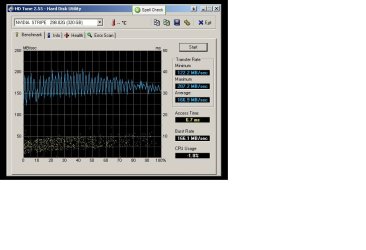
Thanks for that additional link, whs. BTW: I've attached the spec's for the Velociraptors in RAID 0 Raptors.jpg
 

My Computer My Computer

Computer type
PC/Desktop
Computer Manufacturer/Model Number
home built
OS
win 7 pro 64 bit
CPU
Intel Corei7-6700K 4.0 GHz
Motherboard
ASUS Z170I Pro Gaming
Memory
Crucial Ballistix Sport 16GB 2400MHz
Graphics Card(s)
Gigabyte GeForce GTX 970 Mini ITX
Sound Card
SoundBlaster THX Pro
Monitor(s) Displays
ASUS VE278 27" + AOC 2769 27"
Screen Resolution
1920 x 1080
Hard Drives
Samsung 950 Pro NVMe M.2 512GB SSD
Intel A2M160G2GN 160GB SSD
OCZ SSD Vertex-2 120GB SSD
WD 2 TB External
PSU
Corsair RM550
Case
Cooler Master Elite 130 Mini ITX
Cooling
Corsair H60 CPU Liquid Cooler + Front 120mm fan
Keyboard
Logitech wireless
Mouse
Logitech wireless
Internet Speed
7 mbps down, 768 kbps up
Antivirus
Various
Browser
Various
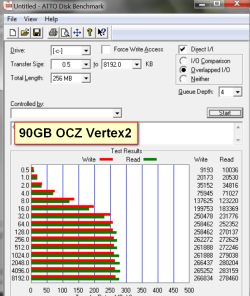
The access time is a bit faster than I thought. But it is still 67 times slower than an SSD. Here are a couple of my SSDs as an example:
 

Attachments

  • 2011-01-21_1119.png
    2011-01-21_1119.png
    24.6 KB · Views: 39
  • vertex2.png
    vertex2.png
    38.3 KB · Views: 42

My Computer My Computer

Computer Manufacturer/Model Number
HP, Dell, Gateway, Toshiba - 4 laptops and 2 desktops
OS
Vista, Windows7, Mint Mate, Zorin, Windows 8
CPU
from 1.6GHz Duo to i7
Monitor(s) Displays
2x HP w2207
Hard Drives
5x HDD, 7x SSD, 12x Externals
Keyboard
with trackball - no mices
Mouse
Trackball mice
Internet Speed
DSL 6000
Whew. I'm convinced. I'll take the 2 SSDs and use one in each of my main computers for the OS. I checked out the Paragon Migration Tool and it looks like exactly what I need. I'm glad I hit the sevenforums with this question. Probably would have battled my way through the SSD RAID 0 setup and never realized I was largely wasting my time and money. Thanks.
 

My Computer My Computer

Computer type
PC/Desktop
Computer Manufacturer/Model Number
home built
OS
win 7 pro 64 bit
CPU
Intel Corei7-6700K 4.0 GHz
Motherboard
ASUS Z170I Pro Gaming
Memory
Crucial Ballistix Sport 16GB 2400MHz
Graphics Card(s)
Gigabyte GeForce GTX 970 Mini ITX
Sound Card
SoundBlaster THX Pro
Monitor(s) Displays
ASUS VE278 27" + AOC 2769 27"
Screen Resolution
1920 x 1080
Hard Drives
Samsung 950 Pro NVMe M.2 512GB SSD
Intel A2M160G2GN 160GB SSD
OCZ SSD Vertex-2 120GB SSD
WD 2 TB External
PSU
Corsair RM550
Case
Cooler Master Elite 130 Mini ITX
Cooling
Corsair H60 CPU Liquid Cooler + Front 120mm fan
Keyboard
Logitech wireless
Mouse
Logitech wireless
Internet Speed
7 mbps down, 768 kbps up
Antivirus
Various
Browser
Various
You are welcome. I am sure you will enjoy your SSDs.
 

My Computer My Computer

Computer Manufacturer/Model Number
HP, Dell, Gateway, Toshiba - 4 laptops and 2 desktops
OS
Vista, Windows7, Mint Mate, Zorin, Windows 8
CPU
from 1.6GHz Duo to i7
Monitor(s) Displays
2x HP w2207
Hard Drives
5x HDD, 7x SSD, 12x Externals
Keyboard
with trackball - no mices
Mouse
Trackball mice
Internet Speed
DSL 6000
Back
Top