upgrading to Windows 10 Tech Preview

techtitan100

New member
Power User
VIP
Local time
4:20 AM
Messages
541
Location
Indianapolis
Hey guys, I was thinking about trying out the Windows 10 Tech Preview on my laptop and was wanting to know if I didn't like it if it was possible to get my laptop back to factory condition in which it came which is Windows 7 Home Premium, this laptop has a hidden partition that has the original "out-of-the-box" state and if upgrading to Windows 10 Tech Preview would erase the hidden partition.
 

My Computer

Computer type
Laptop
Computer Manufacturer/Model Number
Toshiba Satellite C655-S5547
OS
Windows 7 Pro 64bit
CPU
Intel(R) Core(TM) i3-2350M CPU @ 2.30 GHZ
Memory
4.00 GB
Graphics Card(s)
Intel HD Graphiics
Sound Card
Conexant HD Audio
Monitor(s) Displays
Generic PnP Monitor
Screen Resolution
1366 x 768 x 32 bits (4294967296 colors) @ 60 Hz
Hard Drives
TI106321W0B(C:) 450GB
Keyboard
Standard PS/2 Keyboard
Mouse
Synaptics Pointing Device
Internet Speed
51.68 mb/s download and 12.08 mb/s upload as of 6/24/15
Antivirus
Webroot Secure Anywhere
Browser
IE11, Mozilla Firefox 41.1.01, and Google Chrome if I must
   Information
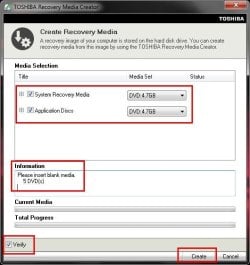
We always assume you have made your Recovery Disks using the OEM manufacturer's Recovery Media Creator app the first day you had your new PC.
& made the Startup Repair CD.
startup repair disc-create


Did you make the OEM manufacturer's Recovery Disks?


start_menu04.jpg

Toshiba USB.PNG

How to use Toshiba Recovery.
http://aps2.toshiba-tro.de/kb0/HTD7C02140000R01.htm
http://aps2.toshiba-tro.de/kb0/HTD1303440001R01.htm
You can order Toshiba Recovery disks from here:
https://www.csd.toshiba.com/cgi-bin/tais/support/jsp/serviceUnitVerification.jsp
 

My Computer

OS
ME/XP/Vista/Win7
As far as I am aware preview versions of Windows have never provided for restoring the previous version of Windows. That is your responsibility. This could be done with an OEM restore facility or an image backup you have made yourself. It is not wise to rely on a recovery partition. If the drive fails you loose everything.

Be aware that the preview is intended for advanced users. Microsoft has emphasized this. The preview is not a finished product and will have bugs, some of which may be serious. The preview will expire on April 15 2015. Going to the release version will likely require a clean install.

Running the preview in a virtual machine would be much safer.
 

My Computer

Computer type
PC/Desktop
Computer Manufacturer/Model Number
HP
OS
Windows 7 Pro 64 bit
CPU
Xeon W3520
Memory
8 GB
Graphics Card(s)
Nvidia Geforce 210
alright I won't do it I think I will do it when the real thing comes out and pay to upgrade
 

My Computer

Computer type
Laptop
Computer Manufacturer/Model Number
Toshiba Satellite C655-S5547
OS
Windows 7 Pro 64bit
CPU
Intel(R) Core(TM) i3-2350M CPU @ 2.30 GHZ
Memory
4.00 GB
Graphics Card(s)
Intel HD Graphiics
Sound Card
Conexant HD Audio
Monitor(s) Displays
Generic PnP Monitor
Screen Resolution
1366 x 768 x 32 bits (4294967296 colors) @ 60 Hz
Hard Drives
TI106321W0B(C:) 450GB
Keyboard
Standard PS/2 Keyboard
Mouse
Synaptics Pointing Device
Internet Speed
51.68 mb/s download and 12.08 mb/s upload as of 6/24/15
Antivirus
Webroot Secure Anywhere
Browser
IE11, Mozilla Firefox 41.1.01, and Google Chrome if I must
You do realize you can just install Windows 10 into a virtualPC setup, and that way not touch your actual normal installation, right? If not, look up how to install Microsoft Windows Virtual PC, and go from there. That's the best way to handle Dev Previews anyway, since it's so early on.
 

My Computer

OS
Various
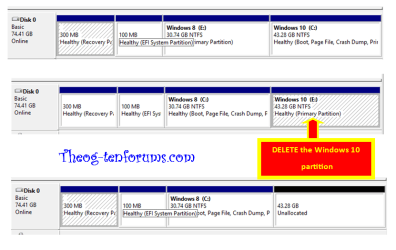
You can easily shrink your C drive to install the preview as a Dual Boot. Just follow these same steps for Dual Boot Windows 7 and Windows 8 - Delete Windows 8.

The boot files will be added to the Win7 drive on C, so when ready to get rid of the preview all you need to do is delete it's partition in Disk Mgmt and Extend C back over the space.

If this interests you then post back a screenshot of http://www.sevenforums.com/tutorial...nt-post-screen-capture-image.html#post2261610 so we can make sure you're ready to go with shrinking C.
 

My Computer

Computer Manufacturer/Model Number
HP, Dell, Gateway, Toshiba - 4 laptops and 2 desktops
OS
Vista, Windows7, Mint Mate, Zorin, Windows 8
CPU
from 1.6GHz Duo to i7
Monitor(s) Displays
2x HP w2207
Hard Drives
5x HDD, 7x SSD, 12x Externals
Keyboard
with trackball - no mices
Mouse
Trackball mice
Internet Speed
DSL 6000

My Computer

Computer type
PC/Desktop
Computer Manufacturer/Model Number
self build
OS
Windows 7 pro x64 SP1
CPU
Intel i7-2600k o/c to 4.6GHz
Motherboard
MSI Z68-GD80
Memory
8GB Mushkin 1866MHz
Graphics Card(s)
Nvidia GTX 750 Ti 2GB
Sound Card
integrated
Monitor(s) Displays
Liyama ProLite 27"
Screen Resolution
1920*1080 px
Hard Drives
Seagate 2TB
PSU
Coolermaster GX 750W
Case
Antec 300 case + 5 fans
Cooling
Dark Rock Pro
Internet Speed
62Mbit down 18Mbit up
Antivirus
MSE
Browser
Firefox
Other Info
Blackgold BGT3650 Quad HD TV card. Also have various 3770 + 4770K render boxes.
I have the Windows 10 trial (32 bit) running in a virtual machine with 1 GB assigned to it. It runs fine with no issues. Not adequate for demanding tasks but quite sufficient for testing purposes.
 

My Computer

Computer type
PC/Desktop
Computer Manufacturer/Model Number
HP
OS
Windows 7 Pro 64 bit
CPU
Xeon W3520
Memory
8 GB
Graphics Card(s)
Nvidia Geforce 210
I run very well with VMware Player on a 4GB system. I allocated 2 and 2.
 

My Computer

Computer Manufacturer/Model Number
HP, Dell, Gateway, Toshiba - 4 laptops and 2 desktops
OS
Vista, Windows7, Mint Mate, Zorin, Windows 8
CPU
from 1.6GHz Duo to i7
Monitor(s) Displays
2x HP w2207
Hard Drives
5x HDD, 7x SSD, 12x Externals
Keyboard
with trackball - no mices
Mouse
Trackball mice
Internet Speed
DSL 6000
Here is how I got my system now.
Windows 7 sp1
Small 45gb fat 32.

I want to prevent Win7 from being overwritten.
Do I need to create two primary partition or just one primary partition?

Here I would have 3 primary partitions
Windows 7
Windows 10
Small 45gb fat 32 drive


Or this
Here I would have 4 primary partitions

Windows 7
Windows System partition 300 mb
Windows 10
small 45 gb fat 32

Do I need to hide the windows 7 partition, while installing?

I have a minitool partition wizard, so I won't lose data
 

My Computer

Computer type
PC/Desktop
Computer Manufacturer/Model Number
Dell All in one Inspiron 2020
OS
W10 32 bit, XUbuntu 18.xx 64 bit
CPU
Intel(R) Celeron(R) CPU G1620T @ 2.40GHz, 2400 Mhz
Motherboard
Dell
Memory
4GB
Graphics Card(s)
Intel HD graphics
Sound Card
High Definition Audio Device
Monitor(s) Displays
20 inch Screen
Screen Resolution
W7=1280 x 720 & Linux Mint Xfce=1360 x 768
Hard Drives
500 GB hard drive
Keyboard
Usb
Mouse
Usb
Internet Speed
High-Speed
Antivirus
MSE
Browser
Main Browser Firefox
Other Info
I have done a clean install of Windows 7 using Dell re-installation disk (Dell sent me one). I also use Free Macrium reflect backup and restore.
small 45 gb fat 32
Why FAT 32 ?

I use dosbox, for some reason some dos games I play won't work on ntfs partitions even with dos box. I can temporally move those folders if needed, while doing the trial install of windows 10. Then I can go back and recreate it.

I don't want to dual-boot in the normal way, I would choose disk manage and select the partition to activate. This way it will be easier to delete the windows 10 partition(S). From my understanding to prevent windows from creating a system partition you have to have 1 full primary or 4 primary partition all ready active unless I misunderstood that.
 

My Computer

Computer type
PC/Desktop
Computer Manufacturer/Model Number
Dell All in one Inspiron 2020
OS
W10 32 bit, XUbuntu 18.xx 64 bit
CPU
Intel(R) Celeron(R) CPU G1620T @ 2.40GHz, 2400 Mhz
Motherboard
Dell
Memory
4GB
Graphics Card(s)
Intel HD graphics
Sound Card
High Definition Audio Device
Monitor(s) Displays
20 inch Screen
Screen Resolution
W7=1280 x 720 & Linux Mint Xfce=1360 x 768
Hard Drives
500 GB hard drive
Keyboard
Usb
Mouse
Usb
Internet Speed
High-Speed
Antivirus
MSE
Browser
Main Browser Firefox
Other Info
I have done a clean install of Windows 7 using Dell re-installation disk (Dell sent me one). I also use Free Macrium reflect backup and restore.
With a old type MOBO's YES, one partition is ACTIVE.

With MOBO's using UEFI, you have up to 128 primary partition.

Win10-000-2.PNG
 

My Computer

OS
ME/XP/Vista/Win7
I will sign up over at ten forums.

Here is what I have.
 

Attachments

  • mysys.jpg
    mysys.jpg
    14.3 KB · Views: 3

My Computer

Computer type
PC/Desktop
Computer Manufacturer/Model Number
Dell All in one Inspiron 2020
OS
W10 32 bit, XUbuntu 18.xx 64 bit
CPU
Intel(R) Celeron(R) CPU G1620T @ 2.40GHz, 2400 Mhz
Motherboard
Dell
Memory
4GB
Graphics Card(s)
Intel HD graphics
Sound Card
High Definition Audio Device
Monitor(s) Displays
20 inch Screen
Screen Resolution
W7=1280 x 720 & Linux Mint Xfce=1360 x 768
Hard Drives
500 GB hard drive
Keyboard
Usb
Mouse
Usb
Internet Speed
High-Speed
Antivirus
MSE
Browser
Main Browser Firefox
Other Info
I have done a clean install of Windows 7 using Dell re-installation disk (Dell sent me one). I also use Free Macrium reflect backup and restore.
Do an image backup then upgrade to Windows 10 TP.

I'm running Windows 10 TP X64 under Oracle VB on my Dekstop but I want to see it running native on the hardware so I'm in the process of using Macrium to do an image backup of my laptop running WIndows 8.1.1 Pro X64, then I will try the upgrade path to W10 X64 via a mounted iso.

I seldom use the laptop so this is a good way for me to play.

Edit: Install completed and it runs very well. I'm not seeing enough difference to upgrade my Desktop to W10, at least not yet. Maybe as more changes are released via update I'll be more enthused but so far, no big deal. No real difference from W8.1.1 with Classic Shell or Start8.
 
Last edited:

My Computer

Computer type
PC/Desktop
Computer Manufacturer/Model Number
Lenovo IdeaCenter 450
OS
Windows 10 Pro X64
CPU
Intel Quad Core i7-4770 @ 3.4Ghz
Memory
16.0GB PC3-12800 DDR3 SDRAM 1600 MHz
Graphics Card(s)
Intel Integrated HD Graphics
Sound Card
Realtek HD Audio
Monitor(s) Displays
HP 22" LCD
Screen Resolution
1680 x 1050
Hard Drives
250GB Samsung EVO SATA-3 SSD
2TB Seagate ST2000DM001 SATA-2
1.5TB Seagate ST3150041AS SATA
Keyboard
Dell USB
Mouse
Lenovo USB
Internet Speed
Cable via Road Runner 3MB Upload, 30MB Download
Antivirus
Windows Defender, MBAM Pro, MBAE
Browser
Seamonkey
Other Info
UEFI/GPT
PLDS DVD-RW DH16AERSH
Running 10 under Oracle VM, 4Gb from total of 8Gb on a laptop. Until yesterday was working fine. Attempted to do an update (Build 9860) which seemed to work but on reloading 10 nothing had changed. BUT, on unloading the VM my screen had changed to what looked like a corrupted LCD. Major panic :( for a few seconds. Hit Personalize and attempted to change the background. SUCCESS. :D Panic over. 10 is looking good but not yet convinced that I should part with cash on final release. What I'm looking for is the joy I felt when XP replaced ME and when 2000 took over from NT. NT, oh the frustration of hitting return some 30 times only to be told I'd made an error by say hitting item 17 before hitting item 16.:banghead:
 

My Computer

OS
Win 7 64 Enterprise
Back
Top