
You are using an out of date browser. It may not display this or other websites correctly.
You should upgrade or use an alternative browser.
You should upgrade or use an alternative browser.
Usable RAM -Windows 7 64bit
- Thread starter bethy1234
- Start date
Hi cmd187,
That was a quick response.
My gpu details are as follows: Graphics adapter
ATI Mobility Radeon HD 3470 - 256 MB, Core: 680 MHz, Memory: 800 MHz, GDDR3, 7.14.10.0567.
I'll accept what you say, but a full 1GB ring-fenced for the gpu sounds excessive. Would you say this is the case for most pc's and laptops?
Thanks
Andy
That was a quick response.
My gpu details are as follows: Graphics adapter
ATI Mobility Radeon HD 3470 - 256 MB, Core: 680 MHz, Memory: 800 MHz, GDDR3, 7.14.10.0567.
I'll accept what you say, but a full 1GB ring-fenced for the gpu sounds excessive. Would you say this is the case for most pc's and laptops?
Thanks
Andy
My Computer
At a glance
windows 7
- OS
- windows 7
If its integrated that is correct. On my work system I have an integrated 4250 which takes 256MB out of 4GB and on my gaming system I have a 6870 with a dedicated 1GB. It can take memory if required, but not generally when you boot up. The 1GB sounds about right, especially when you play games. Then the usage will rise.
My Computer
At a glance
Debian Squeeze Stable 64-bit
- OS
- Debian Squeeze Stable 64-bit

You're title says windows 64 bit. Are you sure that's what your running?
THe video ram blocking installed ram is extremely common... for 32 bit windows. Any modern laptop with Windows 7-64 bit should not have any hardware reserved (Or just a tiny bit, a few K). My last two Windows 7 64 bit laptops had 4 and 8 gig of ram and virtyally nothing hardware reserved even though they had 1 gig video cards.
Also with a 256 meg graphics adapter, even if it were taking up system ram, it shouldn;t be 1 gig, should only be 256 meg plus some for the other hardware meaning you should still have like 3.5 gig free...
[Edit] In fact my newest laptop is a vaio too... How old is the laptop? What is the model? [\edit]
THe video ram blocking installed ram is extremely common... for 32 bit windows. Any modern laptop with Windows 7-64 bit should not have any hardware reserved (Or just a tiny bit, a few K). My last two Windows 7 64 bit laptops had 4 and 8 gig of ram and virtyally nothing hardware reserved even though they had 1 gig video cards.
Also with a 256 meg graphics adapter, even if it were taking up system ram, it shouldn;t be 1 gig, should only be 256 meg plus some for the other hardware meaning you should still have like 3.5 gig free...
[Edit] In fact my newest laptop is a vaio too... How old is the laptop? What is the model? [\edit]
My Computer
At a glance
Windows 7 x64 Ultimatei7 96012 Gig Corsair DominatorNvidia 480
- Computer Manufacturer/Model Number
- Scratch built
- OS
- Windows 7 x64 Ultimate
- CPU
- i7 960
- Motherboard
- Asus P6X58D
- Memory
- 12 Gig Corsair Dominator
- Graphics Card(s)
- Nvidia 480
- Sound Card
- Maudio Delta 44 + breakout box
- Monitor(s) Displays
- Dell UltraSharp U2410 24in and Samsung 21 dual monitors
- Screen Resolution
- 1920x1200 and 1280x1024
- Hard Drives
- Primary: Intel X-25M G2 160G SSD
Secondary: Segate baracuda 1.0 TB
HDs in AHCI mode.
- PSU
- Corasair TX850
- Case
- Cooler Master HAF
- Cooling
- Corsair H50
- Keyboard
- Logitech G15 + N52 game pad
- Mouse
- Logitech MX518
- Internet Speed
- 15kbs down 4.5kbps up
- Other Info
- WEI 7.6
CPU & RAM 7.6
Graphics 7.9
Hard disk 7.7
Hmm, well if it really is an old laptop then that might be stuck that way even in win 64 bit. Old BOISes don't know how to remap the hardware to outside the 4 GB range even with a 64 bit OS. Some people on the forums have desktops that show that problem, ususaly pretty old hardware.
When buying a new computer, one of the first things I do is go to the resource monitor and look at the memory tab to make sure that there is no hardware reserved memory
When buying a new computer, one of the first things I do is go to the resource monitor and look at the memory tab to make sure that there is no hardware reserved memory
My Computer
At a glance
Windows 7 x64 Ultimatei7 96012 Gig Corsair DominatorNvidia 480
- Computer Manufacturer/Model Number
- Scratch built
- OS
- Windows 7 x64 Ultimate
- CPU
- i7 960
- Motherboard
- Asus P6X58D
- Memory
- 12 Gig Corsair Dominator
- Graphics Card(s)
- Nvidia 480
- Sound Card
- Maudio Delta 44 + breakout box
- Monitor(s) Displays
- Dell UltraSharp U2410 24in and Samsung 21 dual monitors
- Screen Resolution
- 1920x1200 and 1280x1024
- Hard Drives
- Primary: Intel X-25M G2 160G SSD
Secondary: Segate baracuda 1.0 TB
HDs in AHCI mode.
- PSU
- Corasair TX850
- Case
- Cooler Master HAF
- Cooling
- Corsair H50
- Keyboard
- Logitech G15 + N52 game pad
- Mouse
- Logitech MX518
- Internet Speed
- 15kbs down 4.5kbps up
- Other Info
- WEI 7.6
CPU & RAM 7.6
Graphics 7.9
Hard disk 7.7
Hi Cmd187,
I don,t play games but i do run Cubase 5 with some heavy duty vst's - if that means anything to you. But you have got me thinking, you have taught me that ram reservation usage increases when you run games/graphic intensive stuff (which i don't). I have just finished a session using my music apps, and thought i would just check the ram usage. I will do a reboot in the mornng and see if the pc boots with the same value with no apps running.
Hi fseal,
Yes indeed this is 64 bit win 7 ultimate. Indeed, I too expected to see closer to 3.5gb free ram. Do you know of any method by which I can view exactly how the reserved ram is being used? Is there a way to manually modify the qty of reserved ram?
Thanks hombres
I don,t play games but i do run Cubase 5 with some heavy duty vst's - if that means anything to you. But you have got me thinking, you have taught me that ram reservation usage increases when you run games/graphic intensive stuff (which i don't). I have just finished a session using my music apps, and thought i would just check the ram usage. I will do a reboot in the mornng and see if the pc boots with the same value with no apps running.
Hi fseal,
Yes indeed this is 64 bit win 7 ultimate. Indeed, I too expected to see closer to 3.5gb free ram. Do you know of any method by which I can view exactly how the reserved ram is being used? Is there a way to manually modify the qty of reserved ram?
Thanks hombres
My Computer
At a glance
windows 7
- OS
- windows 7
Hi all,
Yes this is about 4yrs old,
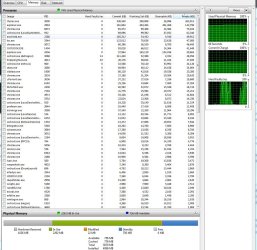
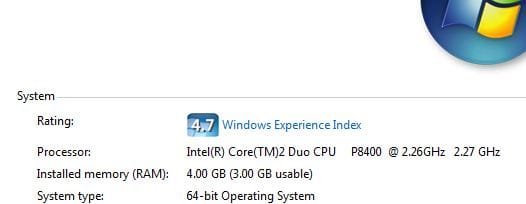
Here is a pic showing usable ram, and also a pic from the Resource monitor Memory page showing how the ram is being used(sorted by the 'Private' column).
Seriously, I have no major complaints, except when i'm running heavy duty cpu-intensive vst's.
Andy B.
Yes this is about 4yrs old,
Here is a pic showing usable ram, and also a pic from the Resource monitor Memory page showing how the ram is being used(sorted by the 'Private' column).
Seriously, I have no major complaints, except when i'm running heavy duty cpu-intensive vst's.
Andy B.
Attachments
My Computer
At a glance
windows 7
- OS
- windows 7
Sadly that shows how much is reserved but not who is reserving it.
Usually the only way to free up that space is to disable hardware. Like if it were a desktop with an integrated video card that was enabled along with your aftermarket one, disabling the integrated would ususaly get you more free ram.
Also, if this were a desktop, your mention of cubase would have me asking about any hardware acellerators for it you may have installed internally which might be using ram, but.. not for the laptop
Might also look in the laptop BIOS for a memory remap option. May be off when it should be on. No idea where it might be located, but maybe a little googling with reference to your laptop model might bring something up.
Usually the only way to free up that space is to disable hardware. Like if it were a desktop with an integrated video card that was enabled along with your aftermarket one, disabling the integrated would ususaly get you more free ram.
Also, if this were a desktop, your mention of cubase would have me asking about any hardware acellerators for it you may have installed internally which might be using ram, but.. not for the laptop
Might also look in the laptop BIOS for a memory remap option. May be off when it should be on. No idea where it might be located, but maybe a little googling with reference to your laptop model might bring something up.
My Computer
At a glance
Windows 7 x64 Ultimatei7 96012 Gig Corsair DominatorNvidia 480
- Computer Manufacturer/Model Number
- Scratch built
- OS
- Windows 7 x64 Ultimate
- CPU
- i7 960
- Motherboard
- Asus P6X58D
- Memory
- 12 Gig Corsair Dominator
- Graphics Card(s)
- Nvidia 480
- Sound Card
- Maudio Delta 44 + breakout box
- Monitor(s) Displays
- Dell UltraSharp U2410 24in and Samsung 21 dual monitors
- Screen Resolution
- 1920x1200 and 1280x1024
- Hard Drives
- Primary: Intel X-25M G2 160G SSD
Secondary: Segate baracuda 1.0 TB
HDs in AHCI mode.
- PSU
- Corasair TX850
- Case
- Cooler Master HAF
- Cooling
- Corsair H50
- Keyboard
- Logitech G15 + N52 game pad
- Mouse
- Logitech MX518
- Internet Speed
- 15kbs down 4.5kbps up
- Other Info
- WEI 7.6
CPU & RAM 7.6
Graphics 7.9
Hard disk 7.7
Similar threads
- Replies
- 9
- Views
- 688
- Replies
- 5
- Views
- 2K
- Replies
- 3
- Views
- 763


- Replies
- 23
- Views
- 97K