USB 3.0 host utility controller not found

Daveywavey

New member
Local time
1:36 PM
Messages
15
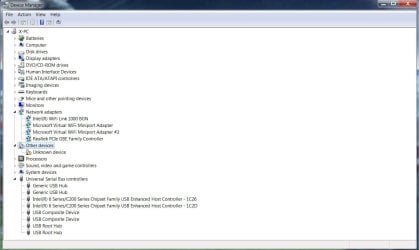
Hi, I think I have accidentally uninstalled my Reneas USB 3.0 controller as the usb ports are not working and I'm getting the not found error. I have tried installing the driver from the reneas website and restarting my laptop but I get the same problem. Also usb 3.0 doesn't show up in the driver manager at all. Any suggestions? Having only 1 usb port working on a laptop sucks...


Thanks in advance.
 

My Computer

Computer type
Laptop
Computer Manufacturer/Model Number
Dell XPS L502X
OS
windows 7 home premium 64 bit
CPU
Intel i7-2630QM 2.00GHz
Memory
8.00 GB
Graphics Card(s)
GeForce GT 525M
Hard Drives
500 GB
Browser
Firefox
Hi Welcome to Seven Forums ... Download and Install the Chipset Driver from the Link below ..

Then Download the USB3 Driver from the same Link ...


Product Support | Dell US
 

My Computer

Computer Manufacturer/Model Number
W530-3630QM1
OS
windows 7 home 64bit
CPU
INTEL-CORE I7
Memory
16GB
Hard Drives
750GB
Browser
Chrome
Ok I tried installing the chipset driver but it said that I already have the later version of the program installed on my computer. The driver installed fine but still its giving me the 'not found' error when I try to open the controller.
 

My Computer

Computer type
Laptop
Computer Manufacturer/Model Number
Dell XPS L502X
OS
windows 7 home premium 64 bit
CPU
Intel i7-2630QM 2.00GHz
Memory
8.00 GB
Graphics Card(s)
GeForce GT 525M
Hard Drives
500 GB
Browser
Firefox
Here it is.
 

Attachments

  • Untitled.jpg
    Untitled.jpg
    73.6 KB · Views: 0

My Computer

Computer type
Laptop
Computer Manufacturer/Model Number
Dell XPS L502X
OS
windows 7 home premium 64 bit
CPU
Intel i7-2630QM 2.00GHz
Memory
8.00 GB
Graphics Card(s)
GeForce GT 525M
Hard Drives
500 GB
Browser
Firefox
While installing it said "the Asmedia asm104x USB 3.0 host controller was not found" so I could not complete the installation. The Reneas controller appears in my programs list though for some reason.
 

My Computer

Computer type
Laptop
Computer Manufacturer/Model Number
Dell XPS L502X
OS
windows 7 home premium 64 bit
CPU
Intel i7-2630QM 2.00GHz
Memory
8.00 GB
Graphics Card(s)
GeForce GT 525M
Hard Drives
500 GB
Browser
Firefox
Not so good do you have any Restore Points before you made the Changes ? ...
 

My Computer

Computer Manufacturer/Model Number
W530-3630QM1
OS
windows 7 home 64bit
CPU
INTEL-CORE I7
Memory
16GB
Hard Drives
750GB
Browser
Chrome
Nope, it happened about a month ago and I only got around to fixing it now.... =/
 

My Computer

Computer type
Laptop
Computer Manufacturer/Model Number
Dell XPS L502X
OS
windows 7 home premium 64 bit
CPU
Intel i7-2630QM 2.00GHz
Memory
8.00 GB
Graphics Card(s)
GeForce GT 525M
Hard Drives
500 GB
Browser
Firefox
Do you have the Intel Management Engine Installed ?
 

My Computer

Computer Manufacturer/Model Number
W530-3630QM1
OS
windows 7 home 64bit
CPU
INTEL-CORE I7
Memory
16GB
Hard Drives
750GB
Browser
Chrome
doesnt look like it.....
 

My Computer

Computer type
Laptop
Computer Manufacturer/Model Number
Dell XPS L502X
OS
windows 7 home premium 64 bit
CPU
Intel i7-2630QM 2.00GHz
Memory
8.00 GB
Graphics Card(s)
GeForce GT 525M
Hard Drives
500 GB
Browser
Firefox
Okay Uninstall the USB 3 from Program and Features ..

Download the Intel Management Engine and Install it ..


It is in the Dell Website Link i gave you ...
 

My Computer

Computer Manufacturer/Model Number
W530-3630QM1
OS
windows 7 home 64bit
CPU
INTEL-CORE I7
Memory
16GB
Hard Drives
750GB
Browser
Chrome
Alright got that installed.
 

My Computer

Computer type
Laptop
Computer Manufacturer/Model Number
Dell XPS L502X
OS
windows 7 home premium 64 bit
CPU
Intel i7-2630QM 2.00GHz
Memory
8.00 GB
Graphics Card(s)
GeForce GT 525M
Hard Drives
500 GB
Browser
Firefox
You did Uninstall the USB3 from Programs .. ?


If so try and Re-Install it ...
 

My Computer

Computer Manufacturer/Model Number
W530-3630QM1
OS
windows 7 home 64bit
CPU
INTEL-CORE I7
Memory
16GB
Hard Drives
750GB
Browser
Chrome
Reinstalled it but the same message pops up.
 

My Computer

Computer type
Laptop
Computer Manufacturer/Model Number
Dell XPS L502X
OS
windows 7 home premium 64 bit
CPU
Intel i7-2630QM 2.00GHz
Memory
8.00 GB
Graphics Card(s)
GeForce GT 525M
Hard Drives
500 GB
Browser
Firefox
Need a strong cup of Coffee and another think about your issue ...

It might be a Clean Install is the only way to fix this ..


I am sure you do not want to go down that road ..


So will get back to you as soon as i can ...
 

My Computer

Computer Manufacturer/Model Number
W530-3630QM1
OS
windows 7 home 64bit
CPU
INTEL-CORE I7
Memory
16GB
Hard Drives
750GB
Browser
Chrome
I know you tried to Install the Chipset Driver and you got the error message ...


Could you not Proceed with the Insulation ?
 

My Computer

Computer Manufacturer/Model Number
W530-3630QM1
OS
windows 7 home 64bit
CPU
INTEL-CORE I7
Memory
16GB
Hard Drives
750GB
Browser
Chrome
no it said the installation was interrupted and could not be completed.
 

My Computer

Computer type
Laptop
Computer Manufacturer/Model Number
Dell XPS L502X
OS
windows 7 home premium 64 bit
CPU
Intel i7-2630QM 2.00GHz
Memory
8.00 GB
Graphics Card(s)
GeForce GT 525M
Hard Drives
500 GB
Browser
Firefox
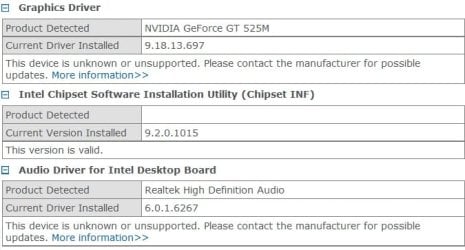
According to it the chipset is fine.... =/
 

Attachments

  • Untitled1.jpg
    Untitled1.jpg
    37 KB · Views: 7

My Computer

Computer type
Laptop
Computer Manufacturer/Model Number
Dell XPS L502X
OS
windows 7 home premium 64 bit
CPU
Intel i7-2630QM 2.00GHz
Memory
8.00 GB
Graphics Card(s)
GeForce GT 525M
Hard Drives
500 GB
Browser
Firefox
Back
Top