USB 3.0 port won't recognize USB 3.0 hard drive

darknightz0117

New member
Member
VIP
Local time
9:30 PM
Messages
179
Hi everybody,

I have an Asus U46e-BAL5 and was really happy with the USB 3.0 port as a future proof technology. I didn't get to use it until I purchased a Western Digital My Passport Essential SE 1TB USB 3.0. Everything ran smoothly the first few months, but recently, things have been strange. The USB 3.0 port seems to recognize USB 2.0 drives just fine. I plugged in my Patriot Xporter XT into that port, and the drive was recognizes just fine. But my Western Digital drive won't work in the USB 3.0 port for some reason. It works in any other USB 2.0 port, and it works on my desktop's USB 2.0 ports. I tried reinstalling the drivers for the hard drive, but that didn't fix anything. Does anyone have suggestions?
 

My Computer My Computer

At a glance

Windows 7AMD Phenom II X4 5552x2GB OCZ Platinum Edition DDR3 PC3-10666Sapphire Radeon 6870
OS
Windows 7
CPU
AMD Phenom II X4 555
Motherboard
Biostar TA785G3
Memory
2x2GB OCZ Platinum Edition DDR3 PC3-10666
Graphics Card(s)
Sapphire Radeon 6870
Hard Drives
Generic SSD (64GB)
Samsung F3 (1TB)
Seagate (1TB)
Case
Antec 300
If you are using the front panel USB 3.0 ports on your case, check the USB 3.0 cable where it plugs into the motherboard. If you are using the rear panel ports from the motherboard, check device manager, and expand USB ports and find the USB 3.0 controller, go to properties and see if there is an error code or a yellow triangle over the icon for USB 3.0. failing that I would check the hard drive itself. You can run diagnostics by downloading Windig, Western Digital's diagnostic tool.
 

My Computers My Computers

  • At a glance

    Windows 11 ProRyzen 9 5900X32GB G Skill DDR4-3600EVGA RTX 3080 FTW 3 Ultra
    Computer type
    PC/Desktop
    Computer Manufacturer/Model Number
    ALWAYS UNDER CONSTRUCTION
    OS
    Windows 11 Pro
    CPU
    Ryzen 9 5900X
    Motherboard
    Asus X570 Crosshair Viii Hero
    Memory
    32GB G Skill DDR4-3600
    Graphics Card(s)
    EVGA RTX 3080 FTW 3 Ultra
    Sound Card
    On Board/Sennheiser PC37X Headset
    Monitor(s) Displays
    3 X Asus 27"
    Screen Resolution
    2560x1440
    Hard Drives
    2 X 1 TB NVME drives
    PSU
    EVGA 850
    Case
    Phanteks Eclipse P400A
    Cooling
    EVGA 280 AIO
    Keyboard
    Logitech G510s/ Logitech G13
    Mouse
    Logitech G502
    Internet Speed
    24/1
    Antivirus
    ESET/MBAM Pro/SAS Pro
    Browser
    Chrome/ Firefox/ Edge
  • At a glance

    Windows 11 ProIntel Ultra 9 288V32 GB LPDDR5X 8533
    Computer type
    Laptop
    System Manufacturer/Model Number
    Dell 16 Plus
    OS
    Windows 11 Pro
    CPU
    Intel Ultra 9 288V
    Memory
    32 GB LPDDR5X 8533
    Monitor(s) Displays
    16" Mini-LED HDR600 Touch 90 Hz
    Screen Resolution
    2560X1600
    Hard Drives
    1 TB NVME
If you are using the front panel USB 3.0 ports on your case, check the USB 3.0 cable where it plugs into the motherboard. If you are using the rear panel ports from the motherboard, check device manager, and expand USB ports and find the USB 3.0 controller, go to properties and see if there is an error code or a yellow triangle over the icon for USB 3.0. failing that I would check the hard drive itself. You can run diagnostics by downloading Windig, Western Digital's diagnostic tool.

I'm using a laptop, so I'm not sure if I can get into the case to check the USB 3.0 cable. I checked device manager and it says the device is working properly. Will that diagnostics work for external drives as well?

EDIT: Nvm, I see that it works for both external and internal. sorry!
 

My Computer My Computer

At a glance

Windows 7AMD Phenom II X4 5552x2GB OCZ Platinum Edition DDR3 PC3-10666Sapphire Radeon 6870
OS
Windows 7
CPU
AMD Phenom II X4 555
Motherboard
Biostar TA785G3
Memory
2x2GB OCZ Platinum Edition DDR3 PC3-10666
Graphics Card(s)
Sapphire Radeon 6870
Hard Drives
Generic SSD (64GB)
Samsung F3 (1TB)
Seagate (1TB)
Case
Antec 300
I ran the diagnostic, and got a PASS for the test results. So it looks like my hard drive is working fine?
 

My Computer My Computer

At a glance

Windows 7AMD Phenom II X4 5552x2GB OCZ Platinum Edition DDR3 PC3-10666Sapphire Radeon 6870
OS
Windows 7
CPU
AMD Phenom II X4 555
Motherboard
Biostar TA785G3
Memory
2x2GB OCZ Platinum Edition DDR3 PC3-10666
Graphics Card(s)
Sapphire Radeon 6870
Hard Drives
Generic SSD (64GB)
Samsung F3 (1TB)
Seagate (1TB)
Case
Antec 300
Yes, it will work for internal or external drives.
 

My Computers My Computers

  • At a glance

    Windows 11 ProRyzen 9 5900X32GB G Skill DDR4-3600EVGA RTX 3080 FTW 3 Ultra
    Computer type
    PC/Desktop
    Computer Manufacturer/Model Number
    ALWAYS UNDER CONSTRUCTION
    OS
    Windows 11 Pro
    CPU
    Ryzen 9 5900X
    Motherboard
    Asus X570 Crosshair Viii Hero
    Memory
    32GB G Skill DDR4-3600
    Graphics Card(s)
    EVGA RTX 3080 FTW 3 Ultra
    Sound Card
    On Board/Sennheiser PC37X Headset
    Monitor(s) Displays
    3 X Asus 27"
    Screen Resolution
    2560x1440
    Hard Drives
    2 X 1 TB NVME drives
    PSU
    EVGA 850
    Case
    Phanteks Eclipse P400A
    Cooling
    EVGA 280 AIO
    Keyboard
    Logitech G510s/ Logitech G13
    Mouse
    Logitech G502
    Internet Speed
    24/1
    Antivirus
    ESET/MBAM Pro/SAS Pro
    Browser
    Chrome/ Firefox/ Edge
  • At a glance

    Windows 11 ProIntel Ultra 9 288V32 GB LPDDR5X 8533
    Computer type
    Laptop
    System Manufacturer/Model Number
    Dell 16 Plus
    OS
    Windows 11 Pro
    CPU
    Intel Ultra 9 288V
    Memory
    32 GB LPDDR5X 8533
    Monitor(s) Displays
    16" Mini-LED HDR600 Touch 90 Hz
    Screen Resolution
    2560X1600
    Hard Drives
    1 TB NVME
If you can, try another USB3.0 device of any kind to test the port. It could be the USB 3 cable id bad too, try another one.
If you have access to another computer with USB 3, try the drive there.
 

My Computer My Computer

At a glance

Windows 7 Ultimate X64 SP1Intel i5-2550K, Differing ~4.4-4.8GHz No buil...16GB G.Skill Sniper 1866MHz @ 2133MHz 2x8GBASUS GTX650TIB-DC2OC-2GD5, (650TI Boost)
Computer type
PC/Desktop
Computer Manufacturer/Model Number
Home Built Desktop By DataTech
OS
Windows 7 Ultimate X64 SP1
CPU
Intel i5-2550K, Differing ~4.4-4.8GHz No built in GPU
Motherboard
ASUS P8Z68-V PRO/GEN3
Memory
16GB G.Skill Sniper 1866MHz @ 2133MHz 2x8GB
Graphics Card(s)
ASUS GTX650TIB-DC2OC-2GD5, (650TI Boost)
Sound Card
Onboard Realtek 5-1
Monitor(s) Displays
Samsung P2570HD
Screen Resolution
1920x1080
Hard Drives
Samsung 840 Pro 256GB SSD for OS, 500GB Seagate Constellation (Enterprise drive) for Data
PSU
Corsair HX650W
Case
Inwin Dragon Rider
Cooling
Hyper 212 EVO w/two Noctua fans, push-pull, @1300 RPM
Keyboard
E-Z Eyes, bright yellow keys with large characters
Mouse
steelseries SENSEI Laser Pro Gaming
Internet Speed
48-51Mbs Mbs down, 11 Mbs up Xfinity Cable
Antivirus
Norton Internet Security 2013
Browser
IE 10, Opera, Pale Moon if needed
Other Info
4 case fans, LG BluRay-RE, ASUS DVD-RW, Mr. Fusion power supply, 1.21 gigawatts.
Yes, it will work for internal or external drives.

So it looks like the diagnostic came back fine. Is there something I can run to test the USB 3.0 capability of the drive? Thank you for your help!


If you can, try another USB3.0 device of any kind to test the port. It could be the USB 3 cable id bad too, try another one.
If you have access to another computer with USB 3, try the drive there.

I don't have another USB 3.0 device unfortunately, but I think I can try testing with another computer that has USB 3.0. Will have to get back to you later today on that. Thank you for the reply!
 

My Computer My Computer

At a glance

Windows 7AMD Phenom II X4 5552x2GB OCZ Platinum Edition DDR3 PC3-10666Sapphire Radeon 6870
OS
Windows 7
CPU
AMD Phenom II X4 555
Motherboard
Biostar TA785G3
Memory
2x2GB OCZ Platinum Edition DDR3 PC3-10666
Graphics Card(s)
Sapphire Radeon 6870
Hard Drives
Generic SSD (64GB)
Samsung F3 (1TB)
Seagate (1TB)
Case
Antec 300
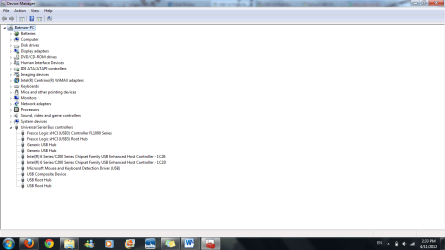
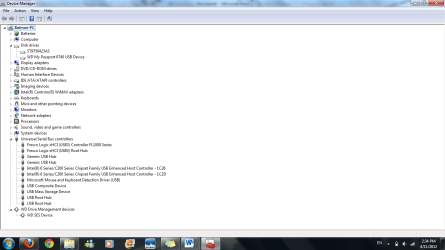
I haven't had a chance to test my hard drive on another USB 3.0 port, but here are screen shots of my device manager when there is no hard drive connected to any port, when my hard drive is connected to a USB 2.0 port, and when my hard drive is connected to a USB 3.0 port.
 

Attachments

  • No external hd connected.png
    No external hd connected.png
    42.7 KB · Views: 767
  • Hd connected through USB 2.0.png
    Hd connected through USB 2.0.png
    44.2 KB · Views: 504
  • Hd attached through usb 3.0.png
    Hd attached through usb 3.0.png
    44.3 KB · Views: 505

My Computer My Computer

At a glance

Windows 7AMD Phenom II X4 5552x2GB OCZ Platinum Edition DDR3 PC3-10666Sapphire Radeon 6870
OS
Windows 7
CPU
AMD Phenom II X4 555
Motherboard
Biostar TA785G3
Memory
2x2GB OCZ Platinum Edition DDR3 PC3-10666
Graphics Card(s)
Sapphire Radeon 6870
Hard Drives
Generic SSD (64GB)
Samsung F3 (1TB)
Seagate (1TB)
Case
Antec 300
Western Digital's site lists drivers and software downloads as well as a knowledge base. I'm just not sure which version you have. If it does not have it's own power source, the laptop may not provide the power to run it. If your USB 3.0 drivers for your laptop are up to date and western Digital's web site can't provide any information, I'm not sure what to do. If you can find a friend who has USB 3.0 and connect it to their computer, it may tell you whether the problem is with your laptop or the drive.
 

My Computers My Computers

  • At a glance

    Windows 11 ProRyzen 9 5900X32GB G Skill DDR4-3600EVGA RTX 3080 FTW 3 Ultra
    Computer type
    PC/Desktop
    Computer Manufacturer/Model Number
    ALWAYS UNDER CONSTRUCTION
    OS
    Windows 11 Pro
    CPU
    Ryzen 9 5900X
    Motherboard
    Asus X570 Crosshair Viii Hero
    Memory
    32GB G Skill DDR4-3600
    Graphics Card(s)
    EVGA RTX 3080 FTW 3 Ultra
    Sound Card
    On Board/Sennheiser PC37X Headset
    Monitor(s) Displays
    3 X Asus 27"
    Screen Resolution
    2560x1440
    Hard Drives
    2 X 1 TB NVME drives
    PSU
    EVGA 850
    Case
    Phanteks Eclipse P400A
    Cooling
    EVGA 280 AIO
    Keyboard
    Logitech G510s/ Logitech G13
    Mouse
    Logitech G502
    Internet Speed
    24/1
    Antivirus
    ESET/MBAM Pro/SAS Pro
    Browser
    Chrome/ Firefox/ Edge
  • At a glance

    Windows 11 ProIntel Ultra 9 288V32 GB LPDDR5X 8533
    Computer type
    Laptop
    System Manufacturer/Model Number
    Dell 16 Plus
    OS
    Windows 11 Pro
    CPU
    Intel Ultra 9 288V
    Memory
    32 GB LPDDR5X 8533
    Monitor(s) Displays
    16" Mini-LED HDR600 Touch 90 Hz
    Screen Resolution
    2560X1600
    Hard Drives
    1 TB NVME
Western Digital's site lists drivers and software downloads as well as a knowledge base. I'm just not sure which version you have. If it does not have it's own power source, the laptop may not provide the power to run it. If your USB 3.0 drivers for your laptop are up to date and western Digital's web site can't provide any information, I'm not sure what to do. If you can find a friend who has USB 3.0 and connect it to their computer, it may tell you whether the problem is with your laptop or the drive.

Ah, I figured it out. Something's wrong with my cable; for whatever reason, my cable will work only with USB 2.0 ports, not USB 3.0. I borrowed my friend's hard drive, who has the exact same model as mine. Both of our hard drives worked through the USB 3.0 port when using her cable, and her hard drive didn't work through the USB 3.0 port using my cable either, so something must have happened to my cable. Guess I need to find a replacement...
 

My Computer My Computer

At a glance

Windows 7AMD Phenom II X4 5552x2GB OCZ Platinum Edition DDR3 PC3-10666Sapphire Radeon 6870
OS
Windows 7
CPU
AMD Phenom II X4 555
Motherboard
Biostar TA785G3
Memory
2x2GB OCZ Platinum Edition DDR3 PC3-10666
Graphics Card(s)
Sapphire Radeon 6870
Hard Drives
Generic SSD (64GB)
Samsung F3 (1TB)
Seagate (1TB)
Case
Antec 300
Back
Top