
Solved USB 3.0 won't start after PC sleeps

Choglidite

New member
Local time
7:27 PM
Messages
30
Hi Guys, Thanks for the help right off!!

I've got a home built PC with an ASUS P8P67 mobo using Win 7X64. I've been working with the BSOD forum for about a month and finally figured out what was causing the crash. They sent me here to figure out what to do with it.

When I cold boot my PC everything works fine.

If the PC goes to sleep it (1) either won't wake up and if left alone will either BSOD or go to a restart screen, selecting "normal" or "repair" will send it to the Windows logo screen and it will hang. If I shut power off then restart, at the restart screen select "normal" everything works, probably 80% of the time this is what happens. The guys at the BSOD forum looked at all the .dmp and other files and said they give no clue to the crash.

OR (2) PC will wake up and the front USB 3.0 is no longer functioning. I also tried a pass through cable to my rear USB 3.0. and no crashes but (2) every time.

The front USB is plugged into a 20 pin USB 3.0 slot on the mobo.

I've downloaded the latest Renesas driver from ASUS. The old driver won't recognize the front panel at all. :cry:
 

My Computer My Computer

At a glance

Microsoft Windows 7 Ultimate 64-bit 7601 Mult...Intel(R) Core(TM) i7-2600K CPU @ 3.40GHz16.00 GBNVIDIA GeForce GTX 470
Computer type
PC/Desktop
Computer Manufacturer/Model Number
Handbuilt
OS
Microsoft Windows 7 Ultimate 64-bit 7601 Multiprocessor Free Service Pack 1
CPU
Intel(R) Core(TM) i7-2600K CPU @ 3.40GHz
Motherboard
ASUSTeK Computer INC. P8P67
Memory
16.00 GB
Graphics Card(s)
NVIDIA GeForce GTX 470
Sound Card
(1) NVIDIA High Definition Audio (2) NVIDIA High Definitio
Screen Resolution
1920 x 1080 x 32 bits (4294967296 colors) @ 60 Hz
Hard Drives
(1) OCZ-AGILITY3 ATA Device (2) ST31000528AS ATA Device (3) ST31500341AS ATA Device
What case are you using? How many USB 3.0 ports are on the front of the case? The 20-pin header should provide two. Are the case ports truely 3.0 or are you trying to use 2.0 ports on the case as 3.0?
 

My Computer My Computer

At a glance

Windows 7 Pro-x64i7-2600 3.4GHz - 3.8GHz Turbo8Gb - 2x4GB, Muskin 991770 PC3-1333Integrated Intel HD 2000
Computer type
PC/Desktop
Computer Manufacturer/Model Number
Built 2/11/2011
OS
Windows 7 Pro-x64
CPU
i7-2600 3.4GHz - 3.8GHz Turbo
Motherboard
Intel DH67BL-B3
Memory
8Gb - 2x4GB, Muskin 991770 PC3-1333
Graphics Card(s)
Integrated Intel HD 2000
Sound Card
Integrated Intel 10.1 HD, RealTek ALC892
Monitor(s) Displays
Asus LCD VH222H, Haier HL24XSL2a
Screen Resolution
1920x1080, 1920x1080
Hard Drives
Crucial SSD C300-128Gb,
Western Digital WD5002AALX - 500Gb,
Western Digital WD7501AALS - 750Gb
PSU
Seasonic 650W 80+ Gold Modular
Case
Rosewill Defender
Cooling
Stock CPU, Four 120mm case fans, PCH fan added
Keyboard
Logitech EX100 Y-RBH94 Wireless
Mouse
Logitech EX100 M-RCE95 Wireless
Internet Speed
3.0/1.5 Mbs
Antivirus
Microsoft Security Essentials
Browser
Microsoft Internet Explorer 11
Other Info
Antec Veris Premier-Multimedia IR Station,
Cyber Accoustics-3602 Speakers,
AFT XM-5U Card Reader,
Hauppauge TV-HVR-2250,
Sony LX300 USB Turntable
What case are you using? How many USB 3.0 ports are on the front of the case? The 20-pin header should provide two. Are the case ports truely 3.0 or are you trying to use 2.0 ports on the case as 3.0?
Along the same lines, but more specifically, what is the case make and model?
 

My Computer My Computer

At a glance

Windows 7 Home Premium x64Intel 2500k @4.5ghz 66deg max P95/IBT8 Gigs Patriot Viper 2 Extreme @1600EVGA GTX 580 3 GIG 35degrees idle
Computer Manufacturer/Model Number
Home Made
OS
Windows 7 Home Premium x64
CPU
Intel 2500k @4.5ghz 66deg max P95/IBT
Motherboard
Gigabyte Z68A-D3-B3
Memory
8 Gigs Patriot Viper 2 Extreme @1600
Graphics Card(s)
EVGA GTX 580 3 GIG 35degrees idle
Sound Card
Nvidia HD audio via HDMI to 7.1 Receiver
Monitor(s) Displays
32" Olevia hdtv
Screen Resolution
1080p
Hard Drives
64gig SSD(OS/Apps)
250gig (Files and Dox)
1tb (imaging and backup)
PSU
Corsair vx550w
Case
Thermaltake V3 black
Cooling
CM 212+(push n pull) 4 case fans
Keyboard
Logitech wireless Combo, G13
Mouse
G300
Internet Speed
40mps
Other Info
Two others up and running; C2D E5200/MSI G41M-P26/Corsair XMS3 8gb/GTS 250 1gb and C2D E8200/xFx 750sli/8gb Corsair Dominator/2x EVGA 550ti
Working on; i2600 Build...
HP DV6
@Work I use a Lenovo 5536B8U + Lenovo U300s
Hi Guys Thanks for the help. My case is a "Cooler Master HAF 922M ATX". The front of the case has 2 USB 2.0 ports. There is a combination card reader, SATA, USB 3.0 X 3, setup in one of the 5.25 bays. This is where my problem is. I do not know the brand, I don't see any name on it. It connects to power, Sata and has a USB 3.0 cable with a male end. I've got an adapter from the male end to the 20 pin. I've also run the cable through to the back and plugged directly into the rear USB 3.0.

I've updated my BIOS to the latest revision and I'm running the latest USB 3.0 driver. This has stopped the crashes.

Here's what I've figured out so far:
1 - If I use the adapter to the 20 pin the system recognizes the front panel as a Renesas USB 2.0 Hub.???
2 - If I use the pass through cable and plug into a 3.0 port, it's recognized as a Renesas USB 3.0 Hub. When the PC starts the USB ports work fine in either configuration. Once the PC goes to sleep the USB in the hub is still recognized in Device Manager but it doesn't work. If I disconnect it, wait a bit, and then plug it back in, it starts to work again. The Sata works fine. I've connected the pass through cable to a rear USB 2.0 and have the same result. In device manager I have disabled and enabled it but that doesn’t do anything. I have also uninstalled it and it will immediately find it and reinstall the drivers but it still won’t work. I have an external Belkin USB 2.0 hub that works fine after sleep.

I'm willing to try anything, just let me know. Thanks Again!!!! :)
 

My Computer My Computer

At a glance

Microsoft Windows 7 Ultimate 64-bit 7601 Mult...Intel(R) Core(TM) i7-2600K CPU @ 3.40GHz16.00 GBNVIDIA GeForce GTX 470
Computer type
PC/Desktop
Computer Manufacturer/Model Number
Handbuilt
OS
Microsoft Windows 7 Ultimate 64-bit 7601 Multiprocessor Free Service Pack 1
CPU
Intel(R) Core(TM) i7-2600K CPU @ 3.40GHz
Motherboard
ASUSTeK Computer INC. P8P67
Memory
16.00 GB
Graphics Card(s)
NVIDIA GeForce GTX 470
Sound Card
(1) NVIDIA High Definition Audio (2) NVIDIA High Definitio
Screen Resolution
1920 x 1080 x 32 bits (4294967296 colors) @ 60 Hz
Hard Drives
(1) OCZ-AGILITY3 ATA Device (2) ST31000528AS ATA Device (3) ST31500341AS ATA Device
Question, does everything work as it should when leaving the hub disconnected?
 

My Computer My Computer

At a glance

Windows 7 Home Premium x64Intel 2500k @4.5ghz 66deg max P95/IBT8 Gigs Patriot Viper 2 Extreme @1600EVGA GTX 580 3 GIG 35degrees idle
Computer Manufacturer/Model Number
Home Made
OS
Windows 7 Home Premium x64
CPU
Intel 2500k @4.5ghz 66deg max P95/IBT
Motherboard
Gigabyte Z68A-D3-B3
Memory
8 Gigs Patriot Viper 2 Extreme @1600
Graphics Card(s)
EVGA GTX 580 3 GIG 35degrees idle
Sound Card
Nvidia HD audio via HDMI to 7.1 Receiver
Monitor(s) Displays
32" Olevia hdtv
Screen Resolution
1080p
Hard Drives
64gig SSD(OS/Apps)
250gig (Files and Dox)
1tb (imaging and backup)
PSU
Corsair vx550w
Case
Thermaltake V3 black
Cooling
CM 212+(push n pull) 4 case fans
Keyboard
Logitech wireless Combo, G13
Mouse
G300
Internet Speed
40mps
Other Info
Two others up and running; C2D E5200/MSI G41M-P26/Corsair XMS3 8gb/GTS 250 1gb and C2D E8200/xFx 750sli/8gb Corsair Dominator/2x EVGA 550ti
Working on; i2600 Build...
HP DV6
@Work I use a Lenovo 5536B8U + Lenovo U300s
Yes, everything else is fine. All the issues seem to be around this front panel. :cry:
 

My Computer My Computer

At a glance

Microsoft Windows 7 Ultimate 64-bit 7601 Mult...Intel(R) Core(TM) i7-2600K CPU @ 3.40GHz16.00 GBNVIDIA GeForce GTX 470
Computer type
PC/Desktop
Computer Manufacturer/Model Number
Handbuilt
OS
Microsoft Windows 7 Ultimate 64-bit 7601 Multiprocessor Free Service Pack 1
CPU
Intel(R) Core(TM) i7-2600K CPU @ 3.40GHz
Motherboard
ASUSTeK Computer INC. P8P67
Memory
16.00 GB
Graphics Card(s)
NVIDIA GeForce GTX 470
Sound Card
(1) NVIDIA High Definition Audio (2) NVIDIA High Definitio
Screen Resolution
1920 x 1080 x 32 bits (4294967296 colors) @ 60 Hz
Hard Drives
(1) OCZ-AGILITY3 ATA Device (2) ST31000528AS ATA Device (3) ST31500341AS ATA Device
You say that it has a Sata cable that connects to it? There may be a necessary driver for this panel that you don't have. Would be very useful to know what the make and model of the unit was.
 

My Computer My Computer

At a glance

Windows 7 Home Premium x64Intel 2500k @4.5ghz 66deg max P95/IBT8 Gigs Patriot Viper 2 Extreme @1600EVGA GTX 580 3 GIG 35degrees idle
Computer Manufacturer/Model Number
Home Made
OS
Windows 7 Home Premium x64
CPU
Intel 2500k @4.5ghz 66deg max P95/IBT
Motherboard
Gigabyte Z68A-D3-B3
Memory
8 Gigs Patriot Viper 2 Extreme @1600
Graphics Card(s)
EVGA GTX 580 3 GIG 35degrees idle
Sound Card
Nvidia HD audio via HDMI to 7.1 Receiver
Monitor(s) Displays
32" Olevia hdtv
Screen Resolution
1080p
Hard Drives
64gig SSD(OS/Apps)
250gig (Files and Dox)
1tb (imaging and backup)
PSU
Corsair vx550w
Case
Thermaltake V3 black
Cooling
CM 212+(push n pull) 4 case fans
Keyboard
Logitech wireless Combo, G13
Mouse
G300
Internet Speed
40mps
Other Info
Two others up and running; C2D E5200/MSI G41M-P26/Corsair XMS3 8gb/GTS 250 1gb and C2D E8200/xFx 750sli/8gb Corsair Dominator/2x EVGA 550ti
Working on; i2600 Build...
HP DV6
@Work I use a Lenovo 5536B8U + Lenovo U300s
Yes the SATA is connected to the mobo and is hot swap-able. It works perfectly.

I bought it from a soldier about to be deployed. He just liked building machines. He got most of the components from Tigerdirect. I've looked at both their and Neweggs web sites and they don't have anything that looks like this one. He did tell me it wasn't suppose to need any special drivers. He was right if the machine never goes to sleep. I'm in and out of the office all day so sleeping is preferable to shutting down.
 

My Computer My Computer

At a glance

Microsoft Windows 7 Ultimate 64-bit 7601 Mult...Intel(R) Core(TM) i7-2600K CPU @ 3.40GHz16.00 GBNVIDIA GeForce GTX 470
Computer type
PC/Desktop
Computer Manufacturer/Model Number
Handbuilt
OS
Microsoft Windows 7 Ultimate 64-bit 7601 Multiprocessor Free Service Pack 1
CPU
Intel(R) Core(TM) i7-2600K CPU @ 3.40GHz
Motherboard
ASUSTeK Computer INC. P8P67
Memory
16.00 GB
Graphics Card(s)
NVIDIA GeForce GTX 470
Sound Card
(1) NVIDIA High Definition Audio (2) NVIDIA High Definitio
Screen Resolution
1920 x 1080 x 32 bits (4294967296 colors) @ 60 Hz
Hard Drives
(1) OCZ-AGILITY3 ATA Device (2) ST31000528AS ATA Device (3) ST31500341AS ATA Device

My Computer My Computer

At a glance

Windows 7 Home Premium x64Intel 2500k @4.5ghz 66deg max P95/IBT8 Gigs Patriot Viper 2 Extreme @1600EVGA GTX 580 3 GIG 35degrees idle
Computer Manufacturer/Model Number
Home Made
OS
Windows 7 Home Premium x64
CPU
Intel 2500k @4.5ghz 66deg max P95/IBT
Motherboard
Gigabyte Z68A-D3-B3
Memory
8 Gigs Patriot Viper 2 Extreme @1600
Graphics Card(s)
EVGA GTX 580 3 GIG 35degrees idle
Sound Card
Nvidia HD audio via HDMI to 7.1 Receiver
Monitor(s) Displays
32" Olevia hdtv
Screen Resolution
1080p
Hard Drives
64gig SSD(OS/Apps)
250gig (Files and Dox)
1tb (imaging and backup)
PSU
Corsair vx550w
Case
Thermaltake V3 black
Cooling
CM 212+(push n pull) 4 case fans
Keyboard
Logitech wireless Combo, G13
Mouse
G300
Internet Speed
40mps
Other Info
Two others up and running; C2D E5200/MSI G41M-P26/Corsair XMS3 8gb/GTS 250 1gb and C2D E8200/xFx 750sli/8gb Corsair Dominator/2x EVGA 550ti
Working on; i2600 Build...
HP DV6
@Work I use a Lenovo 5536B8U + Lenovo U300s
James, I'm not sure what to do with this. Here are the details for my device: "USB\VID_2109&PID_0810&REV_0376"
There are 3 0810 devices but no vendor 2109'

"Returning 3 matches for: "0810"
Sorted by: Device ID

Device Id Chip Description Vendor Id Vendor Name
0x0810 EFAR 486 host Bridge 0x1055 Standard Microsystems Corp.
0x0810 486 CPU/PCI Bridge 0x1155 Pine Technology Ltd
0x0810 LynxE 0x126F Silicon Motion"

Gregrocker - All total they had me run about 30 different .dmp, WER, chkdisk etc files. Nothing showed the cause. I figured it out because I'd recognized the USB issue and removed the hardware, and ran the PC. It worked, re-installed and crash. That's how we got to here. Do you still think it's worth running the trace? I'll admit, I'm close to the point of throwing the hardware in the can and getting something else. Thanks
 

My Computer My Computer

At a glance

Microsoft Windows 7 Ultimate 64-bit 7601 Mult...Intel(R) Core(TM) i7-2600K CPU @ 3.40GHz16.00 GBNVIDIA GeForce GTX 470
Computer type
PC/Desktop
Computer Manufacturer/Model Number
Handbuilt
OS
Microsoft Windows 7 Ultimate 64-bit 7601 Multiprocessor Free Service Pack 1
CPU
Intel(R) Core(TM) i7-2600K CPU @ 3.40GHz
Motherboard
ASUSTeK Computer INC. P8P67
Memory
16.00 GB
Graphics Card(s)
NVIDIA GeForce GTX 470
Sound Card
(1) NVIDIA High Definition Audio (2) NVIDIA High Definitio
Screen Resolution
1920 x 1080 x 32 bits (4294967296 colors) @ 60 Hz
Hard Drives
(1) OCZ-AGILITY3 ATA Device (2) ST31000528AS ATA Device (3) ST31500341AS ATA Device
Are these Devices without a driver?

If you post it up to a file server and link it here, our expert Cluberti can help you read the boot trace which often nails the cause of the problem.

Before I'd trash it I'd do a clean reinstall following these steps to get a perfect Clean Reinstall - Factory OEM Windows 7
which are the same for retail - unless you're confident the install is cleanest possible and not at all bloated, corrupt or (worse) a factory preinstall.
 
Here's what I've figured out so far:
1 - If I use the adapter to the 20 pin the system recognizes the front panel as a Renesas USB 2.0 Hub.???
2 - If I use the pass through cable and plug into a 3.0 port, it's recognized as a Renesas USB 3.0 Hub. When the PC starts the USB ports work fine in either configuration. Once the PC goes to sleep the USB in the hub is still recognized in Device Manager but it doesn't work. If I disconnect it, wait a bit, and then plug it back in, it starts to work again.
It would appear to me that the problem is the 20-pin adapter and your power settings. Fill us in on why you're using the adapter to begin with and what type of cable is the "pass through cable". Does the adapter have blue ports?

Also, check in the downloaded Renesas driver folder named File for a program called nusb3utl.exe. See if it's there.

Forgot to mention: All USB 3.0 ports will be blue. Verify your front ports are blue. (The plastic divider inside the port.)
 

My Computer My Computer

At a glance

Windows 7 Pro-x64i7-2600 3.4GHz - 3.8GHz Turbo8Gb - 2x4GB, Muskin 991770 PC3-1333Integrated Intel HD 2000
Computer type
PC/Desktop
Computer Manufacturer/Model Number
Built 2/11/2011
OS
Windows 7 Pro-x64
CPU
i7-2600 3.4GHz - 3.8GHz Turbo
Motherboard
Intel DH67BL-B3
Memory
8Gb - 2x4GB, Muskin 991770 PC3-1333
Graphics Card(s)
Integrated Intel HD 2000
Sound Card
Integrated Intel 10.1 HD, RealTek ALC892
Monitor(s) Displays
Asus LCD VH222H, Haier HL24XSL2a
Screen Resolution
1920x1080, 1920x1080
Hard Drives
Crucial SSD C300-128Gb,
Western Digital WD5002AALX - 500Gb,
Western Digital WD7501AALS - 750Gb
PSU
Seasonic 650W 80+ Gold Modular
Case
Rosewill Defender
Cooling
Stock CPU, Four 120mm case fans, PCH fan added
Keyboard
Logitech EX100 Y-RBH94 Wireless
Mouse
Logitech EX100 M-RCE95 Wireless
Internet Speed
3.0/1.5 Mbs
Antivirus
Microsoft Security Essentials
Browser
Microsoft Internet Explorer 11
Other Info
Antec Veris Premier-Multimedia IR Station,
Cyber Accoustics-3602 Speakers,
AFT XM-5U Card Reader,
Hauppauge TV-HVR-2250,
Sony LX300 USB Turntable
Hi Carwiz, The cable to the front panel is a USB 3.0 - Cable A Male to B Male. I bought the 3.0 adapter thinking it would be better than a pass through. (Bad Idea!) The front panel has blue ports and in the back I've plugged the cable into a blue 3.0 port. In the Device Manager, when I first boot, the front panel shows up as a "Renesas Electronics USB 3.0 Hub". Once it sleeps, it just disappears from Device Manager. Nothing re-starts it unless I unplug it - wait - then re-plug or reboot.

Yes I have the nusb3utl.exe file.

Thanks
 

My Computer My Computer

At a glance

Microsoft Windows 7 Ultimate 64-bit 7601 Mult...Intel(R) Core(TM) i7-2600K CPU @ 3.40GHz16.00 GBNVIDIA GeForce GTX 470
Computer type
PC/Desktop
Computer Manufacturer/Model Number
Handbuilt
OS
Microsoft Windows 7 Ultimate 64-bit 7601 Multiprocessor Free Service Pack 1
CPU
Intel(R) Core(TM) i7-2600K CPU @ 3.40GHz
Motherboard
ASUSTeK Computer INC. P8P67
Memory
16.00 GB
Graphics Card(s)
NVIDIA GeForce GTX 470
Sound Card
(1) NVIDIA High Definition Audio (2) NVIDIA High Definitio
Screen Resolution
1920 x 1080 x 32 bits (4294967296 colors) @ 60 Hz
Hard Drives
(1) OCZ-AGILITY3 ATA Device (2) ST31000528AS ATA Device (3) ST31500341AS ATA Device
Gregrocker, I've got the machine ready to run the traces but I'm not sure which ones. The title of the tutorial includes Hibernate and Sleep but the only choices are: BOOT * Shutdown * Reboot. Which one(s) should I run?

Also some things on the tutorial wouldn't work on my Win 7X64 machine. After some research I found two things. They are in these two URLs. You guys may want to ref. them. The linked file didn't include the WPT_X64.MSI.

Downloading the WPT
also
Fix Problem Installing Windows SDK for Windows 7 | Ctrl+F5

Thanks
 

My Computer My Computer

At a glance

Microsoft Windows 7 Ultimate 64-bit 7601 Mult...Intel(R) Core(TM) i7-2600K CPU @ 3.40GHz16.00 GBNVIDIA GeForce GTX 470
Computer type
PC/Desktop
Computer Manufacturer/Model Number
Handbuilt
OS
Microsoft Windows 7 Ultimate 64-bit 7601 Multiprocessor Free Service Pack 1
CPU
Intel(R) Core(TM) i7-2600K CPU @ 3.40GHz
Motherboard
ASUSTeK Computer INC. P8P67
Memory
16.00 GB
Graphics Card(s)
NVIDIA GeForce GTX 470
Sound Card
(1) NVIDIA High Definition Audio (2) NVIDIA High Definitio
Screen Resolution
1920 x 1080 x 32 bits (4294967296 colors) @ 60 Hz
Hard Drives
(1) OCZ-AGILITY3 ATA Device (2) ST31000528AS ATA Device (3) ST31500341AS ATA Device
I would ask for help with the trace from it's author in the Tutorial comments section. He is the top expert on this and can even help you interpret it's findings. However he is very busy with a new release of SysInternals at MS so you may need to be patient.
 
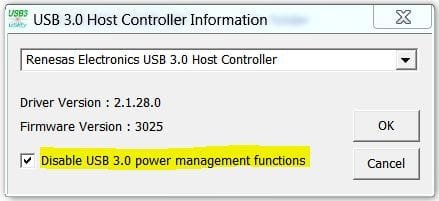
Run nusb3utl.exe as administrator. (Right click, choose Run as administrator.)

Check the box to disable USB 3.0 power management. Click OK. Reboot. Check to see if that keeps the USB 3.0 Hub active.
 

Attachments

  • USB3 Power Setting - nusb3utl.JPG
    USB3 Power Setting - nusb3utl.JPG
    20.9 KB · Views: 15

My Computer My Computer

At a glance

Windows 7 Pro-x64i7-2600 3.4GHz - 3.8GHz Turbo8Gb - 2x4GB, Muskin 991770 PC3-1333Integrated Intel HD 2000
Computer type
PC/Desktop
Computer Manufacturer/Model Number
Built 2/11/2011
OS
Windows 7 Pro-x64
CPU
i7-2600 3.4GHz - 3.8GHz Turbo
Motherboard
Intel DH67BL-B3
Memory
8Gb - 2x4GB, Muskin 991770 PC3-1333
Graphics Card(s)
Integrated Intel HD 2000
Sound Card
Integrated Intel 10.1 HD, RealTek ALC892
Monitor(s) Displays
Asus LCD VH222H, Haier HL24XSL2a
Screen Resolution
1920x1080, 1920x1080
Hard Drives
Crucial SSD C300-128Gb,
Western Digital WD5002AALX - 500Gb,
Western Digital WD7501AALS - 750Gb
PSU
Seasonic 650W 80+ Gold Modular
Case
Rosewill Defender
Cooling
Stock CPU, Four 120mm case fans, PCH fan added
Keyboard
Logitech EX100 Y-RBH94 Wireless
Mouse
Logitech EX100 M-RCE95 Wireless
Internet Speed
3.0/1.5 Mbs
Antivirus
Microsoft Security Essentials
Browser
Microsoft Internet Explorer 11
Other Info
Antec Veris Premier-Multimedia IR Station,
Cyber Accoustics-3602 Speakers,
AFT XM-5U Card Reader,
Hauppauge TV-HVR-2250,
Sony LX300 USB Turntable
  • Like
Reactions: Arc
Carwiz it didn't work either. I need to clarify something I told you. Device Manager shows it as a Renesas USB 3.0 Hub all of the time, working or not. But, when the PC sleeps the hub disappears from Windows Explorer. Device Manager shows the hub is still working properly.

Also a foot note, once the PC wakes up and the hub is no longer usable, a Restart will NOT fix it. I have to totally shut the PC down and restart to get the hub functioning again.

I forgot to ask, when we pulled the device ID and got the return of three possible devices, does that give us a direction to try? Is there a way to get drivers for each of those and try them? I'm game for about anything now but I'll tell you that trash can is looking sweet about now. ;)
 

My Computer My Computer

At a glance

Microsoft Windows 7 Ultimate 64-bit 7601 Mult...Intel(R) Core(TM) i7-2600K CPU @ 3.40GHz16.00 GBNVIDIA GeForce GTX 470
Computer type
PC/Desktop
Computer Manufacturer/Model Number
Handbuilt
OS
Microsoft Windows 7 Ultimate 64-bit 7601 Multiprocessor Free Service Pack 1
CPU
Intel(R) Core(TM) i7-2600K CPU @ 3.40GHz
Motherboard
ASUSTeK Computer INC. P8P67
Memory
16.00 GB
Graphics Card(s)
NVIDIA GeForce GTX 470
Sound Card
(1) NVIDIA High Definition Audio (2) NVIDIA High Definitio
Screen Resolution
1920 x 1080 x 32 bits (4294967296 colors) @ 60 Hz
Hard Drives
(1) OCZ-AGILITY3 ATA Device (2) ST31000528AS ATA Device (3) ST31500341AS ATA Device
Hubs in Windows Explorer? :confused:
I tried to find the vendor and device ID but the results are confusing at best. The info I find is for a USB 3.0 chip maker. Will be back.
 

My Computer My Computer

At a glance

Windows 7 Pro-x64i7-2600 3.4GHz - 3.8GHz Turbo8Gb - 2x4GB, Muskin 991770 PC3-1333Integrated Intel HD 2000
Computer type
PC/Desktop
Computer Manufacturer/Model Number
Built 2/11/2011
OS
Windows 7 Pro-x64
CPU
i7-2600 3.4GHz - 3.8GHz Turbo
Motherboard
Intel DH67BL-B3
Memory
8Gb - 2x4GB, Muskin 991770 PC3-1333
Graphics Card(s)
Integrated Intel HD 2000
Sound Card
Integrated Intel 10.1 HD, RealTek ALC892
Monitor(s) Displays
Asus LCD VH222H, Haier HL24XSL2a
Screen Resolution
1920x1080, 1920x1080
Hard Drives
Crucial SSD C300-128Gb,
Western Digital WD5002AALX - 500Gb,
Western Digital WD7501AALS - 750Gb
PSU
Seasonic 650W 80+ Gold Modular
Case
Rosewill Defender
Cooling
Stock CPU, Four 120mm case fans, PCH fan added
Keyboard
Logitech EX100 Y-RBH94 Wireless
Mouse
Logitech EX100 M-RCE95 Wireless
Internet Speed
3.0/1.5 Mbs
Antivirus
Microsoft Security Essentials
Browser
Microsoft Internet Explorer 11
Other Info
Antec Veris Premier-Multimedia IR Station,
Cyber Accoustics-3602 Speakers,
AFT XM-5U Card Reader,
Hauppauge TV-HVR-2250,
Sony LX300 USB Turntable
Sorry, that did sound a bit odd. I had a memory card plugged into the hub so I could see it in Windows Explorer. When the PC wakes up, after a few seconds, the memory card disappears from Explorer. Just like I had pulled the card out. Thanks for spending the time on this.
 

My Computer My Computer

At a glance

Microsoft Windows 7 Ultimate 64-bit 7601 Mult...Intel(R) Core(TM) i7-2600K CPU @ 3.40GHz16.00 GBNVIDIA GeForce GTX 470
Computer type
PC/Desktop
Computer Manufacturer/Model Number
Handbuilt
OS
Microsoft Windows 7 Ultimate 64-bit 7601 Multiprocessor Free Service Pack 1
CPU
Intel(R) Core(TM) i7-2600K CPU @ 3.40GHz
Motherboard
ASUSTeK Computer INC. P8P67
Memory
16.00 GB
Graphics Card(s)
NVIDIA GeForce GTX 470
Sound Card
(1) NVIDIA High Definition Audio (2) NVIDIA High Definitio
Screen Resolution
1920 x 1080 x 32 bits (4294967296 colors) @ 60 Hz
Hard Drives
(1) OCZ-AGILITY3 ATA Device (2) ST31000528AS ATA Device (3) ST31500341AS ATA Device
Back
Top