
Solved Usb 3.0

I don't understand the whole discussion. Whether you have USB1, 2, 3 , or 99, the channel (attachment) cannot transmit the data any faster than the disk feeds it. USB3 is a LOT faster than any spinning disk around. You have to check the specs of the disk to get the story. And also be sure you always talk in the same currency - Mb/sec versus MB/sec - that is appr. 1:10.

We aren't saying anything different. Hard Disk Drives speeds are the limit, not USB 3.0, SATA II or SATA III. The only technology that can exceed these protocols is higher-end Solid State Disk drives.

The OP should be seeing HDD transfer speeds from his USB 3.0 drive, depending on the capabilities of the other end of the transfer.
 

My Computer

Computer type
PC/Desktop
Computer Manufacturer/Model Number
Home built (GeneO industries)/Model 4
OS
Windows 10 Pro. EFI boot partition, full EFI boot
CPU
i7 4770k 4.4GHz (44-44-43-43 turbo) @ 1.248V
Motherboard
ASUS Maximus VI Hero
Memory
16GB (8GBx2) @2200 MHz G.skill Sniper 10-11-10-30-1, 1.6V
Graphics Card(s)
MSI GTX 970 Gaming 4G
Sound Card
Onboard SupremeFX Audio
Monitor(s) Displays
NEC Spectraview 2490WUXi-SV
Screen Resolution
1920 x 1200
Hard Drives
Samsung 850 Pro 256GB (OS), Samsung 2x 128GB 840 Pro SSD in RAID0, 3x WD Blue 6Gb/s 1TB RAID0, WD 2TB Black external USB 3.0, 2TB WD20EARS Green external USB 3.0, 2x 500GB Seagate and 1 750 GB external USB, 1x 350GB external USB3
PSU
Seasonic X-850 (2012 KM3 model)
Case
Fractal Design Define R4
Cooling
NH-D14, NF-F12, NF-A15; NF-P14, NF-P12,NF-A14, S12A PWM
Keyboard
Cooler Master Storm Quickfire Rapid - Brown
Mouse
Logitech G602
Internet Speed
126.4 Mb/s down, 24.3 Mb/s up
Other Info
USB 3.0 x8 , SATA III x8, eSATA, USB 2.0 x6. Samsung DVD R/W drive.

WEI: CPU 7.8, Memory 7.9, Graphics 7.9, Disk 7.9
whs,

I stand corrected, my reference should be to Megabytes/second (MB/s).
 

My Computer

Computer Manufacturer/Model Number
Dell 1901 XPS
OS
Win 7 Home (twice, dual boot) 64 bit
CPU
i7 930 @ 2.8GHz
Motherboard
Dell
Memory
9.00 GB
Graphics Card(s)
ATI Radeon HD5770 1GB
Sound Card
integrated
Monitor(s) Displays
Two DEll SE198WFP
Screen Resolution
1440 X 900
Hard Drives
WD6400AALS-00L3B
Samsung 470 Series SSD 64GB
STE31500341AS
PSU
Dell 525Watt
Case
Dell
Cooling
Stock
Keyboard
Microsoft Wireless 5000
Mouse
Logitech M705
Internet Speed
12 MBS
The ATA hardware limitations is what WHS is referring to there. The speed you see listed for 3.0 is the maximum you could see not the actual in use speed.

A Sata III drive for example in an external enclosure would be the preferred over any Sata II drive with that seeing the 6gb over 3gb capability but still not end up seeing more then what the usb bus supports. The transfer rate is rated twice as fast as Sata II.

The SSDs are obviously fastter but will still be limited by the bus if the speeds exceed that. But external drives are not sold with performance in mind but typically see the more energy saving model drives in use there. For WD that would be a Green Power model over a Caviar Blue or Black edition performance model.
 

My Computers

System One System Two

  • Computer type
    PC/Desktop
    Computer Manufacturer/Model Number
    Custom builds = 2
    OS
    W7 Ultimate x64/W10 Pro x64/W11 Pro Triple Boot - Main PC W7 Remote PC Micro ATX W7 Pro x64/W11 Pro
    CPU
    AMD Phenom II X4 975 Deneb 3.6ghz - 965 2nd remote pc
    Motherboard
    Gigabyte GA-790XTA-UD4-Gigabyte GA-880GM-D2H remote pc
    Memory
    Kingston Hyper X DDR3 1600 1.5v 16gb - Hyper X Fury 8gb 2nd
    Graphics Card(s)
    MSI HD Radeon 5750 1gb - MSI HD Radeon 6450 on mini tower
    Sound Card
    Creative Labs X-Fi Xtreme Audio P - Realtek onooard 2nd case
    Monitor(s) Displays
    ASUS VW199T-P 19" HP 2082a Main-HP 2082a 20" remote pc
    Screen Resolution
    Asus 1440x900 - HP 1600x900
    Hard Drives
    WD Black 1TB HD per OS W7, W10, and pending W11 presently on 500gb OS Drive - Pending Triple 1TB HDs for Spanned Storage/backup volume
    Single 2TB external USB enclosure, single 1TB System 7 Host/Boot drive, Pending 8TB external HD for system image b
    PSU
    Corsair 750TX - primary / Corsair CX600 - second
    Case
    Antec 900-2 - SSD compatible / NZXT Vulcan mini tower
    Cooling
    Zalman CNPS9900A
    Keyboard
    AZIO L70 Backlit Letters Gaming - ONN Cordless/USB
    Mouse
    MSI DS200 Programmable, Logitech Cordless
    Internet Speed
    30mbps upgrade - primary hard wired - mini tower usb WiFi
    Antivirus
    GFI VIPRE Internet Security 2014 on W7 2016 beta on W10,
    Browser
    Cyberfox, WaterFox 64bit FF variants, FireFox x64, Pale Moon
    Other Info
    Accomdata fan cooled usb 2.0 PIDE/Sata II, III external enclosure.
    Sambient usb/eSata PATA/Sata II, III external enclosure.
  • Computer type
    PC/Desktop
    System Manufacturer/Model Number
    CUSTOM ASSEMBLY
    OS
    W7 Pro x64/W11 Pro
    CPU
    AMD Deneb 3.6ghz - 965
    Motherboard
    Gigabyte GA-880GM-D2H remote pc
    Memory
    Kingston Hyper X Fury 8gb
    Graphics Card(s)
    MSI HD Radeon 6450 DVI Output
    Sound Card
    Realtek onooard Creative or Other separate PENDING
    Monitor(s) Displays
    VIZIO 32" LCD TV Separate LCD Pending
    Screen Resolution
    1600x1080
    Hard Drives
    WD 500GB OS Host/Boot WD Green 1TB Storage/Backup
    PSU
    Corsair 600W - THERMALTAKE 600W spare case
    Case
    NZXT Vulcan mini tower
    Cooling
    Twin 120mm Top Fans - 240mm Side Cover
    Keyboard
    ONN Cordless/USB Logitech Cordless
    Mouse
    ONN USB/Cordless - Logitech Cordless
    Internet Speed
    DSL 5G
    Browser
    MS Edge, FireFox, WaterFox x64, FireFox Nightly
    Other Info
    OS Testing-Remote Access to Main TeamViewer
I don't understand the whole discussion. Whether you have USB1, 2, 3 , or 99, the channel (attachment) cannot transmit the data any faster than the disk feeds it. USB3 is a LOT faster than any spinning disk around. You have to check the specs of the disk to get the story. And also be sure you always talk in the same currency - Mb/sec versus MB/sec - that is appr. 1:10.

I believe they already have some USB 3.0 devices released. With that, the speeds should be faster than what the OP is getting. That's his point.

I think we're losing sight of his issue.

Again, the OP needs to check his drivers, and check the owner's manual for the board.

My two cents.
Sygnus, I do not dispute that. But the USB disks are no faster than any other disk. They just have a USB3 controller. If you put any old disk into a USB3 enclosure, you have the same effect - but that does not make the disk any faster.

And the transfer rate will vary very much depending whether it is streaming adjacent records or whether the records are dispersed all over the disk. In addition, there is a big difference depending on record size. So a lot of factors that do not neccessarily have anything to do with USB3.
 

My Computer

Computer Manufacturer/Model Number
HP, Dell, Gateway, Toshiba - 4 laptops and 2 desktops
OS
Vista, Windows7, Mint Mate, Zorin, Windows 8
CPU
from 1.6GHz Duo to i7
Monitor(s) Displays
2x HP w2207
Hard Drives
5x HDD, 7x SSD, 12x Externals
Keyboard
with trackball - no mices
Mouse
Trackball mice
Internet Speed
DSL 6000
The ATA hardware limitations is what WHS is referring to there. The speed you see listed for 3.0 is the maximum you could see not the actual in use speed.

A Sata III drive for example in an external enclosure would be the preferred over any Sata II drive with that seeing the 6gb over 3gb capability but still not end up seeing more then what the usb bus supports. The transfer rate is rated twice as fast as Sata II.


The SSDs are obviously fastter but will still be limited by the bus if the speeds exceed that. But external drives are not sold with performance in mind but typically see the more energy saving model drives in use there. For WD that would be a Green Power model over a Caviar Blue or Black edition performance model.

There is absolutely no reason to prefer a SATA III drive over a SATA II drive. Transfer rates for Hard Disk Drives will be the same for SATA II or SATA III interfaces. Either protocol can handle the rates of current and future Hard Disk drives, whether it is an external or internal enclosure.

Simply staed: HDD transfer rates are slower than either SATA II or SATA III. The only reason to prefer SATA III over SATA II is for SSD drives, which can outperform SATA II rates, unlike HDD which don't. In any case USB 3.0 will be the limiting factor in that case, so again - no reason to prefer SATA III over II for an external drive.
 

My Computer

Computer type
PC/Desktop
Computer Manufacturer/Model Number
Home built (GeneO industries)/Model 4
OS
Windows 10 Pro. EFI boot partition, full EFI boot
CPU
i7 4770k 4.4GHz (44-44-43-43 turbo) @ 1.248V
Motherboard
ASUS Maximus VI Hero
Memory
16GB (8GBx2) @2200 MHz G.skill Sniper 10-11-10-30-1, 1.6V
Graphics Card(s)
MSI GTX 970 Gaming 4G
Sound Card
Onboard SupremeFX Audio
Monitor(s) Displays
NEC Spectraview 2490WUXi-SV
Screen Resolution
1920 x 1200
Hard Drives
Samsung 850 Pro 256GB (OS), Samsung 2x 128GB 840 Pro SSD in RAID0, 3x WD Blue 6Gb/s 1TB RAID0, WD 2TB Black external USB 3.0, 2TB WD20EARS Green external USB 3.0, 2x 500GB Seagate and 1 750 GB external USB, 1x 350GB external USB3
PSU
Seasonic X-850 (2012 KM3 model)
Case
Fractal Design Define R4
Cooling
NH-D14, NF-F12, NF-A15; NF-P14, NF-P12,NF-A14, S12A PWM
Keyboard
Cooler Master Storm Quickfire Rapid - Brown
Mouse
Logitech G602
Internet Speed
126.4 Mb/s down, 24.3 Mb/s up
Other Info
USB 3.0 x8 , SATA III x8, eSATA, USB 2.0 x6. Samsung DVD R/W drive.

WEI: CPU 7.8, Memory 7.9, Graphics 7.9, Disk 7.9
Sygnus, I do not dispute that. But the USB disks are no faster than any other disk. They just have a USB3 controller. If you put any old disk into a USB3 enclosure, you have the same effect - but that does not make the disk any faster.

And the transfer rate will vary very much depending whether it is streaming adjacent records or whether the records are dispersed all over the disk. In addition, there is a big difference depending on record size. So a lot of factors that do not neccessarily have anything to do with USB3.

I don't diagree with your points as well. The OP isn't going to see blazing speeds, but I'm thinking he should see something better than what he's getting. However there are other factors to consider, cables, setup, driver.

Now to be quite honest I don't even have any 3.0 devices to check my USB 3.0 speeds so I can't really say what to expect.

And a question I have would be: are there special cables required for USB 3.0? I don't know, to be honest I haven't researched even though my board supports 3.0. I know my HAF X case came with special cables for the USB 3.0 front headers, but....

Anyway you guys have some good points I just think we're getting too technical here as opposed to providing the OP an answer. Again, no he's not going to see balzing speeds, but is the speeds he's getting now to low? I think that's the issue.

I myself can't answer that.
 

My Computer

Computer type
PC/Desktop
Computer Manufacturer/Model Number
Custom built by me.
OS
Windows 10 Pro
CPU
Intel Core i7-4770K (3.5Ghz)
Motherboard
Gigabyte G1 Sniper 5 (F10 Bios)
Memory
32 gig Corsair Dominator Platinum (4x8Gig)
Graphics Card(s)
Sapphire Tri-X R9 Fury
Sound Card
Soundblaster ZXR
Monitor(s) Displays
NEC PA242W 24" LCD Monitor
Screen Resolution
1920 x 1200
Hard Drives
Primary - Samsung 850 Pro (512gig), Samsung 840 Pro (256gig), 2TB WD Caviar Black.
PSU
EVGA Supernova 1000 G2
Case
Cooler Master HAF X
Cooling
Corsair H100i with Corsair Air Series SP120 Quiet Fans
Keyboard
Logitech Wireless Wave
Mouse
Logitech Performance MX
Internet Speed
High Speed Cable
Antivirus
Norton Security
Browser
IE11
Other Info
Memory Timings - 1866MHz @ 9-9-9-27-1T @ 1.5 volts
The ATA hardware limitations is what WHS is referring to there. The speed you see listed for 3.0 is the maximum you could see not the actual in use speed.

A Sata III drive for example in an external enclosure would be the preferred over any Sata II drive with that seeing the 6gb over 3gb capability but still not end up seeing more then what the usb bus supports. The transfer rate is rated twice as fast as Sata II.


The SSDs are obviously fastter but will still be limited by the bus if the speeds exceed that. But external drives are not sold with performance in mind but typically see the more energy saving model drives in use there. For WD that would be a Green Power model over a Caviar Blue or Black edition performance model.

There is absolutely no reason to prefer a SATA III drive over a SATA II drive. Transfer rates for Hard Disk Drives will be the same for SATA II or SATA III interfaces. Either protocol can handle the rates of current and future Hard Disk drives, whether it is an external or internal enclosure.

Simply staed: HDD transfer rates are slower than either SATA II or SATA III. The only reason to prefer SATA III over SATA II is for SSD drives, which can outperform SATA II rates, unlike HDD which don't. In any case USB 3.0 will be the limiting factor in that case, so again - no reason to prefer SATA III over II for an external drive.

Well I can tell you a little story on that one. When first putting this case together 7 went onto one of the Sata III drives until the memory was found incorrect forcing a new clean install on one of the Sata II drives instead. Note the Sata IIIs were plugged into the S3 ports.

What big difference was seen with 7 during the first install and later on the present host/boot drive? NONE!

What does that mean? The faster bus "allows at times" faster transfer/access times when all conditions are met. Ideal speed with ideal conditions met.

As for hard drives they are still limited by the ATA contraints of that standard. And of course one reason why people are looking a lot at SSDs being solid state over physical platters to surpass the physical limitations seen with the ATA 100/133 standard.
 

My Computers

System One System Two

  • Computer type
    PC/Desktop
    Computer Manufacturer/Model Number
    Custom builds = 2
    OS
    W7 Ultimate x64/W10 Pro x64/W11 Pro Triple Boot - Main PC W7 Remote PC Micro ATX W7 Pro x64/W11 Pro
    CPU
    AMD Phenom II X4 975 Deneb 3.6ghz - 965 2nd remote pc
    Motherboard
    Gigabyte GA-790XTA-UD4-Gigabyte GA-880GM-D2H remote pc
    Memory
    Kingston Hyper X DDR3 1600 1.5v 16gb - Hyper X Fury 8gb 2nd
    Graphics Card(s)
    MSI HD Radeon 5750 1gb - MSI HD Radeon 6450 on mini tower
    Sound Card
    Creative Labs X-Fi Xtreme Audio P - Realtek onooard 2nd case
    Monitor(s) Displays
    ASUS VW199T-P 19" HP 2082a Main-HP 2082a 20" remote pc
    Screen Resolution
    Asus 1440x900 - HP 1600x900
    Hard Drives
    WD Black 1TB HD per OS W7, W10, and pending W11 presently on 500gb OS Drive - Pending Triple 1TB HDs for Spanned Storage/backup volume
    Single 2TB external USB enclosure, single 1TB System 7 Host/Boot drive, Pending 8TB external HD for system image b
    PSU
    Corsair 750TX - primary / Corsair CX600 - second
    Case
    Antec 900-2 - SSD compatible / NZXT Vulcan mini tower
    Cooling
    Zalman CNPS9900A
    Keyboard
    AZIO L70 Backlit Letters Gaming - ONN Cordless/USB
    Mouse
    MSI DS200 Programmable, Logitech Cordless
    Internet Speed
    30mbps upgrade - primary hard wired - mini tower usb WiFi
    Antivirus
    GFI VIPRE Internet Security 2014 on W7 2016 beta on W10,
    Browser
    Cyberfox, WaterFox 64bit FF variants, FireFox x64, Pale Moon
    Other Info
    Accomdata fan cooled usb 2.0 PIDE/Sata II, III external enclosure.
    Sambient usb/eSata PATA/Sata II, III external enclosure.
  • Computer type
    PC/Desktop
    System Manufacturer/Model Number
    CUSTOM ASSEMBLY
    OS
    W7 Pro x64/W11 Pro
    CPU
    AMD Deneb 3.6ghz - 965
    Motherboard
    Gigabyte GA-880GM-D2H remote pc
    Memory
    Kingston Hyper X Fury 8gb
    Graphics Card(s)
    MSI HD Radeon 6450 DVI Output
    Sound Card
    Realtek onooard Creative or Other separate PENDING
    Monitor(s) Displays
    VIZIO 32" LCD TV Separate LCD Pending
    Screen Resolution
    1600x1080
    Hard Drives
    WD 500GB OS Host/Boot WD Green 1TB Storage/Backup
    PSU
    Corsair 600W - THERMALTAKE 600W spare case
    Case
    NZXT Vulcan mini tower
    Cooling
    Twin 120mm Top Fans - 240mm Side Cover
    Keyboard
    ONN Cordless/USB Logitech Cordless
    Mouse
    ONN USB/Cordless - Logitech Cordless
    Internet Speed
    DSL 5G
    Browser
    MS Edge, FireFox, WaterFox x64, FireFox Nightly
    Other Info
    OS Testing-Remote Access to Main TeamViewer
Sygnus, The USB3 cable seems to be sturdier than the USB2 cable - at least the one I have. That would suggest a bigger diameter. My tests showed a 30% faster speed with /3 over /2 when making an image of 20GBs. And that was with a 5400 RPM HDD that I recovered from my laptop when I installed the SSD.

HDD transfer rates are slower than either SATA II or SATA III.
GeneO, this is not quite correct. Transfer rates of spinning disks go to 80MB/sec and even higher - that corresponds to appr. 800Mb/sec. The USB2 can only transfer 480 Mb/sec maximum. So in that case the disk can "deliver" faster (best case) than the USB2 attachment can transport.

Night Hawk, access time is a function of the disk (speed of the arm and rotation speed) - the attachment does not do anything for that.
 

My Computer

Computer Manufacturer/Model Number
HP, Dell, Gateway, Toshiba - 4 laptops and 2 desktops
OS
Vista, Windows7, Mint Mate, Zorin, Windows 8
CPU
from 1.6GHz Duo to i7
Monitor(s) Displays
2x HP w2207
Hard Drives
5x HDD, 7x SSD, 12x Externals
Keyboard
with trackball - no mices
Mouse
Trackball mice
Internet Speed
DSL 6000
Sygnus, I do not dispute that. But the USB disks are no faster than any other disk. They just have a USB3 controller. If you put any old disk into a USB3 enclosure, you have the same effect - but that does not make the disk any faster.

And the transfer rate will vary very much depending whether it is streaming adjacent records or whether the records are dispersed all over the disk. In addition, there is a big difference depending on record size. So a lot of factors that do not neccessarily have anything to do with USB3.

I don't diagree with your points as well. The OP isn't going to see blazing speeds, but I'm thinking he should see something better than what he's getting. However there are other factors to consider, cables, setup, driver.

Now to be quite honest I don't even have any 3.0 devices to check my USB 3.0 speeds so I can't really say what to expect.

And a question I have would be: are there special cables required for USB 3.0? I don't know, to be honest I haven't researched even though my board supports 3.0. I know my HAF X case came with special cables for the USB 3.0 front headers, but....

Anyway you guys have some good points I just think we're getting too technical here as opposed to providing the OP an answer. Again, no he's not going to see balzing speeds, but is the speeds he's getting now to low? I think that's the issue.

I myself can't answer that.

The answer to the OP has to be technical, sorry this is a technical forum. Yes, the speed the OP is reporting is way less than USB 2.0 speeds let alone USB 3.0.
 

My Computer

Computer type
PC/Desktop
Computer Manufacturer/Model Number
Home built (GeneO industries)/Model 4
OS
Windows 10 Pro. EFI boot partition, full EFI boot
CPU
i7 4770k 4.4GHz (44-44-43-43 turbo) @ 1.248V
Motherboard
ASUS Maximus VI Hero
Memory
16GB (8GBx2) @2200 MHz G.skill Sniper 10-11-10-30-1, 1.6V
Graphics Card(s)
MSI GTX 970 Gaming 4G
Sound Card
Onboard SupremeFX Audio
Monitor(s) Displays
NEC Spectraview 2490WUXi-SV
Screen Resolution
1920 x 1200
Hard Drives
Samsung 850 Pro 256GB (OS), Samsung 2x 128GB 840 Pro SSD in RAID0, 3x WD Blue 6Gb/s 1TB RAID0, WD 2TB Black external USB 3.0, 2TB WD20EARS Green external USB 3.0, 2x 500GB Seagate and 1 750 GB external USB, 1x 350GB external USB3
PSU
Seasonic X-850 (2012 KM3 model)
Case
Fractal Design Define R4
Cooling
NH-D14, NF-F12, NF-A15; NF-P14, NF-P12,NF-A14, S12A PWM
Keyboard
Cooler Master Storm Quickfire Rapid - Brown
Mouse
Logitech G602
Internet Speed
126.4 Mb/s down, 24.3 Mb/s up
Other Info
USB 3.0 x8 , SATA III x8, eSATA, USB 2.0 x6. Samsung DVD R/W drive.

WEI: CPU 7.8, Memory 7.9, Graphics 7.9, Disk 7.9
Sygnus, The USB3 cable seems to be sturdier than the USB2 cable - at least the one I have. That would suggest a bigger diameter. My tests showed a 30% faster speed with /3 over /2 when making an image of 20GBs. And that was with a 5400 RPM HDD that I recovered from my laptop when I installed the SSD.

HDD transfer rates are slower than either SATA II or SATA III.
GeneO, this is not quite correct. Transfer rates of spinning disks go to 80GB/sec and even higher - that corresponds to appr. 800Gb/sec. The USB2 can only transfer 480 Gb/sec maximum. So in that case the disk can "deliver" faster than the USB2 attachment can transport.

Night Hawk, access time is a function of the disk - the attachment does not do anything for that.

Why are you talking USB 2.0? This is a USB 3.0 interface, which should exceed 150 MB/s. HDD drives nowadays are in excess of 90 MB//s (I assume you meant 80 MB/s and not 80 GB/s like you typed). This is much less than USB 3.0 speed.
 

My Computer

Computer type
PC/Desktop
Computer Manufacturer/Model Number
Home built (GeneO industries)/Model 4
OS
Windows 10 Pro. EFI boot partition, full EFI boot
CPU
i7 4770k 4.4GHz (44-44-43-43 turbo) @ 1.248V
Motherboard
ASUS Maximus VI Hero
Memory
16GB (8GBx2) @2200 MHz G.skill Sniper 10-11-10-30-1, 1.6V
Graphics Card(s)
MSI GTX 970 Gaming 4G
Sound Card
Onboard SupremeFX Audio
Monitor(s) Displays
NEC Spectraview 2490WUXi-SV
Screen Resolution
1920 x 1200
Hard Drives
Samsung 850 Pro 256GB (OS), Samsung 2x 128GB 840 Pro SSD in RAID0, 3x WD Blue 6Gb/s 1TB RAID0, WD 2TB Black external USB 3.0, 2TB WD20EARS Green external USB 3.0, 2x 500GB Seagate and 1 750 GB external USB, 1x 350GB external USB3
PSU
Seasonic X-850 (2012 KM3 model)
Case
Fractal Design Define R4
Cooling
NH-D14, NF-F12, NF-A15; NF-P14, NF-P12,NF-A14, S12A PWM
Keyboard
Cooler Master Storm Quickfire Rapid - Brown
Mouse
Logitech G602
Internet Speed
126.4 Mb/s down, 24.3 Mb/s up
Other Info
USB 3.0 x8 , SATA III x8, eSATA, USB 2.0 x6. Samsung DVD R/W drive.

WEI: CPU 7.8, Memory 7.9, Graphics 7.9, Disk 7.9
Sygnus, The USB3 cable seems to be sturdier than the USB2 cable - at least the one I have. That would suggest a bigger diameter. My tests showed a 30% faster speed with /3 over /2 when making an image of 20GBs. And that was with a 5400 RPM HDD that I recovered from my laptop when I installed the SSD.

HDD transfer rates are slower than either SATA II or SATA III.
GeneO, this is not quite correct. Transfer rates of spinning disks go to 80GB/sec and even higher - that corresponds to appr. 800Gb/sec. The USB2 can only transfer 480 Gb/sec maximum. So in that case the disk can "deliver" faster than the USB2 attachment can transport.

Night Hawk, access time is a function of the disk - the attachment does not do anything for that.

Why are you talking USB 2.0? This is a USB 3.0 interface. And HDD drives nowadays are in excess of 90 MB//s (I assume you meant 80 MB/s and not 80 GB/s like you typed).

Yeah right. Thanks for pointing that out. At least I was consistent and made it GB in all places - LOL. I corrected it.
 

My Computer

Computer Manufacturer/Model Number
HP, Dell, Gateway, Toshiba - 4 laptops and 2 desktops
OS
Vista, Windows7, Mint Mate, Zorin, Windows 8
CPU
from 1.6GHz Duo to i7
Monitor(s) Displays
2x HP w2207
Hard Drives
5x HDD, 7x SSD, 12x Externals
Keyboard
with trackball - no mices
Mouse
Trackball mice
Internet Speed
DSL 6000
Sygnus, The USB3 cable seems to be sturdier than the USB2 cable - at least the one I have. That would suggest a bigger diameter.

Yeah the cables I got with my case were heavier as well.

My tests showed a 30% faster speed with /3 over /2 when making an image of 20GBs. And that was with a 5400 RPM HDD that I recovered from my laptop when I installed the SSD.

Well there you have it. I believe that's what the OP was looking for.

Thanks for the feedback.

Peace.
 

My Computer

Computer type
PC/Desktop
Computer Manufacturer/Model Number
Custom built by me.
OS
Windows 10 Pro
CPU
Intel Core i7-4770K (3.5Ghz)
Motherboard
Gigabyte G1 Sniper 5 (F10 Bios)
Memory
32 gig Corsair Dominator Platinum (4x8Gig)
Graphics Card(s)
Sapphire Tri-X R9 Fury
Sound Card
Soundblaster ZXR
Monitor(s) Displays
NEC PA242W 24" LCD Monitor
Screen Resolution
1920 x 1200
Hard Drives
Primary - Samsung 850 Pro (512gig), Samsung 840 Pro (256gig), 2TB WD Caviar Black.
PSU
EVGA Supernova 1000 G2
Case
Cooler Master HAF X
Cooling
Corsair H100i with Corsair Air Series SP120 Quiet Fans
Keyboard
Logitech Wireless Wave
Mouse
Logitech Performance MX
Internet Speed
High Speed Cable
Antivirus
Norton Security
Browser
IE11
Other Info
Memory Timings - 1866MHz @ 9-9-9-27-1T @ 1.5 volts
Specs been check, all 3 devices are 3.0 and drivers are in. All 3 drives are Sata II 3GB/Sec. Now are we all on the same page?
 

My Computer

Computer Manufacturer/Model Number
Dell XPS 17
OS
Windows Professional 64bit
CPU
Intel Core i7 2820QM @ 2.30GHz, Sandy Bridge 32nm
Motherboard
03RG89, Intel Ver: A12
Memory
16GB
Graphics Card(s)
Generic PnP Monitor (1600x900@60Hz), NVIDIA GeForce GT 555m
Sound Card
High Definition Audio Device
Monitor(s) Displays
NVIDIA 3D
Screen Resolution
1600 x 900 3d
Hard Drives
250GB SAMSUNG SAMSUNG SSD PM810 2.5" 256GB ATA Device (SATA-SSD)
625GB SAMSUNG SAMSUNG HM640JJ ATA Device (SATA)
Other Info
Transend 64GB Memory Card, Lexar Echo ZE 32GB USB 2.0 Backup DriveLEHZE32GASBNA <---Newest thing and very small.
Specs been check, all 3 devices are 3.0 and drivers are in. All 3 drives are Sata II 3GB/Sec. Now are we all on the same page?
That is useful information but does not really tell us the speed of the disk. It is probably in the 60 to 80 MB/sec range which would be typical for spinning disks. Another parameter we do not know is the size of the records - that could play a role in your low write performance.

I have been looking back at your very first post. Your first question was whether anybody got to 3Gb/sec (not GB -- 3Gb equal appr. 300GB). - That will never happen with spinners that run at 80 to 100GB/sec at best.

The 10MB/sec write speed is slow indeed and would need investigation. The 60 to 70MB/sec would, however, be normal. That is all the disks can probably pump.

Here is your first posts copy:

Has anyone gotten their USB 3.0 speed up to at least 3GB/sec yet? I have two 2TB extrnal hard drives and on my lap top I have 2 ports for 3.0. But when I send information out to the HDD's I get speeds like 10MB/sec. When I ask one extranal HDD to send information to the other extranal HDD I get speeds like 60-70MB/sec. How come I'm not getting speeds like I've read?
 

My Computer

Computer Manufacturer/Model Number
HP, Dell, Gateway, Toshiba - 4 laptops and 2 desktops
OS
Vista, Windows7, Mint Mate, Zorin, Windows 8
CPU
from 1.6GHz Duo to i7
Monitor(s) Displays
2x HP w2207
Hard Drives
5x HDD, 7x SSD, 12x Externals
Keyboard
with trackball - no mices
Mouse
Trackball mice
Internet Speed
DSL 6000
hard drive.JPG

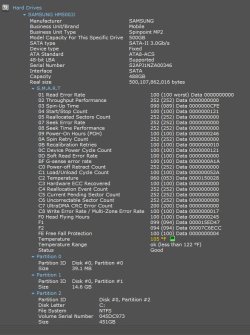
Here is a picture of my computers HDD. The Seagate and the Iomage has both the same spin as my computer HDD.
 

My Computer

Computer Manufacturer/Model Number
Dell XPS 17
OS
Windows Professional 64bit
CPU
Intel Core i7 2820QM @ 2.30GHz, Sandy Bridge 32nm
Motherboard
03RG89, Intel Ver: A12
Memory
16GB
Graphics Card(s)
Generic PnP Monitor (1600x900@60Hz), NVIDIA GeForce GT 555m
Sound Card
High Definition Audio Device
Monitor(s) Displays
NVIDIA 3D
Screen Resolution
1600 x 900 3d
Hard Drives
250GB SAMSUNG SAMSUNG SSD PM810 2.5" 256GB ATA Device (SATA-SSD)
625GB SAMSUNG SAMSUNG HM640JJ ATA Device (SATA)
Other Info
Transend 64GB Memory Card, Lexar Echo ZE 32GB USB 2.0 Backup DriveLEHZE32GASBNA <---Newest thing and very small.
Nice picture which I unfortunately cannot read - too faint (too little contrast) for my eyes.
 

My Computer

Computer Manufacturer/Model Number
HP, Dell, Gateway, Toshiba - 4 laptops and 2 desktops
OS
Vista, Windows7, Mint Mate, Zorin, Windows 8
CPU
from 1.6GHz Duo to i7
Monitor(s) Displays
2x HP w2207
Hard Drives
5x HDD, 7x SSD, 12x Externals
Keyboard
with trackball - no mices
Mouse
Trackball mice
Internet Speed
DSL 6000
The ATA hardware limitations is what WHS is referring to there. The speed you see listed for 3.0 is the maximum you could see not the actual in use speed.

A Sata III drive for example in an external enclosure would be the preferred over any Sata II drive with that seeing the 6gb over 3gb capability but still not end up seeing more then what the usb bus supports. The transfer rate is rated twice as fast as Sata II.


The SSDs are obviously fastter but will still be limited by the bus if the speeds exceed that. But external drives are not sold with performance in mind but typically see the more energy saving model drives in use there. For WD that would be a Green Power model over a Caviar Blue or Black edition performance model.

There is absolutely no reason to prefer a SATA III drive over a SATA II drive. Transfer rates for Hard Disk Drives will be the same for SATA II or SATA III interfaces. Either protocol can handle the rates of current and future Hard Disk drives, whether it is an external or internal enclosure.

Simply staed: HDD transfer rates are slower than either SATA II or SATA III. The only reason to prefer SATA III over SATA II is for SSD drives, which can outperform SATA II rates, unlike HDD which don't. In any case USB 3.0 will be the limiting factor in that case, so again - no reason to prefer SATA III over II for an external drive.

Well I can tell you a little story on that one. When first putting this case together 7 went onto one of the Sata III drives until the memory was found incorrect forcing a new clean install on one of the Sata II drives instead. Note the Sata IIIs were plugged into the S3 ports.

What big difference was seen with 7 during the first install and later on the present host/boot drive? NONE!

What does that mean? The faster bus "allows at times" faster transfer/access times when all conditions are met. Ideal speed with ideal conditions met.

As for hard drives they are still limited by the ATA contraints of that standard. And of course one reason why people are looking a lot at SSDs being solid state over physical platters to surpass the physical limitations seen with the ATA 100/133 standard.

Well I ( and many other see no difference). Perhaps it was a difference in the device drivers you had for the 3 vs 2.
 

My Computer

Computer type
PC/Desktop
Computer Manufacturer/Model Number
Home built (GeneO industries)/Model 4
OS
Windows 10 Pro. EFI boot partition, full EFI boot
CPU
i7 4770k 4.4GHz (44-44-43-43 turbo) @ 1.248V
Motherboard
ASUS Maximus VI Hero
Memory
16GB (8GBx2) @2200 MHz G.skill Sniper 10-11-10-30-1, 1.6V
Graphics Card(s)
MSI GTX 970 Gaming 4G
Sound Card
Onboard SupremeFX Audio
Monitor(s) Displays
NEC Spectraview 2490WUXi-SV
Screen Resolution
1920 x 1200
Hard Drives
Samsung 850 Pro 256GB (OS), Samsung 2x 128GB 840 Pro SSD in RAID0, 3x WD Blue 6Gb/s 1TB RAID0, WD 2TB Black external USB 3.0, 2TB WD20EARS Green external USB 3.0, 2x 500GB Seagate and 1 750 GB external USB, 1x 350GB external USB3
PSU
Seasonic X-850 (2012 KM3 model)
Case
Fractal Design Define R4
Cooling
NH-D14, NF-F12, NF-A15; NF-P14, NF-P12,NF-A14, S12A PWM
Keyboard
Cooler Master Storm Quickfire Rapid - Brown
Mouse
Logitech G602
Internet Speed
126.4 Mb/s down, 24.3 Mb/s up
Other Info
USB 3.0 x8 , SATA III x8, eSATA, USB 2.0 x6. Samsung DVD R/W drive.

WEI: CPU 7.8, Memory 7.9, Graphics 7.9, Disk 7.9
Nice picture which I unfortunately cannot read - too faint (too little contrast) for my eyes.

If you click on the picture you'll be able to blow it up. As for the drivers, they are all up to date. I guess I'm doomed.
 

My Computer

Computer Manufacturer/Model Number
Dell XPS 17
OS
Windows Professional 64bit
CPU
Intel Core i7 2820QM @ 2.30GHz, Sandy Bridge 32nm
Motherboard
03RG89, Intel Ver: A12
Memory
16GB
Graphics Card(s)
Generic PnP Monitor (1600x900@60Hz), NVIDIA GeForce GT 555m
Sound Card
High Definition Audio Device
Monitor(s) Displays
NVIDIA 3D
Screen Resolution
1600 x 900 3d
Hard Drives
250GB SAMSUNG SAMSUNG SSD PM810 2.5" 256GB ATA Device (SATA-SSD)
625GB SAMSUNG SAMSUNG HM640JJ ATA Device (SATA)
Other Info
Transend 64GB Memory Card, Lexar Echo ZE 32GB USB 2.0 Backup DriveLEHZE32GASBNA <---Newest thing and very small.
If you click on the picture you'll be able to blow it up
I know - that's what I always do. And I have all the maximum settings like different screen resolution, DPI at 150%, browser at 125%, etc. But if there is little contrast, it is still nearly impossible for me to decypher - who puts white writing on a fair grey background - not a good idea.
 

My Computer

Computer Manufacturer/Model Number
HP, Dell, Gateway, Toshiba - 4 laptops and 2 desktops
OS
Vista, Windows7, Mint Mate, Zorin, Windows 8
CPU
from 1.6GHz Duo to i7
Monitor(s) Displays
2x HP w2207
Hard Drives
5x HDD, 7x SSD, 12x Externals
Keyboard
with trackball - no mices
Mouse
Trackball mice
Internet Speed
DSL 6000
If you click on the picture you'll be able to blow it up
I know - that's what I always do. And I have all the maximum settings like different screen resolution, DPI at 150%, browser at 125%, etc. But if there is little contrast, it is still nearly impossible for me to decypher - who puts white writing on a fair grey background - not a good idea.

Agreed. Not eveyone has the great eyesight they once had (me). Even though I can read it it is a little hard on the eyes.... and this is with my reading glasses ;)
 

My Computer

Computer type
PC/Desktop
Computer Manufacturer/Model Number
Custom built by me.
OS
Windows 10 Pro
CPU
Intel Core i7-4770K (3.5Ghz)
Motherboard
Gigabyte G1 Sniper 5 (F10 Bios)
Memory
32 gig Corsair Dominator Platinum (4x8Gig)
Graphics Card(s)
Sapphire Tri-X R9 Fury
Sound Card
Soundblaster ZXR
Monitor(s) Displays
NEC PA242W 24" LCD Monitor
Screen Resolution
1920 x 1200
Hard Drives
Primary - Samsung 850 Pro (512gig), Samsung 840 Pro (256gig), 2TB WD Caviar Black.
PSU
EVGA Supernova 1000 G2
Case
Cooler Master HAF X
Cooling
Corsair H100i with Corsair Air Series SP120 Quiet Fans
Keyboard
Logitech Wireless Wave
Mouse
Logitech Performance MX
Internet Speed
High Speed Cable
Antivirus
Norton Security
Browser
IE11
Other Info
Memory Timings - 1866MHz @ 9-9-9-27-1T @ 1.5 volts
Back
Top