USB ATA HD: Primary vs Logical

Russellreno

New member
Member
Local time
2:57 AM
Messages
24
Location
Turlock
Win 7 recognizes my UST ATA hard drive but I want to test it before I spend hours moving data to it.

How do I test the drive?

Since it is formated as a primary drive does that mean it must on when I power up my computer?

What happens if I turn it off and on again.

Should I convert it to a Logical drive?

The most frustrating part of the process is the drive is not consistently recognized by Win 7, VM Player or XP Home. EASEUS Partition Manager failed several times to complete a move, format, delete partition.

Background:
I recently converted a Western Digital 500GB drive from Raw to NTFS. Saturday I used an Elevated Command to format it ~ F: /NTFS /Q. At that point Win 7 recognized the drive and I backup 140GB to this drive.

Sunday morning Win 7 could not recognize the drive.

I then installed VM Player, XP Home Edition and ran EASEUS Partition Manager. PM found several Partition in front of the F drive. PM removed all of the partitions and formatted the drive.

Win 7 currently recognizes the drive. Computer Manager reports it as:

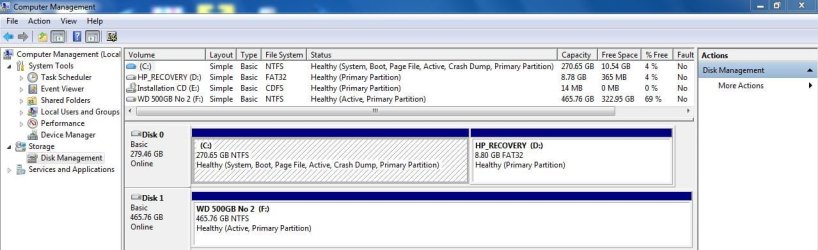
F: Simple, Basic, NTFS Healthy (Active Primary Partition) 465.7 GB Free: 322.9
 

My Computer My Computer

Computer type
PC/Desktop
Computer Manufacturer/Model Number
HP Pavillion
OS
OS Name Microsoft Windows 7 Home Premium OS Version 6.1.7601
CPU
AMD Athlon II x4 630 Processor
Motherboard
Aloe Foxconn
Memory
6GB 1066Mhz
Graphics Card(s)
ATI Radeon HD 4200
Sound Card
Realtek High Definition Audio
Monitor(s) Displays
HP w2338h Wide LCD Monitor
Screen Resolution
1080x1920
Being Primary does not mean it needs to be on when you power up your computer. There is no need to convert to Logical unless you run out of Primary partitions.

Have you tried updating your USB drivers from Device Manager, and updating your chipset drivers?
 

My Computer My Computer

Computer Manufacturer/Model Number
Custom
OS
Windows 7 Professional x64
CPU
Intel i7 2600K OC'd @ 4620 MHz
Motherboard
Asus P8Z68-V Pro
Memory
16GB GSkill Sniper 2133 Mhz (4x4GB)
Graphics Card(s)
EVGA GeForce GTX 480 SuperClocked+
Sound Card
Realtek High Definition Audio
Monitor(s) Displays
2x Acer S273HLbmii 27"
Screen Resolution
2 x 1920x1080
Hard Drives
64GB Crucial M4 SSD

Storage: Hitachi 1TB 5400RPM, Samsung 1.5TB 5400RPM
PSU
Corsair HW Series 750w (modular)
Case
Cooler Master HAF 932 Advanced Blue Edition
Cooling
CM Hyper 212+ CPU cooler, 3x 230mm + 1x 140mm case fans
Keyboard
Logitech MK320 (wireless)
Mouse
Logitech MK320 (wireless)
Internet Speed
30 Mb/s : 2 Mb/s
The similar threads below answers some of my questions.
1. Use a primary drive to assign a letter so Win 7 can recognize it.

Can I rely Win 7 to recognize this drive now?
What happens if I turn it off and on?
 

My Computer My Computer

Computer type
PC/Desktop
Computer Manufacturer/Model Number
HP Pavillion
OS
OS Name Microsoft Windows 7 Home Premium OS Version 6.1.7601
CPU
AMD Athlon II x4 630 Processor
Motherboard
Aloe Foxconn
Memory
6GB 1066Mhz
Graphics Card(s)
ATI Radeon HD 4200
Sound Card
Realtek High Definition Audio
Monitor(s) Displays
HP w2338h Wide LCD Monitor
Screen Resolution
1080x1920
If you turn it off without using the Safely Remove Hardware button in the system tray, you risk data loss. I am not at home now, so I can't show you a screenshot, but search Google for "disable write caching windows 7".
 

My Computer My Computer

Computer Manufacturer/Model Number
Custom
OS
Windows 7 Professional x64
CPU
Intel i7 2600K OC'd @ 4620 MHz
Motherboard
Asus P8Z68-V Pro
Memory
16GB GSkill Sniper 2133 Mhz (4x4GB)
Graphics Card(s)
EVGA GeForce GTX 480 SuperClocked+
Sound Card
Realtek High Definition Audio
Monitor(s) Displays
2x Acer S273HLbmii 27"
Screen Resolution
2 x 1920x1080
Hard Drives
64GB Crucial M4 SSD

Storage: Hitachi 1TB 5400RPM, Samsung 1.5TB 5400RPM
PSU
Corsair HW Series 750w (modular)
Case
Cooler Master HAF 932 Advanced Blue Edition
Cooling
CM Hyper 212+ CPU cooler, 3x 230mm + 1x 140mm case fans
Keyboard
Logitech MK320 (wireless)
Mouse
Logitech MK320 (wireless)
Internet Speed
30 Mb/s : 2 Mb/s
Being Primary does not mean it needs to be on when you power up your computer. There is no need to convert to Logical unless you run out of Primary partitions.

Have you tried updating your USB drivers from Device Manager, and updating your chipset drivers?

I did try to update the USB drivers from Device Manager but it did not find any drivers.

I recently updated most of my drivers. What driver update service or program do you use?
 

My Computer My Computer

Computer type
PC/Desktop
Computer Manufacturer/Model Number
HP Pavillion
OS
OS Name Microsoft Windows 7 Home Premium OS Version 6.1.7601
CPU
AMD Athlon II x4 630 Processor
Motherboard
Aloe Foxconn
Memory
6GB 1066Mhz
Graphics Card(s)
ATI Radeon HD 4200
Sound Card
Realtek High Definition Audio
Monitor(s) Displays
HP w2338h Wide LCD Monitor
Screen Resolution
1080x1920

My Computer My Computer

Computer type
PC/Desktop
Computer Manufacturer/Model Number
HP Pavillion
OS
OS Name Microsoft Windows 7 Home Premium OS Version 6.1.7601
CPU
AMD Athlon II x4 630 Processor
Motherboard
Aloe Foxconn
Memory
6GB 1066Mhz
Graphics Card(s)
ATI Radeon HD 4200
Sound Card
Realtek High Definition Audio
Monitor(s) Displays
HP w2338h Wide LCD Monitor
Screen Resolution
1080x1920
Being Primary does not mean it needs to be on when you power up your computer. There is no need to convert to Logical unless you run out of Primary partitions.

Have you tried updating your USB drivers from Device Manager, and updating your chipset drivers?

I did try to update the USB drivers from Device Manager but it did not find any drivers.

I recently updated most of my drivers. What driver update service or program do you use?
I use Device Manager and manually search for new drivers for the devices I need to update, but I can recommend a third-party program: Driver Easy - Free Driver Detect & Download Software
 

My Computer My Computer

Computer Manufacturer/Model Number
Custom
OS
Windows 7 Professional x64
CPU
Intel i7 2600K OC'd @ 4620 MHz
Motherboard
Asus P8Z68-V Pro
Memory
16GB GSkill Sniper 2133 Mhz (4x4GB)
Graphics Card(s)
EVGA GeForce GTX 480 SuperClocked+
Sound Card
Realtek High Definition Audio
Monitor(s) Displays
2x Acer S273HLbmii 27"
Screen Resolution
2 x 1920x1080
Hard Drives
64GB Crucial M4 SSD

Storage: Hitachi 1TB 5400RPM, Samsung 1.5TB 5400RPM
PSU
Corsair HW Series 750w (modular)
Case
Cooler Master HAF 932 Advanced Blue Edition
Cooling
CM Hyper 212+ CPU cooler, 3x 230mm + 1x 140mm case fans
Keyboard
Logitech MK320 (wireless)
Mouse
Logitech MK320 (wireless)
Internet Speed
30 Mb/s : 2 Mb/s
I hate do argue with my friend Jonathan, but there is really no need to disable write caching if you ALWAYS use "safely remove". The safely remove will purge the cache before it releases the disk. But it is very rare that there is anything left in the cache anyhow. When you disable write caching, you may get a performance hit.
 

My Computer My Computer

Computer Manufacturer/Model Number
HP, Dell, Gateway, Toshiba - 4 laptops and 2 desktops
OS
Vista, Windows7, Mint Mate, Zorin, Windows 8
CPU
from 1.6GHz Duo to i7
Monitor(s) Displays
2x HP w2207
Hard Drives
5x HDD, 7x SSD, 12x Externals
Keyboard
with trackball - no mices
Mouse
Trackball mice
Internet Speed
DSL 6000
I agree with whs completely. Using the Safely Remove button is a good practice.
 

My Computer My Computer

Computer Manufacturer/Model Number
Custom
OS
Windows 7 Professional x64
CPU
Intel i7 2600K OC'd @ 4620 MHz
Motherboard
Asus P8Z68-V Pro
Memory
16GB GSkill Sniper 2133 Mhz (4x4GB)
Graphics Card(s)
EVGA GeForce GTX 480 SuperClocked+
Sound Card
Realtek High Definition Audio
Monitor(s) Displays
2x Acer S273HLbmii 27"
Screen Resolution
2 x 1920x1080
Hard Drives
64GB Crucial M4 SSD

Storage: Hitachi 1TB 5400RPM, Samsung 1.5TB 5400RPM
PSU
Corsair HW Series 750w (modular)
Case
Cooler Master HAF 932 Advanced Blue Edition
Cooling
CM Hyper 212+ CPU cooler, 3x 230mm + 1x 140mm case fans
Keyboard
Logitech MK320 (wireless)
Mouse
Logitech MK320 (wireless)
Internet Speed
30 Mb/s : 2 Mb/s
I updated my Intel Chipset drivers on January 19, 2010.

Device Manager reports I have the current drivers for the USB Mass Storage Device.

It looks like we are finished here!

I will leave this post open until tomorrow.

Thanks Jonathon.

BTW the next time I am in Rednecksville I will buy you a beer.
 

My Computer My Computer

Computer type
PC/Desktop
Computer Manufacturer/Model Number
HP Pavillion
OS
OS Name Microsoft Windows 7 Home Premium OS Version 6.1.7601
CPU
AMD Athlon II x4 630 Processor
Motherboard
Aloe Foxconn
Memory
6GB 1066Mhz
Graphics Card(s)
ATI Radeon HD 4200
Sound Card
Realtek High Definition Audio
Monitor(s) Displays
HP w2338h Wide LCD Monitor
Screen Resolution
1080x1920
Great, hopefully the drive will stop disconnecting now.
 

My Computer My Computer

Computer Manufacturer/Model Number
Custom
OS
Windows 7 Professional x64
CPU
Intel i7 2600K OC'd @ 4620 MHz
Motherboard
Asus P8Z68-V Pro
Memory
16GB GSkill Sniper 2133 Mhz (4x4GB)
Graphics Card(s)
EVGA GeForce GTX 480 SuperClocked+
Sound Card
Realtek High Definition Audio
Monitor(s) Displays
2x Acer S273HLbmii 27"
Screen Resolution
2 x 1920x1080
Hard Drives
64GB Crucial M4 SSD

Storage: Hitachi 1TB 5400RPM, Samsung 1.5TB 5400RPM
PSU
Corsair HW Series 750w (modular)
Case
Cooler Master HAF 932 Advanced Blue Edition
Cooling
CM Hyper 212+ CPU cooler, 3x 230mm + 1x 140mm case fans
Keyboard
Logitech MK320 (wireless)
Mouse
Logitech MK320 (wireless)
Internet Speed
30 Mb/s : 2 Mb/s
More trouble.

I check on Syncback progress. The drive was not responding. I powered it off and on. Still on response.

I restarted Win 7 with the USB powered on. Win 7 stopped at the setup screen.
USB off, Win 7 loaded immediated but stopped at Starting Windows.

Win 7 with USB off. Start up repairs ran.

Win 7 finally started with USB off.

Device Manager reports:

USB Mass Storage is working properly.

WD Drive Device is disabled. Code 22. Enabled is grayed out. Properties window could not enable device.
 

My Computer My Computer

Computer type
PC/Desktop
Computer Manufacturer/Model Number
HP Pavillion
OS
OS Name Microsoft Windows 7 Home Premium OS Version 6.1.7601
CPU
AMD Athlon II x4 630 Processor
Motherboard
Aloe Foxconn
Memory
6GB 1066Mhz
Graphics Card(s)
ATI Radeon HD 4200
Sound Card
Realtek High Definition Audio
Monitor(s) Displays
HP w2338h Wide LCD Monitor
Screen Resolution
1080x1920
Bump.
 

My Computer My Computer

Computer type
PC/Desktop
Computer Manufacturer/Model Number
HP Pavillion
OS
OS Name Microsoft Windows 7 Home Premium OS Version 6.1.7601
CPU
AMD Athlon II x4 630 Processor
Motherboard
Aloe Foxconn
Memory
6GB 1066Mhz
Graphics Card(s)
ATI Radeon HD 4200
Sound Card
Realtek High Definition Audio
Monitor(s) Displays
HP w2338h Wide LCD Monitor
Screen Resolution
1080x1920
Does the drive work in another machine?
 

My Computer My Computer

Computer Manufacturer/Model Number
Custom
OS
Windows 7 Professional x64
CPU
Intel i7 2600K OC'd @ 4620 MHz
Motherboard
Asus P8Z68-V Pro
Memory
16GB GSkill Sniper 2133 Mhz (4x4GB)
Graphics Card(s)
EVGA GeForce GTX 480 SuperClocked+
Sound Card
Realtek High Definition Audio
Monitor(s) Displays
2x Acer S273HLbmii 27"
Screen Resolution
2 x 1920x1080
Hard Drives
64GB Crucial M4 SSD

Storage: Hitachi 1TB 5400RPM, Samsung 1.5TB 5400RPM
PSU
Corsair HW Series 750w (modular)
Case
Cooler Master HAF 932 Advanced Blue Edition
Cooling
CM Hyper 212+ CPU cooler, 3x 230mm + 1x 140mm case fans
Keyboard
Logitech MK320 (wireless)
Mouse
Logitech MK320 (wireless)
Internet Speed
30 Mb/s : 2 Mb/s
Does the drive work in another machine?

Sorta kinda.

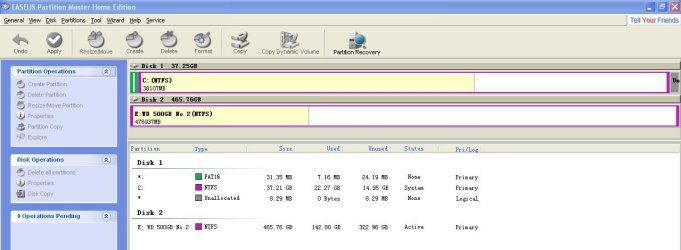
EASEUS Partition Manager will recognize it via VM Player XP Home but when I format the drive PM reports "Update System Information Failed".

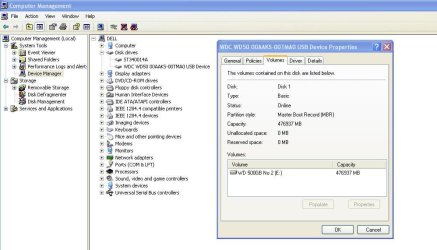
I just installed the Windows 98 drivers on my Dell XP Home machine. Computer Manager recognizes the drive now.

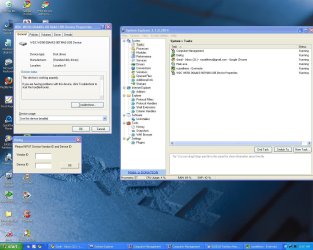
The 98 Driver installer is asking for the Manufacture ID and Device ID.

The drive is a Western Digital WD50000AAKS,

Please advise.
 

Attachments

  • Dell XP Home Driver 98 WD EASEUS.jpg
    Dell XP Home Driver 98 WD EASEUS.jpg
    151.2 KB · Views: 20

My Computer My Computer

Computer type
PC/Desktop
Computer Manufacturer/Model Number
HP Pavillion
OS
OS Name Microsoft Windows 7 Home Premium OS Version 6.1.7601
CPU
AMD Athlon II x4 630 Processor
Motherboard
Aloe Foxconn
Memory
6GB 1066Mhz
Graphics Card(s)
ATI Radeon HD 4200
Sound Card
Realtek High Definition Audio
Monitor(s) Displays
HP w2338h Wide LCD Monitor
Screen Resolution
1080x1920
That doesn't sound very good to me. USB drives should be plug-n-play, on XP and newer.

You shouldn't need to install drivers for it.

What HP Pavillion do you have? Could you give me the model number?
 

My Computer My Computer

Computer Manufacturer/Model Number
Custom
OS
Windows 7 Professional x64
CPU
Intel i7 2600K OC'd @ 4620 MHz
Motherboard
Asus P8Z68-V Pro
Memory
16GB GSkill Sniper 2133 Mhz (4x4GB)
Graphics Card(s)
EVGA GeForce GTX 480 SuperClocked+
Sound Card
Realtek High Definition Audio
Monitor(s) Displays
2x Acer S273HLbmii 27"
Screen Resolution
2 x 1920x1080
Hard Drives
64GB Crucial M4 SSD

Storage: Hitachi 1TB 5400RPM, Samsung 1.5TB 5400RPM
PSU
Corsair HW Series 750w (modular)
Case
Cooler Master HAF 932 Advanced Blue Edition
Cooling
CM Hyper 212+ CPU cooler, 3x 230mm + 1x 140mm case fans
Keyboard
Logitech MK320 (wireless)
Mouse
Logitech MK320 (wireless)
Internet Speed
30 Mb/s : 2 Mb/s
The HP Pavillion a1560n is running Win 7 Enterprise, VM Player and XP Home Edition.

Mean while, back at the Dell Dimension 2400 running XP Home Edition:

I did a search for Sunplus USB Adaptor and found this page.

The first driver file added XP so I dl and installed. It error "No Sunplus Adaptor found".

After uninstalling and reinstalling the Win 98 driver I gave up. Several minutes later the Plug and Play function recognized the E drive!

I made a few screen caps, then restarted the Dell. The E drive is no longer recognized.
 

Attachments

  • WD Drive E Win 98 Driver.jpg
    WD Drive E Win 98 Driver.jpg
    71.8 KB · Views: 16
  • EASEUS WD Drive E.jpg
    EASEUS WD Drive E.jpg
    63.2 KB · Views: 9

My Computer My Computer

Computer type
PC/Desktop
Computer Manufacturer/Model Number
HP Pavillion
OS
OS Name Microsoft Windows 7 Home Premium OS Version 6.1.7601
CPU
AMD Athlon II x4 630 Processor
Motherboard
Aloe Foxconn
Memory
6GB 1066Mhz
Graphics Card(s)
ATI Radeon HD 4200
Sound Card
Realtek High Definition Audio
Monitor(s) Displays
HP w2338h Wide LCD Monitor
Screen Resolution
1080x1920

My Computer My Computer

Computer Manufacturer/Model Number
Custom
OS
Windows 7 Professional x64
CPU
Intel i7 2600K OC'd @ 4620 MHz
Motherboard
Asus P8Z68-V Pro
Memory
16GB GSkill Sniper 2133 Mhz (4x4GB)
Graphics Card(s)
EVGA GeForce GTX 480 SuperClocked+
Sound Card
Realtek High Definition Audio
Monitor(s) Displays
2x Acer S273HLbmii 27"
Screen Resolution
2 x 1920x1080
Hard Drives
64GB Crucial M4 SSD

Storage: Hitachi 1TB 5400RPM, Samsung 1.5TB 5400RPM
PSU
Corsair HW Series 750w (modular)
Case
Cooler Master HAF 932 Advanced Blue Edition
Cooling
CM Hyper 212+ CPU cooler, 3x 230mm + 1x 140mm case fans
Keyboard
Logitech MK320 (wireless)
Mouse
Logitech MK320 (wireless)
Internet Speed
30 Mb/s : 2 Mb/s
The HP Pavillion recognizes the WD drive now. I did not try a reboot yet.

Uninstalled the Win 98 Drivers (located in the mini disk). (Clean start point)
Install Sunplus USA ATA to Serial - SPIF218_98. (See above to URL)
Disable USB Mass Storage Device.
Enable USB Mass Storage Device.

I will now create a restore point, reboot and hope for the best.
 

Attachments

  • HP WD 500GB Drive F.jpg
    HP WD 500GB Drive F.jpg
    78.9 KB · Views: 69

My Computer My Computer

Computer type
PC/Desktop
Computer Manufacturer/Model Number
HP Pavillion
OS
OS Name Microsoft Windows 7 Home Premium OS Version 6.1.7601
CPU
AMD Athlon II x4 630 Processor
Motherboard
Aloe Foxconn
Memory
6GB 1066Mhz
Graphics Card(s)
ATI Radeon HD 4200
Sound Card
Realtek High Definition Audio
Monitor(s) Displays
HP w2338h Wide LCD Monitor
Screen Resolution
1080x1920
As of last night Syncback still could not consistently read the F: drive on the HP Win 7 64. The drive would not install on the Dell XP Home.

So I decided to check the USB ports and finally I changed the USB cable. Voila. Both the HP and Dell read the drive. I had also upgraded Syncback Free to Syncback SE. I've copied 227 GB of data to the drive. I had no problems with the drive since last night.

Earlier this week I installed the new HP Driver Update program. The HP drivers were already up to date. I wondered if the Sunplus USA ATA to Serial drivers were necessary so I uninstalled them on both machine. The drive continued to work flawlessly.

Since I had tossed the original USB cable in the trash last night I then test it on both machines. The drive is working with that cable.

I have a complete back up of both machines on the F: drive. I have a second WD drive I will test now.
 

My Computer My Computer

Computer type
PC/Desktop
Computer Manufacturer/Model Number
HP Pavillion
OS
OS Name Microsoft Windows 7 Home Premium OS Version 6.1.7601
CPU
AMD Athlon II x4 630 Processor
Motherboard
Aloe Foxconn
Memory
6GB 1066Mhz
Graphics Card(s)
ATI Radeon HD 4200
Sound Card
Realtek High Definition Audio
Monitor(s) Displays
HP w2338h Wide LCD Monitor
Screen Resolution
1080x1920
Back
Top