
Usb code 10

To reconfirm, your audio device has class upper filter ksthunk and no lower filter listed, correct?


that is correct
 

My Computer

Computer type
PC/Desktop
OS
Windows 7 64 bit
CPU
Overclocked Intel® Core™i7-4770k Quad Core (
Motherboard
ASUS® Z87-A: ATX, USB3.0, SATA6GB/S, SLi, XFIRE
Memory
16GB KINGSTON HYPERX BEAST DUAL-DDR3 2400MHz X.
Graphics Card(s)
3GB NVIDIA GEFORCE GTX 780 - 2 DVI, HDMI, DP -
Monitor(s) Displays
Asus VG248QE 24-inch 3D LED Monitor - Black (1920x1080, 8000
Hard Drives
1st Hard Disk 240GB INTEL® 520 SERIES SSD (upto 550MB/sR | 520MB/sW)

2nd Hard Disk 1TB WD CAVIAR BLACK WD1003FZEX, SATA 6 Gb/s, 64MB CACHE (7200rpm)
PSU
CORSAIR 750W RM SERIES™ MODULAR 80 PLUS® GOLD,
Case
COOLERMASTER CM STORM TROOPER - GAMING ENTHUSIAST CASE
Cooling
Corsair H80i Hydro Series High Performance. Thermal Paste
image_1.jpeg
[/URL][/IMG]
 

My Computer

Computer type
PC/Desktop
OS
Windows 7 64 bit
CPU
Overclocked Intel® Core™i7-4770k Quad Core (
Motherboard
ASUS® Z87-A: ATX, USB3.0, SATA6GB/S, SLi, XFIRE
Memory
16GB KINGSTON HYPERX BEAST DUAL-DDR3 2400MHz X.
Graphics Card(s)
3GB NVIDIA GEFORCE GTX 780 - 2 DVI, HDMI, DP -
Monitor(s) Displays
Asus VG248QE 24-inch 3D LED Monitor - Black (1920x1080, 8000
Hard Drives
1st Hard Disk 240GB INTEL® 520 SERIES SSD (upto 550MB/sR | 520MB/sW)

2nd Hard Disk 1TB WD CAVIAR BLACK WD1003FZEX, SATA 6 Gb/s, 64MB CACHE (7200rpm)
PSU
CORSAIR 750W RM SERIES™ MODULAR 80 PLUS® GOLD,
Case
COOLERMASTER CM STORM TROOPER - GAMING ENTHUSIAST CASE
Cooling
Corsair H80i Hydro Series High Performance. Thermal Paste
OK. In your DevMgr snapshot, Expand USB just to check new yellow icons there either.

Ughh. You're problem is tougher to figure out what's going on then i first guessed. Device Manager writes a trace file. Let's have a look at that too
1. Create a .zip file of C:\WINDOWS\inf\setupapi.dev.log. Attach to next post.

2. Delete the original file

3. Let things run. Try to notice machine clock time when problem clears up and again approx machine clock time when problem reappears. The create a new .zip of the new setupapi.dev.log and tell me the approx clock times when things were good and again when it broke.

Hoping to find more helpful info in there
 

My Computer

Computer type
PC/Desktop
Computer Manufacturer/Model Number
Dell Optiplex 360 and Optiplex 755
OS
Desk 1: Win 7 Pro x32; Desk 2: Windows 10 x64
Hard Drives
500GB Crucial SSD in both Desktops
Other Info
Buffalo 6TB NAS, Raid 1
OK. In your DevMgr snapshot, Expand USB just to check new yellow icons there either.

all clear
 

My Computer

Computer type
PC/Desktop
OS
Windows 7 64 bit
CPU
Overclocked Intel® Core™i7-4770k Quad Core (
Motherboard
ASUS® Z87-A: ATX, USB3.0, SATA6GB/S, SLi, XFIRE
Memory
16GB KINGSTON HYPERX BEAST DUAL-DDR3 2400MHz X.
Graphics Card(s)
3GB NVIDIA GEFORCE GTX 780 - 2 DVI, HDMI, DP -
Monitor(s) Displays
Asus VG248QE 24-inch 3D LED Monitor - Black (1920x1080, 8000
Hard Drives
1st Hard Disk 240GB INTEL® 520 SERIES SSD (upto 550MB/sR | 520MB/sW)

2nd Hard Disk 1TB WD CAVIAR BLACK WD1003FZEX, SATA 6 Gb/s, 64MB CACHE (7200rpm)
PSU
CORSAIR 750W RM SERIES™ MODULAR 80 PLUS® GOLD,
Case
COOLERMASTER CM STORM TROOPER - GAMING ENTHUSIAST CASE
Cooling
Corsair H80i Hydro Series High Performance. Thermal Paste
here we go
 

Attachments

My Computer

Computer type
PC/Desktop
OS
Windows 7 64 bit
CPU
Overclocked Intel® Core™i7-4770k Quad Core (
Motherboard
ASUS® Z87-A: ATX, USB3.0, SATA6GB/S, SLi, XFIRE
Memory
16GB KINGSTON HYPERX BEAST DUAL-DDR3 2400MHz X.
Graphics Card(s)
3GB NVIDIA GEFORCE GTX 780 - 2 DVI, HDMI, DP -
Monitor(s) Displays
Asus VG248QE 24-inch 3D LED Monitor - Black (1920x1080, 8000
Hard Drives
1st Hard Disk 240GB INTEL® 520 SERIES SSD (upto 550MB/sR | 520MB/sW)

2nd Hard Disk 1TB WD CAVIAR BLACK WD1003FZEX, SATA 6 Gb/s, 64MB CACHE (7200rpm)
PSU
CORSAIR 750W RM SERIES™ MODULAR 80 PLUS® GOLD,
Case
COOLERMASTER CM STORM TROOPER - GAMING ENTHUSIAST CASE
Cooling
Corsair H80i Hydro Series High Performance. Thermal Paste
2. Delete the original file

will i delete that log file
 

My Computer

Computer type
PC/Desktop
OS
Windows 7 64 bit
CPU
Overclocked Intel® Core™i7-4770k Quad Core (
Motherboard
ASUS® Z87-A: ATX, USB3.0, SATA6GB/S, SLi, XFIRE
Memory
16GB KINGSTON HYPERX BEAST DUAL-DDR3 2400MHz X.
Graphics Card(s)
3GB NVIDIA GEFORCE GTX 780 - 2 DVI, HDMI, DP -
Monitor(s) Displays
Asus VG248QE 24-inch 3D LED Monitor - Black (1920x1080, 8000
Hard Drives
1st Hard Disk 240GB INTEL® 520 SERIES SSD (upto 550MB/sR | 520MB/sW)

2nd Hard Disk 1TB WD CAVIAR BLACK WD1003FZEX, SATA 6 Gb/s, 64MB CACHE (7200rpm)
PSU
CORSAIR 750W RM SERIES™ MODULAR 80 PLUS® GOLD,
Case
COOLERMASTER CM STORM TROOPER - GAMING ENTHUSIAST CASE
Cooling
Corsair H80i Hydro Series High Performance. Thermal Paste
If i disable my OC and return BIOS to default everything is fine :) i can reset my PC loads of times without issue. But when i enable my OC i get that error
 

My Computer

Computer type
PC/Desktop
OS
Windows 7 64 bit
CPU
Overclocked Intel® Core™i7-4770k Quad Core (
Motherboard
ASUS® Z87-A: ATX, USB3.0, SATA6GB/S, SLi, XFIRE
Memory
16GB KINGSTON HYPERX BEAST DUAL-DDR3 2400MHz X.
Graphics Card(s)
3GB NVIDIA GEFORCE GTX 780 - 2 DVI, HDMI, DP -
Monitor(s) Displays
Asus VG248QE 24-inch 3D LED Monitor - Black (1920x1080, 8000
Hard Drives
1st Hard Disk 240GB INTEL® 520 SERIES SSD (upto 550MB/sR | 520MB/sW)

2nd Hard Disk 1TB WD CAVIAR BLACK WD1003FZEX, SATA 6 Gb/s, 64MB CACHE (7200rpm)
PSU
CORSAIR 750W RM SERIES™ MODULAR 80 PLUS® GOLD,
Case
COOLERMASTER CM STORM TROOPER - GAMING ENTHUSIAST CASE
Cooling
Corsair H80i Hydro Series High Performance. Thermal Paste
upload the new setup.api.log file windows built.

This is a tricky one. From what i have found
> ksthunk.sys is a filter only used on 64 bit machine
> I think it's used to interface to apps/modules that are 32 bit
> Googling ksthunk code 10 reveals a lot of forum posts from people with a variety of issues (BSODs as well) but not much in solutions

But we'll still take a look. Suggest you go back to Driver Details for the audio device
> Click on each module in the display to see its Provider and Version number
> Are they all from Microsoft? If not, who else Provdes?
> Also not the version and date of ksthunk. Just in case the process of reinstalling changes the version.
 

My Computer

Computer type
PC/Desktop
Computer Manufacturer/Model Number
Dell Optiplex 360 and Optiplex 755
OS
Desk 1: Win 7 Pro x32; Desk 2: Windows 10 x64
Hard Drives
500GB Crucial SSD in both Desktops
Other Info
Buffalo 6TB NAS, Raid 1
See that youve overclocked, according to your specs, thats more than likely the problem.

Roy
Accolades to torchwood for suggesting OC early on. :geek: I've never tried OC nor know much about it. I'm much more a "software kind-a-guy". So I'm curious how OC fits into the equation and could be causing these s/w issues if anyone(s) want to jump in with more info?

@Driver170
I don't want to hijack your thread.. but thought it might help all around to get a better idea of how OC could be part of your code 10 problem.
 

My Computer

Computer type
PC/Desktop
Computer Manufacturer/Model Number
Dell Optiplex 360 and Optiplex 755
OS
Desk 1: Win 7 Pro x32; Desk 2: Windows 10 x64
Hard Drives
500GB Crucial SSD in both Desktops
Other Info
Buffalo 6TB NAS, Raid 1
Its the OC for sure no code 10 as yet with asus default :)

@Driver170
I don't want to hijack your thread.. but thought it might help all around to get a better idea of how OC could be part of your code 10 problem.

Well if i disable my OC and use default the error 10 code is gone!
 

My Computer

Computer type
PC/Desktop
OS
Windows 7 64 bit
CPU
Overclocked Intel® Core™i7-4770k Quad Core (
Motherboard
ASUS® Z87-A: ATX, USB3.0, SATA6GB/S, SLi, XFIRE
Memory
16GB KINGSTON HYPERX BEAST DUAL-DDR3 2400MHz X.
Graphics Card(s)
3GB NVIDIA GEFORCE GTX 780 - 2 DVI, HDMI, DP -
Monitor(s) Displays
Asus VG248QE 24-inch 3D LED Monitor - Black (1920x1080, 8000
Hard Drives
1st Hard Disk 240GB INTEL® 520 SERIES SSD (upto 550MB/sR | 520MB/sW)

2nd Hard Disk 1TB WD CAVIAR BLACK WD1003FZEX, SATA 6 Gb/s, 64MB CACHE (7200rpm)
PSU
CORSAIR 750W RM SERIES™ MODULAR 80 PLUS® GOLD,
Case
COOLERMASTER CM STORM TROOPER - GAMING ENTHUSIAST CASE
Cooling
Corsair H80i Hydro Series High Performance. Thermal Paste
Great news! I don't understand why but I can pursue that in another thread if i choose to.

Congrats! and good work Torchwood! Learned something new
 

My Computer

Computer type
PC/Desktop
Computer Manufacturer/Model Number
Dell Optiplex 360 and Optiplex 755
OS
Desk 1: Win 7 Pro x32; Desk 2: Windows 10 x64
Hard Drives
500GB Crucial SSD in both Desktops
Other Info
Buffalo 6TB NAS, Raid 1
I'll take it over to simforums and dig deeper thats where i got the OC from.

But if it comes back during default CG i will message back :) thankyou for all the effort and fixing my blue screen cheers man
 

My Computer

Computer type
PC/Desktop
OS
Windows 7 64 bit
CPU
Overclocked Intel® Core™i7-4770k Quad Core (
Motherboard
ASUS® Z87-A: ATX, USB3.0, SATA6GB/S, SLi, XFIRE
Memory
16GB KINGSTON HYPERX BEAST DUAL-DDR3 2400MHz X.
Graphics Card(s)
3GB NVIDIA GEFORCE GTX 780 - 2 DVI, HDMI, DP -
Monitor(s) Displays
Asus VG248QE 24-inch 3D LED Monitor - Black (1920x1080, 8000
Hard Drives
1st Hard Disk 240GB INTEL® 520 SERIES SSD (upto 550MB/sR | 520MB/sW)

2nd Hard Disk 1TB WD CAVIAR BLACK WD1003FZEX, SATA 6 Gb/s, 64MB CACHE (7200rpm)
PSU
CORSAIR 750W RM SERIES™ MODULAR 80 PLUS® GOLD,
Case
COOLERMASTER CM STORM TROOPER - GAMING ENTHUSIAST CASE
Cooling
Corsair H80i Hydro Series High Performance. Thermal Paste

My Computer

Computer type
PC/Desktop
OS
Windows 7 64 bit
CPU
Overclocked Intel® Core™i7-4770k Quad Core (
Motherboard
ASUS® Z87-A: ATX, USB3.0, SATA6GB/S, SLi, XFIRE
Memory
16GB KINGSTON HYPERX BEAST DUAL-DDR3 2400MHz X.
Graphics Card(s)
3GB NVIDIA GEFORCE GTX 780 - 2 DVI, HDMI, DP -
Monitor(s) Displays
Asus VG248QE 24-inch 3D LED Monitor - Black (1920x1080, 8000
Hard Drives
1st Hard Disk 240GB INTEL® 520 SERIES SSD (upto 550MB/sR | 520MB/sW)

2nd Hard Disk 1TB WD CAVIAR BLACK WD1003FZEX, SATA 6 Gb/s, 64MB CACHE (7200rpm)
PSU
CORSAIR 750W RM SERIES™ MODULAR 80 PLUS® GOLD,
Case
COOLERMASTER CM STORM TROOPER - GAMING ENTHUSIAST CASE
Cooling
Corsair H80i Hydro Series High Performance. Thermal Paste
I redone my OC with that guide and so far so good no code 10
 

My Computer

Computer type
PC/Desktop
OS
Windows 7 64 bit
CPU
Overclocked Intel® Core™i7-4770k Quad Core (
Motherboard
ASUS® Z87-A: ATX, USB3.0, SATA6GB/S, SLi, XFIRE
Memory
16GB KINGSTON HYPERX BEAST DUAL-DDR3 2400MHz X.
Graphics Card(s)
3GB NVIDIA GEFORCE GTX 780 - 2 DVI, HDMI, DP -
Monitor(s) Displays
Asus VG248QE 24-inch 3D LED Monitor - Black (1920x1080, 8000
Hard Drives
1st Hard Disk 240GB INTEL® 520 SERIES SSD (upto 550MB/sR | 520MB/sW)

2nd Hard Disk 1TB WD CAVIAR BLACK WD1003FZEX, SATA 6 Gb/s, 64MB CACHE (7200rpm)
PSU
CORSAIR 750W RM SERIES™ MODULAR 80 PLUS® GOLD,
Case
COOLERMASTER CM STORM TROOPER - GAMING ENTHUSIAST CASE
Cooling
Corsair H80i Hydro Series High Performance. Thermal Paste
need this

Hi Driver,
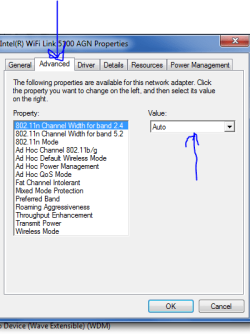
As i said, the only place you might be able to change the drivers properties is under the advanced options,
IF they are available post a screenshot of it, hopefully they are.

IF NOT then you will only be able to use the Turtlebeach equipement at BIOS default values.

see screenshot, if advanced tab/option is not shown then its time to buy another headset.

Roy
 

Attachments

  • advanced.PNG
    advanced.PNG
    13.9 KB · Views: 23

My Computer

Computer type
PC/Desktop
Computer Manufacturer/Model Number
medionl/Aspire 6930G/acer x55a
OS
W7 home premium 32bit/W7HP 64bit/w10 tp insider ring
CPU
E5300 dual core
Motherboard
medion MS7366
Memory
3gb
Graphics Card(s)
Nvidia Geforce 7100 Nforce 630i
Monitor(s) Displays
avixc
Internet Speed
n (isp resticted to 72)
Antivirus
mse/pands
Browser
palemoon
Other Info
Belkin Fd7050 n USB using Railink RT2870 drivers, more upto date
Hi my other USB device plays up too. So i have two that do it now but it never happens together thats the thing.

image_2.jpeg
[/URL][/IMG]
 

My Computer

Computer type
PC/Desktop
OS
Windows 7 64 bit
CPU
Overclocked Intel® Core™i7-4770k Quad Core (
Motherboard
ASUS® Z87-A: ATX, USB3.0, SATA6GB/S, SLi, XFIRE
Memory
16GB KINGSTON HYPERX BEAST DUAL-DDR3 2400MHz X.
Graphics Card(s)
3GB NVIDIA GEFORCE GTX 780 - 2 DVI, HDMI, DP -
Monitor(s) Displays
Asus VG248QE 24-inch 3D LED Monitor - Black (1920x1080, 8000
Hard Drives
1st Hard Disk 240GB INTEL® 520 SERIES SSD (upto 550MB/sR | 520MB/sW)

2nd Hard Disk 1TB WD CAVIAR BLACK WD1003FZEX, SATA 6 Gb/s, 64MB CACHE (7200rpm)
PSU
CORSAIR 750W RM SERIES™ MODULAR 80 PLUS® GOLD,
Case
COOLERMASTER CM STORM TROOPER - GAMING ENTHUSIAST CASE
Cooling
Corsair H80i Hydro Series High Performance. Thermal Paste
image_3.jpeg
[/URL][/IMG]
 

My Computer

Computer type
PC/Desktop
OS
Windows 7 64 bit
CPU
Overclocked Intel® Core™i7-4770k Quad Core (
Motherboard
ASUS® Z87-A: ATX, USB3.0, SATA6GB/S, SLi, XFIRE
Memory
16GB KINGSTON HYPERX BEAST DUAL-DDR3 2400MHz X.
Graphics Card(s)
3GB NVIDIA GEFORCE GTX 780 - 2 DVI, HDMI, DP -
Monitor(s) Displays
Asus VG248QE 24-inch 3D LED Monitor - Black (1920x1080, 8000
Hard Drives
1st Hard Disk 240GB INTEL® 520 SERIES SSD (upto 550MB/sR | 520MB/sW)

2nd Hard Disk 1TB WD CAVIAR BLACK WD1003FZEX, SATA 6 Gb/s, 64MB CACHE (7200rpm)
PSU
CORSAIR 750W RM SERIES™ MODULAR 80 PLUS® GOLD,
Case
COOLERMASTER CM STORM TROOPER - GAMING ENTHUSIAST CASE
Cooling
Corsair H80i Hydro Series High Performance. Thermal Paste
Is that the right ?
 

My Computer

Computer type
PC/Desktop
OS
Windows 7 64 bit
CPU
Overclocked Intel® Core™i7-4770k Quad Core (
Motherboard
ASUS® Z87-A: ATX, USB3.0, SATA6GB/S, SLi, XFIRE
Memory
16GB KINGSTON HYPERX BEAST DUAL-DDR3 2400MHz X.
Graphics Card(s)
3GB NVIDIA GEFORCE GTX 780 - 2 DVI, HDMI, DP -
Monitor(s) Displays
Asus VG248QE 24-inch 3D LED Monitor - Black (1920x1080, 8000
Hard Drives
1st Hard Disk 240GB INTEL® 520 SERIES SSD (upto 550MB/sR | 520MB/sW)

2nd Hard Disk 1TB WD CAVIAR BLACK WD1003FZEX, SATA 6 Gb/s, 64MB CACHE (7200rpm)
PSU
CORSAIR 750W RM SERIES™ MODULAR 80 PLUS® GOLD,
Case
COOLERMASTER CM STORM TROOPER - GAMING ENTHUSIAST CASE
Cooling
Corsair H80i Hydro Series High Performance. Thermal Paste
not good

Hi Driver,
The screenshots you posted are the one's i wanted to see,
If you compare them to the one i posted
YOU DO NOT have the advanced option tab that could have given you the choice to change the properties of that driver to try and compensate for the overclocking.

Im afraid if you want to use the Turtlebeach equipement then Overclocking is out.

Roy
 

My Computer

Computer type
PC/Desktop
Computer Manufacturer/Model Number
medionl/Aspire 6930G/acer x55a
OS
W7 home premium 32bit/W7HP 64bit/w10 tp insider ring
CPU
E5300 dual core
Motherboard
medion MS7366
Memory
3gb
Graphics Card(s)
Nvidia Geforce 7100 Nforce 630i
Monitor(s) Displays
avixc
Internet Speed
n (isp resticted to 72)
Antivirus
mse/pands
Browser
palemoon
Other Info
Belkin Fd7050 n USB using Railink RT2870 drivers, more upto date
Not good. My other USB wireless dongle now cuts out after a restart and thats with my BIOS at default.
 

My Computer

Computer type
PC/Desktop
OS
Windows 7 64 bit
CPU
Overclocked Intel® Core™i7-4770k Quad Core (
Motherboard
ASUS® Z87-A: ATX, USB3.0, SATA6GB/S, SLi, XFIRE
Memory
16GB KINGSTON HYPERX BEAST DUAL-DDR3 2400MHz X.
Graphics Card(s)
3GB NVIDIA GEFORCE GTX 780 - 2 DVI, HDMI, DP -
Monitor(s) Displays
Asus VG248QE 24-inch 3D LED Monitor - Black (1920x1080, 8000
Hard Drives
1st Hard Disk 240GB INTEL® 520 SERIES SSD (upto 550MB/sR | 520MB/sW)

2nd Hard Disk 1TB WD CAVIAR BLACK WD1003FZEX, SATA 6 Gb/s, 64MB CACHE (7200rpm)
PSU
CORSAIR 750W RM SERIES™ MODULAR 80 PLUS® GOLD,
Case
COOLERMASTER CM STORM TROOPER - GAMING ENTHUSIAST CASE
Cooling
Corsair H80i Hydro Series High Performance. Thermal Paste
Back
Top