USB data transfer speeds

Jeff Friend

New member
Local time
6:57 AM
Messages
5
I am running Windows 7 Ultimate 64Bit with Service Pack 1. I have a P8Z77-V DELUXE M/B, i7-3770 CPU. All the USB drivers are the latest drivers and Windows itself is totally up to date. Yet, when I connect any USB device, I get extremely slow data transfers.

I backed up some of my data to an external WD 1TB USB2 HDD, about 900G and it took 24 hours to copy it all.

Last night, I was copying 390GB from an external 500GB USB3 HDD to my PC and it took 12 hours.

Surely these speeds are NOT right???

I am using the headers on the case, would connecting the external drives to the USB on the motherboard directly make any difference?
 

My Computer

Computer type
PC/Desktop
Computer Manufacturer/Model Number
Custom Build
OS
Windows 7 Ultimate 64bit
CPU
Intel i7 3770K
Motherboard
Asus P7Z77- Deluxe
Memory
16GB DDR3 1600
Graphics Card(s)
NVidia GTX660ti
Hard Drives
1 X 250GB SSD
4 X WD 2TB (RAID 5)
Antivirus
Norton Antivirus
Browser
Internet Explorer and Chrome
Have you tried defragging the source drive? Depending on how many files you are moving and where they are located, the source drive heads might be going all over the platters to find the data. Does your mobo have the latest chipset drivers?
900GB is a lot of data ...
 

My Computer

Computer type
PC/Desktop
Computer Manufacturer/Model Number
Custom
OS
7 x64 Ultimate
CPU
AMD Ryzen 5
Motherboard
Gigabyte GA-AB350-Gaming
Memory
16GB DDR4
Graphics Card(s)
Radeon R7 360
Monitor(s) Displays
2 x Dell U2518D
Screen Resolution
2560x1440 2560x1440
Hard Drives
WD 500GB x2
Samsung SSD 128MB (OS)
XPG SX8200 Pro M.2 2280 1TB
PSU
Antec 500
Cooling
Hyper 212 EVO
Keyboard
Logitech cordless K800
Mouse
Logitech M510
Antivirus
Avira
I assume that was a HDD on USB2 - that is slow to begin with

But for such masses of data you really should have a SSHD attached to eSata or USB3. I made some measurements using 20GB of data to SSHD on eSata. That took 10 minutes. Project that for 900GB and it would be 7.5 hours. That is about the fastest you can expect. I also used a SSD and that was not much faster.
 

My Computer

Computer Manufacturer/Model Number
HP, Dell, Gateway, Toshiba - 4 laptops and 2 desktops
OS
Vista, Windows7, Mint Mate, Zorin, Windows 8
CPU
from 1.6GHz Duo to i7
Monitor(s) Displays
2x HP w2207
Hard Drives
5x HDD, 7x SSD, 12x Externals
Keyboard
with trackball - no mices
Mouse
Trackball mice
Internet Speed
DSL 6000
I have a P8Z77-V Pro board, very much like yours. There are both Intel USB 2.0 and USB 3.0 connectors, and of course depending on your case you may or may not have USB 3.0 via the case front connectors. For sure, you have them available via the motherboard on the rear. And you also have the Asmedia USB 3.0 connectors on the rear.

So for sure, at the very least you need to use a USB 3.0 connector if you want to potentially obtain USB 3.0 transfer speeds. You're not going to get them using a USB 2.0 connector.

Second, external drives which claim to be USB 3.0 are actually SATA drives in an enclosure that provides a SATA->to->USB 3.0 interface. And depending on the external drive you've purchased, this may be a SATA-II or SATA-III drive. And of course every hard drive model varies in access speed specs as well as cache... some have as little as 8MB cache and some have as much as 64MB cache, and some drives are 5400 or 5900 or 7200 RPM (or even variable speed, in "green" drives). The fact that they have been placed into an enclosure facilitating a USB 3.0 interface doesn't change the capabilities of the drive for arm access motion speed as well as data transfer rate.

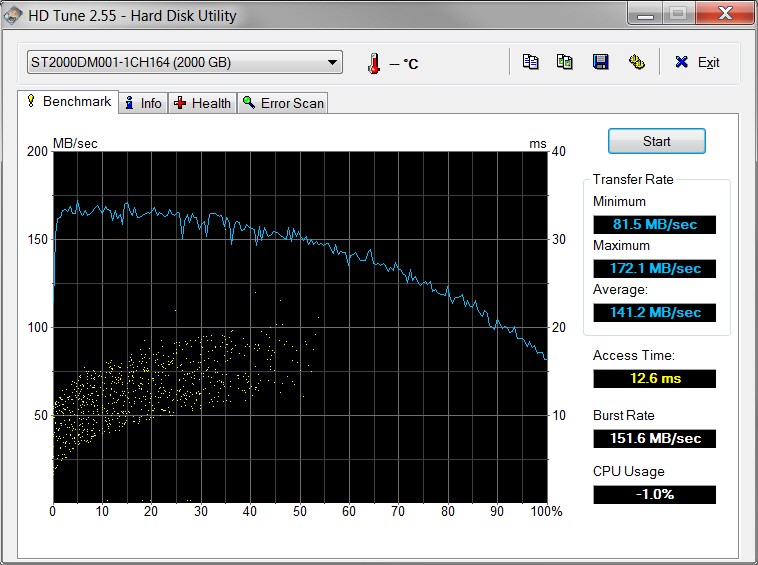
If you use a program such as HD Tune (free or Pro) you will see the actual internal hard drive details (i.e. manufacturer and model) that's inside your external USB enclosure. If you then do a search on that drive id you'll see whether it's a really cheap or slow (or green) drive, which immediately is going to limit its performance even when using USB 3.0 connectors.

Just for example... I have two Verbatim Store 'n' Save 2TB external USB 3.0 drives on my PC. Actually I've installed probably 10 of these drives (as backup drives on other machines for friends and family) over the past few years. Now even though these all purport to be from Verbatim, in fact every single external drive I've purchased has included a DIFFERENT brand/model of SATA drive inside it, starting with Samsung SATA-II drives, moving on to Seagate SATA-III drives, and most recently using Toshiba SATA-III drives.

Anyway, these two particular Verbatim drives are both Seagate inside... although two different drive models. Both drives are connected to the rear Intel USB 3.0 connectors on my P8Z77-V Pro board. And as you can see from the following screenshots from HD Tune (which show the particular Seagate drive model for each), they both perform differently.

9j74.jpg


ohlb.jpg


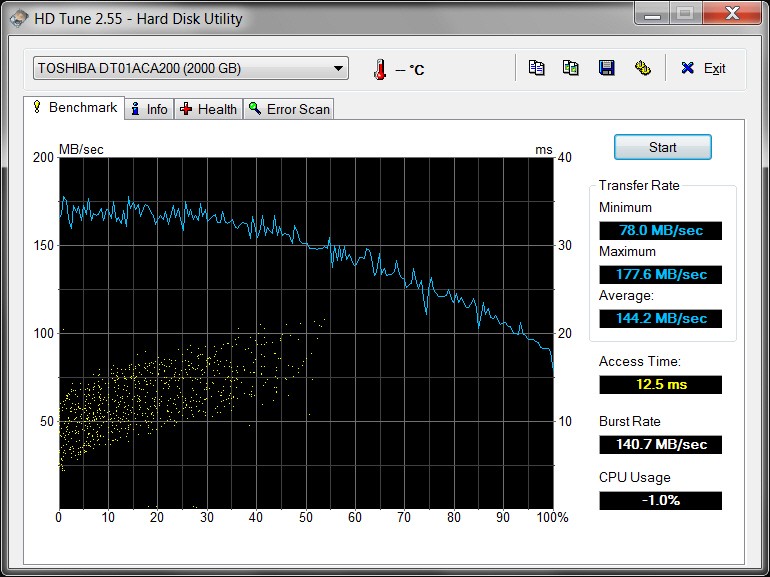
In contrast, another Verbatim drive (this time with a Toshiba drive inside) in use by my Lenovo W530 laptop via its Intel USB 3.0 connector performs differently again.

zl5f.jpg


Bottom line: all external USB 3.0 drives are NOT the same. But at least using an objective performance measuring tool like HD Tune can easily demonstrate what you should expect... in best case.

Note that in the real world, actual performance is a function of the type of data and record/block sizes. Doing a "backup" (say using Macrium Reflect taking a "system image") will produce superb performance, as might copying a very large multimedia audio/video file which individually might be hundreds or thousands of MB's in size. But copying hundreds or thousands of very much smaller files is not going to see the same performance.

 

My Computer

Computer type
PC/Desktop
Computer Manufacturer/Model Number
Home-built, two systems (1) and (2)
OS
Windows 7 Pro x64 (1), Win7 Pro X64 (2)
CPU
i5-3350p 3.1Ghz/6MB-cache (1); E8400 3.0Ghz/6MB-cache (2)
Motherboard
ASUS P8Z77-V Pro (1); ASUS P5Q3 (2)
Memory
8GB PC3-12800 DDR3 (1); 4GB PC3-10600 DDR3 (2)
Graphics Card(s)
ATI HD7750 (1), (see TV cards); ATI R7 250 (2)
Sound Card
Realtek ALC892 HD Audio (1); Realtek ALC1200 HD Audio (2)
Monitor(s) Displays
Eizo HD2441W LCD, Eizo S2433W (1); Eizo 24" S2433W (2)
Screen Resolution
1920x1200, 1920x1200 (1); 1920x1200 (2)
Hard Drives
(1) 1TB SATA-II (7200RPM), 2x2TB SATA-III (7200RPM), 250GB SATA-III (10000RPM) for OS; 2x2TB external USB 3.0

(2) 320GB SATA-II (7200RPM), 750GB SATA-II (7200RPM), 150GB SATA-II (10000RPM) for OS; 2TB external USB 3.0
PSU
Nesteq ECS-6001 600W (1); Nesteq ECS-5001 500W (2)
Case
Acousti-Case 360 (1) and (2)
Cooling
Noctua NH-U12P SE2 for CPU, 2x120mm case fans (1) and (2)
Keyboard
IBM PS/2 (1) and (2)
Mouse
Logitech MX Revolution wireless (1); Microsoft wired (2)
Internet Speed
100mbps down / 10mbps up
Antivirus
Microsoft Security Essentials; Malwarebyte Anti-Malware Pro
Browser
Firefox
Other Info
Ceton InfiniTV 4-tuner cablecard-enabled TV card as well as Hauppauge HVR-2250 OTA/ATSC 2-tuner TV card in (1), running under Win7 WMC
I use Macrium Reflect to make an image of my SSD hard drive every week & this gets backed up to an external 1Tb portable USB3 hard drive.
Using USB3 for this takes 4.5 minutes to copy 213gb & the transfer speed starts at just over 1gb per second & then settles down to about 850mb per second.
Of course the used space on my SSD is not 213gb but is about 27gb.
 

My Computer

Computer type
PC/Desktop
Computer Manufacturer/Model Number
Self built using existing case
OS
Windows 7 Home Premium 64 bit sp1
CPU
Intel i5 3570 3.4Ghz Ivy Bridge SKT 1155 quad core
Motherboard
Gigabyte Z77-HD3 SKT 1155 2xSata 3, 4x USB 3.0
Memory
G-Skill Rip Jaws 16Gb (8x2) DDR3 -1600 PC3 12800 CL 10 red
Graphics Card(s)
Gigabyte NVIDIA GT610 1Gb DDR3 810/1200 PCI-E 2.0 Silent
Sound Card
NVIDIA High Definition & Realtech High Definition Audio
Monitor(s) Displays
2 x Philips 226V4L 16:9 aspect ratio
Screen Resolution
1920 x 1080 HD
Hard Drives
Samsung 840 Pro 256gb SSD, SATA 3.
Hitachi Touro Portable 1tb, USB 3.0 HDD used for image b/ups.
PSU
Corsair VS450
Case
Codeng
Cooling
PSU fan & CPU fan
Keyboard
Logitech
Mouse
Logitech Wireless trackball M570
Internet Speed
Wireless 3G. 3mg down & 550kb up.
Antivirus
Bitdefender Internet Security 2020
Browser
Opera (Current Version) & Firefox
Other Info
MS Office 2013 Pro. Davis weather station software. MGE Nova 600 avr UPS.
I use Macrium Reflect to make an image of my SSD hard drive every week & this gets backed up to an external 1Tb portable USB3 hard drive.
Using USB3 for this takes 4.5 minutes to copy 213gb & the transfer speed starts at just over 1gb per second & then settles down to about 850mb per second.
Of course the used space on my SSD is not 213gb but is about 27gb.
A good example of "real world variables" coming into play.

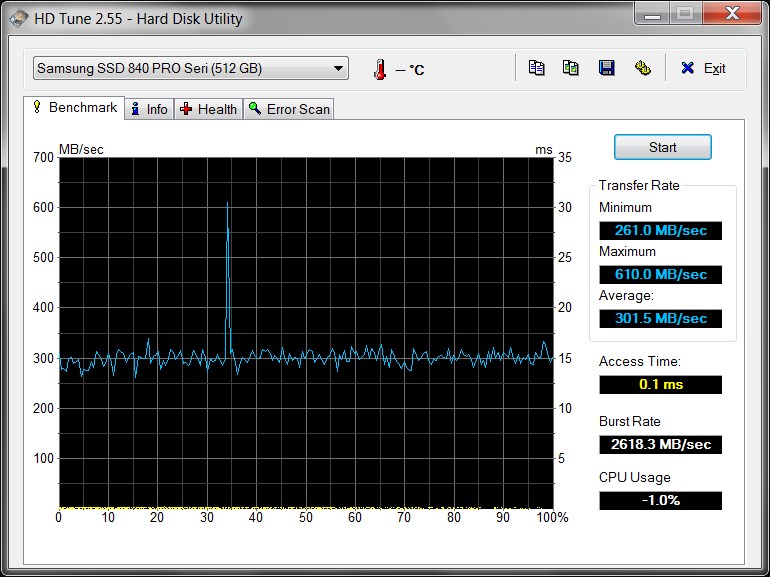
Seems hard to imagine that the actual "used data" on your SSD is 213GB, rather than some "used" number significantly smaller out of what is probably a 213GB allocation C-partition (on a 256GB SSD), if the presumably "medium compress" result via Macrium Reflect is only 27GB. By contrast, the C-partition on my own 512GB SSD is 86GB in size with 46GB used and 40GB free. And Macrium Reflect produces an 18GB backup file (as contrasted with 27GB for yours) using "medium compression" on my 46GB "used".

Official performance in my own backup is 5 minutes to complete, with READ=2.5Gb/s and WRITE=1.5Gb/s, although during the backup my numbers sound very much like yours, starting off at around 1Gb/s and slowing down to about 900mB/s.

This is very fast of course, and very much the result of the INPUT partition to the image backup being on an SSD rather than a spinner. Things are slower on my other machines where the input is a spinner, even though the external USB 3.0 backup drive is very similar.

tl70.jpg
 

My Computer

Computer type
PC/Desktop
Computer Manufacturer/Model Number
Home-built, two systems (1) and (2)
OS
Windows 7 Pro x64 (1), Win7 Pro X64 (2)
CPU
i5-3350p 3.1Ghz/6MB-cache (1); E8400 3.0Ghz/6MB-cache (2)
Motherboard
ASUS P8Z77-V Pro (1); ASUS P5Q3 (2)
Memory
8GB PC3-12800 DDR3 (1); 4GB PC3-10600 DDR3 (2)
Graphics Card(s)
ATI HD7750 (1), (see TV cards); ATI R7 250 (2)
Sound Card
Realtek ALC892 HD Audio (1); Realtek ALC1200 HD Audio (2)
Monitor(s) Displays
Eizo HD2441W LCD, Eizo S2433W (1); Eizo 24" S2433W (2)
Screen Resolution
1920x1200, 1920x1200 (1); 1920x1200 (2)
Hard Drives
(1) 1TB SATA-II (7200RPM), 2x2TB SATA-III (7200RPM), 250GB SATA-III (10000RPM) for OS; 2x2TB external USB 3.0

(2) 320GB SATA-II (7200RPM), 750GB SATA-II (7200RPM), 150GB SATA-II (10000RPM) for OS; 2TB external USB 3.0
PSU
Nesteq ECS-6001 600W (1); Nesteq ECS-5001 500W (2)
Case
Acousti-Case 360 (1) and (2)
Cooling
Noctua NH-U12P SE2 for CPU, 2x120mm case fans (1) and (2)
Keyboard
IBM PS/2 (1) and (2)
Mouse
Logitech MX Revolution wireless (1); Microsoft wired (2)
Internet Speed
100mbps down / 10mbps up
Antivirus
Microsoft Security Essentials; Malwarebyte Anti-Malware Pro
Browser
Firefox
Other Info
Ceton InfiniTV 4-tuner cablecard-enabled TV card as well as Hauppauge HVR-2250 OTA/ATSC 2-tuner TV card in (1), running under Win7 WMC

My Computer

Computer Manufacturer/Model Number
HP, Dell, Gateway, Toshiba - 4 laptops and 2 desktops
OS
Vista, Windows7, Mint Mate, Zorin, Windows 8
CPU
from 1.6GHz Duo to i7
Monitor(s) Displays
2x HP w2207
Hard Drives
5x HDD, 7x SSD, 12x Externals
Keyboard
with trackball - no mices
Mouse
Trackball mice
Internet Speed
DSL 6000
Back
Top