USB device detected won't start (code 10)

ijsman77

New member
Local time
12:09 AM
Messages
12
I've done a fresh install of W7 yesterday on my desktop PC and I want to use the virtual PC for some USB hardware that doesn't have any x64 drivers.

I can choose the USB devices fine in the virtual machine, they are detected and XP starts the usual hardware install wizard.

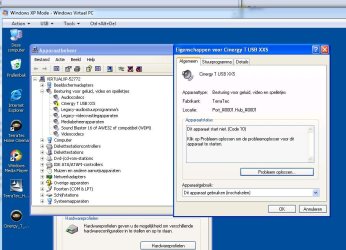
However one of my devices gets the yellow exclamation mark in the device manager with a code 10 (device cannot start).

The virtual machine runs XP SP3, my laptop runs XP SP3 as well and there is no problem on there with this hardware. This leads me to believe that it might be a windows 7 Vmachine issue that is causing this.

I've tried removing the hardware and installing it again, but that didn't solve the problem.

Any ideas for a possible solution?
 

My Computer

OS
W7 x64
CPU
Xeon 3110
Motherboard
Asus rampage formula
Can you screenshot your device manager with that error device ?
 

My Computer

Computer Manufacturer/Model Number
Lenovo ThinkPad T60
OS
Windows 7 Ultimate 64Bit
CPU
GenuineIntel Intel(R) Core(TM) DuoCore T2400 @ 1.83GHz
Motherboard
Intel(R) 82801G (ICH7 Family)
Memory
2.00 GB
Graphics Card(s)
Mobile Intel(R) 945 Express Chipset
Sound Card
SoundMAX Integrated Digital HD Audio
Monitor(s) Displays
ThinkPad Display
Screen Resolution
1400x1050
Hard Drives
100Gb SATA
Keyboard
Standard Keyboard
Mouse
HID-compliant Mouse
Internet Speed
Cable Broadband - 54Mbps
Other Info
Intel(R) PRO/1000 PL Network Connection
11a/b/g Wireless LAN Mini PCI Express Adapter
here's a screenie

I've only connected the device that's not working here.

I installed the dutch version of the vmachine, but have switched my W7 to english already with a LIP.
 

Attachments

  • vmachine_code10.jpg
    vmachine_code10.jpg
    88.9 KB · Views: 631

My Computer

OS
W7 x64
CPU
Xeon 3110
Motherboard
Asus rampage formula
No suggestions for a possible solution?

Is it possible to change the OS of the W7 vmachine? I could try installing a differen XP32 (SP2 for example).
 

My Computer

OS
W7 x64
CPU
Xeon 3110
Motherboard
Asus rampage formula
Technically speaking VM XP and normal XP are not the same. Your VM XP works through the use of emulation and there is no guarantee that whatever work on normal XP will work on VM XP. Software-wise, you may be able to install it on VM XP but running that particular software in VM XP and have it used with a non virtual device is a different matter. I have yet to know why my Sonic RecordNow software doesn't detect my DVD/CD burner to burn files.

Anyway back to your issue, it look like you have a sound issue, what device is it that u are attaching via USB? speakers?
 

My Computer

Computer Manufacturer/Model Number
Lenovo ThinkPad T60
OS
Windows 7 Ultimate 64Bit
CPU
GenuineIntel Intel(R) Core(TM) DuoCore T2400 @ 1.83GHz
Motherboard
Intel(R) 82801G (ICH7 Family)
Memory
2.00 GB
Graphics Card(s)
Mobile Intel(R) 945 Express Chipset
Sound Card
SoundMAX Integrated Digital HD Audio
Monitor(s) Displays
ThinkPad Display
Screen Resolution
1400x1050
Hard Drives
100Gb SATA
Keyboard
Standard Keyboard
Mouse
HID-compliant Mouse
Internet Speed
Cable Broadband - 54Mbps
Other Info
Intel(R) PRO/1000 PL Network Connection
11a/b/g Wireless LAN Mini PCI Express Adapter
No, it is a DVB-T receiver, with it I can watch TV on my PC. The receiver itself would work on x64, but I also have a CI (common interface) module that decrypts my PAYtv channels. That module only works on 32bit systems, hence I run it in a VM.
 

My Computer

OS
W7 x64
CPU
Xeon 3110
Motherboard
Asus rampage formula
And you have already tried manually install the driver?

"Is it possible to change the OS of the Windows 7 vmachine? I could try installing a differen XP32 (SP2 for example). "

You can boot to an XP SP2 image if you have one, i don't know if it'll change the results though. Create a new VM and boot to it.
 

My Computer

Computer Manufacturer/Model Number
Lenovo ThinkPad T60
OS
Windows 7 Ultimate 64Bit
CPU
GenuineIntel Intel(R) Core(TM) DuoCore T2400 @ 1.83GHz
Motherboard
Intel(R) 82801G (ICH7 Family)
Memory
2.00 GB
Graphics Card(s)
Mobile Intel(R) 945 Express Chipset
Sound Card
SoundMAX Integrated Digital HD Audio
Monitor(s) Displays
ThinkPad Display
Screen Resolution
1400x1050
Hard Drives
100Gb SATA
Keyboard
Standard Keyboard
Mouse
HID-compliant Mouse
Internet Speed
Cable Broadband - 54Mbps
Other Info
Intel(R) PRO/1000 PL Network Connection
11a/b/g Wireless LAN Mini PCI Express Adapter
If by manual you mean detect new hardware and choosing the drivers by hand, yes I've done that.

How can I create a new vm image?
 

My Computer

OS
W7 x64
CPU
Xeon 3110
Motherboard
Asus rampage formula
You can do it that way, or just run the executable (.exe). What error did you get when u did that?

To create that new VM, open up the Virtual PC

Start > All Programs > Windows Virtual PC > and click on "Windows Virtual PC" to open the Explorer Window.

And in the task bar, click "Create virtual machine".

BUT FIRST you gotto convert your XP SP2 install to a .VHD first. Make sure all devices and programs are work the way they suppose.

Do this first then we can go thru the creating new virtual machine.
 

Attachments

  • Noname.jpg
    Noname.jpg
    9.5 KB · Views: 50

My Computer

Computer Manufacturer/Model Number
Lenovo ThinkPad T60
OS
Windows 7 Ultimate 64Bit
CPU
GenuineIntel Intel(R) Core(TM) DuoCore T2400 @ 1.83GHz
Motherboard
Intel(R) 82801G (ICH7 Family)
Memory
2.00 GB
Graphics Card(s)
Mobile Intel(R) 945 Express Chipset
Sound Card
SoundMAX Integrated Digital HD Audio
Monitor(s) Displays
ThinkPad Display
Screen Resolution
1400x1050
Hard Drives
100Gb SATA
Keyboard
Standard Keyboard
Mouse
HID-compliant Mouse
Internet Speed
Cable Broadband - 54Mbps
Other Info
Intel(R) PRO/1000 PL Network Connection
11a/b/g Wireless LAN Mini PCI Express Adapter
No, it is a DVB-T receiver, with it I can watch TV on my PC. The receiver itself would work on x64, but I also have a CI (common interface) module that decrypts my PAYtv channels. That module only works on 32bit systems, hence I run it in a VM.


Hi there

One of the limitations of a VM is that programs that react with the real or Physical hardware directly won't normally work properly.

Don't forget the Virtual Machine has its OWN set of hardware in the Virtual Bios.

The latest release of vmware workstation has upgraded the "virtual Video driver" so that some 3d rendering and a few games can be played but it is still a bit of a way off before full video / dvd playing and authoring can be supported.

Virtual PC is still behind both vmware and vbox in this area so I wouldn't even THINK about trying to get a TV card to work with that software.

TV cards and DVD playing are unlikely to work in a virtual machine for some time yet I'm afraid. If you can get one working in a VM I'll be REALLY interested.

Note audio has no problems since the typical virtual bios emulates a sound blaster type of card and that's not a problem with current audio codecs.
Aaudio and video streaming using a VM also poses no problems since you are essentially just sending DATA -- the hardware device at the receiver end will decode it itself.

Tot Ziens van een echter ijsmannetje !!!!.

jimbo
 

My Computer

Computer type
PC/Desktop
Computer Manufacturer/Model Number
Custom built, several laptops HP/ASUS
OS
Linux CENTOS 7 / various Windows OS'es and servers
CPU
Intel i7 Intel i5
Memory
8GB, 16GB
Graphics Card(s)
On Motherboard
Sound Card
Realtek HD audio
Monitor(s) Displays
Apple Cinema display, Samsung LCD
Screen Resolution
1920 X 1080
Hard Drives
4 X 1TB SATA
Mouse
Toshiba wireless laser
Internet Speed
> 20MB up
I've created another XP vmachine, still same problem, so I think it's a Virtual Pc issue that's causing this.

I know about the video limitations, I've tried VirtualBox before but that gave me a black video screen, and the connection of the USB hardware was somewhat buggy.

I think I'll give vmware a try, on XP that crashed for some reason, maybe it'll work on W7 :)
 

My Computer

OS
W7 x64
CPU
Xeon 3110
Motherboard
Asus rampage formula
Virtual PC is still behind both vmware and vbox in this area so I wouldn't even THINK about trying to get a TV card to work with that software.

TV cards and DVD playing are unlikely to work in a virtual machine for some time yet I'm afraid. If you can get one working in a VM I'll be REALLY interested.

jimbo

Thanks for that encouragement, jimbo! So it won't surprise you if I admit to having uninstalled Windows Virtual PC software yesterday... I failed miserably in trying to get it to install my Dvico Fusion HDTV card a few times.

Cheers,

LMH
 

My Computer

Computer Manufacturer/Model Number
2 x home-brew
OS
Win 7 Ultimate 64-bit, Win7 N 32-bit, WHS
CPU
AMD 64 X2 3600+, AMD Phenom II X3 720BE
Motherboard
Gigabyte MA770-UD3, Gigabyte MA790GP-4UDH4, GA-890GPA-UDH3
Memory
4GB DDR2 OCZ dual-channel, 6GB DDR2 Corsair
Graphics Card(s)
Gigabyte HD 4850 on the dual-booter, built-in on others
Sound Card
2 x onboard
Monitor(s) Displays
LG Flatron W2353V
Screen Resolution
1920 x 1080
Hard Drives
Seagates, Samsung, WD
PSU
Corsair HX 620, Corsair 450, Kamariki et al.
Case
Lian Li PC-7F, Antec Sonata, Macase
Keyboard
Logitech diNovo Edge
Mouse
Logitech MX Revolution
Internet Speed
1500kb/s
Other Info
There's a few other PCs in my 'office', all older machines, running Ubuntu 9.10, Vista Ultimate and one surviving Windows ME machine (due to some old programs that I haven't moved...). I believe another 'veteran' still runs OpenSuse...
I've installed VMware player yesterday, first results are promising. I'll do some more testing and will report back here ;)
 

My Computer

OS
W7 x64
CPU
Xeon 3110
Motherboard
Asus rampage formula
I've been fiddling with vmware, the receiver install fine and starts normally.
My other hardware, a common interface decryption module installs fine too.

Without the CI module I was able to watch the free to air channels in the vmware machine without jitter, with virtualbox there was a lot more stutter and jitter in playback.

With the CI module connected my receiver software does not start well, it hangs on startup. Possibly this is caused by the virtual USB connection, which is too bad since basically it means I cannot use my complete setup (paytv channels are the better ones of course)

My conclusion is that vmware is definitely the better one for video playback, just thought it would be nice to know :)
 

My Computer

OS
W7 x64
CPU
Xeon 3110
Motherboard
Asus rampage formula
Leuk om te zien dat je Nederlands spreekt Jimbo ;-)
 

My Computer

Computer Manufacturer/Model Number
Dell Inpspiron 1720
OS
Windows 7 Home Premium x64
CPU
Intel 1720 Core 2 Duo 2.00GHz,800,2M
Memory
4GB 667MHz DDR2 SDRAM (2x2048)
Graphics Card(s)
NVIDIA Geforce Go 8600M GT 256MB DDR2
Sound Card
SigmaTel
Monitor(s) Displays
17.0" Widescreen WXGA+ (1440x900) TFT with TrueLife
Screen Resolution
1440x900
Hard Drives
2x160GB 5400RPM Serial ATA
Mouse
Logitech
Any luck with the FusionHDTV card carioca. Looks like im having the same issue with windows 7 although im not running virtual machine.

Install the drivers, seems to work for 5 minutes before the computer either freezes or gives me the blue screen of death. Then one of the devices comes up with the yellow exclamasion mark. Tried all of the driver versions I could find for the tuner also.
 

My Computer

OS
Windows 7
I am not familiar with that card. I have tried vmware with vista, and it gave me the same problem.
That rules out the vm software, as I have the same issue with vmware and virtual pc.
 

My Computer

OS
W7 x64
CPU
Xeon 3110
Motherboard
Asus rampage formula
Back
Top