Solved USB device not recognized, cannot stop error message

theskyeye

New member
Member
Local time
2:54 PM
Messages
16
Hello all,

Sorry for the long chain of events. A USB port broke sometime in December 2012. The message "USB device not recognized" started randomly popping up from the taskbar. It stopped appearing after about two days but it has been coming back.

Under computer management, I get the message "Windows has stopped this device because it has reported problems.
(Code 43)"

I have tracked down the bad port to #0006 port #0001hub and tested it with a known good thumb drive. It was not recognized by Windows, but the other ports were.

On 17 April the message started appearing again. I then:

1. Ran Malwarebytes, Superantispyware and AVG in safe mode and all were clean. The message even popped up a time or two in safe mode while each anti-varmint program was running.

2. Ran search for updated driver, that came back "the best software driver for your device is already installed".

3. Ran chk dsk with both options checked and it came back no problems.

4. Disabled driver for that port but that did not help. Then re-enabled it.

5. Uninstalled the driver & restarted computer to reinstall. Still no help.

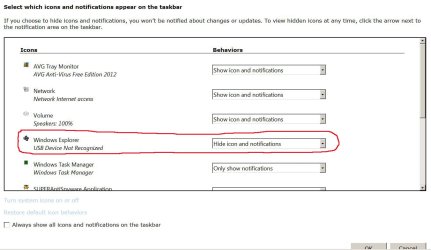
6. Right clicked taskbar, properties, customize, then under: "Windows Explorer, USB Device Not Recognized", "behaviors" drop down chose: "Hide icons and notifications"

Clicked OK.

Unfortunately the "Hide icons and notifications" does not "stick" and reverts immediately to "Show only notifications" after closing and then re opening that window. I have done this a number of times.

On 21 April the message reappeared on and off for a day, then stopped.

On 25 April the message reappeared on and off for several hours, then stopped.

The message has been reappearing again today.

I'm out of ideas. Any help getting the message permanently stopped would be greatly appreciated.
 

My Computer

Computer type
PC/Desktop
Computer Manufacturer/Model Number
ASUS PRO
OS
Windows 7, Pro, 64 bit, SP1
CPU
AMD A4-6300
Motherboard
ASUSTeK COMPUTER INC. D415MT_BM2DK (FM2+ )
Memory
4.00GB Single-Channel DDR3 @ 797MHz (11-11-12-28)
Graphics Card(s)
768MB ATI AMD Radeon HD 8370D
Sound Card
Realtek High Definition Audio
Monitor(s) Displays
SAMSUNG 1680 x 1050
Hard Drives
465GB TOSHIBA DT01ACA050 SATA Disk Device (SATA)
PSU
?
Case
?
Cooling
?
Internet Speed
1.3 down load, .34 upload
Antivirus
N/A
Browser
Pale Moon
Disable the port, maybe via Device Manager?
 

My Computer

Computer type
PC/Desktop
Computer Manufacturer/Model Number
Lenovo IdeaCenter 450
OS
Windows 10 Pro X64
CPU
Intel Quad Core i7-4770 @ 3.4Ghz
Memory
16.0GB PC3-12800 DDR3 SDRAM 1600 MHz
Graphics Card(s)
Intel Integrated HD Graphics
Sound Card
Realtek HD Audio
Monitor(s) Displays
HP 22" LCD
Screen Resolution
1680 x 1050
Hard Drives
250GB Samsung EVO SATA-3 SSD
2TB Seagate ST2000DM001 SATA-2
1.5TB Seagate ST3150041AS SATA
Keyboard
Dell USB
Mouse
Lenovo USB
Internet Speed
Cable via Road Runner 3MB Upload, 30MB Download
Antivirus
Windows Defender, MBAM Pro, MBAE
Browser
Seamonkey
Other Info
UEFI/GPT
PLDS DVD-RW DH16AERSH

My Computer

Computer type
PC/Desktop
Computer Manufacturer/Model Number
ASUS PRO
OS
Windows 7, Pro, 64 bit, SP1
CPU
AMD A4-6300
Motherboard
ASUSTeK COMPUTER INC. D415MT_BM2DK (FM2+ )
Memory
4.00GB Single-Channel DDR3 @ 797MHz (11-11-12-28)
Graphics Card(s)
768MB ATI AMD Radeon HD 8370D
Sound Card
Realtek High Definition Audio
Monitor(s) Displays
SAMSUNG 1680 x 1050
Hard Drives
465GB TOSHIBA DT01ACA050 SATA Disk Device (SATA)
PSU
?
Case
?
Cooling
?
Internet Speed
1.3 down load, .34 upload
Antivirus
N/A
Browser
Pale Moon
theskyeye, try the resolution listed here
 
Last edited:

My Computer

Computer type
PC/Desktop
Computer Manufacturer/Model Number
Dude Build
OS
Windows 10 Pro X64
CPU
Intel(R) Core(TM) i5-3570K CPU OC@ 4.5GHZ Turbo
Motherboard
MSI Z77A-G45 Gaming
Memory
8.00 GB DDR3 1600Mhz
Graphics Card(s)
MSI Gaming X GTX 1070
Sound Card
Realtek High Definition
Monitor(s) Displays
Dell S23O9W, HP L1710
Screen Resolution
DELL-1920 x 1080 HP-1280 x1024
Hard Drives
Crucial m4 256 SSD, WD 7200RPM 500GB WD 1TB
PSU
Seasonic X650 GOLD
Case
Zalman Z12
Cooling
Antec Kuhler 920
Keyboard
Logitech
Mouse
MSI DS100 Interceptor
Internet Speed
50 down and 5 up
Antivirus
MSE
Browser
Chrome, IE 11
Other Info
Logitech X-620 Speakers
theskyeye, try the resolution listed here

Thanks but I already tried that with no success.

It's finally dawned that there must be a service that's running to check for problems and generating the error message. Since the port is physically broken, the driver being installed or not will have no effect on the message.

Found this in services. Unless someone comes along and says it's a really bad idea, I'll set "Diagnostic Policy Service" to manual and see what happens.
 

Attachments

  • USB 12.JPG
    USB 12.JPG
    141.1 KB · Views: 10

My Computer

Computer type
PC/Desktop
Computer Manufacturer/Model Number
ASUS PRO
OS
Windows 7, Pro, 64 bit, SP1
CPU
AMD A4-6300
Motherboard
ASUSTeK COMPUTER INC. D415MT_BM2DK (FM2+ )
Memory
4.00GB Single-Channel DDR3 @ 797MHz (11-11-12-28)
Graphics Card(s)
768MB ATI AMD Radeon HD 8370D
Sound Card
Realtek High Definition Audio
Monitor(s) Displays
SAMSUNG 1680 x 1050
Hard Drives
465GB TOSHIBA DT01ACA050 SATA Disk Device (SATA)
PSU
?
Case
?
Cooling
?
Internet Speed
1.3 down load, .34 upload
Antivirus
N/A
Browser
Pale Moon
I would try stopping the restarting before setting to manual. Good luck, you seem to have one of the rare issues that pop up.
 

My Computer

Computer type
PC/Desktop
Computer Manufacturer/Model Number
Dude Build
OS
Windows 10 Pro X64
CPU
Intel(R) Core(TM) i5-3570K CPU OC@ 4.5GHZ Turbo
Motherboard
MSI Z77A-G45 Gaming
Memory
8.00 GB DDR3 1600Mhz
Graphics Card(s)
MSI Gaming X GTX 1070
Sound Card
Realtek High Definition
Monitor(s) Displays
Dell S23O9W, HP L1710
Screen Resolution
DELL-1920 x 1080 HP-1280 x1024
Hard Drives
Crucial m4 256 SSD, WD 7200RPM 500GB WD 1TB
PSU
Seasonic X650 GOLD
Case
Zalman Z12
Cooling
Antec Kuhler 920
Keyboard
Logitech
Mouse
MSI DS100 Interceptor
Internet Speed
50 down and 5 up
Antivirus
MSE
Browser
Chrome, IE 11
Other Info
Logitech X-620 Speakers
I would try stopping the restarting before setting to manual. Good luck, you seem to have one of the rare issues that pop up.

Thanks again.

Under Icons/Behaviors, "Hide icon and notification" should stop the pop ups, but will not stay set.
 

Attachments

  • USB9-1.jpg
    USB9-1.jpg
    104.1 KB · Views: 5

My Computer

Computer type
PC/Desktop
Computer Manufacturer/Model Number
ASUS PRO
OS
Windows 7, Pro, 64 bit, SP1
CPU
AMD A4-6300
Motherboard
ASUSTeK COMPUTER INC. D415MT_BM2DK (FM2+ )
Memory
4.00GB Single-Channel DDR3 @ 797MHz (11-11-12-28)
Graphics Card(s)
768MB ATI AMD Radeon HD 8370D
Sound Card
Realtek High Definition Audio
Monitor(s) Displays
SAMSUNG 1680 x 1050
Hard Drives
465GB TOSHIBA DT01ACA050 SATA Disk Device (SATA)
PSU
?
Case
?
Cooling
?
Internet Speed
1.3 down load, .34 upload
Antivirus
N/A
Browser
Pale Moon
I set the "Diagnostic Policy Service to "Manual" and so far no reoccurrence of the "USB device not recognized..." message.

I'm marking this thread solved, but with crossed fingers.

Thanks to all who looked at the thread and suggested solutions.
 

My Computer

Computer type
PC/Desktop
Computer Manufacturer/Model Number
ASUS PRO
OS
Windows 7, Pro, 64 bit, SP1
CPU
AMD A4-6300
Motherboard
ASUSTeK COMPUTER INC. D415MT_BM2DK (FM2+ )
Memory
4.00GB Single-Channel DDR3 @ 797MHz (11-11-12-28)
Graphics Card(s)
768MB ATI AMD Radeon HD 8370D
Sound Card
Realtek High Definition Audio
Monitor(s) Displays
SAMSUNG 1680 x 1050
Hard Drives
465GB TOSHIBA DT01ACA050 SATA Disk Device (SATA)
PSU
?
Case
?
Cooling
?
Internet Speed
1.3 down load, .34 upload
Antivirus
N/A
Browser
Pale Moon
Diagnostic Policy Service

theskyeye, try the resolution listed here

thanks but i already tried that with no success.

It's finally dawned that there must be a service that's running to check for problems and generating the error message. Since the port is physically broken, the driver being installed or not will have no effect on the message.

Found this in services. Unless someone comes along and says it's a really bad idea, i'll set "diagnostic policy service" to manual and see what happens.


i had the exact same problem and tried this "fix" and it worked for me as well. It stopped the pop-up pain. Thank you!
 

My Computer

Computer type
PC/Desktop
OS
Windows 8.1 64 bit
Back
Top