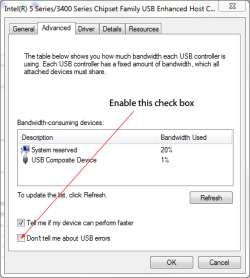
This is getting irritating enough I am tempted to go back to XP. Every time I plug in a USB device to charge it, for example my GoPro helmet cam, or just have an empty USB cable plugged in to one of the PC's ports and leave it on my desk so its ready to plug something else - I get that P.I.T.A. message popping up every couple of seconds.It won't go away either, it just keeps popping up again and again.
I have the all the latest updates, including the latest service pack. I powered off the CPU by unplugging it for 5 minutes and it still pops up whenever I plug in a cable or a device like one of my pocket video cams just to charge it.
Is there a fix for this or not?
I have the all the latest updates, including the latest service pack. I powered off the CPU by unplugging it for 5 minutes and it still pops up whenever I plug in a cable or a device like one of my pocket video cams just to charge it.
Is there a fix for this or not?
My Computer
At a glance
windows 7 home premium
- OS
- windows 7 home premium