
aaronjohn
New member
Good day/evening!
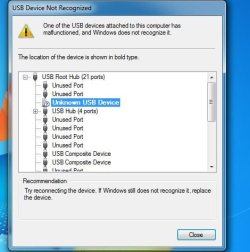
I seem to have a problem with my computer and it is about this popup that keeps buzzing my screen every time I try to update any of my software especially the NVIDIA GeForce Experience. Whenever I try to update one of my programs, it always says my computer has a plug-in error
Please send me your advice. Any help would be appreciated.
Thank you very much!
This is what the popup says (I attached the screen-capped image)
I seem to have a problem with my computer and it is about this popup that keeps buzzing my screen every time I try to update any of my software especially the NVIDIA GeForce Experience. Whenever I try to update one of my programs, it always says my computer has a plug-in error
Please send me your advice. Any help would be appreciated.
Thank you very much!
This is what the popup says (I attached the screen-capped image)
Attachments
My Computer
At a glance
Windows 7 Professional x64Intel i5 - 4460 CPU @ 3.20 GHzHyper X 8GBNVIDIA GeForce 730
- Computer type
- PC/Desktop
- Computer Manufacturer/Model Number
- custom build
- OS
- Windows 7 Professional x64
- CPU
- Intel i5 - 4460 CPU @ 3.20 GHz
- Motherboard
- ASUS B85M-GAMER
- Memory
- Hyper X 8GB
- Graphics Card(s)
- NVIDIA GeForce 730
- Hard Drives
- Kingston 250GB SSD + 1TB WD HDD
- Antivirus
- BitDefender 2017
- Browser
- Google Chrome


