Solved USB Driver Install Problem

ICIT2LOL,

I really don't think this is a virus / malware problem. Just something isn't right in the configuration and needs to be fixed. Just can't figure out what. This used to work, don't know what has changed.


What was the last program or driver that was installed before your issue popped up?
What was the last program or driver removed before your issue popped up?

Avg may be causing the issue. AVG | Download tools and utilities
Try Avg remover program. You might need to run the AVG Identity Protection Remover as well as the Avg remover.
 

My Computer

Computer type
PC/Desktop
Computer Manufacturer/Model Number
Dell All in one Inspiron 2020
OS
W10 32 bit, XUbuntu 18.xx 64 bit
CPU
Intel(R) Celeron(R) CPU G1620T @ 2.40GHz, 2400 Mhz
Motherboard
Dell
Memory
4GB
Graphics Card(s)
Intel HD graphics
Sound Card
High Definition Audio Device
Monitor(s) Displays
20 inch Screen
Screen Resolution
W7=1280 x 720 & Linux Mint Xfce=1360 x 768
Hard Drives
500 GB hard drive
Keyboard
Usb
Mouse
Usb
Internet Speed
High-Speed
Antivirus
MSE
Browser
Main Browser Firefox
Other Info
I have done a clean install of Windows 7 using Dell re-installation disk (Dell sent me one). I also use Free Macrium reflect backup and restore.
Groze,

What was the last program or driver that was installed before your issue popped up?

I just can't answer that. We don't use the scanner that much. Too much time has elapsed. I don't really install or change too many things. Seven months can pass without using the scanner. What did I change? Install TurboTax? Over such a long time I don't know what has changed.
 

My Computer

Computer type
PC/Desktop
Computer Manufacturer/Model Number
Custom
OS
Windows 7, 32 Bit
CPU
AMD
Motherboard
ASUS
Memory
2G
Graphics Card(s)
?
Hard Drives
a few
Antivirus
Bit Defender
Browser
FFx, IE
Groze,

What was the last program or driver that was installed before your issue popped up?
I just can't answer that. We don't use the scanner that much. Too much time has elapsed. I don't really install or change too many things. Seven months can pass without using the scanner. What did I change? Install TurboTax? Over such a long time I don't know what has changed.

You still might want to try the avg removal tool

Groze,

I happen to have bitdefender. I switched over a few weeks ago from avg. I have the free version of bd. I am able to disable it from the sys tray.


There are a few methods you might want to try.

1. Run the avg cleanup tools I mentioned in my previous post. Then install your scanner using the file you downloaded. If it ask you to allow connection through a firewall say yes.


2. Remove free bit defender, reinstall free avg (use major geeks not cnet) Install only the virus protection nothing else. Then install your scanner using the file you downloaded. If it ask you to allow connection through a firewall say yes.


3. If you still have the dvd/cd setup disk, insert the cd, cancel setup if it starts. Go to device manager again, look for your scanner. This time choose browse your computer, select the dvd/cd drive and looks for the location of the driver. If it ask you to allow connection through a firewall say yes.

After trying all that. If you still get the error, try running windows update after a reboot. See if there is an update to your driver list in important or optional. The install that. Reboot if doesn't ask you to reboot. Then try your scanner. You might want to try this after doing each suggestion, that if you want to.
 

My Computer

Computer type
PC/Desktop
Computer Manufacturer/Model Number
Dell All in one Inspiron 2020
OS
W10 32 bit, XUbuntu 18.xx 64 bit
CPU
Intel(R) Celeron(R) CPU G1620T @ 2.40GHz, 2400 Mhz
Motherboard
Dell
Memory
4GB
Graphics Card(s)
Intel HD graphics
Sound Card
High Definition Audio Device
Monitor(s) Displays
20 inch Screen
Screen Resolution
W7=1280 x 720 & Linux Mint Xfce=1360 x 768
Hard Drives
500 GB hard drive
Keyboard
Usb
Mouse
Usb
Internet Speed
High-Speed
Antivirus
MSE
Browser
Main Browser Firefox
Other Info
I have done a clean install of Windows 7 using Dell re-installation disk (Dell sent me one). I also use Free Macrium reflect backup and restore.
Groze,

1. Run the avg cleanup tools I mentioned in my previous post.

Did that.

2. Remove free bit defender, reinstall free avg (use major geeks not cnet) Install only the virus protection nothing else. Then install your scanner using the file you downloaded. If it ask you to allow connection through a firewall say yes.

I have tried installing with BD disabled.
Interesting you mention downloading AVG from MG and not CNET. Is that to avoid their "Download Manager" ?

uninstalled BD.

3. If you still have the dvd/cd setup disk, insert the cd, cancel setup if it starts. Go to device manager again, look for your scanner. This time choose browse your computer, select the dvd/cd drive and looks for the location of the driver. If it ask you to allow connection through a firewall say yes.

Ok, I tried that. The setup CD is for Win2K. When browsing the Device Manager program says that the disk does not contain any pertinent files.

After trying all that. If you still get the error, try running windows update after a reboot.

Tried doing update, but my computer is up to date. Automatic Updates is turned on.


Still no love.
 

My Computer

Computer type
PC/Desktop
Computer Manufacturer/Model Number
Custom
OS
Windows 7, 32 Bit
CPU
AMD
Motherboard
ASUS
Memory
2G
Graphics Card(s)
?
Hard Drives
a few
Antivirus
Bit Defender
Browser
FFx, IE
If the problem is at the device level we might get lucky with a look at the device manager trace log file

1. Delete C:\WINDOWS\inf\setupapi.dev.log
2. Copy/paste the following into notepad. Save the file, name it x.reg. Double click the file to apply the change to the registry
Code:
Windows Registry Editor Version 5.00
[HKEY_LOCAL_MACHINE\SOFTWARE\Microsoft\Windows\CurrentVersion\Setup]
"LogLevel"=dword:08007070
3. Reboot your machine. Attempt to do the install/uninstall again. Still get the "file missing" error message?
4. Upload C:\WINDOWS\inf\setupapi.dev.log and attach to your next post. Will see if anything helpful appears
 

My Computer

Computer type
PC/Desktop
Computer Manufacturer/Model Number
Dell Optiplex 360 and Optiplex 755
OS
Desk 1: Win 7 Pro x32; Desk 2: Windows 10 x64
Hard Drives
500GB Crucial SSD in both Desktops
Other Info
Buffalo 6TB NAS, Raid 1
defenderjim, I didn't mean the install cd/dvd for the operating system. I meant the install cd/dvd for the scanner.
 

My Computer

Computer type
PC/Desktop
Computer Manufacturer/Model Number
Dell All in one Inspiron 2020
OS
W10 32 bit, XUbuntu 18.xx 64 bit
CPU
Intel(R) Celeron(R) CPU G1620T @ 2.40GHz, 2400 Mhz
Motherboard
Dell
Memory
4GB
Graphics Card(s)
Intel HD graphics
Sound Card
High Definition Audio Device
Monitor(s) Displays
20 inch Screen
Screen Resolution
W7=1280 x 720 & Linux Mint Xfce=1360 x 768
Hard Drives
500 GB hard drive
Keyboard
Usb
Mouse
Usb
Internet Speed
High-Speed
Antivirus
MSE
Browser
Main Browser Firefox
Other Info
I have done a clean install of Windows 7 using Dell re-installation disk (Dell sent me one). I also use Free Macrium reflect backup and restore.
Groze,

I didn't mean the install cd/dvd for the operating system. I meant the install cd/dvd for the scanner.

Yes, I understood that. Sorry for my poor wording. What I meant is that the Install CD for the scanner is meant for Win2K and crashed when I tried to use it. Is that clearer?

ComputerGeek,

"LogLevel"=dword:08007070

From looking at the Microsoft website on LogLevel, I assume that this value is hex?

I modified the registry to the above value. I performed the usual install and now Windows is no longer creating the log file. Wisely, I did not write down the original value.

I have attached the log file from before I made the above change.
 

Attachments

My Computer

Computer type
PC/Desktop
Computer Manufacturer/Model Number
Custom
OS
Windows 7, 32 Bit
CPU
AMD
Motherboard
ASUS
Memory
2G
Graphics Card(s)
?
Hard Drives
a few
Antivirus
Bit Defender
Browser
FFx, IE
Groze,
ComputerGeek,

"LogLevel"=dword:08007070

From looking at the Microsoft website on LogLevel, I assume that this value is hex?

I modified the registry to the above value. I performed the usual install and now Windows is no longer creating the log file. Wisely, I did not write down the original value.

I have attached the log file from before I made the above change.


1. Yes. That's a hex value

2. To go back to original: You can set LogLevel=0 or simply delete the key. LogLevel doesn't exist (by default). When LogLevel doesn't exist it's equivalent to a value of 0

Will get back to you about results. (p.s. That hex value a "Verbose" log. Strange if it's not creating one at all - but will look through what you have attached)
 

My Computer

Computer type
PC/Desktop
Computer Manufacturer/Model Number
Dell Optiplex 360 and Optiplex 755
OS
Desk 1: Win 7 Pro x32; Desk 2: Windows 10 x64
Hard Drives
500GB Crucial SSD in both Desktops
Other Info
Buffalo 6TB NAS, Raid 1
Understanding windows drivers is a "black art". At best, my knowledge is a "lighter shade of grey". ;)
So don't take everything I say as gospel - but it's my best understanding based on what i've read, tried and played with to date.

Drivers first get loaded into the DriverStore. Windows only installs drivers from the Store. It seems the driver package in the Store for your scanner is corrupt. The driver package for your scanner is in C:\windows\System32\DriverStore\FileRepository\es1dn.inf_x86_neutral_1bf0cd02788b219b

1. Upload a copy of the INF file
Code:
C:\windows\System32\DriverStore\FileRepository\es1dn.inf_x86_neutral_1bf0cd02788b219b\es1dn.inf

2. From a command prompt run the following. Attach the output file C:\output.txt to your next post
Code:
pnputil -e > C:\output.txt

3. Can you give me the link to where you found the driver you're using?
 

My Computer

Computer type
PC/Desktop
Computer Manufacturer/Model Number
Dell Optiplex 360 and Optiplex 755
OS
Desk 1: Win 7 Pro x32; Desk 2: Windows 10 x64
Hard Drives
500GB Crucial SSD in both Desktops
Other Info
Buffalo 6TB NAS, Raid 1
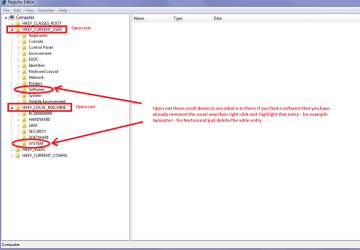
I can't remember if I mentioned it before but if you look in the registry HKEYs CURRENT USER and LOCAL MACHINE under Software/s you may find traces of entries for AVG I have done this before and just deleted the whole entry for it and it is a good way of getting rid of Norton and that wretched Askbar stuff.

You will of course need admin rights to do that;)

See my pic and if you feel unsure of this method then you can back up the reg before you do it use this
http://www.sevenforums.com/tutorials/4230-registry-backup-restore.html
 

Attachments

  • HKEYS.PNG
    HKEYS.PNG
    19.1 KB · Views: 0

My Computer

Computer type
PC/Desktop
Computer Manufacturer/Model Number
Own build (new) Desk1 / Asus ROG Win 7 / Desk2 1st build
OS
Desk1 7 Home Prem / Desk2 10 Pro / Main lap Asus ROG 10 Pro 2 laptop Toshiba 7 Pro Asus P2520 7 & 10
CPU
Desk1 i5 3750K / Laptop i7 GTX 860M / Desk2 i5 2500
Motherboard
Desk1 Asus P877-V / Desk2 Gigabyte H67 UD3H / Laptop ?
Memory
Desk1 8GB (1866) / Desk2 16GB (1333) / Laptop 8Gb DDR3
Graphics Card(s)
Desk 1& 2NVidia GTX 650 & Laptops on board Intel
Sound Card
Desk 1 & 2 -XONAR DG Realtek High Def audio Laptop
Monitor(s) Displays
Desk 1 Benq HD 2450 / Desk2 Philips 24" / Laptop 17.5"
Screen Resolution
1920x1080 D1 & D2 & Laptop 1
Hard Drives
Desk1 Samsung 120GB 830 SSD
Asus ROG 256GB 850 Pro SSD
Desk2 Samsung 840 256 SSD
Toshiba 120GB EVO
PSU
Desk 1 Corsair HX 1050/ Laptop ? / Desk 2 Corsair HX 650
Case
Desk 1 Cooler HAF XM ? Toshiba laptop / Desk2 Coolermaster
Cooling
Fans on all Desk1 -2 Desk2 - all Coolermasters 5 Laptop ?
Keyboard
Desk 1 MS Sidewinder X6 Desk 2 MS Sidewinder X 4
Mouse
Desk 1&2 - Gigabyte MS 900 gamer - laptop - Logitec wireless
Internet Speed
ADSL2+
Other Info
One other Desktop (tester) and spare Toshba laptop both with SSD's
Running Kaspersky 2016 ISS on all machines config'd identically
Logitec audio stereo systems on each machine (x3)
Canon MG5250MFC
Router/modem TP-Link running WPA2SK
ICIT2LOL,

find traces of entries for AVG I have done this before and just deleted the whole entry for it and it

Yes, I found this, even after using the AVG Clean remover / uninstall thingy. Found some remnants of BitDefender. Couldn't wait to get rid of that.

is a good way of getting rid of Norton and that wretched Askbar stuff.

Oh, now you have gone and done it and insulted me! LOL ;) I would never install that sh*te. Though I have spent time fixing a friend's computer. He had so many tool bars it took up half the screen, I kid you not!

wretched Askbar stuff.
So agreed! Yuck....


ComputerGeek,

Upload a copy of the INF file
Attached, looks ok after a quick glance.
Had to rename the extension, the uploader didn't like .inf

pnputil -e > C:\output.txt
Attached.
 

Attachments

My Computer

Computer type
PC/Desktop
Computer Manufacturer/Model Number
Custom
OS
Windows 7, 32 Bit
CPU
AMD
Motherboard
ASUS
Memory
2G
Graphics Card(s)
?
Hard Drives
a few
Antivirus
Bit Defender
Browser
FFx, IE
OK. Here's what I got so far....

I have a tool that tells Windows to install a h/w device (even when i don't have the physical device to plug-in!). So I am able to have Windows go through the process of installing the device driver for your scanner (even though I don't actually have your scanner)

1. Look in folder C:\windows\System32\DriverStore\FileRepository\es1dn.inf_x86_neutral_1bf0cd02788b219b. I only find 2 files in mine. Do the same 2 exist in yours?
> es1dn.inf
> es1dn.pnf

2. During device install i get a Windows warning because the EPSON driver is unsigned. I told it to continue anyway. Did you ever get to that warning window? If so, I assume you told it to continue installation?

3. Your pnputil -e output didn't include an entry for EPSON. My GUESS: that's because the device driver wasn't actually installed (that's why the device shows up under OTHER Device in device manager). fyi.. remember: there's a distinction between the driver files being in the Store vs. the driver files actually installed.

Try re-plugging / reinstalling the scanner so you're back to it appearing under Image with the error code. At least then driver is installed (tho not working). I THINK if you do a pnputil -e when the driver is installed, you'll see an entry for EPSON. Am I right? If yes, give me the pnputil -e output file again

Here's my plan: The only way I know to force removal of the driver package is using pnputil command (but the driver but first be listed by pnputil -e before you can use pnputil to delete it). Once we clean things up, we can try a clean fresh install, hopefully, with no glitch this time. And we can also trace the install

Also delete the LogLevel key we added earlier. And reboot.

/* EDIT */
p.s. The DriverStore is "protected" by Windows. EVERYONE can read the Store. But only SYSTEM has write/modify permissions to change it. So i'd avoid trying to do it by hand as I couldn't predict if it would have a bad impact on your machine

/* EDIT 2 */
DUH. Uninstalling Epson Twain from Programs and Features might remove the package from the Store as well. But for now, just follow the steps above.
 
Last edited:

My Computer

Computer type
PC/Desktop
Computer Manufacturer/Model Number
Dell Optiplex 360 and Optiplex 755
OS
Desk 1: Win 7 Pro x32; Desk 2: Windows 10 x64
Hard Drives
500GB Crucial SSD in both Desktops
Other Info
Buffalo 6TB NAS, Raid 1
btw... The correct order to install any USB device
1. Run the driver executable first (before plugging the device into a USB port)
2. Only after the installer is done, plug in the scanner

Do you recall if you did it that way? Or did you had the scanner plugged in when you ran the EPSON installer?
 

My Computer

Computer type
PC/Desktop
Computer Manufacturer/Model Number
Dell Optiplex 360 and Optiplex 755
OS
Desk 1: Win 7 Pro x32; Desk 2: Windows 10 x64
Hard Drives
500GB Crucial SSD in both Desktops
Other Info
Buffalo 6TB NAS, Raid 1
Or did you had the scanner plugged in when you ran the EPSON installer?
Good point something that wizzed past me:o

Anyway I am glad you have cleared that stuff out so you know what I mean by the remnants and yes the Askbar I found that one out many moons ago and after working through many different "fixes" found the only way to deal with it was the reg.

Mind you if ever you get stuck in that position with something that is hard to get rid of it is a good idea to Google who actually makes the software because it is not always in the registry under what it is called.

Cannot think of one off the top of my head but just for an example if - lets say Askbar was being the wretched nuisance it might well be put out by some company called say "BlogwareSoft" and that would be the entry in the registry to get rid of, much as Norton is entered as "Symantec" ;)
 

My Computer

Computer type
PC/Desktop
Computer Manufacturer/Model Number
Own build (new) Desk1 / Asus ROG Win 7 / Desk2 1st build
OS
Desk1 7 Home Prem / Desk2 10 Pro / Main lap Asus ROG 10 Pro 2 laptop Toshiba 7 Pro Asus P2520 7 & 10
CPU
Desk1 i5 3750K / Laptop i7 GTX 860M / Desk2 i5 2500
Motherboard
Desk1 Asus P877-V / Desk2 Gigabyte H67 UD3H / Laptop ?
Memory
Desk1 8GB (1866) / Desk2 16GB (1333) / Laptop 8Gb DDR3
Graphics Card(s)
Desk 1& 2NVidia GTX 650 & Laptops on board Intel
Sound Card
Desk 1 & 2 -XONAR DG Realtek High Def audio Laptop
Monitor(s) Displays
Desk 1 Benq HD 2450 / Desk2 Philips 24" / Laptop 17.5"
Screen Resolution
1920x1080 D1 & D2 & Laptop 1
Hard Drives
Desk1 Samsung 120GB 830 SSD
Asus ROG 256GB 850 Pro SSD
Desk2 Samsung 840 256 SSD
Toshiba 120GB EVO
PSU
Desk 1 Corsair HX 1050/ Laptop ? / Desk 2 Corsair HX 650
Case
Desk 1 Cooler HAF XM ? Toshiba laptop / Desk2 Coolermaster
Cooling
Fans on all Desk1 -2 Desk2 - all Coolermasters 5 Laptop ?
Keyboard
Desk 1 MS Sidewinder X6 Desk 2 MS Sidewinder X 4
Mouse
Desk 1&2 - Gigabyte MS 900 gamer - laptop - Logitec wireless
Internet Speed
ADSL2+
Other Info
One other Desktop (tester) and spare Toshba laptop both with SSD's
Running Kaspersky 2016 ISS on all machines config'd identically
Logitec audio stereo systems on each machine (x3)
Canon MG5250MFC
Router/modem TP-Link running WPA2SK
ComputerGeek,

tw... The correct order to install any USB device
Yes, I understand that.

\es1dn.inf_x86_neutral_1bf0cd02788b219b. I only find 2 files in mine. Do the same 2 exist in yours?
> es1dn.inf
> es1dn.pnf
Yes, I have those two files.

I realize that you had asked about which driver I was using and where I got it from and that I had forgotten to answer that question. But I see that you have figured that out. However, I got it from here:

Epson Perfection 1250, Drivers & Downloads - Technical Support - Epson America, Inc.

This is the epson site for the Perfection 1250 scanner, Win7 32 bit. FYI.


3. Your pnputil -e
I plugged the scanner in.

See attached. However no listing for the scanner.

2. During device install i get a Windows warning because the EPSON driver is unsigned
No. I don't get that prompt from Windows.


Removed log level entry from registry.
Rebooted.
Re-ran epson installer.
Still no love on the scanner.
No setup.dev log file in win/inf folder.
 

Attachments

Last edited:

My Computer

Computer type
PC/Desktop
Computer Manufacturer/Model Number
Custom
OS
Windows 7, 32 Bit
CPU
AMD
Motherboard
ASUS
Memory
2G
Graphics Card(s)
?
Hard Drives
a few
Antivirus
Bit Defender
Browser
FFx, IE
1. That's really odd that windows/inf/setupapi.dev.log file isn't being generated. Device install, uninstall, updates should generate log entries. :( Will have to move on without it for now

ComputerGeek,
2. During device install i get a Windows warning because the EPSON driver is unsigned
No. I don't get that prompt from Windows.

2. Hmmm... Now that's interesting. You don't see the Unsigned Driver warning AND the setup dev.log attached earlier shows error Driver Store import failed, failing install. Check if your computer policy has somehow been set to automatically reject unsigned drivers. I hope you're running Win 7 Pro. Only Pro and Enterprise have gpedit command

See Disable Driver Signing in Windows 7 Using Group Policy

Enable the policy and set it to Ignore
 
Last edited:

My Computer

Computer type
PC/Desktop
Computer Manufacturer/Model Number
Dell Optiplex 360 and Optiplex 755
OS
Desk 1: Win 7 Pro x32; Desk 2: Windows 10 x64
Hard Drives
500GB Crucial SSD in both Desktops
Other Info
Buffalo 6TB NAS, Raid 1
Enable the policy and set it to Ignore

Yes, running Pro.
Did the gpedit thing. Policy was "not configured". Enabled the policy, and set to ignore.
Tried install and still no love.
 

My Computer

Computer type
PC/Desktop
Computer Manufacturer/Model Number
Custom
OS
Windows 7, 32 Bit
CPU
AMD
Motherboard
ASUS
Memory
2G
Graphics Card(s)
?
Hard Drives
a few
Antivirus
Bit Defender
Browser
FFx, IE
I deleted my last post because I mistakenly posted it before finished

1. Humor me. Download/unzip the attached zip file.
> Run the Set LogLevel DEFAULT.reg file
> Open Device Manager, right click your DVD drive. Select Update and tell Windows to search online for a newer driver
> When it's done (nothing newer,of course) run the OPEN SetuAPIlog.bat file. Anything open?

2. Let's try installing the package a different way. See if it works or what's the error message in the C:\pnputil.txt file. From an admin command prompt
Code:
pnputil -a C:\Windows\inf\es1dn.inf > C:\pnputil.txt


If it works, you'll get something like this
Code:
Microsoft PnP Utility

Processing inf :            ES1Dn.inf
Driver package added successfully.
Published name :            oem6.inf


Total attempted:              1
Number successfully imported: 1

/* EDIT */
Let's try this and see how it goes. Wait for next step instruction but fyi i think next we'd try an uninstall/cleanup/reinstall - and based on result/output - I may be running out of options and stumped :confused:
 

Attachments

My Computer

Computer type
PC/Desktop
Computer Manufacturer/Model Number
Dell Optiplex 360 and Optiplex 755
OS
Desk 1: Win 7 Pro x32; Desk 2: Windows 10 x64
Hard Drives
500GB Crucial SSD in both Desktops
Other Info
Buffalo 6TB NAS, Raid 1
ComputerGeek,

pnputil -a C:\Windows\inf\es1dn.inf > C:\pnputil.txt
If it works, you'll get something like this

Yes, that worked.

See attached, output exactly as predicted.
 

Attachments

My Computer

Computer type
PC/Desktop
Computer Manufacturer/Model Number
Custom
OS
Windows 7, 32 Bit
CPU
AMD
Motherboard
ASUS
Memory
2G
Graphics Card(s)
?
Hard Drives
a few
Antivirus
Bit Defender
Browser
FFx, IE
Did you try described to see if log appeared again? Any luck>?

Plug in scanner. I believe it will be under Image device again? Does it still have the yellow icon error code=18?

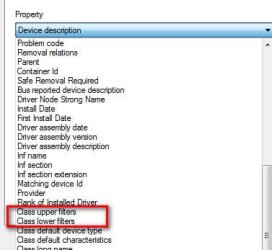
Right click the scanner device in Device Manager->Properties->Advanced tab. Use the pull down menu and carefully scroll through to see if Class upper filters or Class lower filters exist. If either do, copy paste the list of filters displayed for each.
 

Attachments

  • Filters.jpg
    Filters.jpg
    18.7 KB · Views: 9

My Computer

Computer type
PC/Desktop
Computer Manufacturer/Model Number
Dell Optiplex 360 and Optiplex 755
OS
Desk 1: Win 7 Pro x32; Desk 2: Windows 10 x64
Hard Drives
500GB Crucial SSD in both Desktops
Other Info
Buffalo 6TB NAS, Raid 1
Back
Top