Solved USB Driver Install Problem

ComputerGeek,

I believe it will be under Image device again? Does it still have the yellow icon error code=18?

Never under Image Device. Always under "Other".

Right click the scanner device in Device Manager->Properties->Advanced tab

No Advanced Tab, only Details, no mention of upper or lower filters.

The log file has mysteriously decided to start reappearing. See attached.

After I saw that the log file was finally being created, I ran the setup program. I then modified the reg to the $8007070 value as previously given and rebooted. Then I reran the setup program. As you will see, nothing being written to the log file.
 

Attachments

My Computer

Computer type
PC/Desktop
Computer Manufacturer/Model Number
Custom
OS
Windows 7, 32 Bit
CPU
AMD
Motherboard
ASUS
Memory
2G
Graphics Card(s)
?
Hard Drives
a few
Antivirus
Bit Defender
Browser
FFx, IE
Run the Set LogLevel VERBOSE.reg file I provided in earlier zip. Reboot.

Right click the scanner under Other. Click Update. Select Let me pick from a list. Click Have Disk. Browse to and select C:\Windows\inf\oem9.inf. Let 'er rip (oem9.inf is the published name per pnputil -a for the driver we just re-added to the Store)

Check the log file again

/* EDIT */
A device under "Other" has no driver installed. I'm trying to get the driver installed again (in which case it should appear under "Image" again - tho might have an error code again) If driver gets installed, check for filters again. (filters are optional parts to a device driver)
 

My Computer

Computer type
PC/Desktop
Computer Manufacturer/Model Number
Dell Optiplex 360 and Optiplex 755
OS
Desk 1: Win 7 Pro x32; Desk 2: Windows 10 x64
Hard Drives
500GB Crucial SSD in both Desktops
Other Info
Buffalo 6TB NAS, Raid 1
Browse to and select C:\Windows\inf\oem9.inf.
Ok, progress! File does not exist. There is no oem9.inf


it should appear under "Image" again -
I am not sure what you mean by "again". It was there in the "before time", but never since I started this post.


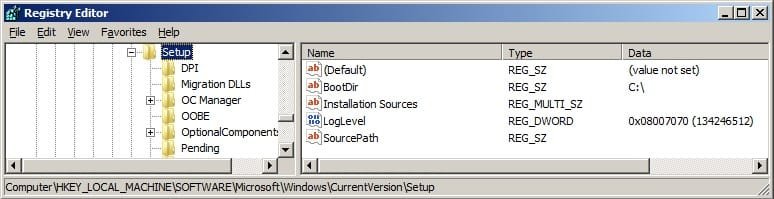
Run the Set LogLevel VERBOSE.reg file I provided in earlier zip. Reboot.
That has been done.
See attached.
 

Attachments

  • regSnapShot.jpg
    regSnapShot.jpg
    27.1 KB · Views: 0
Last edited:

My Computer

Computer type
PC/Desktop
Computer Manufacturer/Model Number
Custom
OS
Windows 7, 32 Bit
CPU
AMD
Motherboard
ASUS
Memory
2G
Graphics Card(s)
?
Hard Drives
a few
Antivirus
Bit Defender
Browser
FFx, IE
Run the Set LogLevel VERBOSE.reg file I provided in earlier zip. Reboot.
I am sorry, I thought I was clear that I had set the LogLevel and rebooted.
That has been done.
See attached.
No disrepect intended. I just wanted to make sure there was no pilot error. (i hadn't seen the log file stop before - other then a LogLevel setting that does turn it off) So i put things in scripts. :o
it should appear under "Image" again -

I am not sure what you mean by "again". It was there in the "before time", but never since I started this post.
Sorry. Also didn't realize that was the last time you saw it there. :o x 2

Re: oem9.inf not there is very strange :confused:

We're going to start the cleanup.

Let's try these 2 pnputil commands back-to-back. the 1st adds driver to the Store. 2nd deletes it. But NOTE! For your case, the name of the oemxx.inf file is whatever name is shown as the Published name inf shown from the 1st command. I also included example output from my machine where oem6.inf happens to be the published name on my computer.

If delete fails, is anything showing up in the setupapi.dev.log at this point? The pnputil add and delete traces should be there. If delete, fails attache log if it's there

Code:
pnputil   -a C:\Windows\inf\es1dn.inf
pnputil -d oemxx.inf
 

Attachments

  • 2015-04-27_165407.jpg
    2015-04-27_165407.jpg
    24.3 KB · Views: 11

My Computer

Computer type
PC/Desktop
Computer Manufacturer/Model Number
Dell Optiplex 360 and Optiplex 755
OS
Desk 1: Win 7 Pro x32; Desk 2: Windows 10 x64
Hard Drives
500GB Crucial SSD in both Desktops
Other Info
Buffalo 6TB NAS, Raid 1
ComputerGeek,

No disrepect intended. I just wanted to make sure there was no pilot error.
No worries. I understand you don't know the level of the person you are trying to help. Sorry, I was bristling. I started out in Unix.... Oh, now I am showing my age ;) So... It did make me double check everything, so that was good.

C:\Windows\System32>pnputil -a C:\Windows\inf\es1dn.inf
Microsoft PnP Utility

Processing inf : ES1Dn.inf
Driver package added successfully.
Published name : oem9.inf


Total attempted: 1
Number successfully imported: 1


C:\Windows\System32>pnputil -d oem9.inf
Microsoft PnP Utility

Deleting the driver package failed :The system cannot find the file specified.

C:\Windows\System32>

So, there is still no oem9.inf in the folder.

anything showing up in the setupapi.dev.log at this point?

Yes, finally! See attached.
 

Attachments

My Computer

Computer type
PC/Desktop
Computer Manufacturer/Model Number
Custom
OS
Windows 7, 32 Bit
CPU
AMD
Motherboard
ASUS
Memory
2G
Graphics Card(s)
?
Hard Drives
a few
Antivirus
Bit Defender
Browser
FFx, IE
Something is fundamentally wrong and bizzare as that oem9.inf file isn't being created. You can disable your A/V and try the commands again - but can't imagine A/V being the cause to removing it. Nor see why permissions should be an issue either :confused:

Let's try doing this manually. We're going to copy from the DriverStore to your Desktop. Rename the files. Then copy the renamed file to the inf directory (for your case, do not copy directly from Store to inf folder)
  1. Scanner should be unplugged from USB port
  2. Copy C:\Windows\System32\DriverStore\FileRepository\es1dn.inf_x86_neutral_1bf0cd02788b219b\ES1Dn.inf to your Desktop. Rename it to oem9.inf. Then copy the file to C:\Windows\inf
  3. Copy C:\Windows\System32\DriverStore\FileRepository\es1dn.inf_x86_neutral_1bf0cd02788b219b\ES1Dn.pnf to your Desktop. Rename it to oem9.pnf. Then copy the PNF file to C:\Windows\inf
Plug in your scanner. What happens?
 

My Computer

Computer type
PC/Desktop
Computer Manufacturer/Model Number
Dell Optiplex 360 and Optiplex 755
OS
Desk 1: Win 7 Pro x32; Desk 2: Windows 10 x64
Hard Drives
500GB Crucial SSD in both Desktops
Other Info
Buffalo 6TB NAS, Raid 1
p.s. If still a problem, double check those two oem9 files we just created haven't disappeared from the inf directory
 

My Computer

Computer type
PC/Desktop
Computer Manufacturer/Model Number
Dell Optiplex 360 and Optiplex 755
OS
Desk 1: Win 7 Pro x32; Desk 2: Windows 10 x64
Hard Drives
500GB Crucial SSD in both Desktops
Other Info
Buffalo 6TB NAS, Raid 1
ComputerGeek,

Copy C:\Windows\System32\DriverStore\FileRepository\es1dn.inf_x86_neutral_1bf0cd02788b219b\ES1Dn.inf to your Desktop. Rename it to oem9.inf. Then copy the file to C:\Windows\inf
Copy C:\Windows\System32\DriverStore\FileRepository\es1dn.inf_x86_neutral_1bf0cd02788b219b\ES1Dn.pnf to your Desktop. Rename it to oem9.pnf. Then copy the PNF file to C:\Windows\inf


F...in A! That worked!

So, I still had to go into Device Mangler and right click the scanner, still in "Other" and have it "Automatically find the driver".
This time it did find something, Online Armor asked if it was ok to run and I said yes. Bang, it's now under "Imaging Devices" and I have successfully scanned!

Arghhh! Wow, don't know why that was such a b.... but I learned a bit about driver installation. I'm a developer, but never have had to to driver in my lifetime, though I have had to do that kind of work.

Thank you for your help and persistence.
 

My Computer

Computer type
PC/Desktop
Computer Manufacturer/Model Number
Custom
OS
Windows 7, 32 Bit
CPU
AMD
Motherboard
ASUS
Memory
2G
Graphics Card(s)
?
Hard Drives
a few
Antivirus
Bit Defender
Browser
FFx, IE
great job. been following the thread learned some stuff too.
 

My Computer

Computer type
PC/Desktop
Computer Manufacturer/Model Number
dell xps 9000
OS
win 10
Woo Hoo!! Great news. Glad to help!

Ah ha! A developer. Yea, you seemed to know your way around computers quite well, for sure! So, after refelction, for what it's worth, I think this is both a Windows and Epson bug.

1. When Windows loads a driver in the Store, it creates corresponding oemxx files for it in the inf directory. The oem files are needed for the next step, driver installation, to work

For some unknown reason at some point in time, there was a glitch. The oem9.inf file disappeared. I looked at the logs. Every time we tried a pnputil -a to reload the epson driver in the Store, Windows said "Already there". So, it seems, since the driver is already in the Store, Windows assumed the oem file, it created earlier, already exists. Windows never actually checks it's still there! So, Windows doesn't attempt to re-create. pnputil -a simply tells us the already assigned published name: oem9.inf

2. As for Epson: I looked. The Epson "uninstaller" only removes the installation files. It does not delete the epson driver from the Driver Store.

Since the epson driver remained in the Store, it was never reloaded - which is when Windows creates the oem files. And, since the oem files were missing, driver installation couldn't work. Catch-22!

Manually re-creating the files did the trick!

I always learn something more from these exercises too . Glad we nailed it!! :)
 

Attachments

  • WOOHOO.jpg
    WOOHOO.jpg
    7.6 KB · Views: 9

My Computer

Computer type
PC/Desktop
Computer Manufacturer/Model Number
Dell Optiplex 360 and Optiplex 755
OS
Desk 1: Win 7 Pro x32; Desk 2: Windows 10 x64
Hard Drives
500GB Crucial SSD in both Desktops
Other Info
Buffalo 6TB NAS, Raid 1

My Computer

Computer type
PC/Desktop
Computer Manufacturer/Model Number
Dell Optiplex 360 and Optiplex 755
OS
Desk 1: Win 7 Pro x32; Desk 2: Windows 10 x64
Hard Drives
500GB Crucial SSD in both Desktops
Other Info
Buffalo 6TB NAS, Raid 1
your welcome you deserved it.
 

My Computer

Computer type
PC/Desktop
Computer Manufacturer/Model Number
dell xps 9000
OS
win 10
The other gotcha is the ever useful Microsoft error message "File Not Found" with out telling you what it is actually looking for.

And this being Windows 7, I am sure that MS will get right on this and fix it.
 

My Computer

Computer type
PC/Desktop
Computer Manufacturer/Model Number
Custom
OS
Windows 7, 32 Bit
CPU
AMD
Motherboard
ASUS
Memory
2G
Graphics Card(s)
?
Hard Drives
a few
Antivirus
Bit Defender
Browser
FFx, IE
Back
Top