USB drives won't eject

sherisdoppel

New member
Local time
3:27 PM
Messages
28
It suddenly started happening and I can assure you there is no other program using it.
I've used process explorer to see what's being handled and I always get this:

I:\$Extend\$RmMetadata\$TxfLog\$TxfLog.blf
I:\$Extend\$RmMetadata\$TxfLog\$TxfLogContainer00000000000000000001
I:\$Extend\$RmMetadata\$Txf
I:\$Extend\$RmMetadata\$TxfLog\$TxfLogContainer00000000000000000002

It happens to every single external HDD I connect to it.
I can't always safe eject them so most of the time I plug out my USB cable 'cause I need them in a different system.
Doing this sometimes mess up the HDD (happened to me before, twice) and I wish there is a solution for this.
 

My Computer

Computer type
PC/Desktop
Computer Manufacturer/Model Number
Custom Build
OS
Windows 7 Ultimate 64bit
CPU
i7 2600K
Motherboard
Asus P8P67 Pro Rev 3.1
Graphics Card(s)
GTX 560 Ti
Screen Resolution
1920x1080
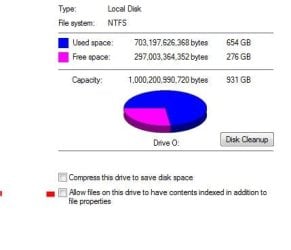
Two things that could be causing the problem is System Restore and Indexing. Do you have either or both set for you HDD?
 

My Computer

Computer type
PC/Desktop
Computer Manufacturer/Model Number
Self build
OS
Windows 10 Home
CPU
Intel Core i5 3550
Motherboard
ASUS P8Z77-V LX (LGA1155)
Memory
Corsair Vengeance DDR3 16GB
Graphics Card(s)
Nvidia GEForce GTX 970 SSC
Monitor(s) Displays
Hanns-G 23.6", Acer 17"
Screen Resolution
1920x1080, 1440x900
Hard Drives
Sandisk SSD 256 GB
WD500GB
WD640GB
Seagage Ultra + 1TB ext.
BWD 800GB
WD 1TB ext
PSU
Antec 650w
Case
Cooler Master Centurion 534
Cooling
COOLER MASTER GeminII S524, 3 120 mm case fans.
Keyboard
Logitech MK300
Mouse
Logitech MK300
Internet Speed
Cable
Antivirus
MSSE, Malwarebytes
Browser
IE 10, Chrome

My Computer

Computer type
PC/Desktop
Computer Manufacturer/Model Number
self build
OS
win 7 ultimate32bit, Win8.1pro wmc 32bit
CPU
amd phenom x4 9600
Motherboard
asus m2n32-sli deluxe
Memory
corsair twinxs 2x2gb
Graphics Card(s)
2x nvidia 1gb 8500gt
Sound Card
onboard
Monitor(s) Displays
23" PB Viseo 233d
Screen Resolution
1920x1080
Hard Drives
maxtor sata 500gb
maxtor sata 320gb
fujitsu sata200gb
PSU
oryxx tornado 750w
Case
thermaltake xaser lll
Cooling
artic freezer64 pro + 7 case fans

My Computer

Computer type
PC/Desktop
Computer Manufacturer/Model Number
Built them myself, Science Experiments !
OS
Win7 Enterprise, Win7 x86 (Ult 7600), Win7 x64 Ult 7600, TechNet RTM on AMD x64 (2.8Ghz)
CPU
AMD fx8350 4ghz, AMD-32 2400mhz, AMD-64 3200mhz, AMDx64 2.8G
Motherboard
SIS 755, ECS-K8M890M-M (Ult 7600), GigaByte & others
Memory
2gb, 4gb on the Ult 7600, 4gb on Technet RTM, 32gb on FX8350
Graphics Card(s)
Draw my own Graphics, several nVidia cards
Sound Card
on motherboard
Monitor(s) Displays
19" flat scr, 28" I-Inc widescr,22" Emprex Widescr, 23" Acer
Screen Resolution
1280 x 1024, 1440 x 900, 1920 x 1080
Hard Drives
6 pata Ide HD's & 2 Sata HD's
added 80gb external on Ult 7600 computer,
numerous extra 1tb, 2TB, 3Tb SATA HD's
A collection of ext HD Docks w/ HDs
PSU
430w, 550w, 600w, 700, 800, etc
Case
All Generic Full Towers
Cooling
Open Air & a few fans, some w/ colored LEDs
Keyboard
Compaq & Dell recycled from GoodWill
Mouse
Made in China Optical Wired Mouse
Internet Speed
Fast Cable InterNet
Antivirus
AVG Free on 24 different Desktops, NO Problems!
Browser
IE 8 is preferred, but use FireFox sometimes
Other Info
Linksys Routers, switches, & Hubs
Too Many USB Flash Drives to count, Biggest is 64GB !
Eight computers in my home network.
Sixteen computers at my business network.
Linked via TeamViewer !
Lots of old used spare computer parts everywhere!
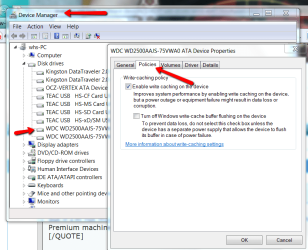
You could set them to "Quick Removal" (in Policies). Then you do not have to worry about that. But they will read/write a bit slower
 

My Computer

Computer Manufacturer/Model Number
HP, Dell, Gateway, Toshiba - 4 laptops and 2 desktops
OS
Vista, Windows7, Mint Mate, Zorin, Windows 8
CPU
from 1.6GHz Duo to i7
Monitor(s) Displays
2x HP w2207
Hard Drives
5x HDD, 7x SSD, 12x Externals
Keyboard
with trackball - no mices
Mouse
Trackball mice
Internet Speed
DSL 6000

My Computer

Computer type
PC/Desktop
Computer Manufacturer/Model Number
Custom Build
OS
Windows 7 Ultimate 64bit
CPU
i7 2600K
Motherboard
Asus P8P67 Pro Rev 3.1
Graphics Card(s)
GTX 560 Ti
Screen Resolution
1920x1080

My Computer

Computer type
PC/Desktop
Computer Manufacturer/Model Number
Custom Build
OS
Windows 7 Ultimate 64bit
CPU
i7 2600K
Motherboard
Asus P8P67 Pro Rev 3.1
Graphics Card(s)
GTX 560 Ti
Screen Resolution
1920x1080
Still needing help on this one...
 

My Computer

Computer type
PC/Desktop
Computer Manufacturer/Model Number
Custom Build
OS
Windows 7 Ultimate 64bit
CPU
i7 2600K
Motherboard
Asus P8P67 Pro Rev 3.1
Graphics Card(s)
GTX 560 Ti
Screen Resolution
1920x1080

My Computer

Computer type
PC/Desktop
Computer Manufacturer/Model Number
self build
OS
win 7 ultimate32bit, Win8.1pro wmc 32bit
CPU
amd phenom x4 9600
Motherboard
asus m2n32-sli deluxe
Memory
corsair twinxs 2x2gb
Graphics Card(s)
2x nvidia 1gb 8500gt
Sound Card
onboard
Monitor(s) Displays
23" PB Viseo 233d
Screen Resolution
1920x1080
Hard Drives
maxtor sata 500gb
maxtor sata 320gb
fujitsu sata200gb
PSU
oryxx tornado 750w
Case
thermaltake xaser lll
Cooling
artic freezer64 pro + 7 case fans
You could set them to "Quick Removal" (in Policies). Then you do not have to worry about that. But they will read/write a bit slower

Pardon the necro, but if I'm not mistaken only win7 Pro and above has this -- searching for "policies" on my win7 x64 Home Premium machine returns no relevant results. However, I also seem to recall the policies are just a nice UI pointing to registry keys, so on Home Premium all I need is the relevant registry key to edit. Right?

Only just purchased a 2-bay USB enclosure and one 2TB drive to stick in it this morning. Copied a whole bunch of data just fine but win7 wouldn't let me eject the drive after I was done.

Possible relevant info in the following (external) threads:
SafelyRemove.com Forum • View topic - transactional ntfs + sata + safe removal
Vista refuses to safely remove external usb hard drive - Vista Help

The second one contained a link to a SysInternals tools ("sync") which I decided to download and use - didn't solve the issue (still couldn't stop the device), but I figure since the data was safely flushed it should be no problem to just yank the usb cable out after syncing.

Really annoying, this. Isn't there any way of telling win7 that this is a removable device, and that I want to remove it, dammit? You'd think processes like search and indexing would take this into account by now, it's not like removable devices are new.
 

My Computer

Computer Manufacturer/Model Number
Self-built rig
OS
Win7 Pro x64
CPU
Koa i5-2550K
Memory
8 GB
Graphics Card(s)
Sapphire ATI 6870 1GB GDDR5
Sound Card
RealTek HD Audio / ATI HDMI Audio
Monitor(s) Displays
Samsung HDTV Monitor T23A350
Screen Resolution
1920 x 1080
Hard Drives
- SSD (C:)
- HDD (D:)
- BD-ROM (E:)
Keyboard
Logitech G110
Internet Speed
Unifi home (5mbps)
but if I'm not mistaken only Windows 7 Pro and above has this -- searching for "policies" on my Windows 7 x64 Home Premium machine returns no relevant results
You have to open Device Manager > Disk drives > disk in question - see picture:
 

Attachments

  • 2011-09-03_1822.png
    2011-09-03_1822.png
    54.1 KB · Views: 528

My Computer

Computer Manufacturer/Model Number
HP, Dell, Gateway, Toshiba - 4 laptops and 2 desktops
OS
Vista, Windows7, Mint Mate, Zorin, Windows 8
CPU
from 1.6GHz Duo to i7
Monitor(s) Displays
2x HP w2207
Hard Drives
5x HDD, 7x SSD, 12x Externals
Keyboard
with trackball - no mices
Mouse
Trackball mice
Internet Speed
DSL 6000
but if I'm not mistaken only Windows 7 Pro and above has this -- searching for "policies" on my Windows 7 x64 Home Premium machine returns no relevant results
You have to open Device Manager > Disk drives > disk in question - see picture:

After calling 'the techs' and searching high and low for a solution to this problem, this one finally worked. I hasten to add an interesting point, the problem only occurred in combination with my main back-up Intenso hard drive. Thank you so much for this from RLP!
 

My Computer

OS
win 7
You could set them to "Quick Removal" (in Policies). Then you do not have to worry about that. But they will read/write a bit slower

After calling 'the techs' and searching high and low for a solution to this problem, this one finally worked. I hasten to add an interesting point, the problem only occurred in combination with my main back-up Intenso hard drive. Thank you so much for this from RLP!
 

My Computer

OS
win 7
This is a very annoying problem, and it happens on all Windows 7 computers that I use. It is obviously poor programming by Microsoft: But there is no need to reboot Windows 7 or search for the process still using it. Here is my workaround:

All my USB drives are either fully encrypted devices (Using Truecrypt) or just contain one or more TrueCrypt files (encrypted containers). In order to use the USB drive, I must first "mount" the device or file, and it then appears as a drive letter in Windows 7. So far so good.

I then proceed to use that encrypted drive, knowing that all the data is safely stored by TrueCrypt. When I'm done, I dismount the drive which closes any open links to that drive. TrueCrypt has no problem dismounting the drive when I am done using it. So far so good: I know I can now dismount it, but Windows 7 doesn't think so. Well, I know it's not in use, so I just unplug it: There is ZERO CHANCE of data corruption or loss, because the drive has been properly dismounted by TrueCrypt.

However, if I wish to mount the drive on a Linux system, Linux will not allow it, saying the drive was uncleanly dismounted - oh heck. So I come up with one more step:
After unplugging the drive, I plug it right back in: Windows will recognize it again. Then I unplug it immediately: Windows has no problem with that.

So there you have it: If you use TrueCrypt to secure your USB drive (which you should do anyway), you can just IGNORE the stupid message from Windows 7, unplug the drive, plug it in again and unplug it cleanly for Linux. Or, if you don't use Linux: Just unplug the drive after proper TrueCrypt dismount and say bye bye to sloppy Microsoft programming...
 

My Computer

Computer type
PC/Desktop
Computer Manufacturer/Model Number
Custom
OS
Windows 7 Home Premium x64
CPU
AMD
Motherboard
Asus
Memory
16GB
Hard Drives
4-drive RAID-0 array with 4 Seagate commercial quality drives
Antivirus
Avast
Browser
Chrome and Firefox
process mngr

:party:Just bought a Seagate mini external HD and it won't eject safely on my Win7, but OK on Win8.
As pebble suggested use the process manager and find the Seagates that are running after you turned off the HD. Then stop them; I stopped 4 and now everything is fine.
 
Last edited:

My Computer

Computer type
PC/Desktop
Computer Manufacturer/Model Number
Lenovo
OS
win7 64bit Pro
CPU
2.4
Memory
8G
Hard Drives
1T SSD
Old thread, but has been bumped recently, so I'll add my 2 cents:

With most any drive I hot swap, I have to open properties and uncheck the indexing option "Allow Files on this drive to..." (as seen in screenshot). After that, windows recognizes the drive and doesn't index it. Win 7 pro x64. Incidentally, Process Explorer shows the exact same handles as the OP posts (before I stop indexing).

Just as Cato suggested earlier in this thread and will likely be a solution for many Googling. Good call, Cato.

Capture.JPG
 

My Computer

Computer type
PC/Desktop
Computer Manufacturer/Model Number
custom
OS
windows 7 Pro 64 Bit
CPU
i5 4670K
Motherboard
Asus Max Hero 1150 socket
Memory
16GB DDR3@933mhz
Graphics Card(s)
Radeon R9 390 8192mb
Monitor(s) Displays
Dell U2415 x3
Screen Resolution
1920 (5760) x 1200 x3
Hard Drives
System: Kingston 128GB SSD

Installing to Samsung 860 EVO 500GB
WD Black 2 TB & 1 TB
PSU
Corsair CX750M
Cooling
Hyper 312
Internet Speed
50mbps
I thought I solved the problem with Task Manager, but it returned. Spent a hour with Seagate on phone and they said to try their HD scan tool: SeaTools. It passed the Seagate external drive, but it failed my hard drive, which according to Seagate means their external drive is not the problem but something on my PC. I followed up with Chkdsk, and Scannow, and both were clean. So who is at fault?
I will try the Acronis HD tool now to get further info on my HD.:huh:
 

My Computer

Computer type
PC/Desktop
Computer Manufacturer/Model Number
Lenovo
OS
win7 64bit Pro
CPU
2.4
Memory
8G
Hard Drives
1T SSD
I thought I solved the problem with Task Manager, but it returned. Spent a hour with Seagate on phone and they said to try their HD scan tool: SeaTools. It passed the Seagate external drive, but it failed my hard drive, which according to Seagate means their external drive is not the problem but something on my PC. I followed up with Chkdsk, and Scannow, and both were clean. So who is at fault?
I will try the Acronis HD tool now to get further info on my HD.:huh:

Is the HD that failed a Seagate? If so, and it's still in the warranty period, you should RMA it. If it's not a seagate drive (but in warranty), run the tests with the manufacturer's tools and then get an RMA from the HD manufacturer. After the new drive is in, try ejecting the external drive and see what happens, although it seems to me that your ext. ejection problems are unrelated to the internal drive.

You should be able to use a free clone utility from the drive manufacturer to clone the failing drive to the replacement.
 

My Computer

Computer type
PC/Desktop
Computer Manufacturer/Model Number
custom
OS
windows 7 Pro 64 Bit
CPU
i5 4670K
Motherboard
Asus Max Hero 1150 socket
Memory
16GB DDR3@933mhz
Graphics Card(s)
Radeon R9 390 8192mb
Monitor(s) Displays
Dell U2415 x3
Screen Resolution
1920 (5760) x 1200 x3
Hard Drives
System: Kingston 128GB SSD

Installing to Samsung 860 EVO 500GB
WD Black 2 TB & 1 TB
PSU
Corsair CX750M
Cooling
Hyper 312
Internet Speed
50mbps
I'm not sure if the drive failed, since 2 out of 3 test passed (not Seatools). The HD is out of warranty anyhow, and like you stated, it is doubtful it is causing the external drive problems.(I just ran the Seatools test on my internal since it was readily available). I followed up with a question on a different thread regarding the HD.
 

My Computer

Computer type
PC/Desktop
Computer Manufacturer/Model Number
Lenovo
OS
win7 64bit Pro
CPU
2.4
Memory
8G
Hard Drives
1T SSD
Solved!

It suddenly started happening and I can assure you there is no other program using it.
I've used process explorer to see what's being handled and I always get this:

I:\$Extend\$RmMetadata\$TxfLog\$TxfLog.blf
I:\$Extend\$RmMetadata\$TxfLog\$TxfLogContainer00000000000000000001
I:\$Extend\$RmMetadata\$Txf
I:\$Extend\$RmMetadata\$TxfLog\$TxfLogContainer00000000000000000002

It happens to every single external HDD I connect to it.
I can't always safe eject them so most of the time I plug out my USB cable 'cause I need them in a different system.
Doing this sometimes mess up the HDD (happened to me before, twice) and I wish there is a solution for this.

I've had the exact same problem with a truecrypt-mounted drive, and I found a solution!

Launch an elevated command prompt and run "fsutil volume dismount [DRIVE]", where in your case drive would be I:

After I did that the handles to the TxfLog were closed and I could safely dismount the volume in truecrypt and then eject the device using "safely remove hardware".

Hope that helps :)
 

My Computer

Computer type
PC/Desktop
OS
Win 7 home premium x64
Back
Top