USB drives won't eject

Two things that could be causing the problem is System Restore and Indexing. Do you have either or both set for you HDD?

YESSSSSS!!!!
I tried EVERYTHING to solve my problem until I read your post.
I disabled System Restore and also Recycle Bin since Indexing was already disabled.
Recycle Bin: to eliminate deleted things directly instead of "moving it" to the recycle bin.

Now I can "safety remove" my 3 USB WD My Book

Thank you very much!

Thank you very much ;)
 

My Computer

Computer type
Laptop
Computer Manufacturer/Model Number
Dell XPS L701X
OS
Windows 7 Professional SP1 x64
CPU
Mobile QuadCore Intel Core i7-740QM, 2647 MHz (2
Motherboard
Dell XPS L701X
Memory
6076 MB (DDR3-1333 DDR3 SDRAM)
Graphics Card(s)
NVIDIA GeForce GT 445M (3 GB)
Antivirus
Comodo Internet Security 8.0.1.4426
Browser
Google Chrome 41.0.2272.101
Two things that could be causing the problem is System Restore and Indexing. Do you have either or both set for you HDD?

YESSSSSS!!!!
I tried EVERYTHING to solve my problem until I read your post.
I disabled System Restore and also Recycle Bin since Indexing was already disabled.
Recycle Bin: to eliminate deleted things directly instead of "moving it" to the recycle bin.

Now I can "safety remove" my 3 USB WD My Book

Thank you very much ;)

Good luck!
 

My Computer

Computer type
Laptop
Computer Manufacturer/Model Number
Dell XPS L701X
OS
Windows 7 Professional SP1 x64
CPU
Mobile QuadCore Intel Core i7-740QM, 2647 MHz (2
Motherboard
Dell XPS L701X
Memory
6076 MB (DDR3-1333 DDR3 SDRAM)
Graphics Card(s)
NVIDIA GeForce GT 445M (3 GB)
Antivirus
Comodo Internet Security 8.0.1.4426
Browser
Google Chrome 41.0.2272.101
Check to see if you have a program running called "Everything.exe". It's a third-party NTFS search indexing freeware program created by VoidTools. This was the culprit that was preventing me from ejecting any external USB hard drive. Whenever it was running, my external hard drive would have multiple handles in use, for example:

W:\$Extend\$RmMetadata\$Txf:$I30:$INDEX_ALLOCATION
W:\$Extend\$RmMetadata\$TxfLog\$TxfLogContainer00000000000000000002
W:\$Extend\$RmMetadata\$TxfLog\$TxfLogContainer00000000000000000001
W:\$Extend\$RmMetadata\$TxfLog\$TxfLog.blf

Closing Everything.exe released these locked connections to my HD and I can safely eject now with no problems.
 
Last edited:

My Computer

Computer type
PC/Desktop
OS
Windows 10 Professional
Check to see if you have a program running called "Everything.exe"...

Closing Everything.exe released these locked connections to my HD and I can safely eject now with no problems.

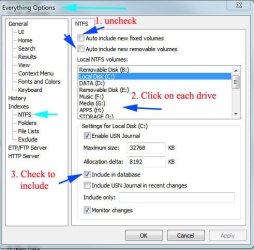
No need to close, just change options, as pictured:

Tools\Options|indexes|NTFS

Everything will no longer automatically include fixed or removable drives. If you add a drive that you desire to have indexed, just go back into options and manually include it. When you uncheck the auto include function, all drives will be excluded. you will have to re-add them as shown.

Everything Index Options.JPG
 

My Computer

Computer type
PC/Desktop
Computer Manufacturer/Model Number
custom
OS
windows 7 Pro 64 Bit
CPU
i5 4670K
Motherboard
Asus Max Hero 1150 socket
Memory
16GB DDR3@933mhz
Graphics Card(s)
Radeon R9 390 8192mb
Monitor(s) Displays
Dell U2415 x3
Screen Resolution
1920 (5760) x 1200 x3
Hard Drives
System: Kingston 128GB SSD

Installing to Samsung 860 EVO 500GB
WD Black 2 TB & 1 TB
PSU
Corsair CX750M
Cooling
Hyper 312
Internet Speed
50mbps
Back
Top