USB Flash Drive got RAW

Clarendon

New member
Local time
4:56 PM
Messages
2
RAW.PNG

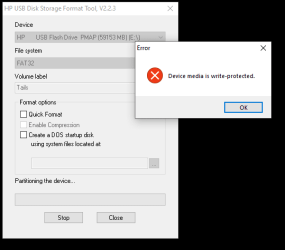
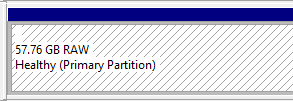
Hello community, My HP USB flash drive got RAW format and i can not see on This PC, it is not listed.

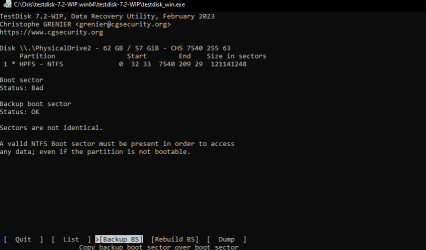
I tried testdisk 7.2 see above screenshot please.
RAW (1).png
Write.png
 

My Computers

System One System Two

  • Computer type
    PC/Desktop
    Computer Manufacturer/Model Number
    Dell
    OS
    Windows 10LTSC
    CPU
    i3-10
    Memory
    8
  • Computer type
    PC/Desktop
If you enabled persistent storage in Tails then that is why the USB drive shows up as raw since the USB drive is encrypted.

Can the drive boot Tails?

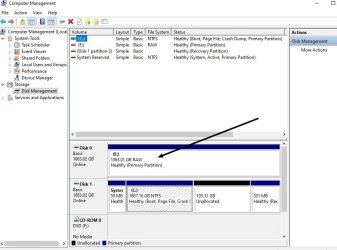
If you're wanting to just format the drive, then you may need to go into Computer Management | Storage | Disk Management. Now right click the USB drive and format. If that doesn't work then a program called DiskGenius may work to format the drive.

An easy way to get to Computer Management in Windows 7 is to right click the My Computer icon (if on your desktop) and chose the option from the right click context menu. Or simply enter Computer Management in Windows search. It's also found in the Windows Control Panel.

- - - Updated - - -

Have a look at my 2 TB HDD. It's raw because it's encrypted.


rfetbht.jpg
 

My Computer

Computer type
PC/Desktop
OS
Windows 7 Ultimate x64
Before i had it encrypted by Veracrypt and after when i tried to install Tails on it as instructed on Tails site it got that RAW format. Is any way to solve it?
Ok i will try disk genius
 

My Computers

System One System Two

  • Computer type
    PC/Desktop
    Computer Manufacturer/Model Number
    Dell
    OS
    Windows 10LTSC
    CPU
    i3-10
    Memory
    8
  • Computer type
    PC/Desktop
Raw means it lost its parition you need specfic parition recover software lost of free one if the parition is recovered all the files will be there
 

My Computer

Computer type
PC/Desktop
OS
win 8 32 bit
No, the disk is encrypted... This is completely different.
 

My Computer

Computer type
PC/Desktop
OS
Windows 7 Ultimate x64
Back
Top