Solved usb flash drive shows NO FILES!

david0077

New member
Local time
8:24 PM
Messages
19
hello all,

i have a 3.74gb sony usb flash drive formatted as FAT32 that i've been using to move files from one machine to another. i've recently upgraded one of my machines from windows xp to windows 7. now for some reason the windows 7 machine doesn't see anything on the flash drive. i thought at first that the files had somehow been deleted, but when i plug it in to the windows xp machine, everything is there and windows xp reports no errors on the drive.

on the windows 7 machine, opening windows explorer displays the flash drive in the left pane, but selecting the drive results in nothing displayed on the right, where folder contents would normally be displayed. windows explorer blocks for about 30 seconds or so while it tries to find out what's on the drive, then displays an empty pane.

opening up computer management and going to storage => disk management, i see a 'disk 3' in the stack labeled w/the appropriate drive letter for the flash drive, but there is a mention beneath it saying 'no media'. right-clicking the disk icon and selecting 'properties' from the resulting pop-up menu shows me the driver pop-up w/the mention that the device is working properly. the 'volumes' tab shows capacity, unallocated space, and reserved space all at 0 mb, w/a partition style of 'master boot record'. if i try to right-click the section to the right that usually has a graphical representation of the partitition, nothing happens.

i have a usb hub connected to one of the usb ports. i disconnected the thumb drive from the straight-in connection and connected it to the usb hub. now i can see the drive in computer management, the drive is now correctly identified [size, partition info, and allocation], but windows explorer still displays no files or folders on the drive, as if it were completely empty. if i right-click the right pane that shows the partition, i can select 'format' and try to format it as ntfs, but then virtual disk mgr gives me the error 'the system cannot find the file specified'.

anyone have any ideas what's going on here ?

thanks,
dave
 

My Computer My Computer

OS
Windows 7 Enterprise SP1 64-bit
Hello Dave now does the stick show files on any other of your machines?? Plus you might try this program
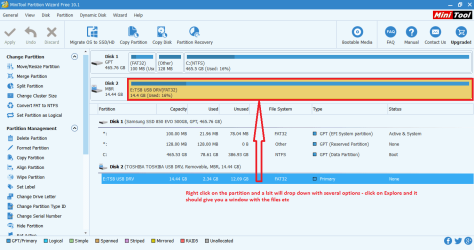
Best Free Partition Manager for Windows | MiniTool Partition Free and see if it shows up in that and if you right click on the drive it will drop down a list of options - click Explore - see my pic.

A tip this program is very useful to keep;)
 

Attachments

  • MINITOOLS EXPLORE.PNG
    MINITOOLS EXPLORE.PNG
    35.1 KB · Views: 1

My Computer My Computer

Computer type
PC/Desktop
Computer Manufacturer/Model Number
Own build (new) Desk1 / Asus ROG Win 7 / Desk2 1st build
OS
Desk1 7 Home Prem / Desk2 10 Pro / Main lap Asus ROG 10 Pro 2 laptop Toshiba 7 Pro Asus P2520 7 & 10
CPU
Desk1 i5 3750K / Laptop i7 GTX 860M / Desk2 i5 2500
Motherboard
Desk1 Asus P877-V / Desk2 Gigabyte H67 UD3H / Laptop ?
Memory
Desk1 8GB (1866) / Desk2 16GB (1333) / Laptop 8Gb DDR3
Graphics Card(s)
Desk 1& 2NVidia GTX 650 & Laptops on board Intel
Sound Card
Desk 1 & 2 -XONAR DG Realtek High Def audio Laptop
Monitor(s) Displays
Desk 1 Benq HD 2450 / Desk2 Philips 24" / Laptop 17.5"
Screen Resolution
1920x1080 D1 & D2 & Laptop 1
Hard Drives
Desk1 Samsung 120GB 830 SSD
Asus ROG 256GB 850 Pro SSD
Desk2 Samsung 840 256 SSD
Toshiba 120GB EVO
PSU
Desk 1 Corsair HX 1050/ Laptop ? / Desk 2 Corsair HX 650
Case
Desk 1 Cooler HAF XM ? Toshiba laptop / Desk2 Coolermaster
Cooling
Fans on all Desk1 -2 Desk2 - all Coolermasters 5 Laptop ?
Keyboard
Desk 1 MS Sidewinder X6 Desk 2 MS Sidewinder X 4
Mouse
Desk 1&2 - Gigabyte MS 900 gamer - laptop - Logitec wireless
Internet Speed
ADSL2+
Other Info
One other Desktop (tester) and spare Toshba laptop both with SSD's
Running Kaspersky 2016 ISS on all machines config'd identically
Logitec audio stereo systems on each machine (x3)
Canon MG5250MFC
Router/modem TP-Link running WPA2SK
Hello Dave now does the stick show files on any other of your machines??
yup. when i plug it in to my windows xp machine, everything is there, right where it should be.
 

My Computer My Computer

OS
Windows 7 Enterprise SP1 64-bit
My Computer My Computer

Computer type
PC/Desktop
Computer Manufacturer/Model Number
Self built using existing case
OS
Windows 7 Home Premium 64 bit sp1
CPU
Intel i5 3570 3.4Ghz Ivy Bridge SKT 1155 quad core
Motherboard
Gigabyte Z77-HD3 SKT 1155 2xSata 3, 4x USB 3.0
Memory
G-Skill Rip Jaws 16Gb (8x2) DDR3 -1600 PC3 12800 CL 10 red
Graphics Card(s)
Gigabyte NVIDIA GT610 1Gb DDR3 810/1200 PCI-E 2.0 Silent
Sound Card
NVIDIA High Definition & Realtech High Definition Audio
Monitor(s) Displays
2 x Philips 226V4L 16:9 aspect ratio
Screen Resolution
1920 x 1080 HD
Hard Drives
Samsung 840 Pro 256gb SSD, SATA 3.
Hitachi Touro Portable 1tb, USB 3.0 HDD used for image b/ups.
PSU
Corsair VS450
Case
Codeng
Cooling
PSU fan & CPU fan
Keyboard
Logitech
Mouse
Logitech Wireless trackball M570
Internet Speed
Wireless 3G. 3mg down & 550kb up.
Antivirus
Bitdefender Internet Security 2020
Browser
Opera (Current Version) & Firefox
Other Info
MS Office 2013 Pro. Davis weather station software. MGE Nova 600 avr UPS.
thanks ! looks like some good info, i'll give it a try.
 

My Computer My Computer

OS
Windows 7 Enterprise SP1 64-bit
no joy, unfortunately. same as before -- the usb stick appears valid in windows xp, but on windows 7, although the device appears and is reported as functioning correctly, there's no disk associated with it. >:(
 

My Computer My Computer

OS
Windows 7 Enterprise SP1 64-bit

My Computer My Computer

Computer type
PC/Desktop
Computer Manufacturer/Model Number
Home made Desktop
OS
Windows 10 Pro. 64/ version 1709 Windows 7 Pro/64
CPU
Intel i7-6800K @ 4.3
Motherboard
ASUS X-99 Deluxe II
Memory
Corsair Platinum 16 gig @2400
Graphics Card(s)
EVGA GTX 1070 OC
Monitor(s) Displays
Asus 27" LED LCD/VE278Q
Screen Resolution
1920-1080 or 1280-720 HDMI
Hard Drives
INTEL SSD 730-240 Gb Sata 3.0/
PSU
EVGA Platium 1200W
Case
Phanteks Luxe Tempered Glass 8 fans/ one radiator
Cooling
XSPC/ Water Cooled CPU
Keyboard
Das 4 Professional
Mouse
Logitech M705/MX Anywhere 2-S
Internet Speed
100 mbits
Antivirus
Microsoft Security Essentials/ Malwarebytes Premium 3.0/ SAS
Browser
I.E. 11 default/Firefox/ ISP Time Warner Cable/Spectrum
Other Info
LG BluRay Burner/
Sound system-KLipsch-THX/
Icy Dock ssd Hot Swap bays.
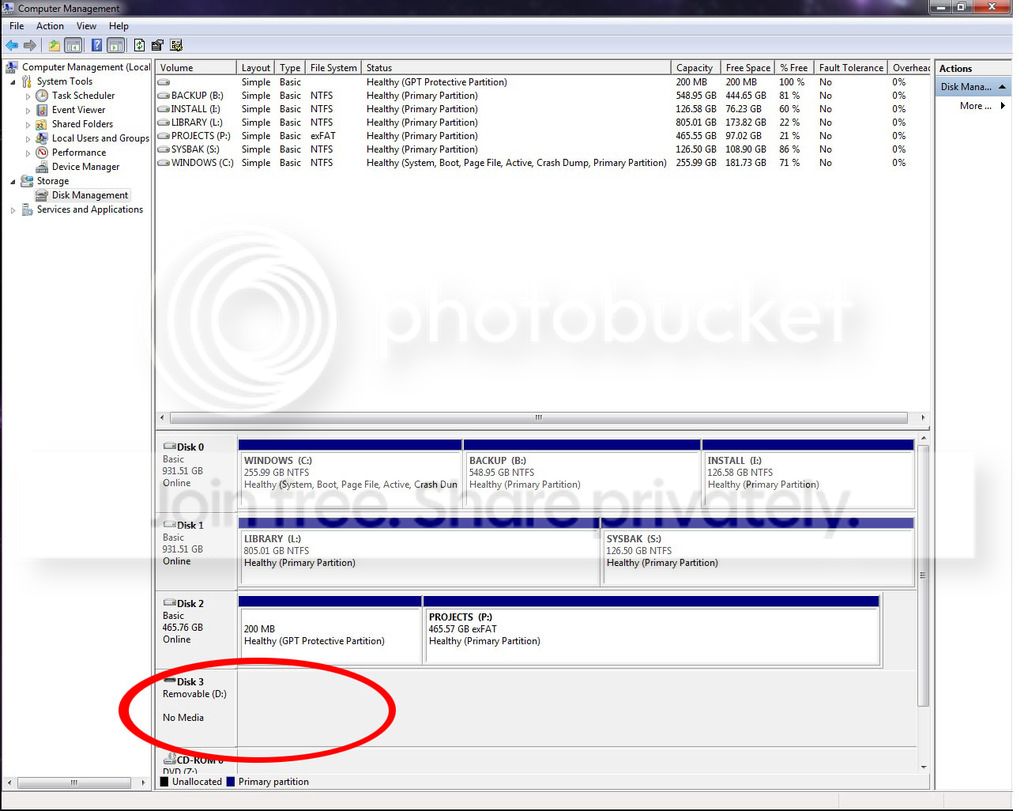
no, it doesn't even show up. but, 'a picture is worth 1,000 words', so here are... 3,000 more for you. ;)

first, the screenie you asked for. as you can see, even though the disk shows up on the left pane of the partition diagram, the media itself doesn't show up on the right. and there's no disk at all in the list of volumes at the top.
Untitled1_1.jpg


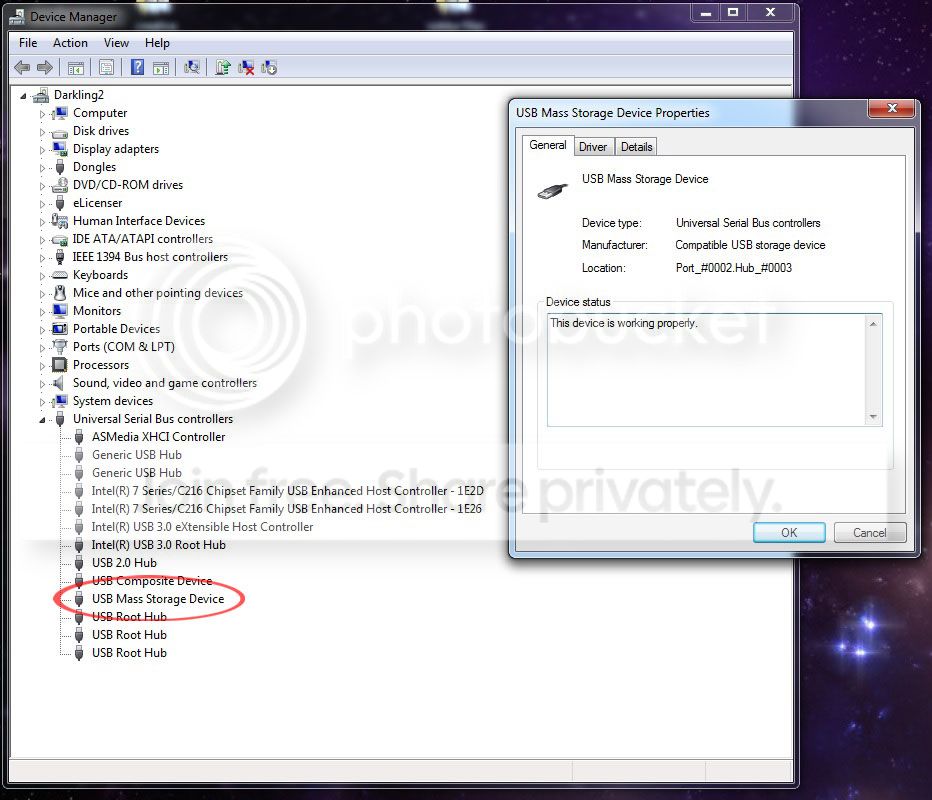
next, a shot of the device in dev mgr -
Untitled2_1.jpg


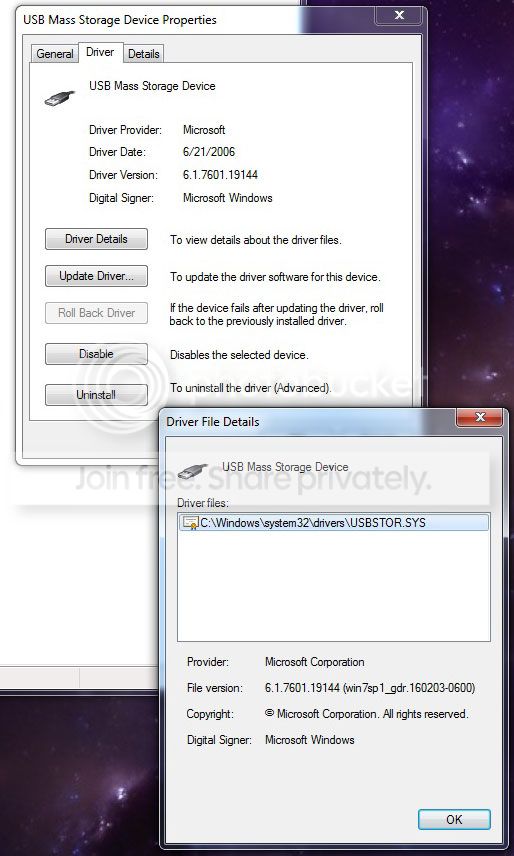
finally, a more detailed look at the driver -
Untitled3_1.jpg


i thought it might be a driver issue, so i checked out sony's site, but they say the usb flash drivers included w/windows 7 are the correct ones i should be using... :confused:

don't know if any of this helps, but hopefully someone w/more savvy than me can point something out.

thanks again to everyone for your help so far.
 

My Computer My Computer

OS
Windows 7 Enterprise SP1 64-bit
Hi David,

not sure but i believe its due to your non standard set-up, using GPT,
have a look at this from MS, basically i can see it but cant use it, i need a drive letter.

What partitions are mounted by default by Windows?

Windows exposes only basic data partitions. Other partitions with FAT file systems may be mounted, but not exposed only programmatically. Only basic data partitions are assigned drive letters or mount points.
The ESP FAT file system is mounted, but not exposed. This allows programs running under Windows to update the contents of the ESP. Assigning a drive letter to the ESP using ‘mountvol /s’ will allow access to the partition. Access to the ESP requires admin privilege. Although the MSR, and any partitions created from the MSR, could have recognizable file systems, none are exposed.
Any OEM-specific partitions or partitions associated with other operating systems are not recognized by Windows. Unrecognized partitions with recognizable file systems are treated like the ESP. They will be mounted, but not exposed. Unlike MBR disks, there is no practical difference between OEM-specific partitions and other operating system partitions; all are "unrecognized."


Roy
 

My Computer My Computer

Computer type
PC/Desktop
Computer Manufacturer/Model Number
medionl/Aspire 6930G/acer x55a
OS
W7 home premium 32bit/W7HP 64bit/w10 tp insider ring
CPU
E5300 dual core
Motherboard
medion MS7366
Memory
3gb
Graphics Card(s)
Nvidia Geforce 7100 Nforce 630i
Monitor(s) Displays
avixc
Internet Speed
n (isp resticted to 72)
Antivirus
mse/pands
Browser
palemoon
Other Info
Belkin Fd7050 n USB using Railink RT2870 drivers, more upto date
not sure but i believe its due to your non standard set-up, using GPT,
have a look at this from MS, basically i can see it but cant use it, i need a drive letter.
but the GPT is on a completely different disk, disk2. the usb flash drive is disk3. if i understand the microsoft post correctly, they're talking about not exposing the gpt partition of a disk so it appears in explorer. in my case, the disk -- which is an mbr disk -- isn't being displayed at all. i.e., there isn't even a partition to display in the volume mgr so it can be exposed, or not.
 

My Computer My Computer

OS
Windows 7 Enterprise SP1 64-bit
David did you try the Partition Wizard?? and just out of interest what AV are you running?

Plus as you are running Enterprise are there any blocks your IT people have put on using other drives on that machine/s
 

My Computer My Computer

Computer type
PC/Desktop
Computer Manufacturer/Model Number
Own build (new) Desk1 / Asus ROG Win 7 / Desk2 1st build
OS
Desk1 7 Home Prem / Desk2 10 Pro / Main lap Asus ROG 10 Pro 2 laptop Toshiba 7 Pro Asus P2520 7 & 10
CPU
Desk1 i5 3750K / Laptop i7 GTX 860M / Desk2 i5 2500
Motherboard
Desk1 Asus P877-V / Desk2 Gigabyte H67 UD3H / Laptop ?
Memory
Desk1 8GB (1866) / Desk2 16GB (1333) / Laptop 8Gb DDR3
Graphics Card(s)
Desk 1& 2NVidia GTX 650 & Laptops on board Intel
Sound Card
Desk 1 & 2 -XONAR DG Realtek High Def audio Laptop
Monitor(s) Displays
Desk 1 Benq HD 2450 / Desk2 Philips 24" / Laptop 17.5"
Screen Resolution
1920x1080 D1 & D2 & Laptop 1
Hard Drives
Desk1 Samsung 120GB 830 SSD
Asus ROG 256GB 850 Pro SSD
Desk2 Samsung 840 256 SSD
Toshiba 120GB EVO
PSU
Desk 1 Corsair HX 1050/ Laptop ? / Desk 2 Corsair HX 650
Case
Desk 1 Cooler HAF XM ? Toshiba laptop / Desk2 Coolermaster
Cooling
Fans on all Desk1 -2 Desk2 - all Coolermasters 5 Laptop ?
Keyboard
Desk 1 MS Sidewinder X6 Desk 2 MS Sidewinder X 4
Mouse
Desk 1&2 - Gigabyte MS 900 gamer - laptop - Logitec wireless
Internet Speed
ADSL2+
Other Info
One other Desktop (tester) and spare Toshba laptop both with SSD's
Running Kaspersky 2016 ISS on all machines config'd identically
Logitec audio stereo systems on each machine (x3)
Canon MG5250MFC
Router/modem TP-Link running WPA2SK

My Computer My Computer

Computer type
PC/Desktop
Computer Manufacturer/Model Number
Home made Desktop
OS
Windows 10 Pro. 64/ version 1709 Windows 7 Pro/64
CPU
Intel i7-6800K @ 4.3
Motherboard
ASUS X-99 Deluxe II
Memory
Corsair Platinum 16 gig @2400
Graphics Card(s)
EVGA GTX 1070 OC
Monitor(s) Displays
Asus 27" LED LCD/VE278Q
Screen Resolution
1920-1080 or 1280-720 HDMI
Hard Drives
INTEL SSD 730-240 Gb Sata 3.0/
PSU
EVGA Platium 1200W
Case
Phanteks Luxe Tempered Glass 8 fans/ one radiator
Cooling
XSPC/ Water Cooled CPU
Keyboard
Das 4 Professional
Mouse
Logitech M705/MX Anywhere 2-S
Internet Speed
100 mbits
Antivirus
Microsoft Security Essentials/ Malwarebytes Premium 3.0/ SAS
Browser
I.E. 11 default/Firefox/ ISP Time Warner Cable/Spectrum
Other Info
LG BluRay Burner/
Sound system-KLipsch-THX/
Icy Dock ssd Hot Swap bays.
thanks for all the help, guys. it turned out to be a problem w/a flaky motherboard. :/
 

My Computer My Computer

OS
Windows 7 Enterprise SP1 64-bit
Thats a shame mate and just goes to show you how many things can go wrong in a machine from corrupted software, malware, and of course faulty components.
 

My Computer My Computer

Computer type
PC/Desktop
Computer Manufacturer/Model Number
Own build (new) Desk1 / Asus ROG Win 7 / Desk2 1st build
OS
Desk1 7 Home Prem / Desk2 10 Pro / Main lap Asus ROG 10 Pro 2 laptop Toshiba 7 Pro Asus P2520 7 & 10
CPU
Desk1 i5 3750K / Laptop i7 GTX 860M / Desk2 i5 2500
Motherboard
Desk1 Asus P877-V / Desk2 Gigabyte H67 UD3H / Laptop ?
Memory
Desk1 8GB (1866) / Desk2 16GB (1333) / Laptop 8Gb DDR3
Graphics Card(s)
Desk 1& 2NVidia GTX 650 & Laptops on board Intel
Sound Card
Desk 1 & 2 -XONAR DG Realtek High Def audio Laptop
Monitor(s) Displays
Desk 1 Benq HD 2450 / Desk2 Philips 24" / Laptop 17.5"
Screen Resolution
1920x1080 D1 & D2 & Laptop 1
Hard Drives
Desk1 Samsung 120GB 830 SSD
Asus ROG 256GB 850 Pro SSD
Desk2 Samsung 840 256 SSD
Toshiba 120GB EVO
PSU
Desk 1 Corsair HX 1050/ Laptop ? / Desk 2 Corsair HX 650
Case
Desk 1 Cooler HAF XM ? Toshiba laptop / Desk2 Coolermaster
Cooling
Fans on all Desk1 -2 Desk2 - all Coolermasters 5 Laptop ?
Keyboard
Desk 1 MS Sidewinder X6 Desk 2 MS Sidewinder X 4
Mouse
Desk 1&2 - Gigabyte MS 900 gamer - laptop - Logitec wireless
Internet Speed
ADSL2+
Other Info
One other Desktop (tester) and spare Toshba laptop both with SSD's
Running Kaspersky 2016 ISS on all machines config'd identically
Logitec audio stereo systems on each machine (x3)
Canon MG5250MFC
Router/modem TP-Link running WPA2SK
Back
Top