USB Host Controller waking pc

powercfg

New member
Local time
8:49 AM
Messages
2
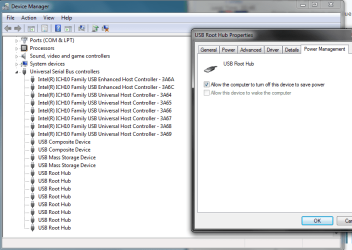
I've had this issue for a bit and have been searching for a fix for weeks. Every once in a while, seemingly whenever it wants to and not on a set schedule, I have this host controller waking the pc during sleep mode.
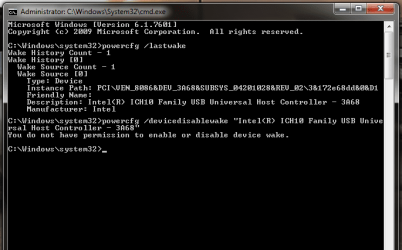
In device manager the power options are non-existant. With powercfg, when I try to "devicedisablewake" the host controller it says I do not have permission to do so. I own the pc, have full admin rights, and ran cmd as admin. So that really gets to me. There is also no options for the host controllers in the BIOS.

Does anyone have any clue as to how I can get this device to stop waking the PC? I'm at the end of my rope here.

The controller is "Intel<R> ICH10 Family USB Host Controller 3A68"
 

Attachments
  • halp.png
    halp.png
    14.8 KB · Views: 17
  • halp2.png
    halp2.png
    57.8 KB · Views: 0

My Computer

Computer type
PC/Desktop
Computer Manufacturer/Model Number
Dell Optiplex 780
OS
Windows 7 Professional 64bit
CPU
Intel Core2 Duo E8400 @3.00 GHz
Memory
8.0GB
Hi powercfg, welcome to the Forum.

Have you considered it might be a USB device that is plugged into the computer & not the USB Host Controller. Also are you using a USB hub?.
 

My Computer

Computer type
PC/Desktop
Computer Manufacturer/Model Number
Self built using existing case
OS
Windows 7 Home Premium 64 bit sp1
CPU
Intel i5 3570 3.4Ghz Ivy Bridge SKT 1155 quad core
Motherboard
Gigabyte Z77-HD3 SKT 1155 2xSata 3, 4x USB 3.0
Memory
G-Skill Rip Jaws 16Gb (8x2) DDR3 -1600 PC3 12800 CL 10 red
Graphics Card(s)
Gigabyte NVIDIA GT610 1Gb DDR3 810/1200 PCI-E 2.0 Silent
Sound Card
NVIDIA High Definition & Realtech High Definition Audio
Monitor(s) Displays
2 x Philips 226V4L 16:9 aspect ratio
Screen Resolution
1920 x 1080 HD
Hard Drives
Samsung 840 Pro 256gb SSD, SATA 3.
Hitachi Touro Portable 1tb, USB 3.0 HDD used for image b/ups.
PSU
Corsair VS450
Case
Codeng
Cooling
PSU fan & CPU fan
Keyboard
Logitech
Mouse
Logitech Wireless trackball M570
Internet Speed
Wireless 3G. 3mg down & 550kb up.
Antivirus
Bitdefender Internet Security 2020
Browser
Opera (Current Version) & Firefox
Other Info
MS Office 2013 Pro. Davis weather station software. MGE Nova 600 avr UPS.
'Power Management' tabs can be found on each USB 'Root Hub', not the 'Host Controller'.


Hope this helps...
 

My Computer

Computer type
PC/Desktop
OS
Windows 7 Ultimate 32-bit
Ranger: Thanks for the welcome! I have moved the few devices around all the ports and it keeps happening. I don't have a hub, just a keyboard, mouse, and headphones powered via usb. I will try unplugging them all tonight and see what happens.
I am using the same kb/mouse/headphones as I did with my last PC with zero issues. Granted it was a Vostro 230 so it was a wonder that it still works, but still haha.

Rick: I looked in to the Root Hubs but the power option is grayed out for all of them. I will try disabling the root hub next if the beforementioned test doesn't work.

Is there a possible way to run the "devicedisablewake" command on a root hub? If so, what would I list the device as? Would there be a way to disable all devices but the power button to wake the pc?
 

Attachments

  • halp3.png
    halp3.png
    28.3 KB · Views: 0
  • halp4.png
    halp4.png
    24.4 KB · Views: 0

My Computer

Computer type
PC/Desktop
Computer Manufacturer/Model Number
Dell Optiplex 780
OS
Windows 7 Professional 64bit
CPU
Intel Core2 Duo E8400 @3.00 GHz
Memory
8.0GB
Check that your USB mouse is on a stable base & not subject to vibration or possible movement as moving the mouse is a frequently used method of waking a computer. Perhaps try unplugging the mouse to if that helps as well.
 

My Computer

Computer type
PC/Desktop
Computer Manufacturer/Model Number
Self built using existing case
OS
Windows 7 Home Premium 64 bit sp1
CPU
Intel i5 3570 3.4Ghz Ivy Bridge SKT 1155 quad core
Motherboard
Gigabyte Z77-HD3 SKT 1155 2xSata 3, 4x USB 3.0
Memory
G-Skill Rip Jaws 16Gb (8x2) DDR3 -1600 PC3 12800 CL 10 red
Graphics Card(s)
Gigabyte NVIDIA GT610 1Gb DDR3 810/1200 PCI-E 2.0 Silent
Sound Card
NVIDIA High Definition & Realtech High Definition Audio
Monitor(s) Displays
2 x Philips 226V4L 16:9 aspect ratio
Screen Resolution
1920 x 1080 HD
Hard Drives
Samsung 840 Pro 256gb SSD, SATA 3.
Hitachi Touro Portable 1tb, USB 3.0 HDD used for image b/ups.
PSU
Corsair VS450
Case
Codeng
Cooling
PSU fan & CPU fan
Keyboard
Logitech
Mouse
Logitech Wireless trackball M570
Internet Speed
Wireless 3G. 3mg down & 550kb up.
Antivirus
Bitdefender Internet Security 2020
Browser
Opera (Current Version) & Firefox
Other Info
MS Office 2013 Pro. Davis weather station software. MGE Nova 600 avr UPS.
In an elevated command prompt you should be able to use the following to list devices with wake capability:
powercfg -devicequery wake_armed

On my Win 7 PC this shows:


jhq7bk.png


I actually use a tiny (24k) GUI version called System Wake Manager to see devices which have 'wake' enabled.


xehb8p.png


As a matter of interest, in Control Panel\All Control Panel Items\Power Options\Edit Plan Settings, have you disabled Wake Timers?


t9fe2q.png


Hope this helps...
 

My Computer

Computer type
PC/Desktop
OS
Windows 7 Ultimate 32-bit
Another approach might be to completely disable sleep (and hibernate, while you're at it). In my opinion, sleep is not a needed thing on a computer; you can leave the computer at full power all the time without any problem. And if the computer is always at full power, it will be ready instantly to do whatever it is required to do; it won't need to wake up first.
 

My Computer

Computer type
PC/Desktop
Computer Manufacturer/Model Number
Dell
OS
Linux Mint 18.2 xfce 64-bit (VMWare host) / Windows 8.1 Pro 32-bit (VMWare guest)
CPU
Haswell
Memory
4 GB
Monitor(s) Displays
Acer 23"
Screen Resolution
1920 x 1080
Hard Drives
Two hard drives, 1TB each: One for Linux, one for my data.
Keyboard
IBM Model M
Antivirus
Sophos (Linux), Trend Micro (Windows)
Browser
Firefox, Opera
Other Info
I use Samba to share my data drive with the other computers at my house and with my guest session in VMWare Workstation Player.
Back
Top