
Hello everyone, my windows 7 pc was running fine yesterday. I shut down last night and upon turning it on today it will not boot up.
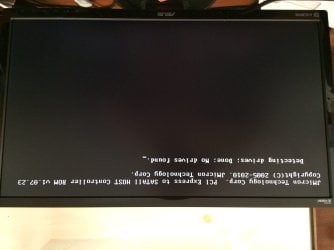
1. I first get a message saying: PCI Express to SATAII HOST Controller-
"Detecting Drives; Done; No drives are detected"
2. After several minutes on this screen it goes black with just a flashing cursor in the corner.
3. Then after several minutes it shows the BIOS Version Initialing screen.
4. After several more minutes it shows a list of my SATA drives, including their name, size and speed.
At the bottom of this screen it says "Press Space to Continue"....doing so does nothing.
I left the pc on the screen in #4 while typing this, it then went to the Windows Loading screen, after a few minutes it showed the screen in #1, and the proceeded to display screens 2-4 again over several minutes
5. Windows Error Recovery Screen then came up, and I told i to "Launch Startup Repair". The screen changed very slowly, from top to bottom, to the screen saying "Windows is loading files..." with progress bar, It has been on this screen for at least 10 minutes.
6. I am now having Startup Repair attempt a System Restore.
I have not changed any hardware or programs in the last several months. The only other issue I have had recently is the sound cutting out while playing Star Wars Battlefront 2. However, closing the game and relaunching it fixed the issue both times it occurred. The sound worked fine with other programs (Internet Explorer playing YouTube video) at the same time sound wasn't working in the game, so I thought it was just related to that game.
Has my hard drive failed? It is relatively new, maybe about a year. Or could it be a bad cable?
I tried disconnecting the hard drive and plugging in an older one. (The new one is a clone of the old one), but it was not detected either.
1. I first get a message saying: PCI Express to SATAII HOST Controller-
"Detecting Drives; Done; No drives are detected"
2. After several minutes on this screen it goes black with just a flashing cursor in the corner.
3. Then after several minutes it shows the BIOS Version Initialing screen.
4. After several more minutes it shows a list of my SATA drives, including their name, size and speed.
At the bottom of this screen it says "Press Space to Continue"....doing so does nothing.
I left the pc on the screen in #4 while typing this, it then went to the Windows Loading screen, after a few minutes it showed the screen in #1, and the proceeded to display screens 2-4 again over several minutes
5. Windows Error Recovery Screen then came up, and I told i to "Launch Startup Repair". The screen changed very slowly, from top to bottom, to the screen saying "Windows is loading files..." with progress bar, It has been on this screen for at least 10 minutes.
6. I am now having Startup Repair attempt a System Restore.
I have not changed any hardware or programs in the last several months. The only other issue I have had recently is the sound cutting out while playing Star Wars Battlefront 2. However, closing the game and relaunching it fixed the issue both times it occurred. The sound worked fine with other programs (Internet Explorer playing YouTube video) at the same time sound wasn't working in the game, so I thought it was just related to that game.
Has my hard drive failed? It is relatively new, maybe about a year. Or could it be a bad cable?
I tried disconnecting the hard drive and plugging in an older one. (The new one is a clone of the old one), but it was not detected either.
Attachments
Last edited:
My Computer
- Computer type
- PC/Desktop
- Computer Manufacturer/Model Number
- Custom Build
- OS
- Windows 7 Home Premium 64bit
- CPU
- Intel Core i5-2500k 3.30GHz
- Motherboard
- Asus P8Z68-V Pro Gen3 LGA2255
- Memory
- G.Skill - Ripjaws X Series 16GB (2 x 8GB) DDR3-1600 Memory
- Graphics Card(s)
- EVGA - GeForce GTX 1060 6GB 6GB SC
- Monitor(s) Displays
- ASUS VG248 LCD Monitor
- Hard Drives
- Western Digital - Caviar Black 2TB 3.5" 7200RPM Internal Hard Drive
- PSU
- EVGA SuperNOVA G2 850W 80+ Gold Certified Fully-Modular ATX
- Case
- Antec 900 Steel ATX Mid Tower
- Cooling
- 4 case fans
- Mouse
- LogiTech G502 Proteus Core
- Antivirus
- Microsoft Security Essentials
- Browser
- Internet Explorer 11, FireFox


