USB Hubs and Devices

walkerdrive

New member
Local time
10:22 AM
Messages
16
I have an Abit IP35 Pro motherboard which has 2 ports that are USB2. When I plug my gaming mouse and my SteelSeries 5HV2 USB sound card which are both USB2 and check under USB Root Hub devices, it shows that they are running in Full Speed and not on the High Speed USB Root Hubs. I thought all 4 USB ports on the back of my computer were USB2 and thus the USB2 devices plugged in those ports will run at High Speed or USB2 speed, but it seems like that's not the case. Can someone help me figure out what's going on and why it's like this. I can post screenshots just tell me what I should snap.

Thanks!
 

My Computer My Computer

Computer Manufacturer/Model Number
Myself
OS
Windows 7 Enterprise 64bit
CPU
Core 2 Duo E8500 @ 3.0Ghz
Motherboard
Abit IP35 Pro; BIOS 14
Memory
2GB G.Skill DDR2-800
Graphics Card(s)
PNY Geforce GTS 250 1GB
Sound Card
SteelSeries 5HV2 USB
Monitor(s) Displays
19" ViewSonic P95f+ CRT
Hard Drives
WD Raptor 150GB 10K RPM 16MB Cache
PSU
Corsair HX520W
Case
CoolerMaster
Cooling
Stock
Back Panel I/O1 x PS/2 Keyboard, 1 x PS/2 Mouse
abit Silent OTES™
1 x S/P DIF In, 1 x S/P DIF Out
2 x eSATA
7.1 CH Audio connector (Front, Line-in, MIC-in, Center/Subwoofer, Surround, Rear Surround)
4 x USB 2.0
1 x RJ-45 LAN connector
EZ CCMOS Switch


From your Abit moboard web page.
Four standard USB 2.0.
It says nothing about Intel high speed USB 2.0 which is rare.
 

My Computer My Computer

Computer Manufacturer/Model Number
Hopalong/ Godzilla
OS
Windows7 Pro 64bit SP-1; Windows XP Pro 32bit
CPU
Intel Core i7-870 Lynnfield 2.93GHz LGA 1156 95W Quad-Core
Motherboard
ASUS P7P55D-E PRO
Memory
8GB@1400MHz Crucial Ballistix DDR3-1600 4x2GB
Graphics Card(s)
ASUS ENGTX460 DirectCU/2DI/1GD5 1GB 256-bit GDDR5
Sound Card
VIA Onboard
Monitor(s) Displays
Asus VS248H-P 24"; Samsung SyncMaster 941BW 19"ws
Screen Resolution
1920x1080; 1440x900
Hard Drives
Samsung 830 120GB SSD
Intel 320 120GB SSD
Western Digital Caviar Black WD7501AALS 750GB 7200 RPM SATA 3.0Gb/s
Western Digital Caviar Black WD6401AALS 640GB 7200 RPM SATA 3.0Gb/s
PSU
COOLER MASTER Silent Pro RS850-AMBAJ3-US 850W Modular
Case
COOLER MASTER HAF 932 RC-932-KKN5-GP Black
Cooling
Scythe "Mugen-2 Rev.B" (2 ScytheKaze-Jyuni PWM fans)
Keyboard
Logitech K-320
Mouse
Kensington
Antivirus
Avast Inernet Suite
Browser
IE 9 ; Chrome
I thought USB 2.0 meant High-Speed while USB 1.0 can work in full-speed and low speed. Correct me if I'm wrong.

And in the device manager, two of the root hubs show up as enhanced and are working in high-speed but there are no devices associated with them. I thought the gaming mouse and USB sound card would be high speed devices since they are USB 2.0 and especially the sound card since it requires quite a bit of bandwidth to work.
 

My Computer My Computer

Computer Manufacturer/Model Number
Myself
OS
Windows 7 Enterprise 64bit
CPU
Core 2 Duo E8500 @ 3.0Ghz
Motherboard
Abit IP35 Pro; BIOS 14
Memory
2GB G.Skill DDR2-800
Graphics Card(s)
PNY Geforce GTS 250 1GB
Sound Card
SteelSeries 5HV2 USB
Monitor(s) Displays
19" ViewSonic P95f+ CRT
Hard Drives
WD Raptor 150GB 10K RPM 16MB Cache
PSU
Corsair HX520W
Case
CoolerMaster
Cooling
Stock
Actually, USB 1.0 is just the old 4 prong type of USB connector. As Hopalong says, high-speed USB 2.0 ports are very rare. I'm not to sure what your root hubs showing up as advanced is.
 

My Computer My Computer

Computer Manufacturer/Model Number
Acer Aspire 5532
OS
Windows 7 Home Premium 64 bit SP1
CPU
AMD Athlon 64 processor TF-20 1.6 GHz. 1 Core
Motherboard
MB.PGY02.001/MBPGY02001
Memory
3 GB (2.75 available)
Graphics Card(s)
ATI Radion HD 3200
Sound Card
Realtek High Definition Audio
Monitor(s) Displays
Generic PnP 15.6"
Screen Resolution
1366 x 768
Hard Drives
250 GB HDD (220 available)
PSU
?
Case
?
Cooling
Single cycling fan, on cooling stand
Keyboard
PNP Device ID ACPI\PNP0303\4&12734F14&0
Mouse
Microsoft Laser 7000
Internet Speed
Ultra high speed download 2500 kb/s upload 720 kb/s
Other Info
Norton Internet Security 2011
Sorry but this is the best I could do.
I used the tutorial for finding the missing info but still could not find it. Special Thanks to PooMan UK and DocBrown for their help in filling out these specs.
Do you mean high-speed "devices" or ports? Because look, here is a screen shot of what I'm talking about:

106x6d5.jpg


Even in the BIOS there is an option of whether the USB speed should be "low or full" or "high speed" and I've selected High Speed so the hub/port should be running at high-speed. Now the question is, why aren't my devices running at high speed?
 

My Computer My Computer

Computer Manufacturer/Model Number
Myself
OS
Windows 7 Enterprise 64bit
CPU
Core 2 Duo E8500 @ 3.0Ghz
Motherboard
Abit IP35 Pro; BIOS 14
Memory
2GB G.Skill DDR2-800
Graphics Card(s)
PNY Geforce GTS 250 1GB
Sound Card
SteelSeries 5HV2 USB
Monitor(s) Displays
19" ViewSonic P95f+ CRT
Hard Drives
WD Raptor 150GB 10K RPM 16MB Cache
PSU
Corsair HX520W
Case
CoolerMaster
Cooling
Stock
OK I can see what your saying, could you go from where you are in your pic and click on Power Management just to make sure the "allow the computer to turn this off" is unchecked.
 

My Computer My Computer

Computer Manufacturer/Model Number
Acer Aspire 5532
OS
Windows 7 Home Premium 64 bit SP1
CPU
AMD Athlon 64 processor TF-20 1.6 GHz. 1 Core
Motherboard
MB.PGY02.001/MBPGY02001
Memory
3 GB (2.75 available)
Graphics Card(s)
ATI Radion HD 3200
Sound Card
Realtek High Definition Audio
Monitor(s) Displays
Generic PnP 15.6"
Screen Resolution
1366 x 768
Hard Drives
250 GB HDD (220 available)
PSU
?
Case
?
Cooling
Single cycling fan, on cooling stand
Keyboard
PNP Device ID ACPI\PNP0303\4&12734F14&0
Mouse
Microsoft Laser 7000
Internet Speed
Ultra high speed download 2500 kb/s upload 720 kb/s
Other Info
Norton Internet Security 2011
Sorry but this is the best I could do.
I used the tutorial for finding the missing info but still could not find it. Special Thanks to PooMan UK and DocBrown for their help in filling out these specs.
Yes, I have unchecked all those check boxes for all the USB Root Hubs. The thing is, the devices are not turning off, they are working fine, it's just that I was wondering why they are not running in high-speed mode when it is available to them. The devices would work much faster than they are now that way. I thought there might be a windows setting or something preventing it from working or maybe windows is choosing how the devices are going to work.

Anyway, if someone knows how it all works, let me know... I'm interested to hear it.

Thanks a lot so far!
 

My Computer My Computer

Computer Manufacturer/Model Number
Myself
OS
Windows 7 Enterprise 64bit
CPU
Core 2 Duo E8500 @ 3.0Ghz
Motherboard
Abit IP35 Pro; BIOS 14
Memory
2GB G.Skill DDR2-800
Graphics Card(s)
PNY Geforce GTS 250 1GB
Sound Card
SteelSeries 5HV2 USB
Monitor(s) Displays
19" ViewSonic P95f+ CRT
Hard Drives
WD Raptor 150GB 10K RPM 16MB Cache
PSU
Corsair HX520W
Case
CoolerMaster
Cooling
Stock
The way I understand it the "Standard Enhanced PCI to USB Host Controller" entry is for the USB controller, the chip that drives the ports. You will never see anything connected to it as it connects to the "Root Hub(s)". Seeing that device under Universal Serial Bus controllers means you have USB 2 support. If you plug a USB 2 capable device into a USB 1 port you will get a "This device could preform faster...." pop up message. If you didn't get that message I wouldn't worry about it. I'm sure someone will correct me if I'm wrong. ;)
 

My Computer My Computer

Computer type
PC/Desktop
Computer Manufacturer/Model Number
Home Built
OS
Windows 10 Education 64 bit
CPU
AMD Phenom II X4 980 Black Edition Deneb 3.7GHz
Motherboard
Asus M4N68T-M V2 µATX Motherboard
Memory
8GB 4GBx2 Kingston PC10600 DDR3 1333 Memory
Graphics Card(s)
Zotac NVIDIA Geforce GT640 2 Gig DDR3 PCIe
Sound Card
VIA VT1708s High Definition Audio 8-channel Onboard
Monitor(s) Displays
22" LG E2242 1080p and 2 19" I-INC AG191D
Screen Resolution
1280x1024 - 1920x1080 - 1280x1024
Hard Drives
Crucial M100 256 GB SSD and 500 GB WD Blue SATA
PSU
Thermaltake TR 620
Case
Power Up Black ATX Mid-Tower Case
Cooling
Stock heatsink and fan
Keyboard
Logitech Wireless K350 Wave
Mouse
Logitech Wireless M570 Trackman Wheel
Internet Speed
80 Mbps Down 30 Mbps Up
Antivirus
Windows Defender
Browser
Internet Explorer 11
Other Info
HP DVD1040e Lightscribe - External USB2
So you are saying the devices are already running at their optimum speeds?
 

My Computer My Computer

Computer Manufacturer/Model Number
Myself
OS
Windows 7 Enterprise 64bit
CPU
Core 2 Duo E8500 @ 3.0Ghz
Motherboard
Abit IP35 Pro; BIOS 14
Memory
2GB G.Skill DDR2-800
Graphics Card(s)
PNY Geforce GTS 250 1GB
Sound Card
SteelSeries 5HV2 USB
Monitor(s) Displays
19" ViewSonic P95f+ CRT
Hard Drives
WD Raptor 150GB 10K RPM 16MB Cache
PSU
Corsair HX520W
Case
CoolerMaster
Cooling
Stock
Actually, USB 1.0 is just the old 4 prong type of USB connector. As Hopalong says, high-speed USB 2.0 ports are very rare. I'm not to sure what your root hubs showing up as advanced is.

USB 1 and USB 2 devices use the same 4 pin connector, you can't tell one from the other just by looking at them. A USB 1 spec-ed device will plug into and work in a USB 2 port. It just won't work at the full USB 2 speed. Same deal for a USB 2 device pluged into a USB 1 port. USB 2.0 is quit common these days unless you have a really old PC.
 

My Computer My Computer

Computer type
PC/Desktop
Computer Manufacturer/Model Number
Home Built
OS
Windows 10 Education 64 bit
CPU
AMD Phenom II X4 980 Black Edition Deneb 3.7GHz
Motherboard
Asus M4N68T-M V2 µATX Motherboard
Memory
8GB 4GBx2 Kingston PC10600 DDR3 1333 Memory
Graphics Card(s)
Zotac NVIDIA Geforce GT640 2 Gig DDR3 PCIe
Sound Card
VIA VT1708s High Definition Audio 8-channel Onboard
Monitor(s) Displays
22" LG E2242 1080p and 2 19" I-INC AG191D
Screen Resolution
1280x1024 - 1920x1080 - 1280x1024
Hard Drives
Crucial M100 256 GB SSD and 500 GB WD Blue SATA
PSU
Thermaltake TR 620
Case
Power Up Black ATX Mid-Tower Case
Cooling
Stock heatsink and fan
Keyboard
Logitech Wireless K350 Wave
Mouse
Logitech Wireless M570 Trackman Wheel
Internet Speed
80 Mbps Down 30 Mbps Up
Antivirus
Windows Defender
Browser
Internet Explorer 11
Other Info
HP DVD1040e Lightscribe - External USB2

My Computer My Computer

Computer type
PC/Desktop
Computer Manufacturer/Model Number
Home Built
OS
Windows 10 Education 64 bit
CPU
AMD Phenom II X4 980 Black Edition Deneb 3.7GHz
Motherboard
Asus M4N68T-M V2 µATX Motherboard
Memory
8GB 4GBx2 Kingston PC10600 DDR3 1333 Memory
Graphics Card(s)
Zotac NVIDIA Geforce GT640 2 Gig DDR3 PCIe
Sound Card
VIA VT1708s High Definition Audio 8-channel Onboard
Monitor(s) Displays
22" LG E2242 1080p and 2 19" I-INC AG191D
Screen Resolution
1280x1024 - 1920x1080 - 1280x1024
Hard Drives
Crucial M100 256 GB SSD and 500 GB WD Blue SATA
PSU
Thermaltake TR 620
Case
Power Up Black ATX Mid-Tower Case
Cooling
Stock heatsink and fan
Keyboard
Logitech Wireless K350 Wave
Mouse
Logitech Wireless M570 Trackman Wheel
Internet Speed
80 Mbps Down 30 Mbps Up
Antivirus
Windows Defender
Browser
Internet Explorer 11
Other Info
HP DVD1040e Lightscribe - External USB2
Okay then. If anyone knows more about this issue please speak up, otherwise I'll let it rest.

Thanks for the help!
 

My Computer My Computer

Computer Manufacturer/Model Number
Myself
OS
Windows 7 Enterprise 64bit
CPU
Core 2 Duo E8500 @ 3.0Ghz
Motherboard
Abit IP35 Pro; BIOS 14
Memory
2GB G.Skill DDR2-800
Graphics Card(s)
PNY Geforce GTS 250 1GB
Sound Card
SteelSeries 5HV2 USB
Monitor(s) Displays
19" ViewSonic P95f+ CRT
Hard Drives
WD Raptor 150GB 10K RPM 16MB Cache
PSU
Corsair HX520W
Case
CoolerMaster
Cooling
Stock
I plugged a USB 2.0 external hard drive (seagate portable) and it was attached to the high-speed USB root hub so I guess it works. I'm just wondering why the sound card doesn't work at high-speed since I'd assume it requires a lot of bandwidth to function properly.

I have one question though. When I plugged in the hard drive and was backing up my data, the average speed was between 19 and 25MB/s. Since USB 2.0 allows for 480Mb/s which is 60MB/s, I was wondering why isn't the transfer speed higher? I'm transferring from a WD Raptor 10K RPM HD which is SATA I. Any ideas?
 

My Computer My Computer

Computer Manufacturer/Model Number
Myself
OS
Windows 7 Enterprise 64bit
CPU
Core 2 Duo E8500 @ 3.0Ghz
Motherboard
Abit IP35 Pro; BIOS 14
Memory
2GB G.Skill DDR2-800
Graphics Card(s)
PNY Geforce GTS 250 1GB
Sound Card
SteelSeries 5HV2 USB
Monitor(s) Displays
19" ViewSonic P95f+ CRT
Hard Drives
WD Raptor 150GB 10K RPM 16MB Cache
PSU
Corsair HX520W
Case
CoolerMaster
Cooling
Stock
Well I did some more reading and it appears USB 2.0 can be certified as Full speed or High speed and still be called or advertised as USB 2 certified. Same thing with USB devices so now I'm getting confused. Too the OP, I guess you have to read the fine print for your devices specs to see what the fastest USB speed they support is and go from there. It looks like Full speed isn't much better than USB 1.1 speeds. Also the quoted speeds are the theoretical maximum so you aren't likely ever to get 480 Mbs and if you do it will only be for short bursts. I'm not 100% sure on this but I believe the USB ports connect to the hubs in groups of two. If one of the ports has a USB device running at a lower speed it may be that both ports on that hub will run at the lower speed. I've never sat down and tried to prove it but I do group my devices so one won't interfere with the other. My keyboard and mouse for instance are on two adjacent ports. My DVD burner and external drive are on two other adjacent ports, etc.
 

My Computer My Computer

Computer type
PC/Desktop
Computer Manufacturer/Model Number
Home Built
OS
Windows 10 Education 64 bit
CPU
AMD Phenom II X4 980 Black Edition Deneb 3.7GHz
Motherboard
Asus M4N68T-M V2 µATX Motherboard
Memory
8GB 4GBx2 Kingston PC10600 DDR3 1333 Memory
Graphics Card(s)
Zotac NVIDIA Geforce GT640 2 Gig DDR3 PCIe
Sound Card
VIA VT1708s High Definition Audio 8-channel Onboard
Monitor(s) Displays
22" LG E2242 1080p and 2 19" I-INC AG191D
Screen Resolution
1280x1024 - 1920x1080 - 1280x1024
Hard Drives
Crucial M100 256 GB SSD and 500 GB WD Blue SATA
PSU
Thermaltake TR 620
Case
Power Up Black ATX Mid-Tower Case
Cooling
Stock heatsink and fan
Keyboard
Logitech Wireless K350 Wave
Mouse
Logitech Wireless M570 Trackman Wheel
Internet Speed
80 Mbps Down 30 Mbps Up
Antivirus
Windows Defender
Browser
Internet Explorer 11
Other Info
HP DVD1040e Lightscribe - External USB2
Yeah, with the hard drive I wasn't expecting to get 60MB/s but 20MB/s is pretty bad. That's 1/3 the theoretical speed. I was hoping to get more like 35MB/s+.
 

My Computer My Computer

Computer Manufacturer/Model Number
Myself
OS
Windows 7 Enterprise 64bit
CPU
Core 2 Duo E8500 @ 3.0Ghz
Motherboard
Abit IP35 Pro; BIOS 14
Memory
2GB G.Skill DDR2-800
Graphics Card(s)
PNY Geforce GTS 250 1GB
Sound Card
SteelSeries 5HV2 USB
Monitor(s) Displays
19" ViewSonic P95f+ CRT
Hard Drives
WD Raptor 150GB 10K RPM 16MB Cache
PSU
Corsair HX520W
Case
CoolerMaster
Cooling
Stock
I've never tested the data transfer speed of my external drive. It's not painfully slow so I just accept that it is what it is. If I did test it, it would probably just depress me to know what the true speed is. ;) Mine is just a spare ATA-100 IDE drive I had kicking around after upgarding to a SATA II drive in my PC.
 

My Computer My Computer

Computer type
PC/Desktop
Computer Manufacturer/Model Number
Home Built
OS
Windows 10 Education 64 bit
CPU
AMD Phenom II X4 980 Black Edition Deneb 3.7GHz
Motherboard
Asus M4N68T-M V2 µATX Motherboard
Memory
8GB 4GBx2 Kingston PC10600 DDR3 1333 Memory
Graphics Card(s)
Zotac NVIDIA Geforce GT640 2 Gig DDR3 PCIe
Sound Card
VIA VT1708s High Definition Audio 8-channel Onboard
Monitor(s) Displays
22" LG E2242 1080p and 2 19" I-INC AG191D
Screen Resolution
1280x1024 - 1920x1080 - 1280x1024
Hard Drives
Crucial M100 256 GB SSD and 500 GB WD Blue SATA
PSU
Thermaltake TR 620
Case
Power Up Black ATX Mid-Tower Case
Cooling
Stock heatsink and fan
Keyboard
Logitech Wireless K350 Wave
Mouse
Logitech Wireless M570 Trackman Wheel
Internet Speed
80 Mbps Down 30 Mbps Up
Antivirus
Windows Defender
Browser
Internet Explorer 11
Other Info
HP DVD1040e Lightscribe - External USB2
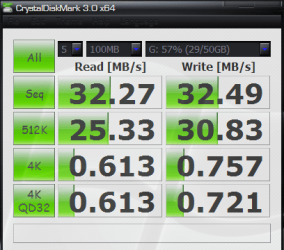
My USB 2.0 external:

WD_USB2.0_2.PNG
 

My Computer My Computer

Computer Manufacturer/Model Number
tw33k
OS
Windows 7 Ultimate (x64) SP1
CPU
Intel 3770k 4.6GHz
Motherboard
ASUS Maximus V Formula
Memory
8GB (2x 4GB) Crucial Ballistix
Graphics Card(s)
Sapphire 7950 (1060/1600)
Sound Card
On Board Realtek HD Audio
Monitor(s) Displays
27" Acer B273HU (via HDMI)
Screen Resolution
2048 x 1152
Hard Drives
Crucial M4 128GB
2TB WD Black
1TB Samsung F3 SATA
1TB WD Elite External
2TB WD USB 3.0
PSU
Corsair AX750 Gold
Case
Corsair Obsidian 800DW
Cooling
Corsair H100 (2x AP-121/2x UK-3000 push/pull)
Keyboard
Microsoft Wireless 5000
Mouse
Microsoft Wireless 5000
Internet Speed
5mb/s
Other Info
Logitech z-2300 2.1 speakers
Lamptron FC-5 v2
You don't have to test it. You can just click on "details" in the file transferring box while you're transferring files and it will show you the current speed.
 

My Computer My Computer

Computer Manufacturer/Model Number
Myself
OS
Windows 7 Enterprise 64bit
CPU
Core 2 Duo E8500 @ 3.0Ghz
Motherboard
Abit IP35 Pro; BIOS 14
Memory
2GB G.Skill DDR2-800
Graphics Card(s)
PNY Geforce GTS 250 1GB
Sound Card
SteelSeries 5HV2 USB
Monitor(s) Displays
19" ViewSonic P95f+ CRT
Hard Drives
WD Raptor 150GB 10K RPM 16MB Cache
PSU
Corsair HX520W
Case
CoolerMaster
Cooling
Stock
Ah, OK, I'll try to remember that the next time I'm using it.
 

My Computer My Computer

Computer type
PC/Desktop
Computer Manufacturer/Model Number
Home Built
OS
Windows 10 Education 64 bit
CPU
AMD Phenom II X4 980 Black Edition Deneb 3.7GHz
Motherboard
Asus M4N68T-M V2 µATX Motherboard
Memory
8GB 4GBx2 Kingston PC10600 DDR3 1333 Memory
Graphics Card(s)
Zotac NVIDIA Geforce GT640 2 Gig DDR3 PCIe
Sound Card
VIA VT1708s High Definition Audio 8-channel Onboard
Monitor(s) Displays
22" LG E2242 1080p and 2 19" I-INC AG191D
Screen Resolution
1280x1024 - 1920x1080 - 1280x1024
Hard Drives
Crucial M100 256 GB SSD and 500 GB WD Blue SATA
PSU
Thermaltake TR 620
Case
Power Up Black ATX Mid-Tower Case
Cooling
Stock heatsink and fan
Keyboard
Logitech Wireless K350 Wave
Mouse
Logitech Wireless M570 Trackman Wheel
Internet Speed
80 Mbps Down 30 Mbps Up
Antivirus
Windows Defender
Browser
Internet Explorer 11
Other Info
HP DVD1040e Lightscribe - External USB2
Right click on each USB Root Hub, select Properties and under Power it will show what is connected and then click on Advanced and it should show the speed. Full-Speed is 1.1 and High-Speed is 2.0

USB supports the following signaling rates:

  • A low-speed rate of 1.5 Mbit/s (~183 kB/s) is defined by USB 1.0. It is very similar to "full-bandwidth" operation except each bit takes 8 times as long to transmit. It is intended primarily to save cost in low-bandwidth human interface devices (HID) such as keyboards, mice, and joysticks.
  • The full-speed rate of 12 Mbit/s (~1.43 MB/s) is the basic USB data rate defined by USB 1.1. All USB hubs support full-bandwidth.
  • A high-speed (USB 2.0) rate of 480 Mbit/s (~57 MB/s) was introduced in 2001. All hi-speed devices are capable of falling back to full-bandwidth operation if necessary; they are backward compatible. Connectors are identical.
  • A SuperSpeed (USB 3.0) rate of 4800 Mbit/s (~572 MB/s). The written USB 3.0 specification was released by Intel and partners in August 2008. The first USB 3 controller chips were sampled by NEC May 2009 [47] and products using the 3.0 specification arrived beginning in January 2010.[48] USB 3.0 connectors are generally backwards compatible, but include new wiring and full duplex operation. There is some incompatibility with older connectors.


Jim :geek:
 

My Computer My Computer

Computer type
PC/Desktop
Computer Manufacturer/Model Number
Home Built
OS
Windows 8.1 Pro w/Media Center 64bit, Windows 7 HP 64bit
CPU
Phenom II X6 1100T
Motherboard
ASUS M5A99X EVO
Memory
Crucial Balistic 8gb DDR3-1866 CL9
Graphics Card(s)
MSI R6850 Cyclone IGD5 PE
Sound Card
On Board
Monitor(s) Displays
ASUS VE258Q 25" LED with DVI-HDMI-DisplayPort
Screen Resolution
1920 x 1080
Hard Drives
Two WD Cavier Black 2TB Sata III, WD My Book Essential 2TB USB 3.0
PSU
Seasonic X650 80 Plus GOLD Modular
Case
Corsair 400R
Cooling
Antec Kuhler H2O 620, Two 120mm and four 140mm
Keyboard
Logitech K120
Mouse
Logitech Marble Mouse USB, Logitech Precision Game Pad
Internet Speed
15MB
Antivirus
Norton IS 2013, Malwarebytes Pro Beta 2
Browser
IE-11, FF-27
Other Info
APC UPS ES 750, Netgear WNR3500L Gigabit & Wireless N Router with SamKnows Test Program, Motorola SB6120 Gigabit Cable Modem. Brother HL-2170W Laser Printer, Epson V300 Scanner
Back
Top