USB Problems... Please Help! PLEASE!

jamez243

New member
Local time
6:48 PM
Messages
9
I have tried multiple forums and searched high and low and can't find anything to help me with this and it's driving me NUTS!

Where do I begin?

Basically there is some serious sort of USB problem. It seems the built in motherboard ports work ok on the back, if I unplug something, then plug it back in... it no longer works. If I try to plug in my external HDD, it does not work. No bubble pops up. No device has any yellow exclimation points in device manager, and the HDD doesn't list in the "Disk Management" screen. So the only way those work is if something is plugged into them before it boots. But the HDD won't work either way.

All of those work at USB 2.0 speeds.

My front USB ports however... do not. Of the front 2 ports... one works... at usb 1.1 speeds. The other one... no matter what you plug into it... says "device not recognized by windows" or something to that nature? Go figure.... (I checked and there is no usb wire on the #10 pin either like I've read in some forums to check for)

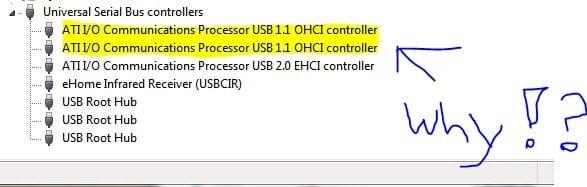
They were all recognized in vista as 2.0 and worked fine. So this has to be a Windows 7 bug or something. In looking at the device manager I did notice this which is quite aggravating... (see pic)

I've tried removing them all and letting windows re-recognize them. Nothing changed... (Upon trying to uninstall the 2.0 one... I get BSOD, EVERYTIME)

I've tried going manually to make the 1.1 ones use the same 2.0 driver as the other, this did not work either.

Please help if you can. I'm basically trying to transfer files at USB 1.1 Speeds (The only way the computer will recognize the drive is in that ONE port) .... it's unbearable... it said it was going to take 40 hours to transfer my files.... I obviously cancelled it.
 

Attachments
  • why.jpg
    why.jpg
    19.5 KB · Views: 44

My Computer

Computer Manufacturer/Model Number
Newegg parts
OS
Window 7 RC
CPU
AMD 939 Athlon
Motherboard
ECS RS482-M
Memory
2 GB Geil
Graphics Card(s)
8800 GTS
Sound Card
SB Audigy SE
Monitor(s) Displays
19" Gateway LCD
Hard Drives
320 GB WD
Where did you get your drivers? What exactly is your build number?
 
I reckon my housemate had a similar problem to this. We ended up working out it was because the front USB ports were not correctly connected to the motherboard... Could be possible.
But if you have had a previous installation of Windows on there before and it all worked fine, I'd say it would be something to do with your motherboard drivers.
 

My Computer

Computer Manufacturer/Model Number
Asus M50SV
OS
Windows 7 RC 7100
CPU
Intel Core 2 Duo T9300
Memory
4GB
Graphics Card(s)
Nvidia GeForce 9500M GS
Hard Drives
1 x 250gb internal
1 x 250gb external
1 x 320gb external
Well

I'm not so sure it's just the front port issue, cause the back ports are messing up too, ya know.

ECS Web Site

Thats the link for my motherboard drivers. But I don't' see a USB driver... and if I download the SouthBridge drivers and and have it search through there it doesn't find anything.

The drivers its using were the default ones windows detected.

Ideas?
 

My Computer

Computer Manufacturer/Model Number
Newegg parts
OS
Window 7 RC
CPU
AMD 939 Athlon
Motherboard
ECS RS482-M
Memory
2 GB Geil
Graphics Card(s)
8800 GTS
Sound Card
SB Audigy SE
Monitor(s) Displays
19" Gateway LCD
Hard Drives
320 GB WD

My Computer

Computer Manufacturer/Model Number
Newegg parts
OS
Window 7 RC
CPU
AMD 939 Athlon
Motherboard
ECS RS482-M
Memory
2 GB Geil
Graphics Card(s)
8800 GTS
Sound Card
SB Audigy SE
Monitor(s) Displays
19" Gateway LCD
Hard Drives
320 GB WD
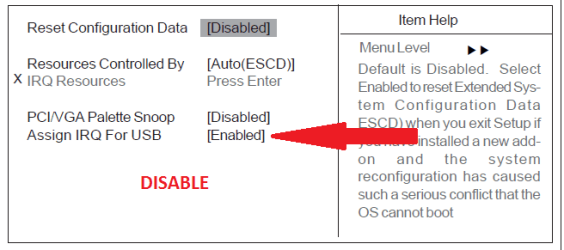
I am fishing. But let's start in BIOS.
 

Attachments

  • Capture.PNG
    Capture.PNG
    8.5 KB · Views: 28
  • Capture2.PNG
    Capture2.PNG
    13.5 KB · Views: 23
I think I've tried that too... as a matter of fact I think it's set that way right now... I'm going to reboot and make sure though.
 

My Computer

Computer Manufacturer/Model Number
Newegg parts
OS
Window 7 RC
CPU
AMD 939 Athlon
Motherboard
ECS RS482-M
Memory
2 GB Geil
Graphics Card(s)
8800 GTS
Sound Card
SB Audigy SE
Monitor(s) Displays
19" Gateway LCD
Hard Drives
320 GB WD
In BIOS, disable any component you are not using, like 1394 or Audio or LAN

In Control Panel, create a custom Power plane where everything is always on.
 
In BIOS, disable any component you are not using, like 1394 or Audio or LAN

Serial and parallel ports can go most of the time too :)
 

My Computer

Computer type
PC/Desktop
Computer Manufacturer/Model Number
DELL VOSTRO 3650
OS
Windows 8.1 PRO
CPU
3rd Generation Intel Core i7‐3612QM CPU @ 2.10GHZ
Memory
8GB DDR3
Graphics Card(s)
NVIDIA GeForce GT 525M (128 bit), 1GB Grpahics
Screen Resolution
1920X1080
Hard Drives
750GB 5400RPM
So Far...

Same results...

Listed in device manager as pictured USB 1.1 OHCI after removal and scan for hardware changes.

Plug External HDD in back USB port... nothing happens... not a sound... no pop up... nothing. Although the light on the HDD come on... (it does not flash as if it's being read)

Still works in the one front port at 1.1
 

My Computer

Computer Manufacturer/Model Number
Newegg parts
OS
Window 7 RC
CPU
AMD 939 Athlon
Motherboard
ECS RS482-M
Memory
2 GB Geil
Graphics Card(s)
8800 GTS
Sound Card
SB Audigy SE
Monitor(s) Displays
19" Gateway LCD
Hard Drives
320 GB WD
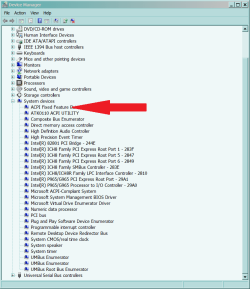
Right Click ACPI Fixed...
UNINSTALL

On the Menu Bar,
Scan for hardware changes
Let Windows re-install the device.
 

Attachments

  • Capture.PNG
    Capture.PNG
    28.2 KB · Views: 34
No Luck

Tried that... Still nothing has changed.
 

My Computer

Computer Manufacturer/Model Number
Newegg parts
OS
Window 7 RC
CPU
AMD 939 Athlon
Motherboard
ECS RS482-M
Memory
2 GB Geil
Graphics Card(s)
8800 GTS
Sound Card
SB Audigy SE
Monitor(s) Displays
19" Gateway LCD
Hard Drives
320 GB WD
I am unable to upgrade to the newer build it wants a clean install. All my stuff is on here at this point.... to save it to a HDD again would take forever at 1.1 speeds :(

I want to give up
 

My Computer

Computer Manufacturer/Model Number
Newegg parts
OS
Window 7 RC
CPU
AMD 939 Athlon
Motherboard
ECS RS482-M
Memory
2 GB Geil
Graphics Card(s)
8800 GTS
Sound Card
SB Audigy SE
Monitor(s) Displays
19" Gateway LCD
Hard Drives
320 GB WD
Nobody else has anything?
 

My Computer

Computer Manufacturer/Model Number
Newegg parts
OS
Window 7 RC
CPU
AMD 939 Athlon
Motherboard
ECS RS482-M
Memory
2 GB Geil
Graphics Card(s)
8800 GTS
Sound Card
SB Audigy SE
Monitor(s) Displays
19" Gateway LCD
Hard Drives
320 GB WD
lol.... I can't do it tho... My computer usually get rebooted when the power flicks here.... it wouldn't stay on for 3 days.
 

My Computer

Computer Manufacturer/Model Number
Newegg parts
OS
Window 7 RC
CPU
AMD 939 Athlon
Motherboard
ECS RS482-M
Memory
2 GB Geil
Graphics Card(s)
8800 GTS
Sound Card
SB Audigy SE
Monitor(s) Displays
19" Gateway LCD
Hard Drives
320 GB WD
The yellow line indicates there are no drivers available for this device - go to your motherboards site, or intel, or AMD, and download the latest vista chipset drivers for your your motherboard - if they wont install because of an OS mismatch do the following -
To install a driver OR program in compatibility mode - right click the setup.exe file - click properties - click compatibility - check run in compatibility with vista - check run as administrator - leave the rest blank. Start setup.exe and install.
 

My Computer

OS
XP, Vista, W7 64bit Home Premium
CPU
Intel Core Duo 6850 3.0 ghz @ 3.7 ghz
Motherboard
Asus P5E
Memory
4GB Corsair DDR 2 PC-6400
Graphics Card(s)
Ati 4870 1ghz
Sound Card
Supreme FX 11
Monitor(s) Displays
View Sonic VX1962wm
Screen Resolution
1680 X1050
Hard Drives
3 Seagate Sata Drives 160gb 250gb 500gb
PSU
Thermaltake 600 watt
Case
NZXT Alpha
Cooling
3X120cm Fans
Keyboard
Microsoft Digital Media Pro Keyboard
Mouse
Microsoft Wheel Mouse Optical
Internet Speed
1.5Mb to 8Mb/384k
Hi Guys

Have read through this post, I have similar problem though I'm more confused now.
I have 3 External HD and one Semi-External (backup unit HP). None of them works through USB ports (none of my 8 ports).
Not even the four Mem sticks I have tried works.

W7 says unknown devices.
1. I have tried all ports.
2. I have tried on Vista and XP on other machines (no problems).
3. I have had these units working on this hardware before (in vista).
4. I have the latest of everything as it seems.. (i think).
5. I have reinstalled with them plugged in and not like 4 times..
6. I have tried several updates and even tried with old USB drivers..
7. I found a writing on a 4 step check and did that to (power management, uninstall, checking power etc.. )

What the H...

My keyboard works (W-less).. My Camera works.. ? on all ports..

Any one have similar problems ?
This is driving me crazy ..

Best Regards
Harry
 

My Computer

Computer Manufacturer/Model Number
HP Pavilion d4491
OS
Windows 7 x32
CPU
AMD 64 x2
Motherboard
Nivida
Memory
3GB
Graphics Card(s)
Gforce 7800 GTX
Monitor(s) Displays
HP
Hard Drives
Sata Western Digital 35Gb 10000 rpm
Sata Western Digital 200Gb
IDE 200Gb
3 External USB disks
1. Semi-External cabinet (HP backup station)
PSU
HP
Case
HP
Cooling
normal
Back
Top