
Solved USB SATA Eclosure with SSD installed drive not recognised fully.

Yes, I know. I was hoping the secure erase with Parted Magic would resolve that problem. Parted Magic will do it with it being your primary drive. You make either a USB thumb drive installation or a CD installation and boot into the USB or CD drive. Laptops make a lot of things more difficult, don't they. It is much easier with a desktop.
 

My Computers My Computers

  • At a glance

    Windows 11 ProRyzen 9 5900X32GB G Skill DDR4-3600EVGA RTX 3080 FTW 3 Ultra
    Computer type
    PC/Desktop
    Computer Manufacturer/Model Number
    ALWAYS UNDER CONSTRUCTION
    OS
    Windows 11 Pro
    CPU
    Ryzen 9 5900X
    Motherboard
    Asus X570 Crosshair Viii Hero
    Memory
    32GB G Skill DDR4-3600
    Graphics Card(s)
    EVGA RTX 3080 FTW 3 Ultra
    Sound Card
    On Board/Sennheiser PC37X Headset
    Monitor(s) Displays
    3 X Asus 27"
    Screen Resolution
    2560x1440
    Hard Drives
    2 X 1 TB NVME drives
    PSU
    EVGA 850
    Case
    Phanteks Eclipse P400A
    Cooling
    EVGA 280 AIO
    Keyboard
    Logitech G510s/ Logitech G13
    Mouse
    Logitech G502
    Internet Speed
    24/1
    Antivirus
    ESET/MBAM Pro/SAS Pro
    Browser
    Chrome/ Firefox/ Edge
  • At a glance

    Windows 11 ProIntel Ultra 9 288V32 GB LPDDR5X 8533
    Computer type
    Laptop
    System Manufacturer/Model Number
    Dell 16 Plus
    OS
    Windows 11 Pro
    CPU
    Intel Ultra 9 288V
    Memory
    32 GB LPDDR5X 8533
    Monitor(s) Displays
    16" Mini-LED HDR600 Touch 90 Hz
    Screen Resolution
    2560X1600
    Hard Drives
    1 TB NVME
Do you happen to have a desktop computer handy? if so, you could possibly temporarily connect the SSD to the desktop, using the cables normally used for your optical drive.

After that, you would problably want to use a firmware-level erase program or a erase program that's designed for SSDs

And how difficult is it to remove the drive? Some laptops allow you to just pop out the drive, while others require full dissassembally. it'd be nice to know so we can plan out questions and requests accordingly.
 

My Computer My Computer

At a glance

Windows 8 Pro (32-bit)1.83GHz Intel Core Duo2GB 667MHz DDR2 SDRAM (PC2-5300) (upgrade)ATI Radeon X1600 with 128MB GDDR3 memory
Computer type
PC/Desktop
Computer Manufacturer/Model Number
Apple 17" iMac MA199LL (Early 2006)
OS
Windows 8 Pro (32-bit)
CPU
1.83GHz Intel Core Duo
Memory
2GB 667MHz DDR2 SDRAM (PC2-5300) (upgrade)
Graphics Card(s)
ATI Radeon X1600 with 128MB GDDR3 memory
Monitor(s) Displays
17-inch TFT active-matrix LCD, millions of colors
Screen Resolution
1440 x 900
Hard Drives
Hitachi 320GB HDT721032SLA360 7200RPM SATA II (upgrade)
Keyboard
Microsoft Wired Keyboard 600
Mouse
Microsoft Basic Optical Mouse v2.0
Internet Speed
4 Mbps
Antivirus
Microsoft Security Essentials
Browser
Google Chrome
Other Info
WEI:
Base Score: 3.9 Processor: 4.4 Memory 4.7
Graphics: 3.9 Gaming Graphics: 4.1 Primary HD: 5.9
I can have access to a desktop and plug in the SSD. If that works, then I can use the stock software to delete.

To remove the drive from the laptop is not difficult, one screw and plug.
 

My Computer My Computer

At a glance

Windows 7 Professional 64bit2.20GHz24GB RAMIntel HD Graphics; NVIDIA Quador 1000M
OS
Windows 7 Professional 64bit
CPU
2.20GHz
Motherboard
Whatever came with Lenovo w520 in 2011
Memory
24GB RAM
Graphics Card(s)
Intel HD Graphics; NVIDIA Quador 1000M
Monitor(s) Displays
HP 24" at work and ASUS 32" at home
Screen Resolution
Depends but Laptop is 1600x900
Hard Drives
SAMSUNG SSD 830 Series: 256GB for C, 128 for D in HHD Slot
Mouse
Different mouse for different desks
Internet Speed
10+MB Down. 2MG Up.
Using the desktop and the samsung Magician software for the secure erase would be the best solution. The Parted Magic software is simply a linux based program that contains several programs, one of which is HDErase. It offers several options. The last option is to issue an internal secure erase command to the SSD. It does nothing more than issue the command. The SSD controller does the secure erase. It is used and recommended by several SSD manufacturers.
 

My Computers My Computers

  • At a glance

    Windows 11 ProRyzen 9 5900X32GB G Skill DDR4-3600EVGA RTX 3080 FTW 3 Ultra
    Computer type
    PC/Desktop
    Computer Manufacturer/Model Number
    ALWAYS UNDER CONSTRUCTION
    OS
    Windows 11 Pro
    CPU
    Ryzen 9 5900X
    Motherboard
    Asus X570 Crosshair Viii Hero
    Memory
    32GB G Skill DDR4-3600
    Graphics Card(s)
    EVGA RTX 3080 FTW 3 Ultra
    Sound Card
    On Board/Sennheiser PC37X Headset
    Monitor(s) Displays
    3 X Asus 27"
    Screen Resolution
    2560x1440
    Hard Drives
    2 X 1 TB NVME drives
    PSU
    EVGA 850
    Case
    Phanteks Eclipse P400A
    Cooling
    EVGA 280 AIO
    Keyboard
    Logitech G510s/ Logitech G13
    Mouse
    Logitech G502
    Internet Speed
    24/1
    Antivirus
    ESET/MBAM Pro/SAS Pro
    Browser
    Chrome/ Firefox/ Edge
  • At a glance

    Windows 11 ProIntel Ultra 9 288V32 GB LPDDR5X 8533
    Computer type
    Laptop
    System Manufacturer/Model Number
    Dell 16 Plus
    OS
    Windows 11 Pro
    CPU
    Intel Ultra 9 288V
    Memory
    32 GB LPDDR5X 8533
    Monitor(s) Displays
    16" Mini-LED HDR600 Touch 90 Hz
    Screen Resolution
    2560X1600
    Hard Drives
    1 TB NVME
Just an quick and funny/silly update...I thought I had the right cable but didn't...darn!
 

My Computer My Computer

At a glance

Windows 7 Professional 64bit2.20GHz24GB RAMIntel HD Graphics; NVIDIA Quador 1000M
OS
Windows 7 Professional 64bit
CPU
2.20GHz
Motherboard
Whatever came with Lenovo w520 in 2011
Memory
24GB RAM
Graphics Card(s)
Intel HD Graphics; NVIDIA Quador 1000M
Monitor(s) Displays
HP 24" at work and ASUS 32" at home
Screen Resolution
Depends but Laptop is 1600x900
Hard Drives
SAMSUNG SSD 830 Series: 256GB for C, 128 for D in HHD Slot
Mouse
Different mouse for different desks
Internet Speed
10+MB Down. 2MG Up.
Solved or work around update - $99 one. I already used up half of 258GB ssd with software so I decided to purchase a HHD Caddy and use it as a data drive :) I am going to presume that it WILL be recognized as a second drive and allow me to format it completely. Stay tuned. The caddy arrives next week.
 

My Computer My Computer

At a glance

Windows 7 Professional 64bit2.20GHz24GB RAMIntel HD Graphics; NVIDIA Quador 1000M
OS
Windows 7 Professional 64bit
CPU
2.20GHz
Motherboard
Whatever came with Lenovo w520 in 2011
Memory
24GB RAM
Graphics Card(s)
Intel HD Graphics; NVIDIA Quador 1000M
Monitor(s) Displays
HP 24" at work and ASUS 32" at home
Screen Resolution
Depends but Laptop is 1600x900
Hard Drives
SAMSUNG SSD 830 Series: 256GB for C, 128 for D in HHD Slot
Mouse
Different mouse for different desks
Internet Speed
10+MB Down. 2MG Up.
Hello,

some what related to this topic.

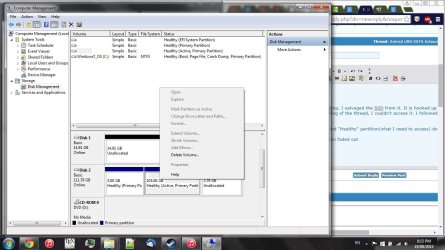
I have recently destroyed my work laptop, I salvaged the SSD from it. It is hooked up as an external drive through USB, and similar to the beginning of the thread, I couldn't access it. I followed through and opened up the Disk Management.

I can see the SSD is one of the disks and "Healthy" partition(what I need to access) does not have a directory.

I also cannot open it because it has been faded out. I CANNOT partition it, I need to copy-and-paste this partition to clone to a new SSD for a new laptop.

How can I access this volume? I'd appreciate any insight ASAP, it's my work/research computer data. I do have backups, but latest backup is from few weeks ago.

I should also mention that the SSD belonged to a Linux laptop, it should have ext4 format.
 

Attachments

  • upload.jpg
    upload.jpg
    109 KB · Views: 3

My Computer My Computer

At a glance

W7 Pro 64 and 32 bit, 2 laptops
Computer type
PC/Desktop
OS
W7 Pro 64 and 32 bit, 2 laptops

My Computer My Computer

At a glance

W7 Pro 64 and 32 bit, 2 laptops
Computer type
PC/Desktop
OS
W7 Pro 64 and 32 bit, 2 laptops

My Computers My Computers

  • At a glance

    Windows 11 ProRyzen 9 5900X32GB G Skill DDR4-3600EVGA RTX 3080 FTW 3 Ultra
    Computer type
    PC/Desktop
    Computer Manufacturer/Model Number
    ALWAYS UNDER CONSTRUCTION
    OS
    Windows 11 Pro
    CPU
    Ryzen 9 5900X
    Motherboard
    Asus X570 Crosshair Viii Hero
    Memory
    32GB G Skill DDR4-3600
    Graphics Card(s)
    EVGA RTX 3080 FTW 3 Ultra
    Sound Card
    On Board/Sennheiser PC37X Headset
    Monitor(s) Displays
    3 X Asus 27"
    Screen Resolution
    2560x1440
    Hard Drives
    2 X 1 TB NVME drives
    PSU
    EVGA 850
    Case
    Phanteks Eclipse P400A
    Cooling
    EVGA 280 AIO
    Keyboard
    Logitech G510s/ Logitech G13
    Mouse
    Logitech G502
    Internet Speed
    24/1
    Antivirus
    ESET/MBAM Pro/SAS Pro
    Browser
    Chrome/ Firefox/ Edge
  • At a glance

    Windows 11 ProIntel Ultra 9 288V32 GB LPDDR5X 8533
    Computer type
    Laptop
    System Manufacturer/Model Number
    Dell 16 Plus
    OS
    Windows 11 Pro
    CPU
    Intel Ultra 9 288V
    Memory
    32 GB LPDDR5X 8533
    Monitor(s) Displays
    16" Mini-LED HDR600 Touch 90 Hz
    Screen Resolution
    2560X1600
    Hard Drives
    1 TB NVME
Buffalo External HD

I have the same issue but i cannot assign a drive letter. Its greyed out. my Device mgr shows an error :

Device USBSTOR\Disk&Ven_BUFFALO&Prod_External_HDD&Rev_0000\00000002058784B&0 could not be migrated.

Last Device Instance Id: USBSTOR\DISK&VEN_&PROD_&REV_8.07\14122955000203&0
Class Guid: {4d36e967-e325-11ce-bfc1-08002be10318}
Location Path:
Migration Rank: 0xF000FC000000F120
Present: false
Status: 0xC0000719

Not sure what that means. Have i lost all of my data ?? Also, the drive shows up everywhere except explorer. The driver is showing updated ive tried everything....Help ! I have family photos on there =(

Thank you so much!
 

My Computer My Computer

At a glance

8.1
Computer type
PC/Desktop
Computer Manufacturer/Model Number
HP
OS
8.1

My Computers My Computers

  • At a glance

    Windows 11 ProRyzen 9 5900X32GB G Skill DDR4-3600EVGA RTX 3080 FTW 3 Ultra
    Computer type
    PC/Desktop
    Computer Manufacturer/Model Number
    ALWAYS UNDER CONSTRUCTION
    OS
    Windows 11 Pro
    CPU
    Ryzen 9 5900X
    Motherboard
    Asus X570 Crosshair Viii Hero
    Memory
    32GB G Skill DDR4-3600
    Graphics Card(s)
    EVGA RTX 3080 FTW 3 Ultra
    Sound Card
    On Board/Sennheiser PC37X Headset
    Monitor(s) Displays
    3 X Asus 27"
    Screen Resolution
    2560x1440
    Hard Drives
    2 X 1 TB NVME drives
    PSU
    EVGA 850
    Case
    Phanteks Eclipse P400A
    Cooling
    EVGA 280 AIO
    Keyboard
    Logitech G510s/ Logitech G13
    Mouse
    Logitech G502
    Internet Speed
    24/1
    Antivirus
    ESET/MBAM Pro/SAS Pro
    Browser
    Chrome/ Firefox/ Edge
  • At a glance

    Windows 11 ProIntel Ultra 9 288V32 GB LPDDR5X 8533
    Computer type
    Laptop
    System Manufacturer/Model Number
    Dell 16 Plus
    OS
    Windows 11 Pro
    CPU
    Intel Ultra 9 288V
    Memory
    32 GB LPDDR5X 8533
    Monitor(s) Displays
    16" Mini-LED HDR600 Touch 90 Hz
    Screen Resolution
    2560X1600
    Hard Drives
    1 TB NVME
Try this, The drive needs to be initalized and formatted. Right click on computer, select manage, in the left column select disk management select your SSD, it probably will not show up top but will below, You should bet a message about initalizing the drive. I am assuming this is a new drive. Formatting will erase all data on it. After that process is complete and a drive letter assigned, it will show upp in computer(windows explorer). See if that works.

EDIT: You may find this tutorial intresting. Transferring the OS to SSD. You may have a problem with space and depending on what program you do the clone with, Alignment may be an issue. The best program to use sis Paragon Migrate. Unfortunately it is not free, $19.95, but it works perfect.

Hello,
I was not sure where to send a visitor message or PM to user Essenbe but I just wanted him as well as all of you to know that this advice in the first paragraph allowed me to sort out my m.2 situation. I'd basically bought the wrong type of m.2 SSD (turned out my Mobo did not support sata but pcie only). So I bought an adaptor for my SSD and was having issues with it being recognized fully. It would basically show up under devices but would not migrate so I followed the above instructions and it was auto detected as soon as I opened the window which allowed me to format and get it working properly. I also found out I had half a TB on another drive that had been forgotten about so big win and MANY MANY thanks.
 

My Computer My Computer

At a glance

Windows 10 64 bit
Computer type
PC/Desktop
OS
Windows 10 64 bit
Back
Top