USB storage devices problem, This device cannot start. (Code 10)

Wayatt

New member
Local time
4:12 PM
Messages
7
Hello everyone, it's my first post on that forums, forgive me if I don't do it right.

So I have this problem with USB storage devices [This device cannot start. (Code 10) - in Device Manager]

It happens with a storage devices only (at least what I noticed). So every pendrive I connect is giving me this, and every external USB drive.

I have the other devices like mouse and keyboard or camera, these are working fine without errors or yellow exclamation mark.

I came here because I think I tried everything and failed, I even removed USB host only to discover I cannot log to windows or do anything because no usb device was responding - I had to recover from the last working configuration, and it saved me.

I want to fix it once and for good.

Anyone can help out?
 

My Computer

Computer type
PC/Desktop
Computer Manufacturer/Model Number
custom build
OS
Windows 7 Home Premium 64bit
CPU
Core i5 4690K
Motherboard
Asus Z97-K
Memory
8GB DDR3 (4x2GB PC3-10700) in Dual Mode
Graphics Card(s)
Asus Nvidia GTX 770/OC 2GB DDR5
Hard Drives
Samsung SSD 850 EVO 500GB
WDC WD10EADS-00M2B0 2TB
WDC WD20EZRX-00D8PB0 1TB
Antivirus
360 Total Security
Browser
Chrome, FF, IE
Hello and welcome Wayat mate have you updated all the drivers for your board?? especially the USB ones? If not then I think it is best make sure it is done before we go any further. I am saying this because the Windows diver update feature is in my mind not worth a lot, - always best to get drivers from the manufacturer's keeping in mind too that the software that comes with the board is more likely than not out of date when you get it too.
Access Denied

Lets start with this.
 

My Computer

Computer type
PC/Desktop
Computer Manufacturer/Model Number
Own build (new) Desk1 / Asus ROG Win 7 / Desk2 1st build
OS
Desk1 7 Home Prem / Desk2 10 Pro / Main lap Asus ROG 10 Pro 2 laptop Toshiba 7 Pro Asus P2520 7 & 10
CPU
Desk1 i5 3750K / Laptop i7 GTX 860M / Desk2 i5 2500
Motherboard
Desk1 Asus P877-V / Desk2 Gigabyte H67 UD3H / Laptop ?
Memory
Desk1 8GB (1866) / Desk2 16GB (1333) / Laptop 8Gb DDR3
Graphics Card(s)
Desk 1& 2NVidia GTX 650 & Laptops on board Intel
Sound Card
Desk 1 & 2 -XONAR DG Realtek High Def audio Laptop
Monitor(s) Displays
Desk 1 Benq HD 2450 / Desk2 Philips 24" / Laptop 17.5"
Screen Resolution
1920x1080 D1 & D2 & Laptop 1
Hard Drives
Desk1 Samsung 120GB 830 SSD
Asus ROG 256GB 850 Pro SSD
Desk2 Samsung 840 256 SSD
Toshiba 120GB EVO
PSU
Desk 1 Corsair HX 1050/ Laptop ? / Desk 2 Corsair HX 650
Case
Desk 1 Cooler HAF XM ? Toshiba laptop / Desk2 Coolermaster
Cooling
Fans on all Desk1 -2 Desk2 - all Coolermasters 5 Laptop ?
Keyboard
Desk 1 MS Sidewinder X6 Desk 2 MS Sidewinder X 4
Mouse
Desk 1&2 - Gigabyte MS 900 gamer - laptop - Logitec wireless
Internet Speed
ADSL2+
Other Info
One other Desktop (tester) and spare Toshba laptop both with SSD's
Running Kaspersky 2016 ISS on all machines config'd identically
Logitec audio stereo systems on each machine (x3)
Canon MG5250MFC
Router/modem TP-Link running WPA2SK
Thank you for your answer. I followed your guide and re-installed all drivers from asus website, plugged in USB pendrive and as soon as I plugged it, it showed me yellow mark on device marker, and inside I see same error code like before.
 

My Computer

Computer type
PC/Desktop
Computer Manufacturer/Model Number
custom build
OS
Windows 7 Home Premium 64bit
CPU
Core i5 4690K
Motherboard
Asus Z97-K
Memory
8GB DDR3 (4x2GB PC3-10700) in Dual Mode
Graphics Card(s)
Asus Nvidia GTX 770/OC 2GB DDR5
Hard Drives
Samsung SSD 850 EVO 500GB
WDC WD10EADS-00M2B0 2TB
WDC WD20EZRX-00D8PB0 1TB
Antivirus
360 Total Security
Browser
Chrome, FF, IE

My Computer

Computer type
PC/Desktop
Computer Manufacturer/Model Number
Own build (new) Desk1 / Asus ROG Win 7 / Desk2 1st build
OS
Desk1 7 Home Prem / Desk2 10 Pro / Main lap Asus ROG 10 Pro 2 laptop Toshiba 7 Pro Asus P2520 7 & 10
CPU
Desk1 i5 3750K / Laptop i7 GTX 860M / Desk2 i5 2500
Motherboard
Desk1 Asus P877-V / Desk2 Gigabyte H67 UD3H / Laptop ?
Memory
Desk1 8GB (1866) / Desk2 16GB (1333) / Laptop 8Gb DDR3
Graphics Card(s)
Desk 1& 2NVidia GTX 650 & Laptops on board Intel
Sound Card
Desk 1 & 2 -XONAR DG Realtek High Def audio Laptop
Monitor(s) Displays
Desk 1 Benq HD 2450 / Desk2 Philips 24" / Laptop 17.5"
Screen Resolution
1920x1080 D1 & D2 & Laptop 1
Hard Drives
Desk1 Samsung 120GB 830 SSD
Asus ROG 256GB 850 Pro SSD
Desk2 Samsung 840 256 SSD
Toshiba 120GB EVO
PSU
Desk 1 Corsair HX 1050/ Laptop ? / Desk 2 Corsair HX 650
Case
Desk 1 Cooler HAF XM ? Toshiba laptop / Desk2 Coolermaster
Cooling
Fans on all Desk1 -2 Desk2 - all Coolermasters 5 Laptop ?
Keyboard
Desk 1 MS Sidewinder X6 Desk 2 MS Sidewinder X 4
Mouse
Desk 1&2 - Gigabyte MS 900 gamer - laptop - Logitec wireless
Internet Speed
ADSL2+
Other Info
One other Desktop (tester) and spare Toshba laptop both with SSD's
Running Kaspersky 2016 ISS on all machines config'd identically
Logitec audio stereo systems on each machine (x3)
Canon MG5250MFC
Router/modem TP-Link running WPA2SK
1. I have checked my all USB storage devices on laptop they are working there with no issues.

2. Cables are ok, same cables work on my laptop

3. I see no yellow exclamation mark next to USB, but I have one at something called WAN Miniport (IKEv2) with I have Code 31, but I belive it's not related to my issue. I see yellow mark when I plug USB device, as I described in first post.

4. I've tried the Step 3 from linked page. This is what I have don'e before that crippled my PC, I don't want to do it again. When I uninstalled the Universal Serial Bus controllers node before I could not use any USB devices, and nothing was downloaded or fixed by this.
 

My Computer

Computer type
PC/Desktop
Computer Manufacturer/Model Number
custom build
OS
Windows 7 Home Premium 64bit
CPU
Core i5 4690K
Motherboard
Asus Z97-K
Memory
8GB DDR3 (4x2GB PC3-10700) in Dual Mode
Graphics Card(s)
Asus Nvidia GTX 770/OC 2GB DDR5
Hard Drives
Samsung SSD 850 EVO 500GB
WDC WD10EADS-00M2B0 2TB
WDC WD20EZRX-00D8PB0 1TB
Antivirus
360 Total Security
Browser
Chrome, FF, IE
Ok mate that WAN is nothing to do with the USB stuff - I stand to be corrected of course it is as you know just the Ethernet related connection.

Now this may sound a bit odd but can you follow this please and post back what you find. I am asking because as strange as it might sound the PSU is very often overlooked as a problem within the system - but without it functioning correctly nothing else can operate properly or at all.
Using HW Info
PART A:
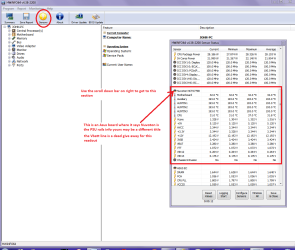
You can test the volts on the PSU with HW Info HWiNFO, HWiNFO32/64 - Download < download the right bit version and close the right hand window select Sensors and scroll down to the power section where you will see what the volts are doing see my pic. In my pic the section (Nuvoton) with VBATT as a dead give away you are in the section for the rail voltages. There are other section titles and one that pops up often is ITE (sometimes the usual one for Gigabyte boards)
Now the voltage on the different rails have to be within 5% =+/- of what is required or the machine will not work properly if at all.
Limits +/-
12v = 11.4 – 12.6v
5v = 4.74 – 5.25v
3.3v = 3.135 – 3.465v
The Power good signal voltage at pin 8 on the 24 pin plug (grey cable) should be the same as the 5v rail reading/s
See this for the rail voltage info
PSUs 101: A Detailed Look Into Power Supplies (Section 2.)
The original right hand window shows the machine running and is handy for that but for looking at the components in some detail close it and use the main left hand side panel
FOR OTHER COMPONENTS
PART B:
Open each small square with + in it on the section the components are in and then click on the individual component/s (it will highlight in blue) - in the right hand side will appear all sorts of details including brands speeds and other essential info that particular device. See pic for example.
 

Attachments

  • HW INFO DESKTOP PSU.PNG
    HW INFO DESKTOP PSU.PNG
    152.2 KB · Views: 3

My Computer

Computer type
PC/Desktop
Computer Manufacturer/Model Number
Own build (new) Desk1 / Asus ROG Win 7 / Desk2 1st build
OS
Desk1 7 Home Prem / Desk2 10 Pro / Main lap Asus ROG 10 Pro 2 laptop Toshiba 7 Pro Asus P2520 7 & 10
CPU
Desk1 i5 3750K / Laptop i7 GTX 860M / Desk2 i5 2500
Motherboard
Desk1 Asus P877-V / Desk2 Gigabyte H67 UD3H / Laptop ?
Memory
Desk1 8GB (1866) / Desk2 16GB (1333) / Laptop 8Gb DDR3
Graphics Card(s)
Desk 1& 2NVidia GTX 650 & Laptops on board Intel
Sound Card
Desk 1 & 2 -XONAR DG Realtek High Def audio Laptop
Monitor(s) Displays
Desk 1 Benq HD 2450 / Desk2 Philips 24" / Laptop 17.5"
Screen Resolution
1920x1080 D1 & D2 & Laptop 1
Hard Drives
Desk1 Samsung 120GB 830 SSD
Asus ROG 256GB 850 Pro SSD
Desk2 Samsung 840 256 SSD
Toshiba 120GB EVO
PSU
Desk 1 Corsair HX 1050/ Laptop ? / Desk 2 Corsair HX 650
Case
Desk 1 Cooler HAF XM ? Toshiba laptop / Desk2 Coolermaster
Cooling
Fans on all Desk1 -2 Desk2 - all Coolermasters 5 Laptop ?
Keyboard
Desk 1 MS Sidewinder X6 Desk 2 MS Sidewinder X 4
Mouse
Desk 1&2 - Gigabyte MS 900 gamer - laptop - Logitec wireless
Internet Speed
ADSL2+
Other Info
One other Desktop (tester) and spare Toshba laptop both with SSD's
Running Kaspersky 2016 ISS on all machines config'd identically
Logitec audio stereo systems on each machine (x3)
Canon MG5250MFC
Router/modem TP-Link running WPA2SK
Thanks again, for this extensive guide

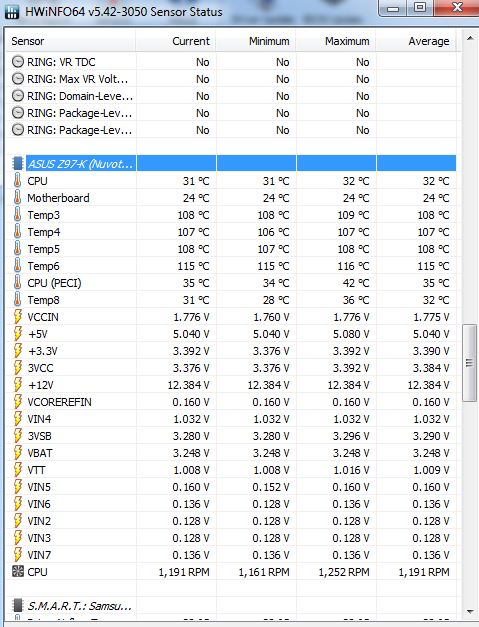
I've checked my voltages, seem valid:

AE3B145.jpg


( ignore the 100+'C temps, they are not correct, nothing is boilng in there ;) )

I would like to add one more detail: This issue has appeared without any particular reason. Everything was working fine, then it has stopped after 2yrs. I'm living with this for 1 year now, but it's getting on my nerves. So not sure maybe it came with some windows update. I was not updating drivers for a very long time until today when you said so. I am very experienced user, I have built many custom pc's installed linuxes, administrating all that things, but at this time got no clue.
 
Last edited:

My Computer

Computer type
PC/Desktop
Computer Manufacturer/Model Number
custom build
OS
Windows 7 Home Premium 64bit
CPU
Core i5 4690K
Motherboard
Asus Z97-K
Memory
8GB DDR3 (4x2GB PC3-10700) in Dual Mode
Graphics Card(s)
Asus Nvidia GTX 770/OC 2GB DDR5
Hard Drives
Samsung SSD 850 EVO 500GB
WDC WD10EADS-00M2B0 2TB
WDC WD20EZRX-00D8PB0 1TB
Antivirus
360 Total Security
Browser
Chrome, FF, IE
Ok mate PSU is fine now what I have an issue with is why the USB devices throw this code on the desktop and not the laptop and am just wondering if you transferred the data on those sticks and tried the new ones in the desktop. Just out of interest just what format are those sticks in?? not that has anything to do with the price of eggs but am wondering if there is a problem form that direction?

Now have a look at this too and see if it is what you did before [Solved] How to fix this device cannot start. (code 10) Error [Windows 10/8.1/8/7] - YouTube
 

My Computer

Computer type
PC/Desktop
Computer Manufacturer/Model Number
Own build (new) Desk1 / Asus ROG Win 7 / Desk2 1st build
OS
Desk1 7 Home Prem / Desk2 10 Pro / Main lap Asus ROG 10 Pro 2 laptop Toshiba 7 Pro Asus P2520 7 & 10
CPU
Desk1 i5 3750K / Laptop i7 GTX 860M / Desk2 i5 2500
Motherboard
Desk1 Asus P877-V / Desk2 Gigabyte H67 UD3H / Laptop ?
Memory
Desk1 8GB (1866) / Desk2 16GB (1333) / Laptop 8Gb DDR3
Graphics Card(s)
Desk 1& 2NVidia GTX 650 & Laptops on board Intel
Sound Card
Desk 1 & 2 -XONAR DG Realtek High Def audio Laptop
Monitor(s) Displays
Desk 1 Benq HD 2450 / Desk2 Philips 24" / Laptop 17.5"
Screen Resolution
1920x1080 D1 & D2 & Laptop 1
Hard Drives
Desk1 Samsung 120GB 830 SSD
Asus ROG 256GB 850 Pro SSD
Desk2 Samsung 840 256 SSD
Toshiba 120GB EVO
PSU
Desk 1 Corsair HX 1050/ Laptop ? / Desk 2 Corsair HX 650
Case
Desk 1 Cooler HAF XM ? Toshiba laptop / Desk2 Coolermaster
Cooling
Fans on all Desk1 -2 Desk2 - all Coolermasters 5 Laptop ?
Keyboard
Desk 1 MS Sidewinder X6 Desk 2 MS Sidewinder X 4
Mouse
Desk 1&2 - Gigabyte MS 900 gamer - laptop - Logitec wireless
Internet Speed
ADSL2+
Other Info
One other Desktop (tester) and spare Toshba laptop both with SSD's
Running Kaspersky 2016 ISS on all machines config'd identically
Logitec audio stereo systems on each machine (x3)
Canon MG5250MFC
Router/modem TP-Link running WPA2SK
It's really not the sticks nor external usb drivers, they have various formats and works in all computers but not in this one. They works in my neighbours pc, my brothers pc, my laptop, works when I visit foreign countries. They worked fine also here on my pc, until they stopped one day for no particular reason. Like I said I am IT guy too, but this time I simply have up.

So it's NTFS, FAT32 etc. Oh btw this might be important info for you, when I ran linux, it's reading USB sticks with no problem.

This is realy limited to the windows :)

Will check this video.

edit:

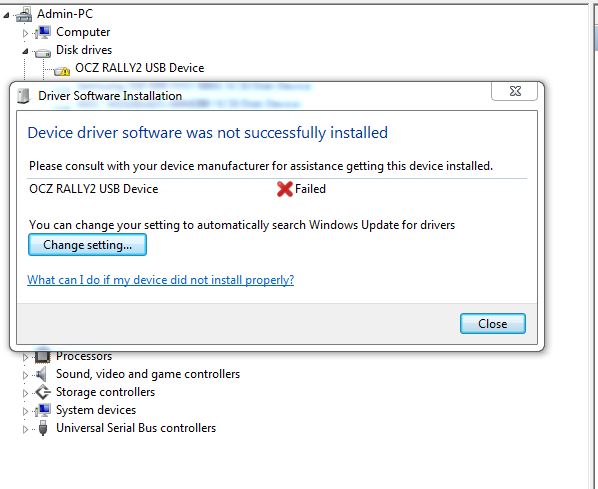
So after uninstalling my device, and pluging it back, I saw installing driver for this device, and next split second I see error message, so not helped unfortunately. And I've tried that too before :(

Zw25kva.jpg
 

My Computer

Computer type
PC/Desktop
Computer Manufacturer/Model Number
custom build
OS
Windows 7 Home Premium 64bit
CPU
Core i5 4690K
Motherboard
Asus Z97-K
Memory
8GB DDR3 (4x2GB PC3-10700) in Dual Mode
Graphics Card(s)
Asus Nvidia GTX 770/OC 2GB DDR5
Hard Drives
Samsung SSD 850 EVO 500GB
WDC WD10EADS-00M2B0 2TB
WDC WD20EZRX-00D8PB0 1TB
Antivirus
360 Total Security
Browser
Chrome, FF, IE
Oh well, no more help, guess now I have a reason to install that W10... ;)
 

My Computer

Computer type
PC/Desktop
Computer Manufacturer/Model Number
custom build
OS
Windows 7 Home Premium 64bit
CPU
Core i5 4690K
Motherboard
Asus Z97-K
Memory
8GB DDR3 (4x2GB PC3-10700) in Dual Mode
Graphics Card(s)
Asus Nvidia GTX 770/OC 2GB DDR5
Hard Drives
Samsung SSD 850 EVO 500GB
WDC WD10EADS-00M2B0 2TB
WDC WD20EZRX-00D8PB0 1TB
Antivirus
360 Total Security
Browser
Chrome, FF, IE
Hello Wayatt mate sorry no reply but got my leg busted a week ago and have been laid up in hospital:(

If you have installed the 10 then really it is not as bad as some would make out - in fact I was in the ready to go process of making this machine a dual boot 7 & 10 to get the best of both worlds. I mention this as you might like to try it yourself. Windows 10 - Dual Boot with Windows 7 or Windows 8 - Windows 10 Tutorials

Now if it were me I would as I have done - made a clone of this machines drive and am going to do the dual boot on the clone drive. This is something I do all the time and although could get a little expensive for some has saved my bacon when trial stuff has gone wrong (not often at all).

They worked fine also here on my pc, until they stopped one day for no particular reason. Like I said I am IT guy too, but this time I simply have up.
Maybe the board mate as you would know one cap, resistor, diode etc out of whack but especially I find caps and it all goes south big time.
 

My Computer

Computer type
PC/Desktop
Computer Manufacturer/Model Number
Own build (new) Desk1 / Asus ROG Win 7 / Desk2 1st build
OS
Desk1 7 Home Prem / Desk2 10 Pro / Main lap Asus ROG 10 Pro 2 laptop Toshiba 7 Pro Asus P2520 7 & 10
CPU
Desk1 i5 3750K / Laptop i7 GTX 860M / Desk2 i5 2500
Motherboard
Desk1 Asus P877-V / Desk2 Gigabyte H67 UD3H / Laptop ?
Memory
Desk1 8GB (1866) / Desk2 16GB (1333) / Laptop 8Gb DDR3
Graphics Card(s)
Desk 1& 2NVidia GTX 650 & Laptops on board Intel
Sound Card
Desk 1 & 2 -XONAR DG Realtek High Def audio Laptop
Monitor(s) Displays
Desk 1 Benq HD 2450 / Desk2 Philips 24" / Laptop 17.5"
Screen Resolution
1920x1080 D1 & D2 & Laptop 1
Hard Drives
Desk1 Samsung 120GB 830 SSD
Asus ROG 256GB 850 Pro SSD
Desk2 Samsung 840 256 SSD
Toshiba 120GB EVO
PSU
Desk 1 Corsair HX 1050/ Laptop ? / Desk 2 Corsair HX 650
Case
Desk 1 Cooler HAF XM ? Toshiba laptop / Desk2 Coolermaster
Cooling
Fans on all Desk1 -2 Desk2 - all Coolermasters 5 Laptop ?
Keyboard
Desk 1 MS Sidewinder X6 Desk 2 MS Sidewinder X 4
Mouse
Desk 1&2 - Gigabyte MS 900 gamer - laptop - Logitec wireless
Internet Speed
ADSL2+
Other Info
One other Desktop (tester) and spare Toshba laptop both with SSD's
Running Kaspersky 2016 ISS on all machines config'd identically
Logitec audio stereo systems on each machine (x3)
Canon MG5250MFC
Router/modem TP-Link running WPA2SK
Upgraded W7 to W10 and this solve this issue, all is working fine now. Thank you for you time.
 

My Computer

Computer type
PC/Desktop
Computer Manufacturer/Model Number
custom build
OS
Windows 7 Home Premium 64bit
CPU
Core i5 4690K
Motherboard
Asus Z97-K
Memory
8GB DDR3 (4x2GB PC3-10700) in Dual Mode
Graphics Card(s)
Asus Nvidia GTX 770/OC 2GB DDR5
Hard Drives
Samsung SSD 850 EVO 500GB
WDC WD10EADS-00M2B0 2TB
WDC WD20EZRX-00D8PB0 1TB
Antivirus
360 Total Security
Browser
Chrome, FF, IE
Back
Top