USB Unknown device

frobru

New member
Local time
9:54 PM
Messages
7
Hi
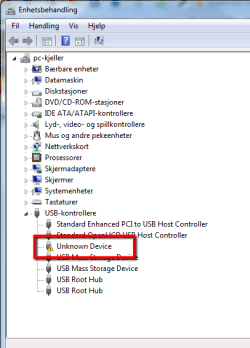
I have an Acer desktop running win 7. I keep getting two unknown usb devices but there are no usb device connected. I have tried disabling the devices, unstalling drivers and even formatted the HD, but they keep popping back. I have updated all my drivers.

In device manager the have this as "strong name for drivernode" (translated from norwegian) usb.inf:Generic.Section.NTx86:BADDEVICE.Dev:6.1.7601.17586:usb\unknown

They are really driving me mad!:mad: How can I get rid of them?
 

My Computer

OS
win enterprice 32 bit

My Computer

Computer type
PC/Desktop
Computer Manufacturer/Model Number
Home Built - Jan 2013
OS
Windows 7 64 Bit Home Premium SP1
CPU
i7-3820
Motherboard
Asus P9X79-PRO - Bios 4608
Memory
GSkill F3-14900CL9Q - 16GB
Graphics Card(s)
EVGA GeForce GTX660 - Driver 352.86
Sound Card
On board Realtek ALC898
Monitor(s) Displays
Acer S271HL
Screen Resolution
1920 x 1080
Hard Drives
#1- Samsung 840 Pro Series
#2- Western Digital WD1002FAEX Sata3 Black
#3- Western Digital WD1002FAEX Sata3 Black
PSU
Corsair CMPSU-850TX-V2 - 850 watt (by Seasonic)
Case
Corsair Obsidian 550D
Cooling
Standard 3 120mm case fans, Cooler Master Hyper 212 EVO
Keyboard
MS KC-0405
Mouse
Intellimouse 5-button
Internet Speed
56 Mbits/Sec (on a good day)
Antivirus
Avast & Malwarebytes
Browser
Firefox
Other Info
Asus DVD - DRW-24B1ST 24X
Tried it all

Txs for your reply. I did it all and for 10 minutes I thought it was ok, but den it started again. Two unknown usb devices popping up:(
 
Last edited:

My Computer

OS
win enterprice 32 bit
Can you post a screen shot of your Device Manager with the 2 problem devices expanded?

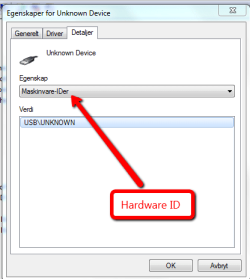
Also, can you look on the Details Tab for those devices, and under the Property drop down, see what it lists for "Hardware IDs"?
 

My Computer

Computer type
PC/Desktop
Computer Manufacturer/Model Number
Home Built - Jan 2013
OS
Windows 7 64 Bit Home Premium SP1
CPU
i7-3820
Motherboard
Asus P9X79-PRO - Bios 4608
Memory
GSkill F3-14900CL9Q - 16GB
Graphics Card(s)
EVGA GeForce GTX660 - Driver 352.86
Sound Card
On board Realtek ALC898
Monitor(s) Displays
Acer S271HL
Screen Resolution
1920 x 1080
Hard Drives
#1- Samsung 840 Pro Series
#2- Western Digital WD1002FAEX Sata3 Black
#3- Western Digital WD1002FAEX Sata3 Black
PSU
Corsair CMPSU-850TX-V2 - 850 watt (by Seasonic)
Case
Corsair Obsidian 550D
Cooling
Standard 3 120mm case fans, Cooler Master Hyper 212 EVO
Keyboard
MS KC-0405
Mouse
Intellimouse 5-button
Internet Speed
56 Mbits/Sec (on a good day)
Antivirus
Avast & Malwarebytes
Browser
Firefox
Other Info
Asus DVD - DRW-24B1ST 24X
Have you recently pluged in a usb portable (removable) devices such as a thumb drive, external drive and removed them?
 

My Computer

Computer Manufacturer/Model Number
Custom built
OS
Windows 7 Ultimate 64 bit
CPU
AMD Phenom II X4 965 Black Edition
Motherboard
Gigabyte GA-MA790X-DS4
Memory
GSkill 4 X 2 GB PC 8500
Graphics Card(s)
XFX Radeon HD 6790 D
Sound Card
On board RealTek HD
Monitor(s) Displays
Dual monitors:Samsung SyncMaster S20B300
Screen Resolution
1600 X 900
Hard Drives
Seagate Barracuda 1TB (primary)
Seagate Barracuda 2 X 320 GB
PSU
Ultra X4 750 watt fully modular
Case
Thermaltake Overseer RX 1 full tower
Cooling
Core-Contact 92 mm CPU Cooler
Keyboard
Logitech G510
Mouse
Razor DeathAdder
Internet Speed
50/5 Mbps UL/DL
Other Info
Optical: Super Muliti DVD burner w/lightscribe, Hauppauge WinTV HVR-1800
I keep getting two unknown usb devices but there are no usb device connected.
If truly you have nothing at all plugged-in to your PC's USB ports, does your PC have a built-in card reader? Any other built-in that is USB related? If yes, then I would look for updated drivers for whatever reader/gizmo you may have.

If not, well, please explain what you mean by unknown devices "popping up"--I don't know what you are seeing specifically. Screenshot(s)?

Apart from what these "pop-ups" are that are annoying you, I might've said to simply ignore the entries in DM if the PC is otherwise working properly.

P.S. It occurs to me that "of course" you have USB devices. Unless yours is an ancient PC you have a USB mouse or USB keyboard. Maybe a USB webcam? If mouse or keyboard, does it have any special features e.g. multimedia buttons? Acer PCs will typically have some sort of ancillary software associated with these features e.g. Dritek Launch Manager or some such...
 

My Computer

Computer type
Laptop
Computer Manufacturer/Model Number
Dell Latitude E6540 Laptop
OS
Windows 7 Professional 64bit
CPU
Intel Core i7 4600M @ 2.90GHz
Motherboard
Dell Inc. 0CYT5F (SOCKET 0)
Memory
16.0GB Dual-Channel DDR3 @ 797MHz (11-11-11-28)
Graphics Card(s)
Intel HD Graphics 4600 (Dell) 2048MB ATI AMD Radeon HD 8790M
Sound Card
Realtek High Definition Audio
Monitor(s) Displays
HP ZR30w (2560x1600@60Hz)
Hard Drives
256GB LITEONIT LMT-256M6M-41 mm SATA (SSD)
1TB Samsung SSD 860 EVO mSATA SATA (SSD)
2TB USB 3.0 USB Device
115GB SanDisk Ultra Fit USB
Other Info
Multiple Dell E-Port Plus II Port Replicator/Docking Stations 0Y72NH USB 3.0 + 130W AC Adapters
I dont have a card reader so it cant be that. I am usually an apple guy but need this pc for som programmingwork. Keyboard and mouse are usb and plugged in, but tyhe have been changed and unplugged and it hasnt helped either. Did that before i formatted the disc.

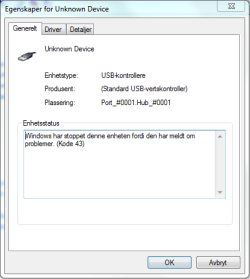
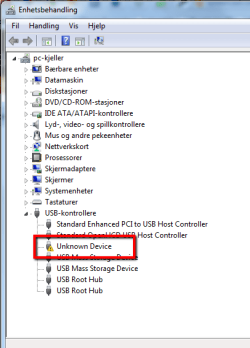
Thanks for all help and here are some screenshots
 

Attachments

  • Bilde1_dm.png
    Bilde1_dm.png
    15.6 KB · Views: 231
  • bilkde2_dm.png
    bilkde2_dm.png
    10.4 KB · Views: 236
  • bilkde_3_dm.png
    bilkde_3_dm.png
    11.8 KB · Views: 479

My Computer

OS
win enterprice 32 bit
I keep getting two unknown usb devices...

They are really driving me mad!:mad: How can I get rid of them?
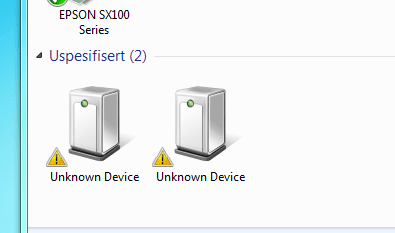
Sorry to press, but you're still not being clear--what is "popping back"? Where is the 2nd "unknown device"? Why are they "driving you mad"? How is this unknown device keeping you from getting your work done?

Usually unknown devices sit in Device Manager and don't bother anything. I can't tell from your description how this is impacting the operation of your PC.
 

My Computer

Computer type
Laptop
Computer Manufacturer/Model Number
Dell Latitude E6540 Laptop
OS
Windows 7 Professional 64bit
CPU
Intel Core i7 4600M @ 2.90GHz
Motherboard
Dell Inc. 0CYT5F (SOCKET 0)
Memory
16.0GB Dual-Channel DDR3 @ 797MHz (11-11-11-28)
Graphics Card(s)
Intel HD Graphics 4600 (Dell) 2048MB ATI AMD Radeon HD 8790M
Sound Card
Realtek High Definition Audio
Monitor(s) Displays
HP ZR30w (2560x1600@60Hz)
Hard Drives
256GB LITEONIT LMT-256M6M-41 mm SATA (SSD)
1TB Samsung SSD 860 EVO mSATA SATA (SSD)
2TB USB 3.0 USB Device
115GB SanDisk Ultra Fit USB
Other Info
Multiple Dell E-Port Plus II Port Replicator/Docking Stations 0Y72NH USB 3.0 + 130W AC Adapters
They keep going on and of, making the connection sound and so on, showing the alert messages. The second device didnt show up today. As I said I am used to macs and sure know my way around them but havent realy used windows for the last 10 years. I think this messages is a fault and dont like it. I appreciate your effort, but if you dont think its a problem then good for you - its still a problem for me. As I said in my first post I even did format the HD to get rid of it. If its common in the windows world to have unknown devices in the device manager then I'll just have to keep up with it for some weeks - and then its Linux time
 

My Computer

OS
win enterprice 32 bit
The second one
 

Attachments

  • 2011-09-18_0147.png
    2011-09-18_0147.png
    6.6 KB · Views: 168

My Computer

OS
win enterprice 32 bit
They keep going on and of, making the connection sound and so on, showing the alert messages.
This is the first time you have said what is actually going on! Now we can go somewhere with your problem! I have never seen USB devices that "go on & off", and I assume you are talking about the System Tray icon for the alert messages.

Normally when you plug-in a USB device, the alert appears, the driver is installed, the PC is happy. Since you apparently are not plugging anything in when the disruption occurs, then I have to suspect the USB devices you do have, namely the mouse and keyboard, that one or both of these is flaky and/or has a bad cable (and it's unplugging/replugging itself by virtue of a bad connection). If you've tried a new kb and mouse and then uninstalled the "unknown devices" again and still have the problem, then I guess I'd start suspecting the motherboard.

What mfr/model of keyboard & mouse are you using?
 

My Computer

Computer type
Laptop
Computer Manufacturer/Model Number
Dell Latitude E6540 Laptop
OS
Windows 7 Professional 64bit
CPU
Intel Core i7 4600M @ 2.90GHz
Motherboard
Dell Inc. 0CYT5F (SOCKET 0)
Memory
16.0GB Dual-Channel DDR3 @ 797MHz (11-11-11-28)
Graphics Card(s)
Intel HD Graphics 4600 (Dell) 2048MB ATI AMD Radeon HD 8790M
Sound Card
Realtek High Definition Audio
Monitor(s) Displays
HP ZR30w (2560x1600@60Hz)
Hard Drives
256GB LITEONIT LMT-256M6M-41 mm SATA (SSD)
1TB Samsung SSD 860 EVO mSATA SATA (SSD)
2TB USB 3.0 USB Device
115GB SanDisk Ultra Fit USB
Other Info
Multiple Dell E-Port Plus II Port Replicator/Docking Stations 0Y72NH USB 3.0 + 130W AC Adapters
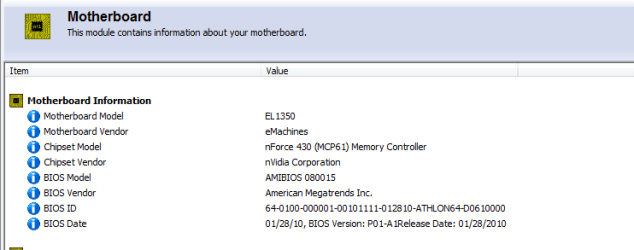
I am normally using the keyboard and mouse that came with the desktop. I have plugged them out several times during the last hours and they seem to work fine. Unplugging them have no effekt om the unknown devices. I now use an old mouse and keyboard attached to the ps/2 sockets and and therefor have no usb devices connected. I am still getting the unknown devices.
Motherboard information:
 

Attachments

  • motherboard.png
    motherboard.png
    7 KB · Views: 230

My Computer

OS
win enterprice 32 bit
The first thing I would suspect then, given what you have posted so far, is that the USB controller(s) are going bad - cutting in and out. This would be a defect in the motherboard repairable only by replacement.

The same thing could be caused by a corrupted driver or an incorrect driver (chipset drivers).
If you followed the procedure laid out in post #2 then that would have corrected any corrupt driver problem.
You could check the eMachines website for your model # to see if they have any chipset driver updates (laugh here) to try. That would correct any incorrect driver issue.

You could also try running Windows System File Checker, just to be sure some basic driver was not corrupted somehow.
http://www.sevenforums.com/tutorials/139810-sfc-scannow-run-command-prompt-boot.html
 

My Computer

Computer type
PC/Desktop
Computer Manufacturer/Model Number
Home Built - Jan 2013
OS
Windows 7 64 Bit Home Premium SP1
CPU
i7-3820
Motherboard
Asus P9X79-PRO - Bios 4608
Memory
GSkill F3-14900CL9Q - 16GB
Graphics Card(s)
EVGA GeForce GTX660 - Driver 352.86
Sound Card
On board Realtek ALC898
Monitor(s) Displays
Acer S271HL
Screen Resolution
1920 x 1080
Hard Drives
#1- Samsung 840 Pro Series
#2- Western Digital WD1002FAEX Sata3 Black
#3- Western Digital WD1002FAEX Sata3 Black
PSU
Corsair CMPSU-850TX-V2 - 850 watt (by Seasonic)
Case
Corsair Obsidian 550D
Cooling
Standard 3 120mm case fans, Cooler Master Hyper 212 EVO
Keyboard
MS KC-0405
Mouse
Intellimouse 5-button
Internet Speed
56 Mbits/Sec (on a good day)
Antivirus
Avast & Malwarebytes
Browser
Firefox
Other Info
Asus DVD - DRW-24B1ST 24X
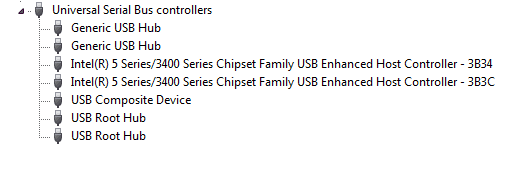
Below is a snip of a random laptop USB tree. As you can see, the devices that are probably not driven correctly are those intel enhanced controllers, unless you have an nvidia chipset.

Your system may be running with generic Windows drivers but your PC requires specific chipset drivers to function properly.
 

Attachments

  • Orig.png
    Orig.png
    15.6 KB · Views: 55
  • Capture.PNG
    Capture.PNG
    2.8 KB · Views: 61

My Computer

Computer type
PC/Desktop
Computer Manufacturer/Model Number
Home Built - Jan 2013
OS
Windows 7 64 Bit Home Premium SP1
CPU
i7-3820
Motherboard
Asus P9X79-PRO - Bios 4608
Memory
GSkill F3-14900CL9Q - 16GB
Graphics Card(s)
EVGA GeForce GTX660 - Driver 352.86
Sound Card
On board Realtek ALC898
Monitor(s) Displays
Acer S271HL
Screen Resolution
1920 x 1080
Hard Drives
#1- Samsung 840 Pro Series
#2- Western Digital WD1002FAEX Sata3 Black
#3- Western Digital WD1002FAEX Sata3 Black
PSU
Corsair CMPSU-850TX-V2 - 850 watt (by Seasonic)
Case
Corsair Obsidian 550D
Cooling
Standard 3 120mm case fans, Cooler Master Hyper 212 EVO
Keyboard
MS KC-0405
Mouse
Intellimouse 5-button
Internet Speed
56 Mbits/Sec (on a good day)
Antivirus
Avast & Malwarebytes
Browser
Firefox
Other Info
Asus DVD - DRW-24B1ST 24X
You could also try running Windows System File Checker, just to be sure some basic driver was not corrupted somehow.
http://www.sevenforums.com/tutorials/139810-sfc-scannow-run-command-prompt-boot.html
I agree, and this is easy & quick to do.

Something not so easy, but frobru you should take a look at this:

http://www.sevenforums.com/tutorials/165554-usb-driver-general-fix-problems.html

The premise is that you may have some hidden junk in your Windows system that this procedure will remove, i.e. that might be causing confusion or conflict.

You should make sure your kb and mouse are plugged-in and working, MAKE A SYSTEM RESTORE POINT ALSO, and then "view hidden devices" in Device Mgr to look for any/all "greyed-out" USB devices, and Uninstall them (either click-on and then select the Uninstall icon above, or right-click and select Uninstall).

You have to do these one-by-one. When finished reboot the PC.

Stick with the grey USB devices at this time, but if after you're all done you still have the problem, I would be inclined to open the other categories and uninstall the other "greyed-out" nonpresent devices as well.
 

My Computer

Computer type
Laptop
Computer Manufacturer/Model Number
Dell Latitude E6540 Laptop
OS
Windows 7 Professional 64bit
CPU
Intel Core i7 4600M @ 2.90GHz
Motherboard
Dell Inc. 0CYT5F (SOCKET 0)
Memory
16.0GB Dual-Channel DDR3 @ 797MHz (11-11-11-28)
Graphics Card(s)
Intel HD Graphics 4600 (Dell) 2048MB ATI AMD Radeon HD 8790M
Sound Card
Realtek High Definition Audio
Monitor(s) Displays
HP ZR30w (2560x1600@60Hz)
Hard Drives
256GB LITEONIT LMT-256M6M-41 mm SATA (SSD)
1TB Samsung SSD 860 EVO mSATA SATA (SSD)
2TB USB 3.0 USB Device
115GB SanDisk Ultra Fit USB
Other Info
Multiple Dell E-Port Plus II Port Replicator/Docking Stations 0Y72NH USB 3.0 + 130W AC Adapters
Txs again. Tried the guide you linked to twice, but still no good so I just gave the pc to my neighbours son and ordered myself a new Imac. Will run bootcamp on that whenever I am in need for some quality time with win 7 and visual studio.
Again - thanks for all the help- Much appreciated
 

My Computer

OS
win enterprice 32 bit
I just gave the pc to my neighbours son and ordered myself a new Imac. appreciated
Hey "no fair" solving the problem with your credit card! ;)

Congrats--I too would like an iMac but can't afford it!

I want to live next to you...:cry:
 

My Computer

Computer type
Laptop
Computer Manufacturer/Model Number
Dell Latitude E6540 Laptop
OS
Windows 7 Professional 64bit
CPU
Intel Core i7 4600M @ 2.90GHz
Motherboard
Dell Inc. 0CYT5F (SOCKET 0)
Memory
16.0GB Dual-Channel DDR3 @ 797MHz (11-11-11-28)
Graphics Card(s)
Intel HD Graphics 4600 (Dell) 2048MB ATI AMD Radeon HD 8790M
Sound Card
Realtek High Definition Audio
Monitor(s) Displays
HP ZR30w (2560x1600@60Hz)
Hard Drives
256GB LITEONIT LMT-256M6M-41 mm SATA (SSD)
1TB Samsung SSD 860 EVO mSATA SATA (SSD)
2TB USB 3.0 USB Device
115GB SanDisk Ultra Fit USB
Other Info
Multiple Dell E-Port Plus II Port Replicator/Docking Stations 0Y72NH USB 3.0 + 130W AC Adapters
Back
Top