USB's Drive Not assigned

goodwins

New member
Local time
2:17 AM
Messages
7
Hi I am running Windows 7 32 bit Professional. When I plug a USB in the message that the device has installed appears. When I go to Printers and Devices the USB appears. When I go to Device Manager the Device appears as a uninstalled device and in Disk Management it has not been assigned a drive letter. Any thoughts?
 

My Computer My Computer

At a glance

Windows 7 PRO 32 Bit
OS
Windows 7 PRO 32 Bit
Assuming the USB you refer to is a flash drive, have you formatted it? In Disk Management Right click it and choose Assign drive leter, any one will do.
 

My Computer My Computer

At a glance

Windows 7 Ultimate X64 SP1Intel i5-2550K, Differing ~4.4-4.8GHz No buil...16GB G.Skill Sniper 1866MHz @ 2133MHz 2x8GBASUS GTX650TIB-DC2OC-2GD5, (650TI Boost)
Computer type
PC/Desktop
Computer Manufacturer/Model Number
Home Built Desktop By DataTech
OS
Windows 7 Ultimate X64 SP1
CPU
Intel i5-2550K, Differing ~4.4-4.8GHz No built in GPU
Motherboard
ASUS P8Z68-V PRO/GEN3
Memory
16GB G.Skill Sniper 1866MHz @ 2133MHz 2x8GB
Graphics Card(s)
ASUS GTX650TIB-DC2OC-2GD5, (650TI Boost)
Sound Card
Onboard Realtek 5-1
Monitor(s) Displays
Samsung P2570HD
Screen Resolution
1920x1080
Hard Drives
Samsung 840 Pro 256GB SSD for OS, 500GB Seagate Constellation (Enterprise drive) for Data
PSU
Corsair HX650W
Case
Inwin Dragon Rider
Cooling
Hyper 212 EVO w/two Noctua fans, push-pull, @1300 RPM
Keyboard
E-Z Eyes, bright yellow keys with large characters
Mouse
steelseries SENSEI Laser Pro Gaming
Internet Speed
48-51Mbs Mbs down, 11 Mbs up Xfinity Cable
Antivirus
Norton Internet Security 2013
Browser
IE 10, Opera, Pale Moon if needed
Other Info
4 case fans, LG BluRay-RE, ASUS DVD-RW, Mr. Fusion power supply, 1.21 gigawatts.
Hi Britton 30, Yes the USB is formatted. It works on XP machines fine and also one of my Win 7 machines but not the others. I have 30 machines in one lab and the ones that fail give me the following message when I try to assign a Drive. "The operation failed because the disk management tool is not up to date. REfresh the view, Close the disk management or restart the PC" After attempting all these things I still get the same message. Any other suggestions would be greatly appreciated.
 

My Computer My Computer

At a glance

Windows 7 PRO 32 Bit
OS
Windows 7 PRO 32 Bit

My Computer My Computer

At a glance

Windows 7 Ultimate X64 SP1Intel i5-2550K, Differing ~4.4-4.8GHz No buil...16GB G.Skill Sniper 1866MHz @ 2133MHz 2x8GBASUS GTX650TIB-DC2OC-2GD5, (650TI Boost)
Computer type
PC/Desktop
Computer Manufacturer/Model Number
Home Built Desktop By DataTech
OS
Windows 7 Ultimate X64 SP1
CPU
Intel i5-2550K, Differing ~4.4-4.8GHz No built in GPU
Motherboard
ASUS P8Z68-V PRO/GEN3
Memory
16GB G.Skill Sniper 1866MHz @ 2133MHz 2x8GB
Graphics Card(s)
ASUS GTX650TIB-DC2OC-2GD5, (650TI Boost)
Sound Card
Onboard Realtek 5-1
Monitor(s) Displays
Samsung P2570HD
Screen Resolution
1920x1080
Hard Drives
Samsung 840 Pro 256GB SSD for OS, 500GB Seagate Constellation (Enterprise drive) for Data
PSU
Corsair HX650W
Case
Inwin Dragon Rider
Cooling
Hyper 212 EVO w/two Noctua fans, push-pull, @1300 RPM
Keyboard
E-Z Eyes, bright yellow keys with large characters
Mouse
steelseries SENSEI Laser Pro Gaming
Internet Speed
48-51Mbs Mbs down, 11 Mbs up Xfinity Cable
Antivirus
Norton Internet Security 2013
Browser
IE 10, Opera, Pale Moon if needed
Other Info
4 case fans, LG BluRay-RE, ASUS DVD-RW, Mr. Fusion power supply, 1.21 gigawatts.
Silly me... I just did a driver scan for the unrecognised device in Device Manager and it found a generic volume for the drive and thus assigned a drive letter. However I can not have my users do these steps everytime they plug a USB into the machine. Can the generic driver be placed in a location that all users have access to and would be found automatically on connection of a USB.

By the way the scan file produced no integrity violations!
 

My Computer My Computer

At a glance

Windows 7 PRO 32 Bit
OS
Windows 7 PRO 32 Bit
I'm not fluent in networks, but I think it could be placed on one of the PCs and deployed to the rest?
But Windows should install a generic driver on its own. Have you tried different USB drives? Maybe you have a wonky (tech term :)) one.
 

My Computer My Computer

At a glance

Windows 7 Ultimate X64 SP1Intel i5-2550K, Differing ~4.4-4.8GHz No buil...16GB G.Skill Sniper 1866MHz @ 2133MHz 2x8GBASUS GTX650TIB-DC2OC-2GD5, (650TI Boost)
Computer type
PC/Desktop
Computer Manufacturer/Model Number
Home Built Desktop By DataTech
OS
Windows 7 Ultimate X64 SP1
CPU
Intel i5-2550K, Differing ~4.4-4.8GHz No built in GPU
Motherboard
ASUS P8Z68-V PRO/GEN3
Memory
16GB G.Skill Sniper 1866MHz @ 2133MHz 2x8GB
Graphics Card(s)
ASUS GTX650TIB-DC2OC-2GD5, (650TI Boost)
Sound Card
Onboard Realtek 5-1
Monitor(s) Displays
Samsung P2570HD
Screen Resolution
1920x1080
Hard Drives
Samsung 840 Pro 256GB SSD for OS, 500GB Seagate Constellation (Enterprise drive) for Data
PSU
Corsair HX650W
Case
Inwin Dragon Rider
Cooling
Hyper 212 EVO w/two Noctua fans, push-pull, @1300 RPM
Keyboard
E-Z Eyes, bright yellow keys with large characters
Mouse
steelseries SENSEI Laser Pro Gaming
Internet Speed
48-51Mbs Mbs down, 11 Mbs up Xfinity Cable
Antivirus
Norton Internet Security 2013
Browser
IE 10, Opera, Pale Moon if needed
Other Info
4 case fans, LG BluRay-RE, ASUS DVD-RW, Mr. Fusion power supply, 1.21 gigawatts.
Pluged USB 1 in Appears in Device Manager as unknown device
Update Driver - it installs the generic volume
Still appears in Device Manager as an unknown device (although it can now be accessed)
Update Driver Again - it installs the WPD File System Volume Driver
Now appears as a recognised Driver in Device Manager

Plugged in USB 2 - Had to perform same steps
Plugged in USB 3 - Same scenario - 3 out of 3 not working dont think it is therefore a USB error but rather a setup or system error.

All installs of Drivers were from scans of the c: so surelly a scan for these drivers should perform automatically when a usb is plugged in? Confused !
 

My Computer My Computer

At a glance

Windows 7 PRO 32 Bit
OS
Windows 7 PRO 32 Bit
Me too buddy, I'll ask for some one more knowledgable for help. Check back regularly, it may not be right away.
 

My Computer My Computer

At a glance

Windows 7 Ultimate X64 SP1Intel i5-2550K, Differing ~4.4-4.8GHz No buil...16GB G.Skill Sniper 1866MHz @ 2133MHz 2x8GBASUS GTX650TIB-DC2OC-2GD5, (650TI Boost)
Computer type
PC/Desktop
Computer Manufacturer/Model Number
Home Built Desktop By DataTech
OS
Windows 7 Ultimate X64 SP1
CPU
Intel i5-2550K, Differing ~4.4-4.8GHz No built in GPU
Motherboard
ASUS P8Z68-V PRO/GEN3
Memory
16GB G.Skill Sniper 1866MHz @ 2133MHz 2x8GB
Graphics Card(s)
ASUS GTX650TIB-DC2OC-2GD5, (650TI Boost)
Sound Card
Onboard Realtek 5-1
Monitor(s) Displays
Samsung P2570HD
Screen Resolution
1920x1080
Hard Drives
Samsung 840 Pro 256GB SSD for OS, 500GB Seagate Constellation (Enterprise drive) for Data
PSU
Corsair HX650W
Case
Inwin Dragon Rider
Cooling
Hyper 212 EVO w/two Noctua fans, push-pull, @1300 RPM
Keyboard
E-Z Eyes, bright yellow keys with large characters
Mouse
steelseries SENSEI Laser Pro Gaming
Internet Speed
48-51Mbs Mbs down, 11 Mbs up Xfinity Cable
Antivirus
Norton Internet Security 2013
Browser
IE 10, Opera, Pale Moon if needed
Other Info
4 case fans, LG BluRay-RE, ASUS DVD-RW, Mr. Fusion power supply, 1.21 gigawatts.

My Computer My Computer

At a glance

Windows 7 Ultimate x64Intel Core i7-2600K16 GB G Skill F3-10666 CL9D-4GBRLATI Radeon HD 6870
Computer Manufacturer/Model Number
Something I threw together
OS
Windows 7 Ultimate x64
CPU
Intel Core i7-2600K
Motherboard
Asus P8P67
Memory
16 GB G Skill F3-10666 CL9D-4GBRL
Graphics Card(s)
ATI Radeon HD 6870
Sound Card
ATI Radeon HDMI / Realtek ALC892
Monitor(s) Displays
2 x 22" standard monitors / LG32LC56v TV to watch films
Screen Resolution
1920 x1080
Hard Drives
2 x OCZ Vertex2 111.79GB
3 x Samsung103SJ
1 x Samsung103UJ
1 x WD3200BEVT
1 x Hitachi5K320-160
PSU
Thermaltake Toughpower Cable Management 750W
Case
Antec 300
Cooling
Noctua NH-U12P SE2 and 5 120mm Case fans
Keyboard
Microsoft Comfort Curve Keyboard 2000
Mouse
Hama M3110 / Logitech M305
Internet Speed
16000
Other Info
I have also used Fedora, Suse, Ubuntu Linux
And all other Windows from 95 to date except ME
Hi Pooch thank you for your suggestion. I followed as outlined in your post deleting all unknown devices and the cache file. Plugged in a known working USB and recreated the infcache file - USB Worked like a charm. Connected a different USB but same thing happens... appears in Device Manager as unknown device and requires the driver to be updated.
 

My Computer My Computer

At a glance

Windows 7 PRO 32 Bit
OS
Windows 7 PRO 32 Bit
Connected a different USB but same thing happens... appears in Device Manager as unknown device and requires the driver to be updated.
Ok this should be good as the driver has been deleted for this drive did you try updating the driver?
Another option may be to visit the manufacturers websites and see if you can download windows 7 drivers
 

My Computer My Computer

At a glance

Windows 7 Ultimate x64Intel Core i7-2600K16 GB G Skill F3-10666 CL9D-4GBRLATI Radeon HD 6870
Computer Manufacturer/Model Number
Something I threw together
OS
Windows 7 Ultimate x64
CPU
Intel Core i7-2600K
Motherboard
Asus P8P67
Memory
16 GB G Skill F3-10666 CL9D-4GBRL
Graphics Card(s)
ATI Radeon HD 6870
Sound Card
ATI Radeon HDMI / Realtek ALC892
Monitor(s) Displays
2 x 22" standard monitors / LG32LC56v TV to watch films
Screen Resolution
1920 x1080
Hard Drives
2 x OCZ Vertex2 111.79GB
3 x Samsung103SJ
1 x Samsung103UJ
1 x WD3200BEVT
1 x Hitachi5K320-160
PSU
Thermaltake Toughpower Cable Management 750W
Case
Antec 300
Cooling
Noctua NH-U12P SE2 and 5 120mm Case fans
Keyboard
Microsoft Comfort Curve Keyboard 2000
Mouse
Hama M3110 / Logitech M305
Internet Speed
16000
Other Info
I have also used Fedora, Suse, Ubuntu Linux
And all other Windows from 95 to date except ME
When I update the driver it works fine... however I can not have my users do this for every USB that is plugged in. I have the latest updates from the manufacturer.

"All installs of Drivers were from scans of the c: so surelly a scan for these drivers should perform automatically when a usb is plugged in?"
 

My Computer My Computer

At a glance

Windows 7 PRO 32 Bit
OS
Windows 7 PRO 32 Bit
Sorry for the delay, I have been trying to find answers to your problem. I am working on the message you received "The operation failed because the disk management tool is not up to date. Refresh the view, Close the disk management or restart the PC" Unfortunately I have found no definitive answers.

Firstly I think you should run http://www.sevenforums.com/tutorials/433-disk-check.html from step 4 go to step 8 then check the drive to see if it is now recognised

If the above does not work A more drastic answer is to delete and format the drive You will have to make a copy of all data on the drive as all data on the drive will be erased
http://www.sevenforums.com/tutorials/52129-disk-clean-clean-all-diskpart-command.html

I would try these methods with just one of the affected USB drives to find out if it is going to help or not.


My Computer My Computer

At a glance

Windows 7 Ultimate x64Intel Core i7-2600K16 GB G Skill F3-10666 CL9D-4GBRLATI Radeon HD 6870
Computer Manufacturer/Model Number
Something I threw together
OS
Windows 7 Ultimate x64
CPU
Intel Core i7-2600K
Motherboard
Asus P8P67
Memory
16 GB G Skill F3-10666 CL9D-4GBRL
Graphics Card(s)
ATI Radeon HD 6870
Sound Card
ATI Radeon HDMI / Realtek ALC892
Monitor(s) Displays
2 x 22" standard monitors / LG32LC56v TV to watch films
Screen Resolution
1920 x1080
Hard Drives
2 x OCZ Vertex2 111.79GB
3 x Samsung103SJ
1 x Samsung103UJ
1 x WD3200BEVT
1 x Hitachi5K320-160
PSU
Thermaltake Toughpower Cable Management 750W
Case
Antec 300
Cooling
Noctua NH-U12P SE2 and 5 120mm Case fans
Keyboard
Microsoft Comfort Curve Keyboard 2000
Mouse
Hama M3110 / Logitech M305
Internet Speed
16000
Other Info
I have also used Fedora, Suse, Ubuntu Linux
And all other Windows from 95 to date except ME
Hi Pooch,
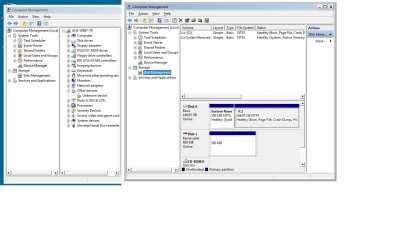
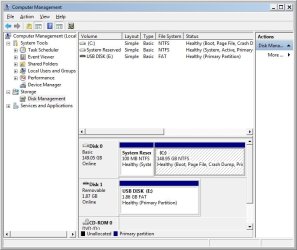
The above suggestions didnt work. I have taken snap shots of device manager and disk management so that you can see what is happening (first time I have tried this so if you didnt get them please let me know!)
I have inculded the difference between the working USB .. after a driver install.. and the not working usb.

I still think it comes down to something to do with it not searching for the driver on connection. As when I do a update driver and search c: manually it loads fine. Is there some setting that may prevent a user from scanning automatically to find these drivers. Why should they have to do it manually.?

I thank you for your on going support with this. I am determined to find the solution!
 

Attachments

  • USB.jpg
    USB.jpg
    101.6 KB · Views: 11
  • WorkUSB.jpg
    WorkUSB.jpg
    58.5 KB · Views: 9

My Computer My Computer

At a glance

Windows 7 PRO 32 Bit
OS
Windows 7 PRO 32 Bit
The problem seems to be that windows either does not load a driver or tries to load the wrong driver, In the research I have done Microsoft seems to lay the blame rightly or wrongly on the drive manufacturers and suggests that the drivers for the devices should come from them. We both know that the drivers are included in Windows but the problem is how to make Windows load the right driver for the right device. Up until now the tutorial I posted has had a fairly high success rate in solving this problem but I am unsure what to do with the unsolved cases.
At the moment the only help I can give is the tutorial, that should, by the way be carried out on each affected PC ( I forgot to mention this before) and from my own experience I suggest one device per USB port as only one driver will be installed for each port avoiding Windows trying to load the wrong driver. Or even buying all devices from the same manufacturer.
I am at a loss as to what else we can try but I will continue looking for an answer and will let you know if and when I find one.
One last thing, do you use a USB hub? if yes is it powered? I cant verify this but I have read about similar problems where USB hubs that do not have a power supply are being used.

 

My Computer My Computer

At a glance

Windows 7 Ultimate x64Intel Core i7-2600K16 GB G Skill F3-10666 CL9D-4GBRLATI Radeon HD 6870
Computer Manufacturer/Model Number
Something I threw together
OS
Windows 7 Ultimate x64
CPU
Intel Core i7-2600K
Motherboard
Asus P8P67
Memory
16 GB G Skill F3-10666 CL9D-4GBRL
Graphics Card(s)
ATI Radeon HD 6870
Sound Card
ATI Radeon HDMI / Realtek ALC892
Monitor(s) Displays
2 x 22" standard monitors / LG32LC56v TV to watch films
Screen Resolution
1920 x1080
Hard Drives
2 x OCZ Vertex2 111.79GB
3 x Samsung103SJ
1 x Samsung103UJ
1 x WD3200BEVT
1 x Hitachi5K320-160
PSU
Thermaltake Toughpower Cable Management 750W
Case
Antec 300
Cooling
Noctua NH-U12P SE2 and 5 120mm Case fans
Keyboard
Microsoft Comfort Curve Keyboard 2000
Mouse
Hama M3110 / Logitech M305
Internet Speed
16000
Other Info
I have also used Fedora, Suse, Ubuntu Linux
And all other Windows from 95 to date except ME
I have just found this, It may possibly help you;


Click on C:\ and create a folder called USB drivers

Go to C:\WINDOWS and copy the contents of the folder called inf

Paste the contents into the folder you just made

Then when you get an unrecognised USB device in Device Manager point it to the folder that you have made on C: and see if it gets remembered this way
 

My Computer My Computer

At a glance

Windows 7 Ultimate x64Intel Core i7-2600K16 GB G Skill F3-10666 CL9D-4GBRLATI Radeon HD 6870
Computer Manufacturer/Model Number
Something I threw together
OS
Windows 7 Ultimate x64
CPU
Intel Core i7-2600K
Motherboard
Asus P8P67
Memory
16 GB G Skill F3-10666 CL9D-4GBRL
Graphics Card(s)
ATI Radeon HD 6870
Sound Card
ATI Radeon HDMI / Realtek ALC892
Monitor(s) Displays
2 x 22" standard monitors / LG32LC56v TV to watch films
Screen Resolution
1920 x1080
Hard Drives
2 x OCZ Vertex2 111.79GB
3 x Samsung103SJ
1 x Samsung103UJ
1 x WD3200BEVT
1 x Hitachi5K320-160
PSU
Thermaltake Toughpower Cable Management 750W
Case
Antec 300
Cooling
Noctua NH-U12P SE2 and 5 120mm Case fans
Keyboard
Microsoft Comfort Curve Keyboard 2000
Mouse
Hama M3110 / Logitech M305
Internet Speed
16000
Other Info
I have also used Fedora, Suse, Ubuntu Linux
And all other Windows from 95 to date except ME
Back
Top