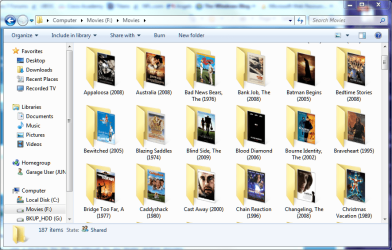
Use picture for thumbnail

Here is a screenshot of what i mean. That is an .mp4 movie.
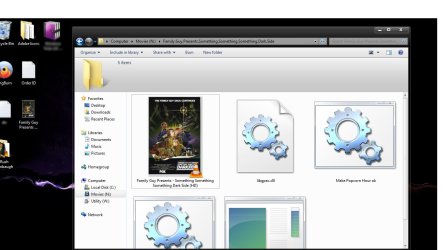

preview.jpg
 

My Computer My Computer

Computer Manufacturer/Model Number
Toshiba Satellite L505D-S9565
OS
Windows 7 Home Premium x64, Mac OS X 10.6.2 x64
CPU
AMD Athlon X2 Dual-Core 2.1 GHz
Motherboard
Toshiba Built-In with Insyde H20 BIOS 1.40
Memory
4 GB DDR2 800 MHz
Graphics Card(s)
ATI Radeon HD Mobility 3100 Graphics 256MB to 1468 MB Shared
Sound Card
Realtek Mobile ALC272 HD Audio
Monitor(s) Displays
15.6" TFT LCD with TruBrite, Samsung 1080p HDTV
Screen Resolution
1366x768, 1920x1080
Hard Drives
❶:Main: Toshiba 250 GB SATA 5400 RPM
PSU
N/A
Case
N/A
Cooling
Built-in/Open window in winter :P
Keyboard
Built-in
Mouse
Build-in Symantics SmartTouch Pad
Internet Speed
55 MB/sec Down, 9 MB/sec Up
Other Info
❷:Backup: Seagate FreeAgent Desk USB 2.0 5400 RPM
❸:Media: Toshiba 640 GB USB 2.0 5400 RPM Portable Edition
No.
 

My Computer My Computer

Computer Manufacturer/Model Number
Toshiba Satellite L505D-S9565
OS
Windows 7 Home Premium x64, Mac OS X 10.6.2 x64
CPU
AMD Athlon X2 Dual-Core 2.1 GHz
Motherboard
Toshiba Built-In with Insyde H20 BIOS 1.40
Memory
4 GB DDR2 800 MHz
Graphics Card(s)
ATI Radeon HD Mobility 3100 Graphics 256MB to 1468 MB Shared
Sound Card
Realtek Mobile ALC272 HD Audio
Monitor(s) Displays
15.6" TFT LCD with TruBrite, Samsung 1080p HDTV
Screen Resolution
1366x768, 1920x1080
Hard Drives
❶:Main: Toshiba 250 GB SATA 5400 RPM
PSU
N/A
Case
N/A
Cooling
Built-in/Open window in winter :P
Keyboard
Built-in
Mouse
Build-in Symantics SmartTouch Pad
Internet Speed
55 MB/sec Down, 9 MB/sec Up
Other Info
❷:Backup: Seagate FreeAgent Desk USB 2.0 5400 RPM
❸:Media: Toshiba 640 GB USB 2.0 5400 RPM Portable Edition
bump
 

My Computer My Computer

Computer Manufacturer/Model Number
Toshiba Satellite L505D-S9565
OS
Windows 7 Home Premium x64, Mac OS X 10.6.2 x64
CPU
AMD Athlon X2 Dual-Core 2.1 GHz
Motherboard
Toshiba Built-In with Insyde H20 BIOS 1.40
Memory
4 GB DDR2 800 MHz
Graphics Card(s)
ATI Radeon HD Mobility 3100 Graphics 256MB to 1468 MB Shared
Sound Card
Realtek Mobile ALC272 HD Audio
Monitor(s) Displays
15.6" TFT LCD with TruBrite, Samsung 1080p HDTV
Screen Resolution
1366x768, 1920x1080
Hard Drives
❶:Main: Toshiba 250 GB SATA 5400 RPM
PSU
N/A
Case
N/A
Cooling
Built-in/Open window in winter :P
Keyboard
Built-in
Mouse
Build-in Symantics SmartTouch Pad
Internet Speed
55 MB/sec Down, 9 MB/sec Up
Other Info
❷:Backup: Seagate FreeAgent Desk USB 2.0 5400 RPM
❸:Media: Toshiba 640 GB USB 2.0 5400 RPM Portable Edition
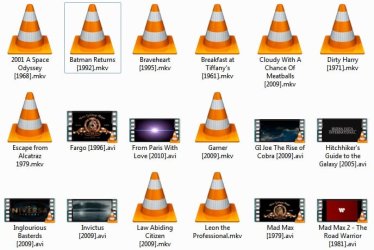
All my .mp4 files show the first frame of the movie or video.

I use KmPlayer,but I don't really think that's the reason why, it's the default for .mp4 filesas far as i can tell

I highly doubt you can change that. It displays the first frame.
 

My Computer My Computer

Computer Manufacturer/Model Number
Cheap $399.00 E-Machine
OS
Windows 7 Pro & Vista Home Premium
CPU
Athlon 64 3800+ (Orleans) 2.40GHz
Motherboard
Winfast
Memory
2GB DDR2 RAM DIMM
Graphics Card(s)
NVIDIA GeForce 8500 GT 512 MB memory HDMI out
Sound Card
creative X-Fi Exteme 7..1 channel
Monitor(s) Displays
Acer V223W 22" widescreen DVI
Screen Resolution
1680x1050
Hard Drives
WDC WD5 500GB
WDC WD25 250GB
PSU
OCZ 550 watt
Case
Gateway
Cooling
2 fans
Keyboard
Dell
Mouse
Sony Vaio
Internet Speed
18MB/s down - .72MB /s up
So if i edited each movie, to put the poster for the first frame, then it would show?
 

My Computer My Computer

Computer Manufacturer/Model Number
Toshiba Satellite L505D-S9565
OS
Windows 7 Home Premium x64, Mac OS X 10.6.2 x64
CPU
AMD Athlon X2 Dual-Core 2.1 GHz
Motherboard
Toshiba Built-In with Insyde H20 BIOS 1.40
Memory
4 GB DDR2 800 MHz
Graphics Card(s)
ATI Radeon HD Mobility 3100 Graphics 256MB to 1468 MB Shared
Sound Card
Realtek Mobile ALC272 HD Audio
Monitor(s) Displays
15.6" TFT LCD with TruBrite, Samsung 1080p HDTV
Screen Resolution
1366x768, 1920x1080
Hard Drives
❶:Main: Toshiba 250 GB SATA 5400 RPM
PSU
N/A
Case
N/A
Cooling
Built-in/Open window in winter :P
Keyboard
Built-in
Mouse
Build-in Symantics SmartTouch Pad
Internet Speed
55 MB/sec Down, 9 MB/sec Up
Other Info
❷:Backup: Seagate FreeAgent Desk USB 2.0 5400 RPM
❸:Media: Toshiba 640 GB USB 2.0 5400 RPM Portable Edition

If you were somehow able to remove the first frame, either that would screw the file up completely or it would display the second frame.
 

My Computer My Computer

Computer Manufacturer/Model Number
Cheap $399.00 E-Machine
OS
Windows 7 Pro & Vista Home Premium
CPU
Athlon 64 3800+ (Orleans) 2.40GHz
Motherboard
Winfast
Memory
2GB DDR2 RAM DIMM
Graphics Card(s)
NVIDIA GeForce 8500 GT 512 MB memory HDMI out
Sound Card
creative X-Fi Exteme 7..1 channel
Monitor(s) Displays
Acer V223W 22" widescreen DVI
Screen Resolution
1680x1050
Hard Drives
WDC WD5 500GB
WDC WD25 250GB
PSU
OCZ 550 watt
Case
Gateway
Cooling
2 fans
Keyboard
Dell
Mouse
Sony Vaio
Internet Speed
18MB/s down - .72MB /s up
How can i use a picture for the thumbnail for my music and/or movies.

AKA. I have a movie, but in explorer, i want it to show the movie poster i have saved as a jpg instead of some random frame in the movie.

Try Yammm... it is an awesome app for WMC. Written by our very own miknho. Automatically searches Internet DB's for your movie info... adds images, ratings, and synopsis!

Get it here: Mikinho | Yammm
 

My Computer My Computer

Computer Manufacturer/Model Number
Homebrew PC - "Alpha_Dawg"
OS
Windows 7 Ultimate 64 bit Steve Ballmer Signature Edition
CPU
Intel Core 2 Quad - Q9550 - 2.83GHz stock - OC'd to 3.6GHz
Motherboard
Gigabyte EP45-UD3P
Memory
4GB DDR2 800MHz (PC6400) OCZ Reaper
Graphics Card(s)
Nvidia GE Force 8800 GTS
Sound Card
Asus Xonar DX
Monitor(s) Displays
Samsung SyncMaster 2333HD
Screen Resolution
1920 x 1080
Hard Drives
WD Caviar Black 750GB - 7200RPM - 32MB cache
WD Caviar Green 1.5TB - 5400RPM - 64MB cache
WD Caviar Green 2.0TB - 5400RPM - 64MB cache
PSU
PC Power & Cooling Silencer 750
Case
Gigabyte 3D Aurora
Cooling
Case is Air - 5ea. 120mm fans (mix of Arctic and Xigmatec)
Keyboard
MS Natural Wireless KB
Mouse
MS Wireless Mouse
Internet Speed
50 mbps down/5 mbps up
Other Info
AVerMedia - AVerTVHD G2 Dual Tuner Card
Hey everyone,

I signed up specifically to find an answer to this question.

There must be a way to do so because I have some video files as well that have the movie poster as the thumbnail rather than a frame from the video itself, just like the OP. Check out the difference between the screenshots:
img1.jpg
img2.jpg

Any ideas as to why the Star Trek and TDK video files have movie posters for icons? And how can I make the rest of my movie library like that? (Note: This has nothing to do with customizing folder thumbnails.)
 

My Computer My Computer

OS
Windows 7
I have found that the reason why some thumbnails do not appear is because you are running a 64 bit version of windows with a 64 bit explorer. If you have 64 bit codecs for your vlc, then the thumbnails should appear immediately. Your trouble is mkv. I have experienced this issue myself. Basically, I don't know if, but I doubt that vlc provides a 64 bit mkv codec that explorer can use to generate thumbnails.

This is why, I suggest to you, use windows media player with shark007's codec package, which is the best codec package, that doesn't alter your windows files, or mess up the media foundation.

Now, if you managed to find a 64 bit mkv codec somewhere, a splitter, or something that allows perhaps the windows media foundation H.264 codec to create the thumbnail, go to start menu and type in disk cleanup. Delete all your thumbnail and regenerate everything from scratch

Cheers!
 

My Computer My Computer

Computer Manufacturer/Model Number
Dell Studio XPS 8000
OS
Windows 7 Home Premium
Thanks for the reply Pichu.

I'm running Windows 7 x86, hence it's 32-bit.

I don't want to make it go back to rendering the thumbnails as a screenshot from the video file, but instead I want to change the rest of the thumbnails in my video library so each video file's thumbnail is the corresponding movie poster.

If the TDK and Star Trek MKV files are able to do this, then there should be a way to do so with the other MKV's and maybe even AVI's. That's what I'm trying to figure out. I'm starting to think that it might be somehow coded into the file itself. Not sure though.

You might be correct about it being only the MKV file and no thumb.db or other Windows file
 

My Computer My Computer

OS
Windows 7
ooo that is difficult to accomplish...
As far as I know, that specific type of thumbnail is encoded directly into your video files. Not all video files have this feature. Most of the time, it is MPEG files that have this feature, not MKV with its H.264. Thus, I do not think, though, I'm not sure, that mkv even supports such a feature, as this is almost exclusively in mpeg and a few other formats. My suggestion would be to either get mpeg copies of such files, or find a splitter for mkv (apparently, vlc didn't load a mkv splitter into directshow to be accessed by other applications, only for vlc itself) that either directshow or windows media foundation can utilize to generate a thumbnail.

Sorry, :cry: but in this case, you can either modify the video file and risk losing your data, find copies of these videos in mpeg format, or simply find a mkv splitter that can generate regular thumbnails. (I suggest the Haali splitter as I have used it without issue.)
 

My Computer My Computer

Computer Manufacturer/Model Number
Dell Studio XPS 8000
OS
Windows 7 Home Premium
Do you mean you want the poster or CD cover as the image shown in WMC? If so, get YAMMM! It does it automatically for you... or find the image you want manually and save it as folder.jpg in that movies folder!
 

My Computer My Computer

Computer Manufacturer/Model Number
Homebrew PC - "Alpha_Dawg"
OS
Windows 7 Ultimate 64 bit Steve Ballmer Signature Edition
CPU
Intel Core 2 Quad - Q9550 - 2.83GHz stock - OC'd to 3.6GHz
Motherboard
Gigabyte EP45-UD3P
Memory
4GB DDR2 800MHz (PC6400) OCZ Reaper
Graphics Card(s)
Nvidia GE Force 8800 GTS
Sound Card
Asus Xonar DX
Monitor(s) Displays
Samsung SyncMaster 2333HD
Screen Resolution
1920 x 1080
Hard Drives
WD Caviar Black 750GB - 7200RPM - 32MB cache
WD Caviar Green 1.5TB - 5400RPM - 64MB cache
WD Caviar Green 2.0TB - 5400RPM - 64MB cache
PSU
PC Power & Cooling Silencer 750
Case
Gigabyte 3D Aurora
Cooling
Case is Air - 5ea. 120mm fans (mix of Arctic and Xigmatec)
Keyboard
MS Natural Wireless KB
Mouse
MS Wireless Mouse
Internet Speed
50 mbps down/5 mbps up
Other Info
AVerMedia - AVerTVHD G2 Dual Tuner Card
Guys i found it out. It was just put into iTunes. I did it with all my movies. Now its embedded directly into the .mp4 file.
 

My Computer My Computer

Computer Manufacturer/Model Number
Toshiba Satellite L505D-S9565
OS
Windows 7 Home Premium x64, Mac OS X 10.6.2 x64
CPU
AMD Athlon X2 Dual-Core 2.1 GHz
Motherboard
Toshiba Built-In with Insyde H20 BIOS 1.40
Memory
4 GB DDR2 800 MHz
Graphics Card(s)
ATI Radeon HD Mobility 3100 Graphics 256MB to 1468 MB Shared
Sound Card
Realtek Mobile ALC272 HD Audio
Monitor(s) Displays
15.6" TFT LCD with TruBrite, Samsung 1080p HDTV
Screen Resolution
1366x768, 1920x1080
Hard Drives
❶:Main: Toshiba 250 GB SATA 5400 RPM
PSU
N/A
Case
N/A
Cooling
Built-in/Open window in winter :P
Keyboard
Built-in
Mouse
Build-in Symantics SmartTouch Pad
Internet Speed
55 MB/sec Down, 9 MB/sec Up
Other Info
❷:Backup: Seagate FreeAgent Desk USB 2.0 5400 RPM
❸:Media: Toshiba 640 GB USB 2.0 5400 RPM Portable Edition
Thank you all for your contribution.

cclloyd9785 is right. iTunes lets you alter the artwork for the .m4v and .mp4 files for the movies and Windows Explorer picks this up and display the artwork rather than a screenshot as the thumbnail. So mystery solved! It's metadata after all.

So for those, like me, who helplessly searched the Internet for an answer: You can add/change/delete the artwork for M4Vs and MP4s using iTunes. Windows Explorer (at least in Windows 7) displays the iTunes artwork as the file's thumbnail in Explorer.

Now the question is... do I have to convert all my AVIs and MKVs into MP4s or M4Vs for me to be able to get that effect, or can I add artwork as metadata to other video files without using iTunes?
 

My Computer My Computer

OS
Windows 7
Thank you all for your contribution.

cclloyd9785 is right. iTunes lets you alter the artwork for the .m4v and .mp4 files for the movies and Windows Explorer picks this up and display the artwork rather than a screenshot as the thumbnail. So mystery solved! It's metadata after all.

So for those, like me, who helplessly searched the Internet for an answer: You can add/change/delete the artwork for M4Vs and MP4s using iTunes. Windows Explorer (at least in Windows 7) displays the iTunes artwork as the file's thumbnail in Explorer.

Now the question is... do I have to convert all my AVIs and MKVs into MP4s or M4Vs for me to be able to get that effect, or can I add artwork as metadata to other video files without using iTunes?

Generally, you cannot convert the avi or mkv to mp4 or m4v without some serious encoding. That equals loss in quality unfortunately. If you search online hard enough though, you can find such freeware programs. You can also use windows live movie maker though I am not sure whether it allows you to convert to mp4.

Another solution is possibly to extract everything out of the mastroka container or the avi container. The container contains the video audio, and subtitle files that are combined into a container in which you play a video in. If you can find a program to extract the H.264 video file, the mp3 audio file, and the .ssa, .ass, etc subtitle file, and find another program somehow that places these three components into a mp4 container, you might get the task completed. Though i know the general concept, i have no experience and cannot recommend to you any programs:zip: sorry :( Im sure the people on this forum though, can.
 

My Computer My Computer

Computer Manufacturer/Model Number
Dell Studio XPS 8000
OS
Windows 7 Home Premium
If you have QuickTime Player Pro you can save it as an mpeg-4 without transcoding using "Passthrough".

Avidemux can also save out as MP4. YAMB can also re-mux MP4.
 

My Computer My Computer

OS
Windows 7-RC
Is this what you all want?

Here is a screenshot of my movies folder I use with WMC.
movie folder and subs with thumbnails.PNG

If you want this same view, and you dont want to have to download every movie poster or dvd front cover to do so.
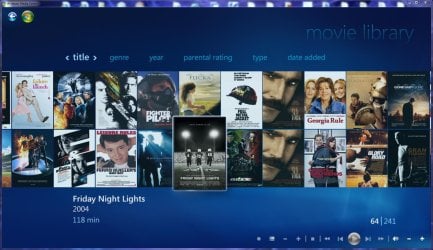
Try Yammm (Yet Another Media Meta Manager).
Its just too easy to use and AUTOMATIC.

Yammm runs as a Windows Service and will download meta data, artwork, rename folders, rename files and\or create playlists. Metadata can be any combination of dvdid.xml, mymovies.xml and\or XBMC nfo file. All meta information and artwork is provided via either themoviedb.org or thetvdb.com. If you haven't checked them out please do so and contribute where possible.

The primary reason for creating Yammm was meta manager that runs "headless" without ANY user interaction and used folder.jpg instead of custom artwork locations. This is important to me as I use various HTPC software depending on the situation and development. I also found that most did not match well. Yammm uses various checks other than the provider's score value

Oh yes... these images also show in WMC!!!
WMC Movies.jpg
 

My Computer My Computer

Computer Manufacturer/Model Number
Homebrew PC - "Alpha_Dawg"
OS
Windows 7 Ultimate 64 bit Steve Ballmer Signature Edition
CPU
Intel Core 2 Quad - Q9550 - 2.83GHz stock - OC'd to 3.6GHz
Motherboard
Gigabyte EP45-UD3P
Memory
4GB DDR2 800MHz (PC6400) OCZ Reaper
Graphics Card(s)
Nvidia GE Force 8800 GTS
Sound Card
Asus Xonar DX
Monitor(s) Displays
Samsung SyncMaster 2333HD
Screen Resolution
1920 x 1080
Hard Drives
WD Caviar Black 750GB - 7200RPM - 32MB cache
WD Caviar Green 1.5TB - 5400RPM - 64MB cache
WD Caviar Green 2.0TB - 5400RPM - 64MB cache
PSU
PC Power & Cooling Silencer 750
Case
Gigabyte 3D Aurora
Cooling
Case is Air - 5ea. 120mm fans (mix of Arctic and Xigmatec)
Keyboard
MS Natural Wireless KB
Mouse
MS Wireless Mouse
Internet Speed
50 mbps down/5 mbps up
Other Info
AVerMedia - AVerTVHD G2 Dual Tuner Card
Can i embed the cover.jpg or cover.png directly into the movie file though? Also with Yamm, can I edit things like the parental rating and other info? Cause my movies dont have the rating on them.

Edit: And does Yamm make movies show up on my media play that is build into my samsung LED tv?
 
Last edited:

My Computer My Computer

Computer Manufacturer/Model Number
Toshiba Satellite L505D-S9565
OS
Windows 7 Home Premium x64, Mac OS X 10.6.2 x64
CPU
AMD Athlon X2 Dual-Core 2.1 GHz
Motherboard
Toshiba Built-In with Insyde H20 BIOS 1.40
Memory
4 GB DDR2 800 MHz
Graphics Card(s)
ATI Radeon HD Mobility 3100 Graphics 256MB to 1468 MB Shared
Sound Card
Realtek Mobile ALC272 HD Audio
Monitor(s) Displays
15.6" TFT LCD with TruBrite, Samsung 1080p HDTV
Screen Resolution
1366x768, 1920x1080
Hard Drives
❶:Main: Toshiba 250 GB SATA 5400 RPM
PSU
N/A
Case
N/A
Cooling
Built-in/Open window in winter :P
Keyboard
Built-in
Mouse
Build-in Symantics SmartTouch Pad
Internet Speed
55 MB/sec Down, 9 MB/sec Up
Other Info
❷:Backup: Seagate FreeAgent Desk USB 2.0 5400 RPM
❸:Media: Toshiba 640 GB USB 2.0 5400 RPM Portable Edition
Can i embed the cover.jpg or cover.png directly into the movie file though? Also with Yamm, can I edit things like the parental rating and other info? Cause my movies dont have the rating on them.

Edit: And does Yamm make movies show up on my media play that is build into my samsung LED tv?

YAMM doesnt embed those items it downloads and places them into that movies folder. What format are your movies in?

As for the Samsung tv... I doubt it. Does that TV have a WMC extender built into it? If so, maybe...
 

My Computer My Computer

Computer Manufacturer/Model Number
Homebrew PC - "Alpha_Dawg"
OS
Windows 7 Ultimate 64 bit Steve Ballmer Signature Edition
CPU
Intel Core 2 Quad - Q9550 - 2.83GHz stock - OC'd to 3.6GHz
Motherboard
Gigabyte EP45-UD3P
Memory
4GB DDR2 800MHz (PC6400) OCZ Reaper
Graphics Card(s)
Nvidia GE Force 8800 GTS
Sound Card
Asus Xonar DX
Monitor(s) Displays
Samsung SyncMaster 2333HD
Screen Resolution
1920 x 1080
Hard Drives
WD Caviar Black 750GB - 7200RPM - 32MB cache
WD Caviar Green 1.5TB - 5400RPM - 64MB cache
WD Caviar Green 2.0TB - 5400RPM - 64MB cache
PSU
PC Power & Cooling Silencer 750
Case
Gigabyte 3D Aurora
Cooling
Case is Air - 5ea. 120mm fans (mix of Arctic and Xigmatec)
Keyboard
MS Natural Wireless KB
Mouse
MS Wireless Mouse
Internet Speed
50 mbps down/5 mbps up
Other Info
AVerMedia - AVerTVHD G2 Dual Tuner Card
Back
Top