Use SD card for Windows Media Player library

Plantje

New member
Member
Local time
3:22 PM
Messages
45
I expect my EXOPC slate to be here tomorrow. Since it only has a 64 GB SSD I cannot put all my music on it.

Therefore I wanted to use a 32GB SDHC card, put the less favorite music on it and add the contents to the media library. However, Windows doesn't let me add the SD card to the media library as it is removable. This is strange, because I AM able to add (for example) a folder on my HDD to the library and remove the MP3's from the file system. Then the files can't be found either...can they?

So, why is it that the SD card cannot be added? And more important: is there a tweak to make it useable?
 

My Computer My Computer

At a glance

Windows 7 32 bit both Ultimate and Home PremiumVaries per systemVaries per systemVaries per system
Computer Manufacturer/Model Number
EXOPC, custom desktop, custom media center, HP laptop
OS
Windows 7 32 bit both Ultimate and Home Premium
CPU
Varies per system
Motherboard
Varies per system
Memory
Varies per system
Graphics Card(s)
Varies per system
Sound Card
Varies per system
Monitor(s) Displays
Varies per system
Screen Resolution
Varies per system
Hard Drives
Varies per system
PSU
Varies per system
Case
Varies per system
Cooling
Varies per system
Keyboard
Varies per system
Mouse
Varies per system
Internet Speed
20Mbit
So, why is it that the SD card cannot be added? And more important: is there a tweak to make it useable?

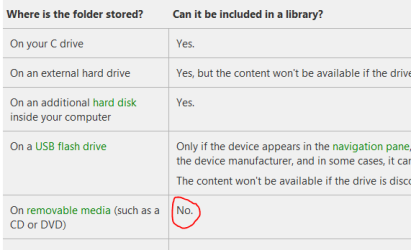
Can't be done I'm afraid, see here:
Capture75.PNG
 

My Computer My Computer

At a glance

Microsoft Windows 7 Home Premium 64-bit 7601 ...Intel(R) Core(TM) i7-3770 CPU @ 3.40GHz8.00 GBIntel(R) HD Graphics 4000
Computer type
PC/Desktop
OS
Microsoft Windows 7 Home Premium 64-bit 7601 Multiprocessor Free Service Pack 1
CPU
Intel(R) Core(TM) i7-3770 CPU @ 3.40GHz
Motherboard
ASUSTeK COMPUTER INC. P8H77-M
Memory
8.00 GB
Graphics Card(s)
Intel(R) HD Graphics 4000
Sound Card
On Board
Monitor(s) Displays
Dell 24"
Screen Resolution
1920 x 1080
Hard Drives
(1) INTEL SSDSC2CT180A3 ATA Device (2) ST500DM002-1BD142 ATA Device (3) WDC WD3200AAKS-75L9A0 ATA Device (4) Generic- Compact Flash USB Device (5) Generic- MS/MS-Pro USB Device (6) Generic- SD/MMC USB Device (7) Generic- SM/xD-Picture USB
PSU
500w Corsair
Case
Cooler Master
Cooling
3 Fans
Keyboard
Logitech MK300
Mouse
Logitech WOM
Internet Speed
75Mb
Antivirus
Norton 360
Browser
Firefox, Opera, IE
Yes, I've found that one as well. However...there must be some sort of tweak possible...right? ;)
 

My Computer My Computer

At a glance

Windows 7 32 bit both Ultimate and Home PremiumVaries per systemVaries per systemVaries per system
Computer Manufacturer/Model Number
EXOPC, custom desktop, custom media center, HP laptop
OS
Windows 7 32 bit both Ultimate and Home Premium
CPU
Varies per system
Motherboard
Varies per system
Memory
Varies per system
Graphics Card(s)
Varies per system
Sound Card
Varies per system
Monitor(s) Displays
Varies per system
Screen Resolution
Varies per system
Hard Drives
Varies per system
PSU
Varies per system
Case
Varies per system
Cooling
Varies per system
Keyboard
Varies per system
Mouse
Varies per system
Internet Speed
20Mbit
Yes, I've found that one as well. However...there must be some sort of tweak possible...right? ;)

Not one that i know of!
 

My Computer My Computer

At a glance

Microsoft Windows 7 Home Premium 64-bit 7601 ...Intel(R) Core(TM) i7-3770 CPU @ 3.40GHz8.00 GBIntel(R) HD Graphics 4000
Computer type
PC/Desktop
OS
Microsoft Windows 7 Home Premium 64-bit 7601 Multiprocessor Free Service Pack 1
CPU
Intel(R) Core(TM) i7-3770 CPU @ 3.40GHz
Motherboard
ASUSTeK COMPUTER INC. P8H77-M
Memory
8.00 GB
Graphics Card(s)
Intel(R) HD Graphics 4000
Sound Card
On Board
Monitor(s) Displays
Dell 24"
Screen Resolution
1920 x 1080
Hard Drives
(1) INTEL SSDSC2CT180A3 ATA Device (2) ST500DM002-1BD142 ATA Device (3) WDC WD3200AAKS-75L9A0 ATA Device (4) Generic- Compact Flash USB Device (5) Generic- MS/MS-Pro USB Device (6) Generic- SD/MMC USB Device (7) Generic- SM/xD-Picture USB
PSU
500w Corsair
Case
Cooler Master
Cooling
3 Fans
Keyboard
Logitech MK300
Mouse
Logitech WOM
Internet Speed
75Mb
Antivirus
Norton 360
Browser
Firefox, Opera, IE
I think it is so strange that it is possible to play music from an SD card, but it is impossible to add it to the library.
 

My Computer My Computer

At a glance

Windows 7 32 bit both Ultimate and Home PremiumVaries per systemVaries per systemVaries per system
Computer Manufacturer/Model Number
EXOPC, custom desktop, custom media center, HP laptop
OS
Windows 7 32 bit both Ultimate and Home Premium
CPU
Varies per system
Motherboard
Varies per system
Memory
Varies per system
Graphics Card(s)
Varies per system
Sound Card
Varies per system
Monitor(s) Displays
Varies per system
Screen Resolution
Varies per system
Hard Drives
Varies per system
PSU
Varies per system
Case
Varies per system
Cooling
Varies per system
Keyboard
Varies per system
Mouse
Varies per system
Internet Speed
20Mbit
SO just make a playlist (or multiple playlists) in WMP and organize your music there, idk.
 

My Computer My Computer

At a glance

Windows 7 Home Premium x64Intel Core i5 2500K8GB DDR3nVidia GeForce GTX650 Ti BOOST
Computer type
Laptop
Computer Manufacturer/Model Number
Custom
OS
Windows 7 Home Premium x64
CPU
Intel Core i5 2500K
Motherboard
MSI MS-7750
Memory
8GB DDR3
Graphics Card(s)
nVidia GeForce GTX650 Ti BOOST
Sound Card
Realtek
Monitor(s) Displays
21' Philips
Screen Resolution
Full HD
Hard Drives
1TB
PSU
500W
Yes, thought about that as well. But I like the WMP feature "Play all music" That will probably not include that separate playlist...right?

But it's worth a shot.
 

My Computer My Computer

At a glance

Windows 7 32 bit both Ultimate and Home PremiumVaries per systemVaries per systemVaries per system
Computer Manufacturer/Model Number
EXOPC, custom desktop, custom media center, HP laptop
OS
Windows 7 32 bit both Ultimate and Home Premium
CPU
Varies per system
Motherboard
Varies per system
Memory
Varies per system
Graphics Card(s)
Varies per system
Sound Card
Varies per system
Monitor(s) Displays
Varies per system
Screen Resolution
Varies per system
Hard Drives
Varies per system
PSU
Varies per system
Case
Varies per system
Cooling
Varies per system
Keyboard
Varies per system
Mouse
Varies per system
Internet Speed
20Mbit
There's always another approch for everything. Pin WMP to the taskbar and upon start just drag&drop those playlists to the active playlist and you're good to go :)
 

My Computer My Computer

At a glance

Windows 7 Home Premium x64Intel Core i5 2500K8GB DDR3nVidia GeForce GTX650 Ti BOOST
Computer type
Laptop
Computer Manufacturer/Model Number
Custom
OS
Windows 7 Home Premium x64
CPU
Intel Core i5 2500K
Motherboard
MSI MS-7750
Memory
8GB DDR3
Graphics Card(s)
nVidia GeForce GTX650 Ti BOOST
Sound Card
Realtek
Monitor(s) Displays
21' Philips
Screen Resolution
Full HD
Hard Drives
1TB
PSU
500W
I think it is so strange that it is possible to play music from an SD card, but it is impossible to add it to the library.

This link will explain all:
About Libraries (Windows)

In any case if you have an extensive range of music files I guess you might store them on an external hard drive. That being so why not just transfer from the SD card to the Ext HD? Or is that a silly idea?
 

My Computer My Computer

At a glance

Microsoft Windows 7 Home Premium 64-bit 7601 ...Intel(R) Core(TM) i7-3770 CPU @ 3.40GHz8.00 GBIntel(R) HD Graphics 4000
Computer type
PC/Desktop
OS
Microsoft Windows 7 Home Premium 64-bit 7601 Multiprocessor Free Service Pack 1
CPU
Intel(R) Core(TM) i7-3770 CPU @ 3.40GHz
Motherboard
ASUSTeK COMPUTER INC. P8H77-M
Memory
8.00 GB
Graphics Card(s)
Intel(R) HD Graphics 4000
Sound Card
On Board
Monitor(s) Displays
Dell 24"
Screen Resolution
1920 x 1080
Hard Drives
(1) INTEL SSDSC2CT180A3 ATA Device (2) ST500DM002-1BD142 ATA Device (3) WDC WD3200AAKS-75L9A0 ATA Device (4) Generic- Compact Flash USB Device (5) Generic- MS/MS-Pro USB Device (6) Generic- SD/MMC USB Device (7) Generic- SM/xD-Picture USB
PSU
500w Corsair
Case
Cooler Master
Cooling
3 Fans
Keyboard
Logitech MK300
Mouse
Logitech WOM
Internet Speed
75Mb
Antivirus
Norton 360
Browser
Firefox, Opera, IE
Thanks for the link. It DID point me in the direction of a possible solution :)

It states that network locations can be added to the library. So, I decided to share my SD card to the network. Currently my machine is not connected to my home network, but that doesn't matter. I can still add my network share (being the SD card) to the library.

Now...put some music on it and check if it works out! :)

And it does! :)

Let's hope these files get included in the list as well when choosing for the "Play all music" option!
 

My Computer My Computer

At a glance

Windows 7 32 bit both Ultimate and Home PremiumVaries per systemVaries per systemVaries per system
Computer Manufacturer/Model Number
EXOPC, custom desktop, custom media center, HP laptop
OS
Windows 7 32 bit both Ultimate and Home Premium
CPU
Varies per system
Motherboard
Varies per system
Memory
Varies per system
Graphics Card(s)
Varies per system
Sound Card
Varies per system
Monitor(s) Displays
Varies per system
Screen Resolution
Varies per system
Hard Drives
Varies per system
PSU
Varies per system
Case
Varies per system
Cooling
Varies per system
Keyboard
Varies per system
Mouse
Varies per system
Internet Speed
20Mbit
It states that network locations can be added to the library. So, I decided to share my SD card to the network. Currently my machine is not connected to my home network, but that doesn't matter. I can still add my network share (being the SD card) to the library.
Still think that it is taking a sledge hammer to crack a nut. Was my idea to put the music files onto your HD not a reasonably easy solution?
 
Last edited:

My Computer My Computer

At a glance

Microsoft Windows 7 Home Premium 64-bit 7601 ...Intel(R) Core(TM) i7-3770 CPU @ 3.40GHz8.00 GBIntel(R) HD Graphics 4000
Computer type
PC/Desktop
OS
Microsoft Windows 7 Home Premium 64-bit 7601 Multiprocessor Free Service Pack 1
CPU
Intel(R) Core(TM) i7-3770 CPU @ 3.40GHz
Motherboard
ASUSTeK COMPUTER INC. P8H77-M
Memory
8.00 GB
Graphics Card(s)
Intel(R) HD Graphics 4000
Sound Card
On Board
Monitor(s) Displays
Dell 24"
Screen Resolution
1920 x 1080
Hard Drives
(1) INTEL SSDSC2CT180A3 ATA Device (2) ST500DM002-1BD142 ATA Device (3) WDC WD3200AAKS-75L9A0 ATA Device (4) Generic- Compact Flash USB Device (5) Generic- MS/MS-Pro USB Device (6) Generic- SD/MMC USB Device (7) Generic- SM/xD-Picture USB
PSU
500w Corsair
Case
Cooler Master
Cooling
3 Fans
Keyboard
Logitech MK300
Mouse
Logitech WOM
Internet Speed
75Mb
Antivirus
Norton 360
Browser
Firefox, Opera, IE
Still think that it taking a sledge hammer to crack a nut. Was my idea to put the music files onto your HD not a reasonably easy solution?
Sorry... I didn't read the second part of that post and went straight to the library explanation!

I thought of an external HD as well, but as this is a tablet it wouldn't really make sense. I'd like to use the device at the office, in the car, at home on the couch etc etc. For a slate it is extremely uncomfortable to have an external hard drive constantly connected.
It would have been even better if the device had a SDXC card reader! Then I could put all of my music on one separate SD card!
 

My Computer My Computer

At a glance

Windows 7 32 bit both Ultimate and Home PremiumVaries per systemVaries per systemVaries per system
Computer Manufacturer/Model Number
EXOPC, custom desktop, custom media center, HP laptop
OS
Windows 7 32 bit both Ultimate and Home Premium
CPU
Varies per system
Motherboard
Varies per system
Memory
Varies per system
Graphics Card(s)
Varies per system
Sound Card
Varies per system
Monitor(s) Displays
Varies per system
Screen Resolution
Varies per system
Hard Drives
Varies per system
PSU
Varies per system
Case
Varies per system
Cooling
Varies per system
Keyboard
Varies per system
Mouse
Varies per system
Internet Speed
20Mbit
Still think that it taking a sledge hammer to crack a nut. Was my idea to put the music files onto your HD not a reasonably easy solution?
Sorry... I didn't read the second part of that post and went straight to the library explanation!

I thought of an external HD as well, but as this is a tablet it wouldn't really make sense. I'd like to use the device at the office, in the car, at home on the couch etc etc. For a slate it is extremely uncomfortable to have an external hard drive constantly connected.
It would have been even better if the device had a SDXC card reader! Then I could put all of my music on one separate SD card!

Could you take a few minutes to complete your system specs then we could all see that it was a tablet.
 

My Computer My Computer

At a glance

Microsoft Windows 7 Home Premium 64-bit 7601 ...Intel(R) Core(TM) i7-3770 CPU @ 3.40GHz8.00 GBIntel(R) HD Graphics 4000
Computer type
PC/Desktop
OS
Microsoft Windows 7 Home Premium 64-bit 7601 Multiprocessor Free Service Pack 1
CPU
Intel(R) Core(TM) i7-3770 CPU @ 3.40GHz
Motherboard
ASUSTeK COMPUTER INC. P8H77-M
Memory
8.00 GB
Graphics Card(s)
Intel(R) HD Graphics 4000
Sound Card
On Board
Monitor(s) Displays
Dell 24"
Screen Resolution
1920 x 1080
Hard Drives
(1) INTEL SSDSC2CT180A3 ATA Device (2) ST500DM002-1BD142 ATA Device (3) WDC WD3200AAKS-75L9A0 ATA Device (4) Generic- Compact Flash USB Device (5) Generic- MS/MS-Pro USB Device (6) Generic- SD/MMC USB Device (7) Generic- SM/xD-Picture USB
PSU
500w Corsair
Case
Cooler Master
Cooling
3 Fans
Keyboard
Logitech MK300
Mouse
Logitech WOM
Internet Speed
75Mb
Antivirus
Norton 360
Browser
Firefox, Opera, IE
Still think that it taking a sledge hammer to crack a nut. Was my idea to put the music files onto your HD not a reasonably easy solution?
Sorry... I didn't read the second part of that post and went straight to the library explanation!

I thought of an external HD as well, but as this is a tablet it wouldn't really make sense. I'd like to use the device at the office, in the car, at home on the couch etc etc. For a slate it is extremely uncomfortable to have an external hard drive constantly connected.
It would have been even better if the device had a SDXC card reader! Then I could put all of my music on one separate SD card!

Could you take a few minutes to complete your system specs then we could all see that it was a tablet.

I didn't fill out the system specs as I am running a desktop, UMPC, tablet slate, media center, laptop, media center extender all on Windows 7.
In the beginning of the topic I stated
I expect my EXOPC slate to be here tomorrow.
I thought that would be clear ;)
But let's not make a huge issue out of that.

The "solution" that I found is not a real solution. As soon as I start fiddling around with songs on the SD card the library reports issues.
I guess the best solution would indeed be to use a external HDD. Then put some music on the SSD of the slate and the rest on the external HDD. Add both locations to the library. That way I can use WMC and WMP with the "Play all music" option and it will only play all songs if the HDD is connected. If it is not connected it will just skip those songs.
If I notice that I would like to have specific songs available if I have the external HDD disconnected I only need to move them from the external HDD's library folder to the SSD's library folder.

Pity though that it is impossible to use an SD card :(
 

My Computer My Computer

At a glance

Windows 7 32 bit both Ultimate and Home PremiumVaries per systemVaries per systemVaries per system
Computer Manufacturer/Model Number
EXOPC, custom desktop, custom media center, HP laptop
OS
Windows 7 32 bit both Ultimate and Home Premium
CPU
Varies per system
Motherboard
Varies per system
Memory
Varies per system
Graphics Card(s)
Varies per system
Sound Card
Varies per system
Monitor(s) Displays
Varies per system
Screen Resolution
Varies per system
Hard Drives
Varies per system
PSU
Varies per system
Case
Varies per system
Cooling
Varies per system
Keyboard
Varies per system
Mouse
Varies per system
Internet Speed
20Mbit
HOWTO: Including an SD in the Music Catalog

1. Create a folder in C:\ ex: "[SDCard]"
2. Open Disk Manager and right-click on the SD volume (likely D:\), select the option for changing the drive letter.
3. Add a mounting path pointing to the folder you created above.

Now the SD's contents are available as C:\[SDCard]\*.* and you can add this folder to the Music Catalog.

Hope my English is matching my Italian... Sorry.

Flavio
 

My Computer My Computer

At a glance

Windows 7 Professional x64
OS
Windows 7 Professional x64
Yes this seems to work! Thanks a lot!

Especially when the SDXC cards are becoming cheaper (and as long as one can read them with a SDHC reader) this will be great!
 

My Computer My Computer

At a glance

Windows 7 32 bit both Ultimate and Home PremiumVaries per systemVaries per systemVaries per system
Computer Manufacturer/Model Number
EXOPC, custom desktop, custom media center, HP laptop
OS
Windows 7 32 bit both Ultimate and Home Premium
CPU
Varies per system
Motherboard
Varies per system
Memory
Varies per system
Graphics Card(s)
Varies per system
Sound Card
Varies per system
Monitor(s) Displays
Varies per system
Screen Resolution
Varies per system
Hard Drives
Varies per system
PSU
Varies per system
Case
Varies per system
Cooling
Varies per system
Keyboard
Varies per system
Mouse
Varies per system
Internet Speed
20Mbit
Thanks for the perfect workaround, loosigoosi! I wish WMP could just do it natively, but this works...
 

My Computer My Computer

At a glance

Windows 7 Ultimatei5 520M4GBIntel GMA
Computer Manufacturer/Model Number
Lenovo X201
OS
Windows 7 Ultimate
CPU
i5 520M
Memory
4GB
Graphics Card(s)
Intel GMA
loosigoosi - Brilliant Tip! :D

I've been messing about with this for a couple of hours, then found this. Perhaps Windows 8 might do better on the Tablet, I will re-post if it does.
 

My Computer My Computer

At a glance

Windows 7 Home Premium, Windows 8 Beta (Devel...AMD C-50 1 Ghz2 GbAMD Radeon HD 6250
Computer Manufacturer/Model Number
Acer ICONIA TAB W501 (Primary)
OS
Windows 7 Home Premium, Windows 8 Beta (Developers)
CPU
AMD C-50 1 Ghz
Memory
2 Gb
Graphics Card(s)
AMD Radeon HD 6250
Sound Card
RealTek HD Audio
Monitor(s) Displays
10" Tablet
Hard Drives
1 x 32 Gb SSD
1 x 64 Gb SD Card
Case
Tablet + Docking Base
I have a Samsung Series 7 Slate with a 64GB microSD, and the W7 running WMP12. It wont recognize my SD card for the Music Library because it is a removable device. On my last tablet, a guy helped me build a shortcut from C drive to read the SD card. It worked well. But I dont know how he did it. The following link tries to explain it, but I can not find anything titled "Disk Management" or "Computer Management" in my Control Panel or Computer menus. Any ideas?
The way to do this is to go to a known location on your hard drive—C:\ perhaps—and create a folder called Camera Card, or whatever. Then start the Computer Management program (Search the start menu for it) and click on "Disk Management" in the left-hand sidebar. Right click your removable drive and select "Change Drive Letter and Paths". Click Add and select "Mount in the following empty NTFS folder". Choose the folder you made earlier (e.g.,C:\Camera Card). Now if you look in the C:\Camera Card folder you'll see the contents of your SD card. Now, if you right click your new Library you made earlier and addC:\Camera Card to it, it'll work!
 

My Computer My Computer

At a glance

Windows 7 Professional 64bit
OS
Windows 7 Professional 64bit
You should go to "Control panel" --> "Administrative Tools" --> "Computer Management". That's where you'll find "Disk Management"

It is really great this is possible! This way I added 64gb for music on my Asus Vivotab RT!
 

My Computer My Computer

At a glance

Windows 7 32 bit both Ultimate and Home PremiumVaries per systemVaries per systemVaries per system
Computer Manufacturer/Model Number
EXOPC, custom desktop, custom media center, HP laptop
OS
Windows 7 32 bit both Ultimate and Home Premium
CPU
Varies per system
Motherboard
Varies per system
Memory
Varies per system
Graphics Card(s)
Varies per system
Sound Card
Varies per system
Monitor(s) Displays
Varies per system
Screen Resolution
Varies per system
Hard Drives
Varies per system
PSU
Varies per system
Case
Varies per system
Cooling
Varies per system
Keyboard
Varies per system
Mouse
Varies per system
Internet Speed
20Mbit
Back
Top