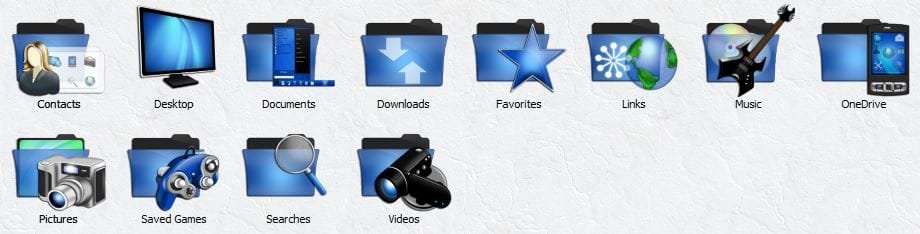
User Folders - Change Default Icon

How to Change Default User Folder Icons in Windows 7 and Windows 8

   Information
This will show you how to change the default folder icon with the icon of your choice for all of your personal User folder icons to display with it in both the Start Menu and C:\Users\(user-name) locations in Windows 7 and Windows 8.

   Tip
If you would prefer to use the Vista user folder icons instead, then see Everlong's post for how. :)


EXAMPLE: Default Personal User Folders Icons
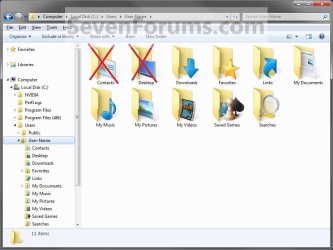
Example1.jpg


OPTION ONE

To Change the User Name Profile Folder Icon
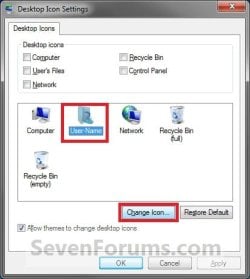
1. Open the change Desktop Icon Settings window. (See screenshot below) User-1.jpg
2. In the lower box, click/tap on your User Name folder to highlight it in blue. (See screenshot above)

3. Click/tap on the Change Icon button. (See screenshot above)

4. Click/tap on the Browse button and navigate to the folder location of were the icon that you want to use for this user folder is at. (See screenshot below) User-2.jpg
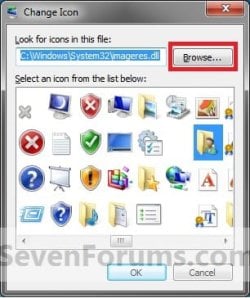
5. Select the icon in the lower window box, and click/tap on OK. (See highlighted in blue icon in the screenshot above)

6. Click/tap on OK. (See screenshot below step 1)

   Tip
If you want to restore the default User Name folder icon, then see OPTION ONE at this link:

How to Restore Default User Folder Icons in Windows 7 and Windows 8


OPTION TWO

To Change User Folders Icons


   Note
This option will be for all of the user folders in the C:\Users\(user-name) folder except the User Name folder itself (OPTION ONE).
   Tip
To be able to change the Contacts and/or Desktop user folder icon, you can click on the Download button below to download the .reg files that enable the Customize tab in these user folders Properties page. After you download the .reg file, double click on it to merge it. You can then follow the steps in this OPTION below to change the icon.

You must be logged in as an administrator to be able to merge the REG files below.

  • To Restore (remove Customize tab) Default Contacts User Folder

Download


  • To Enable (add Customize tab) Changing Contacts User Folder Icon

Download


  • To Restore (remove Customize tab) Default Desktop User Folder

Download


  • To Enable (add Customize tab) Changing Desktop User Folder Icon

Download


1. Open the C:\Users\(user-name) folder.
WARNING: This must be done at this location. It will not work by opening the user folder from the Start Menu location. Example1.jpg
2. Right click or swipe down on the user folder icon that you want to restore default, and click/tap on Properties. (See screenshot above)

3. Click/tap on the Customize tab, and click/tap on the Change Icon button. (See screenshot below) Step1.jpg
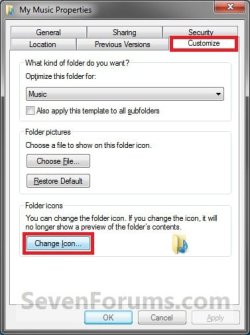
4. Click/tap on the Browse button and navigate to the folder location of were the icon that you want to use for this user folder is at. (See screenshot below) Step2.jpg
5. Select the icon in the lower window box, and click/tap on OK. (See highlighted in blue icon in the screenshot above)

6. Click/tap on OK. (See screenshot below step 3)

   Tip
If you want to restore the default User folders icons, then see OPTION TWO at this link:

How to Restore Default User Folder Icons in Windows 7 and Windows 8


That's it,
Shawn


Attachments

Last edited:
Hello Omnia X, and welcome to Seven Forums.

Are you logged in a administrator account?

Which REG file did you use?
 

My Computer

Computer type
PC/Desktop
Computer Manufacturer/Model Number
Self built custom
OS
64-bit Windows 11 Pro for Workstations
CPU
Intel i7-8700K OC'd to 5 GHz
Motherboard
ASUS ROG Maximus XI Formula Z390
Memory
64 GB (4x16GB) G.SKILL TridentZ RGB DDR4 3600 MHz
Graphics Card(s)
ASUS ROG-STRIX-GTX1080TI-O11G-GAMING
Sound Card
Integrated
Monitor(s) Displays
2 x Samsung Odyssey G7 27"
Screen Resolution
2560x1440
Hard Drives
1TB Samsung 990 PRO M.2,
4TB Samsung 990 PRO PRO M.2,
TerraMaster F8 SSD Plus NAS
PSU
Seasonic Prime Titanium 850W
Case
Thermaltake Core P3
Cooling
Corsair Hydro H115i
Keyboard
Logitech wireless K800
Mouse
Logitech MX Master 4
Internet Speed
2 Gb/s Download and 100 Mb/s Upload
Antivirus
Malwarebyte Anti-Malware Premium
Browser
Google Chrome
Other Info
Logitech Z625 speaker system,
Logitech BRIO 4K Pro webcam,
HP Color LaserJet Pro MFP M477fdn,
APC SMART-UPS RT 1000 XL - SURT1000XLI,
Galaxy S23 Plus phone
I've tried the contacts and the desktop reg files, and I made sure I downloaded the enable reg file, although I am not logged on as admin I would like to simply change it for the non admin User account so my admin account has default settings intact.
 

My Computer

Computer Manufacturer/Model Number
Toshiba Satellite L755-S5216
OS
Windows 7 Home Premium 64bit
Screen Resolution
1366x768
Omnia X,

Not being an administrator is why the REG file is unable to merge since it makes changes to a key in the HKEY_LOCAL_MACHINE section of the registry to add the Customize tab to their properties page. Only an administrator can do this.

You will have to ask the administrator of your computer to run this for you if they wanted to allow it. :(
 

My Computer

Computer type
PC/Desktop
Computer Manufacturer/Model Number
Self built custom
OS
64-bit Windows 11 Pro for Workstations
CPU
Intel i7-8700K OC'd to 5 GHz
Motherboard
ASUS ROG Maximus XI Formula Z390
Memory
64 GB (4x16GB) G.SKILL TridentZ RGB DDR4 3600 MHz
Graphics Card(s)
ASUS ROG-STRIX-GTX1080TI-O11G-GAMING
Sound Card
Integrated
Monitor(s) Displays
2 x Samsung Odyssey G7 27"
Screen Resolution
2560x1440
Hard Drives
1TB Samsung 990 PRO M.2,
4TB Samsung 990 PRO PRO M.2,
TerraMaster F8 SSD Plus NAS
PSU
Seasonic Prime Titanium 850W
Case
Thermaltake Core P3
Cooling
Corsair Hydro H115i
Keyboard
Logitech wireless K800
Mouse
Logitech MX Master 4
Internet Speed
2 Gb/s Download and 100 Mb/s Upload
Antivirus
Malwarebyte Anti-Malware Premium
Browser
Google Chrome
Other Info
Logitech Z625 speaker system,
Logitech BRIO 4K Pro webcam,
HP Color LaserJet Pro MFP M477fdn,
APC SMART-UPS RT 1000 XL - SURT1000XLI,
Galaxy S23 Plus phone
ok thanks, since it is my computer i can log in as the admin, but then how will it affect my computer if i do so?
 

My Computer

Computer Manufacturer/Model Number
Toshiba Satellite L755-S5216
OS
Windows 7 Home Premium 64bit
Screen Resolution
1366x768
Omnia X,

The REG files will only add the Customize tab for the Contacts and Desktop user folders. After merging them in the administrator account, you can log back into the other account that you want to change the icon of them in and do the steps in the tutorial to do so. :)
 

My Computer

Computer type
PC/Desktop
Computer Manufacturer/Model Number
Self built custom
OS
64-bit Windows 11 Pro for Workstations
CPU
Intel i7-8700K OC'd to 5 GHz
Motherboard
ASUS ROG Maximus XI Formula Z390
Memory
64 GB (4x16GB) G.SKILL TridentZ RGB DDR4 3600 MHz
Graphics Card(s)
ASUS ROG-STRIX-GTX1080TI-O11G-GAMING
Sound Card
Integrated
Monitor(s) Displays
2 x Samsung Odyssey G7 27"
Screen Resolution
2560x1440
Hard Drives
1TB Samsung 990 PRO M.2,
4TB Samsung 990 PRO PRO M.2,
TerraMaster F8 SSD Plus NAS
PSU
Seasonic Prime Titanium 850W
Case
Thermaltake Core P3
Cooling
Corsair Hydro H115i
Keyboard
Logitech wireless K800
Mouse
Logitech MX Master 4
Internet Speed
2 Gb/s Download and 100 Mb/s Upload
Antivirus
Malwarebyte Anti-Malware Premium
Browser
Google Chrome
Other Info
Logitech Z625 speaker system,
Logitech BRIO 4K Pro webcam,
HP Color LaserJet Pro MFP M477fdn,
APC SMART-UPS RT 1000 XL - SURT1000XLI,
Galaxy S23 Plus phone
Hi Brink, I do not have Change Icon on any user files (Just Choose Icon And Restore Defaults under Folder Pictures along with Optimize this folder for bit).
 

My Computer

Computer type
PC/Desktop
Computer Manufacturer/Model Number
Novatech iRush Pro
OS
Windows 7 Ultimate SP1 - 64 Bit
CPU
Intel Core i5 2500k
Motherboard
Foxconn H67M-S/H67M-V/H67
Memory
2x4GB DDR3 1333Hz
Graphics Card(s)
Ati Radeon 6770
Sound Card
None
Monitor(s) Displays
Samsung S22B150
Screen Resolution
1920x1080
Hard Drives
2x500GB
PSU
500W
Cooling
Fan
Keyboard
HP KU0316
Mouse
Wireless Logitech M185
Internet Speed
20MB/s
Antivirus
Avast Free
Browser
Google Chrome
Other Info
Logitech M185 Mouse
KU-M316 Keyboard
Hello Infinite,

Did you open them from the default C:\Users\(user-name) folder location?

Could you post a screenshot of Windows Explorer for where these folders are at, and the options that you have?
 

My Computer

Computer type
PC/Desktop
Computer Manufacturer/Model Number
Self built custom
OS
64-bit Windows 11 Pro for Workstations
CPU
Intel i7-8700K OC'd to 5 GHz
Motherboard
ASUS ROG Maximus XI Formula Z390
Memory
64 GB (4x16GB) G.SKILL TridentZ RGB DDR4 3600 MHz
Graphics Card(s)
ASUS ROG-STRIX-GTX1080TI-O11G-GAMING
Sound Card
Integrated
Monitor(s) Displays
2 x Samsung Odyssey G7 27"
Screen Resolution
2560x1440
Hard Drives
1TB Samsung 990 PRO M.2,
4TB Samsung 990 PRO PRO M.2,
TerraMaster F8 SSD Plus NAS
PSU
Seasonic Prime Titanium 850W
Case
Thermaltake Core P3
Cooling
Corsair Hydro H115i
Keyboard
Logitech wireless K800
Mouse
Logitech MX Master 4
Internet Speed
2 Gb/s Download and 100 Mb/s Upload
Antivirus
Malwarebyte Anti-Malware Premium
Browser
Google Chrome
Other Info
Logitech Z625 speaker system,
Logitech BRIO 4K Pro webcam,
HP Color LaserJet Pro MFP M477fdn,
APC SMART-UPS RT 1000 XL - SURT1000XLI,
Galaxy S23 Plus phone
Oh whoops, I just opened my UserFolder not the whole thing. Sorry :D
 

My Computer

Computer type
PC/Desktop
Computer Manufacturer/Model Number
Novatech iRush Pro
OS
Windows 7 Ultimate SP1 - 64 Bit
CPU
Intel Core i5 2500k
Motherboard
Foxconn H67M-S/H67M-V/H67
Memory
2x4GB DDR3 1333Hz
Graphics Card(s)
Ati Radeon 6770
Sound Card
None
Monitor(s) Displays
Samsung S22B150
Screen Resolution
1920x1080
Hard Drives
2x500GB
PSU
500W
Cooling
Fan
Keyboard
HP KU0316
Mouse
Wireless Logitech M185
Internet Speed
20MB/s
Antivirus
Avast Free
Browser
Google Chrome
Other Info
Logitech M185 Mouse
KU-M316 Keyboard
LOL, no problem. :)
 

My Computer

Computer type
PC/Desktop
Computer Manufacturer/Model Number
Self built custom
OS
64-bit Windows 11 Pro for Workstations
CPU
Intel i7-8700K OC'd to 5 GHz
Motherboard
ASUS ROG Maximus XI Formula Z390
Memory
64 GB (4x16GB) G.SKILL TridentZ RGB DDR4 3600 MHz
Graphics Card(s)
ASUS ROG-STRIX-GTX1080TI-O11G-GAMING
Sound Card
Integrated
Monitor(s) Displays
2 x Samsung Odyssey G7 27"
Screen Resolution
2560x1440
Hard Drives
1TB Samsung 990 PRO M.2,
4TB Samsung 990 PRO PRO M.2,
TerraMaster F8 SSD Plus NAS
PSU
Seasonic Prime Titanium 850W
Case
Thermaltake Core P3
Cooling
Corsair Hydro H115i
Keyboard
Logitech wireless K800
Mouse
Logitech MX Master 4
Internet Speed
2 Gb/s Download and 100 Mb/s Upload
Antivirus
Malwarebyte Anti-Malware Premium
Browser
Google Chrome
Other Info
Logitech Z625 speaker system,
Logitech BRIO 4K Pro webcam,
HP Color LaserJet Pro MFP M477fdn,
APC SMART-UPS RT 1000 XL - SURT1000XLI,
Galaxy S23 Plus phone
No "change icon" Button

Hi,

I followed the turtorial for changing the standard folder, this worked fine,
however, in the properties of for instance the "my music" folder there is indeed a customize tab, but no "change icon" button or text, just the "which file do you want to display" and beneath that nothing, empty space. My pc is just a couple of months old, acer, has normal home premium version windows 7 installed. Could this be an annoying windows update or should I change a setting or something ?

grtz,
AudaxFerox
 

My Computer

Computer type
Laptop
OS
Windows 7 Home Premium 64bit
:D, I just noticed that the answer to my last reply is in a post above,
a little stupid, thx anyway, opening from the users map does work.
Also Thx for the great turtorials, changing folders without any suspicious app, well done!!!
 

My Computer

Computer type
Laptop
OS
Windows 7 Home Premium 64bit
That's great news AudaxFerox. Welcome to Seven Forums. :)
 

My Computer

Computer type
PC/Desktop
Computer Manufacturer/Model Number
Self built custom
OS
64-bit Windows 11 Pro for Workstations
CPU
Intel i7-8700K OC'd to 5 GHz
Motherboard
ASUS ROG Maximus XI Formula Z390
Memory
64 GB (4x16GB) G.SKILL TridentZ RGB DDR4 3600 MHz
Graphics Card(s)
ASUS ROG-STRIX-GTX1080TI-O11G-GAMING
Sound Card
Integrated
Monitor(s) Displays
2 x Samsung Odyssey G7 27"
Screen Resolution
2560x1440
Hard Drives
1TB Samsung 990 PRO M.2,
4TB Samsung 990 PRO PRO M.2,
TerraMaster F8 SSD Plus NAS
PSU
Seasonic Prime Titanium 850W
Case
Thermaltake Core P3
Cooling
Corsair Hydro H115i
Keyboard
Logitech wireless K800
Mouse
Logitech MX Master 4
Internet Speed
2 Gb/s Download and 100 Mb/s Upload
Antivirus
Malwarebyte Anti-Malware Premium
Browser
Google Chrome
Other Info
Logitech Z625 speaker system,
Logitech BRIO 4K Pro webcam,
HP Color LaserJet Pro MFP M477fdn,
APC SMART-UPS RT 1000 XL - SURT1000XLI,
Galaxy S23 Plus phone
Hey Brink
I made an account just to tell you you did a great job with the tutorial and your very professional and polite glad I am a member now!
 

My Computer

Computer type
PC/Desktop
Computer Manufacturer/Model Number
Custome Build
OS
Windows 7 Home Premium X64
CPU
AMD Athalon X4 750K Quad Core
Motherboard
Asus F2A55-M
Memory
8 GB DDR3 Kingston Hyper X
Graphics Card(s)
GeForce 750ti
Hard Drives
OS 240GB Kingston SSD
Storage 120GB SSD
Storage 3TB WD HDD
Storage 3TB Seagate HDD
Antivirus
Avast Internet Security 2015
Browser
Firefox
I'm glad it was able to help barterking, and welcome to Seven Forums. :)
 

My Computer

Computer type
PC/Desktop
Computer Manufacturer/Model Number
Self built custom
OS
64-bit Windows 11 Pro for Workstations
CPU
Intel i7-8700K OC'd to 5 GHz
Motherboard
ASUS ROG Maximus XI Formula Z390
Memory
64 GB (4x16GB) G.SKILL TridentZ RGB DDR4 3600 MHz
Graphics Card(s)
ASUS ROG-STRIX-GTX1080TI-O11G-GAMING
Sound Card
Integrated
Monitor(s) Displays
2 x Samsung Odyssey G7 27"
Screen Resolution
2560x1440
Hard Drives
1TB Samsung 990 PRO M.2,
4TB Samsung 990 PRO PRO M.2,
TerraMaster F8 SSD Plus NAS
PSU
Seasonic Prime Titanium 850W
Case
Thermaltake Core P3
Cooling
Corsair Hydro H115i
Keyboard
Logitech wireless K800
Mouse
Logitech MX Master 4
Internet Speed
2 Gb/s Download and 100 Mb/s Upload
Antivirus
Malwarebyte Anti-Malware Premium
Browser
Google Chrome
Other Info
Logitech Z625 speaker system,
Logitech BRIO 4K Pro webcam,
HP Color LaserJet Pro MFP M477fdn,
APC SMART-UPS RT 1000 XL - SURT1000XLI,
Galaxy S23 Plus phone
Thanks for this.

Is it correct that even when the icons are changed via C:\Users\username,
that within the "This PC" folder still will have the standard icons
 

My Computer

Computer type
PC/Desktop
Computer Manufacturer/Model Number
HP Envy 700-540d
OS
Windows 8.1 64bit
CPU
Core i7-4790 3.60MHz
Motherboard
Kaili2
Memory
8 GB DDR3
Graphics Card(s)
Nvidia GTX 745 - 4GB
Sound Card
Intergrated 7.1
Monitor(s) Displays
Samsung 24"
Screen Resolution
1920x1080
Hard Drives
Sata 2TB
Internet Speed
6Mbits - 1Mbits (Thailand is slow)
Antivirus
AVG 2015
Browser
FF
Other Info
Dutch guy, living in Thailand

http://support.hp.com/th-th/document/c04535723
Hello Ronthai,

The icon will be changed everywhere in Windows. :)
 

My Computer

Computer type
PC/Desktop
Computer Manufacturer/Model Number
Self built custom
OS
64-bit Windows 11 Pro for Workstations
CPU
Intel i7-8700K OC'd to 5 GHz
Motherboard
ASUS ROG Maximus XI Formula Z390
Memory
64 GB (4x16GB) G.SKILL TridentZ RGB DDR4 3600 MHz
Graphics Card(s)
ASUS ROG-STRIX-GTX1080TI-O11G-GAMING
Sound Card
Integrated
Monitor(s) Displays
2 x Samsung Odyssey G7 27"
Screen Resolution
2560x1440
Hard Drives
1TB Samsung 990 PRO M.2,
4TB Samsung 990 PRO PRO M.2,
TerraMaster F8 SSD Plus NAS
PSU
Seasonic Prime Titanium 850W
Case
Thermaltake Core P3
Cooling
Corsair Hydro H115i
Keyboard
Logitech wireless K800
Mouse
Logitech MX Master 4
Internet Speed
2 Gb/s Download and 100 Mb/s Upload
Antivirus
Malwarebyte Anti-Malware Premium
Browser
Google Chrome
Other Info
Logitech Z625 speaker system,
Logitech BRIO 4K Pro webcam,
HP Color LaserJet Pro MFP M477fdn,
APC SMART-UPS RT 1000 XL - SURT1000XLI,
Galaxy S23 Plus phone
Unfortunately it doesn't, not even after a restart (just in case)

Image of my username folder: Username.jpg

and of my "This PC" folder: This PC.jpg
 

Attachments

  • Username.JPG
    Username.JPG
    45.5 KB · Views: 154
  • This PC.JPG
    This PC.JPG
    18.5 KB · Views: 339

My Computer

Computer type
PC/Desktop
Computer Manufacturer/Model Number
HP Envy 700-540d
OS
Windows 8.1 64bit
CPU
Core i7-4790 3.60MHz
Motherboard
Kaili2
Memory
8 GB DDR3
Graphics Card(s)
Nvidia GTX 745 - 4GB
Sound Card
Intergrated 7.1
Monitor(s) Displays
Samsung 24"
Screen Resolution
1920x1080
Hard Drives
Sata 2TB
Internet Speed
6Mbits - 1Mbits (Thailand is slow)
Antivirus
AVG 2015
Browser
FF
Other Info
Dutch guy, living in Thailand

http://support.hp.com/th-th/document/c04535723
Sorry, I had thought that you meant OPTION ONE for your username instead.

You should be able to manually change the icons for these user folder in "This PC" by going to the DefaultIcon subkey in the registry locations below for each folder. When there, change the (Default) value to be the full path of the .ico file you want as the icon of the folder.

This will change the icon for all users on the PC though.

Code:
[B][COLOR=red](music) [/COLOR][/B]
HKEY_LOCAL_MACHINE\SOFTWARE\Microsoft\Windows\CurrentVersion\Explorer\MyComputer\NameSpace\{1CF1260C-4DD0-4ebb-811F-33C572699FDE}
 
[COLOR=red][B](downloads)[/B][/COLOR]
HKEY_LOCAL_MACHINE\SOFTWARE\Microsoft\Windows\CurrentVersion\Explorer\MyComputer\NameSpace\{374DE290-123F-4565-9164-39C4925E467B}
 
[B][COLOR=red](pictures)[/COLOR][/B]
HKEY_LOCAL_MACHINE\SOFTWARE\Microsoft\Windows\CurrentVersion\Explorer\MyComputer\NameSpace\{3ADD1653-EB32-4cb0-BBD7-DFA0ABB5ACCA}
 
[B][COLOR=red](videos)[/COLOR][/B]
HKEY_LOCAL_MACHINE\SOFTWARE\Microsoft\Windows\CurrentVersion\Explorer\MyComputer\NameSpace\{A0953C92-50DC-43bf-BE83-3742FED03C9C}
 
[B][COLOR=red](documents)[/COLOR][/B]
HKEY_LOCAL_MACHINE\SOFTWARE\Microsoft\Windows\CurrentVersion\Explorer\MyComputer\NameSpace\{A8CDFF1C-4878-43be-B5FD-F8091C1C60D0}
 
[B][COLOR=red](desktop)[/COLOR][/B]
HKEY_LOCAL_MACHINE\SOFTWARE\Microsoft\Windows\CurrentVersion\Explorer\MyComputer\NameSpace\{B4BFCC3A-DB2C-424C-B029-7FE99A87C641}
 

My Computer

Computer type
PC/Desktop
Computer Manufacturer/Model Number
Self built custom
OS
64-bit Windows 11 Pro for Workstations
CPU
Intel i7-8700K OC'd to 5 GHz
Motherboard
ASUS ROG Maximus XI Formula Z390
Memory
64 GB (4x16GB) G.SKILL TridentZ RGB DDR4 3600 MHz
Graphics Card(s)
ASUS ROG-STRIX-GTX1080TI-O11G-GAMING
Sound Card
Integrated
Monitor(s) Displays
2 x Samsung Odyssey G7 27"
Screen Resolution
2560x1440
Hard Drives
1TB Samsung 990 PRO M.2,
4TB Samsung 990 PRO PRO M.2,
TerraMaster F8 SSD Plus NAS
PSU
Seasonic Prime Titanium 850W
Case
Thermaltake Core P3
Cooling
Corsair Hydro H115i
Keyboard
Logitech wireless K800
Mouse
Logitech MX Master 4
Internet Speed
2 Gb/s Download and 100 Mb/s Upload
Antivirus
Malwarebyte Anti-Malware Premium
Browser
Google Chrome
Other Info
Logitech Z625 speaker system,
Logitech BRIO 4K Pro webcam,
HP Color LaserJet Pro MFP M477fdn,
APC SMART-UPS RT 1000 XL - SURT1000XLI,
Galaxy S23 Plus phone
Back
Top