User Folders - Change Default Icon

How to Change Default User Folder Icons in Windows 7 and Windows 8

   Information
This will show you how to change the default folder icon with the icon of your choice for all of your personal User folder icons to display with it in both the Start Menu and C:\Users\(user-name) locations in Windows 7 and Windows 8.

   Tip
If you would prefer to use the Vista user folder icons instead, then see Everlong's post for how. :)


EXAMPLE: Default Personal User Folders Icons
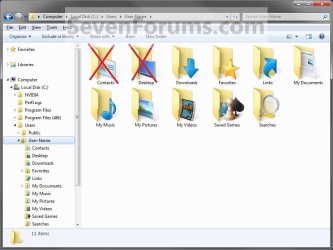
Example1.jpg


OPTION ONE

To Change the User Name Profile Folder Icon
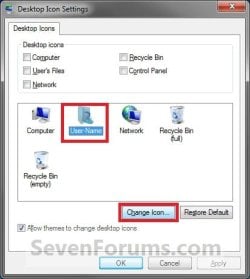
1. Open the change Desktop Icon Settings window. (See screenshot below) User-1.jpg
2. In the lower box, click/tap on your User Name folder to highlight it in blue. (See screenshot above)

3. Click/tap on the Change Icon button. (See screenshot above)

4. Click/tap on the Browse button and navigate to the folder location of were the icon that you want to use for this user folder is at. (See screenshot below) User-2.jpg
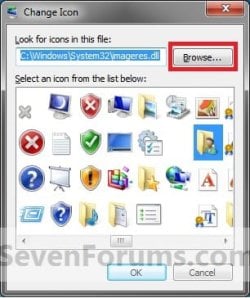
5. Select the icon in the lower window box, and click/tap on OK. (See highlighted in blue icon in the screenshot above)

6. Click/tap on OK. (See screenshot below step 1)

   Tip
If you want to restore the default User Name folder icon, then see OPTION ONE at this link:

How to Restore Default User Folder Icons in Windows 7 and Windows 8


OPTION TWO

To Change User Folders Icons


   Note
This option will be for all of the user folders in the C:\Users\(user-name) folder except the User Name folder itself (OPTION ONE).
   Tip
To be able to change the Contacts and/or Desktop user folder icon, you can click on the Download button below to download the .reg files that enable the Customize tab in these user folders Properties page. After you download the .reg file, double click on it to merge it. You can then follow the steps in this OPTION below to change the icon.

You must be logged in as an administrator to be able to merge the REG files below.

  • To Restore (remove Customize tab) Default Contacts User Folder

Download


  • To Enable (add Customize tab) Changing Contacts User Folder Icon

Download


  • To Restore (remove Customize tab) Default Desktop User Folder

Download


  • To Enable (add Customize tab) Changing Desktop User Folder Icon

Download


1. Open the C:\Users\(user-name) folder.
WARNING: This must be done at this location. It will not work by opening the user folder from the Start Menu location. Example1.jpg
2. Right click or swipe down on the user folder icon that you want to restore default, and click/tap on Properties. (See screenshot above)

3. Click/tap on the Customize tab, and click/tap on the Change Icon button. (See screenshot below) Step1.jpg
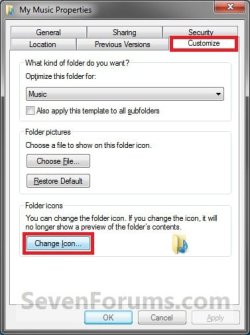
4. Click/tap on the Browse button and navigate to the folder location of were the icon that you want to use for this user folder is at. (See screenshot below) Step2.jpg
5. Select the icon in the lower window box, and click/tap on OK. (See highlighted in blue icon in the screenshot above)

6. Click/tap on OK. (See screenshot below step 3)

   Tip
If you want to restore the default User folders icons, then see OPTION TWO at this link:

How to Restore Default User Folder Icons in Windows 7 and Windows 8


That's it,
Shawn


Attachments

Last edited:
You're most welcome Forte, and welcome to Seven Forums. :)

You may have some add-on or something in Chrome that may be renaming the download's file extension. If this is the case, then just renaming them back to file.reg instead of say file.download will work.
 

My Computer

Computer type
PC/Desktop
Computer Manufacturer/Model Number
Self built custom
OS
64-bit Windows 11 Pro for Workstations
CPU
Intel i7-8700K OC'd to 5 GHz
Motherboard
ASUS ROG Maximus XI Formula Z390
Memory
64 GB (4x16GB) G.SKILL TridentZ RGB DDR4 3600 MHz
Graphics Card(s)
ASUS ROG-STRIX-GTX1080TI-O11G-GAMING
Sound Card
Integrated
Monitor(s) Displays
2 x Samsung Odyssey G7 27"
Screen Resolution
2560x1440
Hard Drives
1TB Samsung 990 PRO M.2,
4TB Samsung 990 PRO PRO M.2,
TerraMaster F8 SSD Plus NAS
PSU
Seasonic Prime Titanium 850W
Case
Thermaltake Core P3
Cooling
Corsair Hydro H115i
Keyboard
Logitech wireless K800
Mouse
Logitech MX Master 4
Internet Speed
2 Gb/s Download and 100 Mb/s Upload
Antivirus
Malwarebyte Anti-Malware Premium
Browser
Google Chrome
Other Info
Logitech Z625 speaker system,
Logitech BRIO 4K Pro webcam,
HP Color LaserJet Pro MFP M477fdn,
APC SMART-UPS RT 1000 XL - SURT1000XLI,
Galaxy S23 Plus phone
You're most welcome. :)
 

My Computer

Computer type
PC/Desktop
Computer Manufacturer/Model Number
Self built custom
OS
64-bit Windows 11 Pro for Workstations
CPU
Intel i7-8700K OC'd to 5 GHz
Motherboard
ASUS ROG Maximus XI Formula Z390
Memory
64 GB (4x16GB) G.SKILL TridentZ RGB DDR4 3600 MHz
Graphics Card(s)
ASUS ROG-STRIX-GTX1080TI-O11G-GAMING
Sound Card
Integrated
Monitor(s) Displays
2 x Samsung Odyssey G7 27"
Screen Resolution
2560x1440
Hard Drives
1TB Samsung 990 PRO M.2,
4TB Samsung 990 PRO PRO M.2,
TerraMaster F8 SSD Plus NAS
PSU
Seasonic Prime Titanium 850W
Case
Thermaltake Core P3
Cooling
Corsair Hydro H115i
Keyboard
Logitech wireless K800
Mouse
Logitech MX Master 4
Internet Speed
2 Gb/s Download and 100 Mb/s Upload
Antivirus
Malwarebyte Anti-Malware Premium
Browser
Google Chrome
Other Info
Logitech Z625 speaker system,
Logitech BRIO 4K Pro webcam,
HP Color LaserJet Pro MFP M477fdn,
APC SMART-UPS RT 1000 XL - SURT1000XLI,
Galaxy S23 Plus phone
Hi Brink,
I am still trying to figure the problem with these two icons whick I can't customized? I tried to download the file but nothing appeared and I also reboot my Pc like you said but nothing work!

Any other ideas what could do that?
 

My Computer

OS
Windows 7 Home Premium 64bit.
CPU
Intel Core i7 CPU
Motherboard
Gigabyte X58A-UD3R
Memory
6.00 GB RAM
Graphics Card(s)
ATI Radeon HD 5700 Series
Sound Card
Creative Sb-X-Fi
Monitor(s) Displays
Acer 24 inch
Screen Resolution
1400 X 1050
Hard Drives
1 Tb
Case
NZXT Mid Tower
Mouse
Kensington Expert Mouse
Internet Speed
Cable
Hello Yannik,

When you say that you "tried to download the file and nothing appeared", what do you mean exactly?

What happens when you download the "Enable" downloads and merge the REG files?

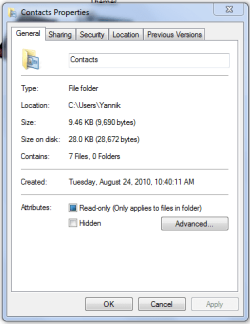
Could you post a screenshot of the properties pages (like under step 3 in Option Two) with the General tab page showing? Maybe this may help to see why it's not working for you.
 
Last edited:

My Computer

Computer type
PC/Desktop
Computer Manufacturer/Model Number
Self built custom
OS
64-bit Windows 11 Pro for Workstations
CPU
Intel i7-8700K OC'd to 5 GHz
Motherboard
ASUS ROG Maximus XI Formula Z390
Memory
64 GB (4x16GB) G.SKILL TridentZ RGB DDR4 3600 MHz
Graphics Card(s)
ASUS ROG-STRIX-GTX1080TI-O11G-GAMING
Sound Card
Integrated
Monitor(s) Displays
2 x Samsung Odyssey G7 27"
Screen Resolution
2560x1440
Hard Drives
1TB Samsung 990 PRO M.2,
4TB Samsung 990 PRO PRO M.2,
TerraMaster F8 SSD Plus NAS
PSU
Seasonic Prime Titanium 850W
Case
Thermaltake Core P3
Cooling
Corsair Hydro H115i
Keyboard
Logitech wireless K800
Mouse
Logitech MX Master 4
Internet Speed
2 Gb/s Download and 100 Mb/s Upload
Antivirus
Malwarebyte Anti-Malware Premium
Browser
Google Chrome
Other Info
Logitech Z625 speaker system,
Logitech BRIO 4K Pro webcam,
HP Color LaserJet Pro MFP M477fdn,
APC SMART-UPS RT 1000 XL - SURT1000XLI,
Galaxy S23 Plus phone
Hi again Brink!
Like you asked, I downloaded and Enabled the "Contacts" user folder and I captured the image showing the properties.Contacts folder.PNG
Let me know if you have other options and thank you very much for your time.

Yankie007
 

My Computer

OS
Windows 7 Home Premium 64bit.
CPU
Intel Core i7 CPU
Motherboard
Gigabyte X58A-UD3R
Memory
6.00 GB RAM
Graphics Card(s)
ATI Radeon HD 5700 Series
Sound Card
Creative Sb-X-Fi
Monitor(s) Displays
Acer 24 inch
Screen Resolution
1400 X 1050
Hard Drives
1 Tb
Case
NZXT Mid Tower
Mouse
Kensington Expert Mouse
Internet Speed
Cable
Yannik,

Did you have any trouble merging the "Enable" REG file?

As a test, create a new administrator account, and try this while logged in it to see if it may be some issue with your original account.
 

My Computer

Computer type
PC/Desktop
Computer Manufacturer/Model Number
Self built custom
OS
64-bit Windows 11 Pro for Workstations
CPU
Intel i7-8700K OC'd to 5 GHz
Motherboard
ASUS ROG Maximus XI Formula Z390
Memory
64 GB (4x16GB) G.SKILL TridentZ RGB DDR4 3600 MHz
Graphics Card(s)
ASUS ROG-STRIX-GTX1080TI-O11G-GAMING
Sound Card
Integrated
Monitor(s) Displays
2 x Samsung Odyssey G7 27"
Screen Resolution
2560x1440
Hard Drives
1TB Samsung 990 PRO M.2,
4TB Samsung 990 PRO PRO M.2,
TerraMaster F8 SSD Plus NAS
PSU
Seasonic Prime Titanium 850W
Case
Thermaltake Core P3
Cooling
Corsair Hydro H115i
Keyboard
Logitech wireless K800
Mouse
Logitech MX Master 4
Internet Speed
2 Gb/s Download and 100 Mb/s Upload
Antivirus
Malwarebyte Anti-Malware Premium
Browser
Google Chrome
Other Info
Logitech Z625 speaker system,
Logitech BRIO 4K Pro webcam,
HP Color LaserJet Pro MFP M477fdn,
APC SMART-UPS RT 1000 XL - SURT1000XLI,
Galaxy S23 Plus phone
Yannik,

Did you have any trouble merging the "Enable" REG file? Non

As a test, create a new administrator account, and try this while logged in it to see if it may be some issue with your original account.

About creating a new admin account, I never did that before so I'm not sure what to do. Also, is there another alternative instead of using these download links?
 

My Computer

OS
Windows 7 Home Premium 64bit.
CPU
Intel Core i7 CPU
Motherboard
Gigabyte X58A-UD3R
Memory
6.00 GB RAM
Graphics Card(s)
ATI Radeon HD 5700 Series
Sound Card
Creative Sb-X-Fi
Monitor(s) Displays
Acer 24 inch
Screen Resolution
1400 X 1050
Hard Drives
1 Tb
Case
NZXT Mid Tower
Mouse
Kensington Expert Mouse
Internet Speed
Cable
Option One in the tutorial below can help show you how to create a new user account. You would just select "administrator" at step 2.

http://www.sevenforums.com/tutorials/2974-user-accounts.html


Other than using the REG files, you could edit the REG files to see what to manually edit in the registry. However, this is not recommended to do if you are not familiar with making edits in the registry. One mistake could have you reinstalling Windows 7.

Did you have any problems merging the REG files?
 

My Computer

Computer type
PC/Desktop
Computer Manufacturer/Model Number
Self built custom
OS
64-bit Windows 11 Pro for Workstations
CPU
Intel i7-8700K OC'd to 5 GHz
Motherboard
ASUS ROG Maximus XI Formula Z390
Memory
64 GB (4x16GB) G.SKILL TridentZ RGB DDR4 3600 MHz
Graphics Card(s)
ASUS ROG-STRIX-GTX1080TI-O11G-GAMING
Sound Card
Integrated
Monitor(s) Displays
2 x Samsung Odyssey G7 27"
Screen Resolution
2560x1440
Hard Drives
1TB Samsung 990 PRO M.2,
4TB Samsung 990 PRO PRO M.2,
TerraMaster F8 SSD Plus NAS
PSU
Seasonic Prime Titanium 850W
Case
Thermaltake Core P3
Cooling
Corsair Hydro H115i
Keyboard
Logitech wireless K800
Mouse
Logitech MX Master 4
Internet Speed
2 Gb/s Download and 100 Mb/s Upload
Antivirus
Malwarebyte Anti-Malware Premium
Browser
Google Chrome
Other Info
Logitech Z625 speaker system,
Logitech BRIO 4K Pro webcam,
HP Color LaserJet Pro MFP M477fdn,
APC SMART-UPS RT 1000 XL - SURT1000XLI,
Galaxy S23 Plus phone
So I think Service Pack 1 has changed some of the settings. The customize icon option isn't there anymore. Any other alternatives?
 

My Computer

OS
Windows 7 Home Premium 64bit
Hello Forte,

It's still there, but could you let me know what user folder this is for?

Did you open directly to the C:\Users\(user-name) folder location?

Did you do what was in the TIP box in OPTION TWO if one of them was the user folder that you wanted to change the icon of?
 

My Computer

Computer type
PC/Desktop
Computer Manufacturer/Model Number
Self built custom
OS
64-bit Windows 11 Pro for Workstations
CPU
Intel i7-8700K OC'd to 5 GHz
Motherboard
ASUS ROG Maximus XI Formula Z390
Memory
64 GB (4x16GB) G.SKILL TridentZ RGB DDR4 3600 MHz
Graphics Card(s)
ASUS ROG-STRIX-GTX1080TI-O11G-GAMING
Sound Card
Integrated
Monitor(s) Displays
2 x Samsung Odyssey G7 27"
Screen Resolution
2560x1440
Hard Drives
1TB Samsung 990 PRO M.2,
4TB Samsung 990 PRO PRO M.2,
TerraMaster F8 SSD Plus NAS
PSU
Seasonic Prime Titanium 850W
Case
Thermaltake Core P3
Cooling
Corsair Hydro H115i
Keyboard
Logitech wireless K800
Mouse
Logitech MX Master 4
Internet Speed
2 Gb/s Download and 100 Mb/s Upload
Antivirus
Malwarebyte Anti-Malware Premium
Browser
Google Chrome
Other Info
Logitech Z625 speaker system,
Logitech BRIO 4K Pro webcam,
HP Color LaserJet Pro MFP M477fdn,
APC SMART-UPS RT 1000 XL - SURT1000XLI,
Galaxy S23 Plus phone
Ah there we go. I forgot to open directly to the C:\Users\(user-name)
Thanks for the help
 

My Computer

OS
Windows 7 Home Premium 64bit
You're most welcome Forte. I'm happy to hear that you got it sorted. :)
 

My Computer

Computer type
PC/Desktop
Computer Manufacturer/Model Number
Self built custom
OS
64-bit Windows 11 Pro for Workstations
CPU
Intel i7-8700K OC'd to 5 GHz
Motherboard
ASUS ROG Maximus XI Formula Z390
Memory
64 GB (4x16GB) G.SKILL TridentZ RGB DDR4 3600 MHz
Graphics Card(s)
ASUS ROG-STRIX-GTX1080TI-O11G-GAMING
Sound Card
Integrated
Monitor(s) Displays
2 x Samsung Odyssey G7 27"
Screen Resolution
2560x1440
Hard Drives
1TB Samsung 990 PRO M.2,
4TB Samsung 990 PRO PRO M.2,
TerraMaster F8 SSD Plus NAS
PSU
Seasonic Prime Titanium 850W
Case
Thermaltake Core P3
Cooling
Corsair Hydro H115i
Keyboard
Logitech wireless K800
Mouse
Logitech MX Master 4
Internet Speed
2 Gb/s Download and 100 Mb/s Upload
Antivirus
Malwarebyte Anti-Malware Premium
Browser
Google Chrome
Other Info
Logitech Z625 speaker system,
Logitech BRIO 4K Pro webcam,
HP Color LaserJet Pro MFP M477fdn,
APC SMART-UPS RT 1000 XL - SURT1000XLI,
Galaxy S23 Plus phone
it wont let me browse for other icons. any help please?? i click browse and nothing happens
 

My Computer

OS
Windows 7 Ultimate x64
Hello Fizpop, and welcome to Seven Forums.

Could you post a screenshot of what you see instead?

What happens if you manually type in the full path of the .ico file that you wanted to use and press Enter instead?
 

My Computer

Computer type
PC/Desktop
Computer Manufacturer/Model Number
Self built custom
OS
64-bit Windows 11 Pro for Workstations
CPU
Intel i7-8700K OC'd to 5 GHz
Motherboard
ASUS ROG Maximus XI Formula Z390
Memory
64 GB (4x16GB) G.SKILL TridentZ RGB DDR4 3600 MHz
Graphics Card(s)
ASUS ROG-STRIX-GTX1080TI-O11G-GAMING
Sound Card
Integrated
Monitor(s) Displays
2 x Samsung Odyssey G7 27"
Screen Resolution
2560x1440
Hard Drives
1TB Samsung 990 PRO M.2,
4TB Samsung 990 PRO PRO M.2,
TerraMaster F8 SSD Plus NAS
PSU
Seasonic Prime Titanium 850W
Case
Thermaltake Core P3
Cooling
Corsair Hydro H115i
Keyboard
Logitech wireless K800
Mouse
Logitech MX Master 4
Internet Speed
2 Gb/s Download and 100 Mb/s Upload
Antivirus
Malwarebyte Anti-Malware Premium
Browser
Google Chrome
Other Info
Logitech Z625 speaker system,
Logitech BRIO 4K Pro webcam,
HP Color LaserJet Pro MFP M477fdn,
APC SMART-UPS RT 1000 XL - SURT1000XLI,
Galaxy S23 Plus phone
well a screenshot wouldnt show much. just at the point where it shows all the default icons, and if i click browse, nothing happens. ive tried typing in the path there aswell and it just shows blank where the icons should be
 

My Computer

OS
Windows 7 Ultimate x64
As a test, does it work properly if you try this in a new user account?

For now, run a sfc /scannow command to see if it may help if there is a corrupted system file causing this.
 

My Computer

Computer type
PC/Desktop
Computer Manufacturer/Model Number
Self built custom
OS
64-bit Windows 11 Pro for Workstations
CPU
Intel i7-8700K OC'd to 5 GHz
Motherboard
ASUS ROG Maximus XI Formula Z390
Memory
64 GB (4x16GB) G.SKILL TridentZ RGB DDR4 3600 MHz
Graphics Card(s)
ASUS ROG-STRIX-GTX1080TI-O11G-GAMING
Sound Card
Integrated
Monitor(s) Displays
2 x Samsung Odyssey G7 27"
Screen Resolution
2560x1440
Hard Drives
1TB Samsung 990 PRO M.2,
4TB Samsung 990 PRO PRO M.2,
TerraMaster F8 SSD Plus NAS
PSU
Seasonic Prime Titanium 850W
Case
Thermaltake Core P3
Cooling
Corsair Hydro H115i
Keyboard
Logitech wireless K800
Mouse
Logitech MX Master 4
Internet Speed
2 Gb/s Download and 100 Mb/s Upload
Antivirus
Malwarebyte Anti-Malware Premium
Browser
Google Chrome
Other Info
Logitech Z625 speaker system,
Logitech BRIO 4K Pro webcam,
HP Color LaserJet Pro MFP M477fdn,
APC SMART-UPS RT 1000 XL - SURT1000XLI,
Galaxy S23 Plus phone
i ran the test and its working now. thanx alot man, i apreciate it:D
 

My Computer

OS
Windows 7 Ultimate x64
That's great news. I'm happy to hear it's working for you now :)
 

My Computer

Computer type
PC/Desktop
Computer Manufacturer/Model Number
Self built custom
OS
64-bit Windows 11 Pro for Workstations
CPU
Intel i7-8700K OC'd to 5 GHz
Motherboard
ASUS ROG Maximus XI Formula Z390
Memory
64 GB (4x16GB) G.SKILL TridentZ RGB DDR4 3600 MHz
Graphics Card(s)
ASUS ROG-STRIX-GTX1080TI-O11G-GAMING
Sound Card
Integrated
Monitor(s) Displays
2 x Samsung Odyssey G7 27"
Screen Resolution
2560x1440
Hard Drives
1TB Samsung 990 PRO M.2,
4TB Samsung 990 PRO PRO M.2,
TerraMaster F8 SSD Plus NAS
PSU
Seasonic Prime Titanium 850W
Case
Thermaltake Core P3
Cooling
Corsair Hydro H115i
Keyboard
Logitech wireless K800
Mouse
Logitech MX Master 4
Internet Speed
2 Gb/s Download and 100 Mb/s Upload
Antivirus
Malwarebyte Anti-Malware Premium
Browser
Google Chrome
Other Info
Logitech Z625 speaker system,
Logitech BRIO 4K Pro webcam,
HP Color LaserJet Pro MFP M477fdn,
APC SMART-UPS RT 1000 XL - SURT1000XLI,
Galaxy S23 Plus phone
Hi I have the same issue with Yankie i believe, when i try to merge the registry files, it says was not able to completely write to registry or something similar to that, do you know of any way to fix this? or is it the registry file itself not working?
 

My Computer

Computer Manufacturer/Model Number
Toshiba Satellite L755-S5216
OS
Windows 7 Home Premium 64bit
Screen Resolution
1366x768
Back
Top