User Folders - Change Default Icon

How to Change Default User Folder Icons in Windows 7 and Windows 8

   Information
This will show you how to change the default folder icon with the icon of your choice for all of your personal User folder icons to display with it in both the Start Menu and C:\Users\(user-name) locations in Windows 7 and Windows 8.

   Tip
If you would prefer to use the Vista user folder icons instead, then see Everlong's post for how. :)


EXAMPLE: Default Personal User Folders Icons
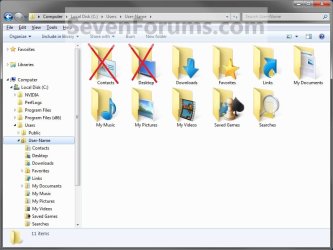
Example1.jpg


OPTION ONE

To Change the User Name Profile Folder Icon
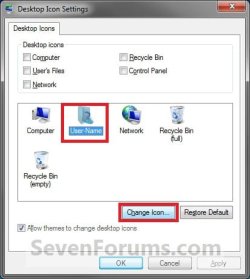
1. Open the change Desktop Icon Settings window. (See screenshot below) User-1.jpg
2. In the lower box, click/tap on your User Name folder to highlight it in blue. (See screenshot above)

3. Click/tap on the Change Icon button. (See screenshot above)

4. Click/tap on the Browse button and navigate to the folder location of were the icon that you want to use for this user folder is at. (See screenshot below) User-2.jpg
5. Select the icon in the lower window box, and click/tap on OK. (See highlighted in blue icon in the screenshot above)

6. Click/tap on OK. (See screenshot below step 1)

   Tip
If you want to restore the default User Name folder icon, then see OPTION ONE at this link:

How to Restore Default User Folder Icons in Windows 7 and Windows 8


OPTION TWO

To Change User Folders Icons


   Note
This option will be for all of the user folders in the C:\Users\(user-name) folder except the User Name folder itself (OPTION ONE).
   Tip
To be able to change the Contacts and/or Desktop user folder icon, you can click on the Download button below to download the .reg files that enable the Customize tab in these user folders Properties page. After you download the .reg file, double click on it to merge it. You can then follow the steps in this OPTION below to change the icon.

You must be logged in as an administrator to be able to merge the REG files below.

  • To Restore (remove Customize tab) Default Contacts User Folder

Download


  • To Enable (add Customize tab) Changing Contacts User Folder Icon

Download


  • To Restore (remove Customize tab) Default Desktop User Folder

Download


  • To Enable (add Customize tab) Changing Desktop User Folder Icon

Download


1. Open the C:\Users\(user-name) folder.
WARNING: This must be done at this location. It will not work by opening the user folder from the Start Menu location. Example1.jpg
2. Right click or swipe down on the user folder icon that you want to restore default, and click/tap on Properties. (See screenshot above)

3. Click/tap on the Customize tab, and click/tap on the Change Icon button. (See screenshot below) Step1.jpg
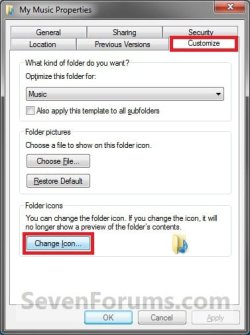
4. Click/tap on the Browse button and navigate to the folder location of were the icon that you want to use for this user folder is at. (See screenshot below) Step2.jpg
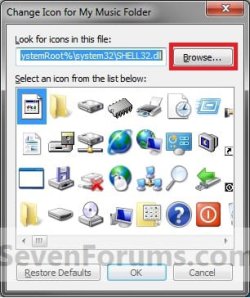
5. Select the icon in the lower window box, and click/tap on OK. (See highlighted in blue icon in the screenshot above)

6. Click/tap on OK. (See screenshot below step 3)

   Tip
If you want to restore the default User folders icons, then see OPTION TWO at this link:

How to Restore Default User Folder Icons in Windows 7 and Windows 8


That's it,
Shawn


Attachments

Last edited:
What is the best way to create a new custom icon for use in 7? I was using a really old crappy program to create them in XP but The program will no longer run in a modern OS such as vista and 7.
 

My Computer

Computer Manufacturer/Model Number
Custom
OS
Win7 64bit Ultimate
CPU
AMD Phenom II X6 1100T Black Edition Thuban 3.3GHz, 3.7GHz
Motherboard
Gigabyte GA-890FXA-UD5
Memory
CORSAIR DOMINATOR GT 8GB (2 x 4GB) 1866 DDR3
Graphics Card(s)
XFX HD-697A-CNDC Radeon HD6970 2GB 256-bit
Sound Card
Creative SoundBlaster X-Fi Platinum Fatal1ty Edition
Monitor(s) Displays
Dual 25 Inch Hanns-G HZ251
Screen Resolution
1920x1080 X 2
PSU
Corsair 850W Single Rail
Case
Thermaltake V9 BlacX w/ Dual HDD Docking Station
Cooling
Air lots and lots of air and copper...
Keyboard
Kensington (Low-Profile)
Mouse
Creative Fatal1ty
Internet Speed
15Gbit (15 Down 5 Up)
Other Info
XIGMATEK HDT-S1284F 120mm HYPRO Bearing CPU Cooler, LG Blu-Ray Burner.

My Computer

Computer type
PC/Desktop
Computer Manufacturer/Model Number
Self built custom
OS
64-bit Windows 11 Pro for Workstations
CPU
Intel i7-8700K OC'd to 5 GHz
Motherboard
ASUS ROG Maximus XI Formula Z390
Memory
64 GB (4x16GB) G.SKILL TridentZ RGB DDR4 3600 MHz
Graphics Card(s)
ASUS ROG-STRIX-GTX1080TI-O11G-GAMING
Sound Card
Integrated
Monitor(s) Displays
2 x Samsung Odyssey G7 27"
Screen Resolution
2560x1440
Hard Drives
1TB Samsung 990 PRO M.2,
4TB Samsung 990 PRO PRO M.2,
TerraMaster F8 SSD Plus NAS
PSU
Seasonic Prime Titanium 850W
Case
Thermaltake Core P3
Cooling
Corsair Hydro H115i
Keyboard
Logitech wireless K800
Mouse
Logitech MX Master 4
Internet Speed
2 Gb/s Download and 100 Mb/s Upload
Antivirus
Malwarebyte Anti-Malware Premium
Browser
Google Chrome
Other Info
Logitech Z625 speaker system,
Logitech BRIO 4K Pro webcam,
HP Color LaserJet Pro MFP M477fdn,
APC SMART-UPS RT 1000 XL - SURT1000XLI,
Galaxy S23 Plus phone
I had that but it never worked out quite how I wanted it to.

I am thinking about using visual studio to pack png images into a dll and then load that to choose my icons from. If I did I think I could simply make png images in photoshop and then pack them into the dll and windows should be able to load them from there just fine.

That's the theory I plan to test anyhow.
 

My Computer

Computer Manufacturer/Model Number
Custom
OS
Win7 64bit Ultimate
CPU
AMD Phenom II X6 1100T Black Edition Thuban 3.3GHz, 3.7GHz
Motherboard
Gigabyte GA-890FXA-UD5
Memory
CORSAIR DOMINATOR GT 8GB (2 x 4GB) 1866 DDR3
Graphics Card(s)
XFX HD-697A-CNDC Radeon HD6970 2GB 256-bit
Sound Card
Creative SoundBlaster X-Fi Platinum Fatal1ty Edition
Monitor(s) Displays
Dual 25 Inch Hanns-G HZ251
Screen Resolution
1920x1080 X 2
PSU
Corsair 850W Single Rail
Case
Thermaltake V9 BlacX w/ Dual HDD Docking Station
Cooling
Air lots and lots of air and copper...
Keyboard
Kensington (Low-Profile)
Mouse
Creative Fatal1ty
Internet Speed
15Gbit (15 Down 5 Up)
Other Info
XIGMATEK HDT-S1284F 120mm HYPRO Bearing CPU Cooler, LG Blu-Ray Burner.
Should work. ;)
 

My Computer

Computer type
PC/Desktop
Computer Manufacturer/Model Number
Self built custom
OS
64-bit Windows 11 Pro for Workstations
CPU
Intel i7-8700K OC'd to 5 GHz
Motherboard
ASUS ROG Maximus XI Formula Z390
Memory
64 GB (4x16GB) G.SKILL TridentZ RGB DDR4 3600 MHz
Graphics Card(s)
ASUS ROG-STRIX-GTX1080TI-O11G-GAMING
Sound Card
Integrated
Monitor(s) Displays
2 x Samsung Odyssey G7 27"
Screen Resolution
2560x1440
Hard Drives
1TB Samsung 990 PRO M.2,
4TB Samsung 990 PRO PRO M.2,
TerraMaster F8 SSD Plus NAS
PSU
Seasonic Prime Titanium 850W
Case
Thermaltake Core P3
Cooling
Corsair Hydro H115i
Keyboard
Logitech wireless K800
Mouse
Logitech MX Master 4
Internet Speed
2 Gb/s Download and 100 Mb/s Upload
Antivirus
Malwarebyte Anti-Malware Premium
Browser
Google Chrome
Other Info
Logitech Z625 speaker system,
Logitech BRIO 4K Pro webcam,
HP Color LaserJet Pro MFP M477fdn,
APC SMART-UPS RT 1000 XL - SURT1000XLI,
Galaxy S23 Plus phone
If it does I will be creating some common icon packs. I am a graphics designer so I will be all over the win7 customization scene when it gets a final release.
 

My Computer

Computer Manufacturer/Model Number
Custom
OS
Win7 64bit Ultimate
CPU
AMD Phenom II X6 1100T Black Edition Thuban 3.3GHz, 3.7GHz
Motherboard
Gigabyte GA-890FXA-UD5
Memory
CORSAIR DOMINATOR GT 8GB (2 x 4GB) 1866 DDR3
Graphics Card(s)
XFX HD-697A-CNDC Radeon HD6970 2GB 256-bit
Sound Card
Creative SoundBlaster X-Fi Platinum Fatal1ty Edition
Monitor(s) Displays
Dual 25 Inch Hanns-G HZ251
Screen Resolution
1920x1080 X 2
PSU
Corsair 850W Single Rail
Case
Thermaltake V9 BlacX w/ Dual HDD Docking Station
Cooling
Air lots and lots of air and copper...
Keyboard
Kensington (Low-Profile)
Mouse
Creative Fatal1ty
Internet Speed
15Gbit (15 Down 5 Up)
Other Info
XIGMATEK HDT-S1284F 120mm HYPRO Bearing CPU Cooler, LG Blu-Ray Burner.
I'll be looking forward to seeing your work with that now. :)
 

My Computer

Computer type
PC/Desktop
Computer Manufacturer/Model Number
Self built custom
OS
64-bit Windows 11 Pro for Workstations
CPU
Intel i7-8700K OC'd to 5 GHz
Motherboard
ASUS ROG Maximus XI Formula Z390
Memory
64 GB (4x16GB) G.SKILL TridentZ RGB DDR4 3600 MHz
Graphics Card(s)
ASUS ROG-STRIX-GTX1080TI-O11G-GAMING
Sound Card
Integrated
Monitor(s) Displays
2 x Samsung Odyssey G7 27"
Screen Resolution
2560x1440
Hard Drives
1TB Samsung 990 PRO M.2,
4TB Samsung 990 PRO PRO M.2,
TerraMaster F8 SSD Plus NAS
PSU
Seasonic Prime Titanium 850W
Case
Thermaltake Core P3
Cooling
Corsair Hydro H115i
Keyboard
Logitech wireless K800
Mouse
Logitech MX Master 4
Internet Speed
2 Gb/s Download and 100 Mb/s Upload
Antivirus
Malwarebyte Anti-Malware Premium
Browser
Google Chrome
Other Info
Logitech Z625 speaker system,
Logitech BRIO 4K Pro webcam,
HP Color LaserJet Pro MFP M477fdn,
APC SMART-UPS RT 1000 XL - SURT1000XLI,
Galaxy S23 Plus phone
Yeah I got to thinking today and I think I may expand the existing system dll so that you can simply replace the default windows dll with the system icons and then upon changing icons you can choose the originals or hand pick from the customs I add to it.

I think that might be easier than adding a new dll to hunt for.
 

My Computer

Computer Manufacturer/Model Number
Custom
OS
Win7 64bit Ultimate
CPU
AMD Phenom II X6 1100T Black Edition Thuban 3.3GHz, 3.7GHz
Motherboard
Gigabyte GA-890FXA-UD5
Memory
CORSAIR DOMINATOR GT 8GB (2 x 4GB) 1866 DDR3
Graphics Card(s)
XFX HD-697A-CNDC Radeon HD6970 2GB 256-bit
Sound Card
Creative SoundBlaster X-Fi Platinum Fatal1ty Edition
Monitor(s) Displays
Dual 25 Inch Hanns-G HZ251
Screen Resolution
1920x1080 X 2
PSU
Corsair 850W Single Rail
Case
Thermaltake V9 BlacX w/ Dual HDD Docking Station
Cooling
Air lots and lots of air and copper...
Keyboard
Kensington (Low-Profile)
Mouse
Creative Fatal1ty
Internet Speed
15Gbit (15 Down 5 Up)
Other Info
XIGMATEK HDT-S1284F 120mm HYPRO Bearing CPU Cooler, LG Blu-Ray Burner.
Use Vista Aero User Folders in Windows 7

I didn't like the Windows 7 user icon files, and prefer the Windows Vista ones, so thought I'd write a guide to how I changed them. You can't change the Contacts and Desktop user folder, but as I don't use these, I just set them to hidden instead.
usericons.png

Obtain a Windows Vista imageres.dll file by copying it from a Vista machine (Found in Windows>System32/SysWOW64). Place it in My Documents and rename it to something like imageres2.dll. (The file is too big to upload as an attachment).
  1. To change the desktop user icon, right click on desktop>Personalize>Change Desktop Icons and click your user icon and click the "Change Icon" button.
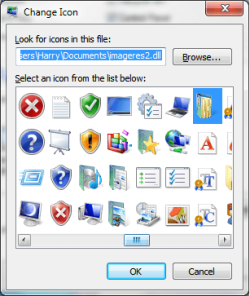
  2. At the top, it will have a field where you can browse for a source file. Browse to and select the imageres2.dll file. It will open all the Vista icons allowing you to select the Vista user folder.
    imageres2.png
  3. To customise the other folders, go to C:>User>Username (You can't edit user folder icons by just clicking your folder on desktop).
  4. Right click on all the folders and go to the customise tab and click "Change Icon". Search for the corresponding icon.
  5. Repeat this for all steps. Remember the Contacts and Desktop icon can't be changed, so I just set these to hidden as I don't use them.
  6. Once all the folders are changed, you can set the imageres2.dll file to hidden as well.
Edit: When you're on the Desktop Icon settings, uncheck the box that says "Allow themes to change desktop icons" so when you change your wallpaper or taskbar colour, the icons don't revert to default.
 
Last edited:

My Computer

Computer type
PC/Desktop
Computer Manufacturer/Model Number
Custom Built
OS
Windows 8.1 Pro x64
CPU
Intel Core i7 4790k
Motherboard
MSI Z97S Krait Edition
Memory
8GB Corsair Dominator 1600MHz
Graphics Card(s)
MSI TwinFrozr GeForce GTX770
Sound Card
ASUS Xonar DX/XD 7.1
Monitor(s) Displays
Dell 24" S2409W + Dell 20" E207WFP
Screen Resolution
1920x1080 + 1680x1050
Hard Drives
1x 120GB OCZ Agility 3, 1x 750GB Western Digital Caviar Black, 1x 1TB Western Digital Caviar Blue
PSU
Corsair HX850 modular
Case
Fractal Design Define R4
Cooling
Corsair H60 w/ twin Corsair SP120 fans
Keyboard
Logitech G510S Keyboard
Mouse
Logitech G500S Laser Mouse
Internet Speed
40Mbps
Antivirus
Microsoft Security Essentials
Browser
Google Chrome
Other Info
LG Blu-Ray player

I've loved it too, but it's kind of tough to get used to. If you want that useful square sheet pointing out each pixel, though, it's awesome! Right now I use Photoshop CS4 and save the icons I make in PNG format, making sure they're EXACTLY 256X256, then I head over to ConvertICO and upload the image to get it freely converted to an icon. I really love that website.

BTW great tutorial! ;)
 

My Computer

Computer type
PC/Desktop
Computer Manufacturer/Model Number
Multirama PC Expert [Bulgaria]
OS
Windows 7 Home Premium [64-Bit]
CPU
Intel Core 2 Quad CPU Q8200 @ 2.33 GHz
Motherboard
GIGABYTE GA-G31M-S2C
Memory
4094 MB DDR2
Graphics Card(s)
SAPPHIRE Radeon HD 6970 (2 GB VRAM)
Sound Card
Realtek ALC883 @ Intel 82801GB ICH7 - High Definition Audio
Monitor(s) Displays
Samsung SyncMaster BX2235 [21.5" LCD with LED Backlight]
Screen Resolution
1920x1080
Hard Drives
Hitachi HDT721075SLA360 - 750 GB
PSU
Cooler Master GX750 - 750W
Case
Multirama (Black / 2010 Revision)
Cooling
Stock + Cooler Master
Keyboard
Logitech G510 (Gaming Keyboard)
Mouse
Razer Lachesis (4000 DPI, Blue Version)
Internet Speed
Vivacom Optical [100 Mbps]
Browser
Chrome [Windows]
Is there any chance of fixing those url's to download the 'enable tab in desktop/contacts'. Or the registry info needed.

...Many Thanks, Chris
 

My Computer

OS
Windows 7 Ultimate x32
Hello Chris,

Umm, not sure what is wrong with them, but here they are below for now.
 

Attachments

My Computer

Computer type
PC/Desktop
Computer Manufacturer/Model Number
Self built custom
OS
64-bit Windows 11 Pro for Workstations
CPU
Intel i7-8700K OC'd to 5 GHz
Motherboard
ASUS ROG Maximus XI Formula Z390
Memory
64 GB (4x16GB) G.SKILL TridentZ RGB DDR4 3600 MHz
Graphics Card(s)
ASUS ROG-STRIX-GTX1080TI-O11G-GAMING
Sound Card
Integrated
Monitor(s) Displays
2 x Samsung Odyssey G7 27"
Screen Resolution
2560x1440
Hard Drives
1TB Samsung 990 PRO M.2,
4TB Samsung 990 PRO PRO M.2,
TerraMaster F8 SSD Plus NAS
PSU
Seasonic Prime Titanium 850W
Case
Thermaltake Core P3
Cooling
Corsair Hydro H115i
Keyboard
Logitech wireless K800
Mouse
Logitech MX Master 4
Internet Speed
2 Gb/s Download and 100 Mb/s Upload
Antivirus
Malwarebyte Anti-Malware Premium
Browser
Google Chrome
Other Info
Logitech Z625 speaker system,
Logitech BRIO 4K Pro webcam,
HP Color LaserJet Pro MFP M477fdn,
APC SMART-UPS RT 1000 XL - SURT1000XLI,
Galaxy S23 Plus phone
You're welcome. :)
 

My Computer

Computer type
PC/Desktop
Computer Manufacturer/Model Number
Self built custom
OS
64-bit Windows 11 Pro for Workstations
CPU
Intel i7-8700K OC'd to 5 GHz
Motherboard
ASUS ROG Maximus XI Formula Z390
Memory
64 GB (4x16GB) G.SKILL TridentZ RGB DDR4 3600 MHz
Graphics Card(s)
ASUS ROG-STRIX-GTX1080TI-O11G-GAMING
Sound Card
Integrated
Monitor(s) Displays
2 x Samsung Odyssey G7 27"
Screen Resolution
2560x1440
Hard Drives
1TB Samsung 990 PRO M.2,
4TB Samsung 990 PRO PRO M.2,
TerraMaster F8 SSD Plus NAS
PSU
Seasonic Prime Titanium 850W
Case
Thermaltake Core P3
Cooling
Corsair Hydro H115i
Keyboard
Logitech wireless K800
Mouse
Logitech MX Master 4
Internet Speed
2 Gb/s Download and 100 Mb/s Upload
Antivirus
Malwarebyte Anti-Malware Premium
Browser
Google Chrome
Other Info
Logitech Z625 speaker system,
Logitech BRIO 4K Pro webcam,
HP Color LaserJet Pro MFP M477fdn,
APC SMART-UPS RT 1000 XL - SURT1000XLI,
Galaxy S23 Plus phone
Change default icon download button doesn't work?

Hi Guys,
First thing, I would like to thank the person who put this tutorial because it help me a lot! But now, I have an issue with two of my icons: Contacts & Desktop.

The problem is that I download both reg. files that modified the registry so that we can customize both icons but nothing happened with me and I followed the exact steps. I also made sure I was doing it from: C:\Users\(user-name) folder.

Do you have another alternative to change both icon folder?

Thanks in advance,

Yannik
 

My Computer

OS
Windows 7 Home Premium 64bit.
CPU
Intel Core i7 CPU
Motherboard
Gigabyte X58A-UD3R
Memory
6.00 GB RAM
Graphics Card(s)
ATI Radeon HD 5700 Series
Sound Card
Creative Sb-X-Fi
Monitor(s) Displays
Acer 24 inch
Screen Resolution
1400 X 1050
Hard Drives
1 Tb
Case
NZXT Mid Tower
Mouse
Kensington Expert Mouse
Internet Speed
Cable
Hello Yannik,

Does your Contacts & Desktop folders have a Locations tab?

If so, be sure that you used the "enable" download. If the Customize tab is not added when you check afterwards, then try restarting the computer.

Hope this helps,
Shawn
 

My Computer

Computer type
PC/Desktop
Computer Manufacturer/Model Number
Self built custom
OS
64-bit Windows 11 Pro for Workstations
CPU
Intel i7-8700K OC'd to 5 GHz
Motherboard
ASUS ROG Maximus XI Formula Z390
Memory
64 GB (4x16GB) G.SKILL TridentZ RGB DDR4 3600 MHz
Graphics Card(s)
ASUS ROG-STRIX-GTX1080TI-O11G-GAMING
Sound Card
Integrated
Monitor(s) Displays
2 x Samsung Odyssey G7 27"
Screen Resolution
2560x1440
Hard Drives
1TB Samsung 990 PRO M.2,
4TB Samsung 990 PRO PRO M.2,
TerraMaster F8 SSD Plus NAS
PSU
Seasonic Prime Titanium 850W
Case
Thermaltake Core P3
Cooling
Corsair Hydro H115i
Keyboard
Logitech wireless K800
Mouse
Logitech MX Master 4
Internet Speed
2 Gb/s Download and 100 Mb/s Upload
Antivirus
Malwarebyte Anti-Malware Premium
Browser
Google Chrome
Other Info
Logitech Z625 speaker system,
Logitech BRIO 4K Pro webcam,
HP Color LaserJet Pro MFP M477fdn,
APC SMART-UPS RT 1000 XL - SURT1000XLI,
Galaxy S23 Plus phone
Hello Yannik,

Does your Contacts & Desktop folders have a Locations tab?

If so, be sure that you used the "enable" download. If the Customize tab is not added when you check afterwards, then try restarting the computer.

Hope this helps,
Shawn

Thanks a lot for replying Shawn. About the location tab, yes they both have one but there is no "customize" Tab. I will try what you said right now by restarting my computer and let you know if it work.

Thanks again
 

My Computer

OS
Windows 7 Home Premium 64bit.
CPU
Intel Core i7 CPU
Motherboard
Gigabyte X58A-UD3R
Memory
6.00 GB RAM
Graphics Card(s)
ATI Radeon HD 5700 Series
Sound Card
Creative Sb-X-Fi
Monitor(s) Displays
Acer 24 inch
Screen Resolution
1400 X 1050
Hard Drives
1 Tb
Case
NZXT Mid Tower
Mouse
Kensington Expert Mouse
Internet Speed
Cable
Hi again,
I just restarted my computer but unfortunatly, it didn't work, I still don't have the "Customize" Tab.
 

My Computer

OS
Windows 7 Home Premium 64bit.
CPU
Intel Core i7 CPU
Motherboard
Gigabyte X58A-UD3R
Memory
6.00 GB RAM
Graphics Card(s)
ATI Radeon HD 5700 Series
Sound Card
Creative Sb-X-Fi
Monitor(s) Displays
Acer 24 inch
Screen Resolution
1400 X 1050
Hard Drives
1 Tb
Case
NZXT Mid Tower
Mouse
Kensington Expert Mouse
Internet Speed
Cable
Are you sure that you are using the Enable downloads, and not the Restore downloads?
 

My Computer

Computer type
PC/Desktop
Computer Manufacturer/Model Number
Self built custom
OS
64-bit Windows 11 Pro for Workstations
CPU
Intel i7-8700K OC'd to 5 GHz
Motherboard
ASUS ROG Maximus XI Formula Z390
Memory
64 GB (4x16GB) G.SKILL TridentZ RGB DDR4 3600 MHz
Graphics Card(s)
ASUS ROG-STRIX-GTX1080TI-O11G-GAMING
Sound Card
Integrated
Monitor(s) Displays
2 x Samsung Odyssey G7 27"
Screen Resolution
2560x1440
Hard Drives
1TB Samsung 990 PRO M.2,
4TB Samsung 990 PRO PRO M.2,
TerraMaster F8 SSD Plus NAS
PSU
Seasonic Prime Titanium 850W
Case
Thermaltake Core P3
Cooling
Corsair Hydro H115i
Keyboard
Logitech wireless K800
Mouse
Logitech MX Master 4
Internet Speed
2 Gb/s Download and 100 Mb/s Upload
Antivirus
Malwarebyte Anti-Malware Premium
Browser
Google Chrome
Other Info
Logitech Z625 speaker system,
Logitech BRIO 4K Pro webcam,
HP Color LaserJet Pro MFP M477fdn,
APC SMART-UPS RT 1000 XL - SURT1000XLI,
Galaxy S23 Plus phone
Thanks for the tutorial :)

Seems like downloading the reg files doesn't work on Chrome (the latest stable version). But downloading works on firefox.
 

My Computer

OS
Windows 7 Home Premium 64bit
Back
Top