User Profile won't load

jak834

New member
Local time
10:23 AM
Messages
28
Have a friend's Win 7 Home Premium 64 bit custom built desktop. Has 2 hdds. She has her business photos backed up but would love access again to her photo editing programs, etc. Possibly after an update a new user profile appeared. She can't logon to hers or the new one now. And then just logged off.

It then wouldn't load to desktop or Safe Mode. Others tried several things. One thing that the other person did was type "net user administrator /active:yes" and enter to make admin acct active. Did that and it came back, "User Profile Service service failed to logon. User profile cannot be loaded." And then it went to Logging Off.

I have tried to use Repair Disk with no success. After many restarts the logon page showed again, but it just shows that same "User Profile Svce svce failed to logon...."
 
Last edited:

My Computer

Computer type
PC/Desktop
OS
WI

My Computer

Computer type
PC/Desktop
Computer Manufacturer/Model Number
Self built custom
OS
64-bit Windows 11 Pro for Workstations
CPU
Intel i7-8700K OC'd to 5 GHz
Motherboard
ASUS ROG Maximus XI Formula Z390
Memory
64 GB (4x16GB) G.SKILL TridentZ RGB DDR4 3600 MHz
Graphics Card(s)
ASUS ROG-STRIX-GTX1080TI-O11G-GAMING
Sound Card
Integrated
Monitor(s) Displays
2 x Samsung Odyssey G7 27"
Screen Resolution
2560x1440
Hard Drives
1TB Samsung 990 PRO M.2,
4TB Samsung 990 PRO PRO M.2,
TerraMaster F8 SSD Plus NAS
PSU
Seasonic Prime Titanium 850W
Case
Thermaltake Core P3
Cooling
Corsair Hydro H115i
Keyboard
Logitech wireless K800
Mouse
Logitech MX Master 4
Internet Speed
2 Gb/s Download and 100 Mb/s Upload
Antivirus
Malwarebyte Anti-Malware Premium
Browser
Google Chrome
Other Info
Logitech Z625 speaker system,
Logitech BRIO 4K Pro webcam,
HP Color LaserJet Pro MFP M477fdn,
APC SMART-UPS RT 1000 XL - SURT1000XLI,
Galaxy S23 Plus phone
There's only 3 things in ProfileList
S-1-5-18
S-1-5-19
S-1-5-20
No long numbered items.

This is all at the Command Prompt in System Recovery. The drive is X:\windows\system32. Correct location?

Never could get into Windows or Safe Mode. She never had System Restore turned on. (Thanks Microsoft for default off on SR!)
 

My Computer

Computer type
PC/Desktop
OS
WI

My Computer

Computer type
PC/Desktop
Computer Manufacturer/Model Number
Self built custom
OS
64-bit Windows 11 Pro for Workstations
CPU
Intel i7-8700K OC'd to 5 GHz
Motherboard
ASUS ROG Maximus XI Formula Z390
Memory
64 GB (4x16GB) G.SKILL TridentZ RGB DDR4 3600 MHz
Graphics Card(s)
ASUS ROG-STRIX-GTX1080TI-O11G-GAMING
Sound Card
Integrated
Monitor(s) Displays
2 x Samsung Odyssey G7 27"
Screen Resolution
2560x1440
Hard Drives
1TB Samsung 990 PRO M.2,
4TB Samsung 990 PRO PRO M.2,
TerraMaster F8 SSD Plus NAS
PSU
Seasonic Prime Titanium 850W
Case
Thermaltake Core P3
Cooling
Corsair Hydro H115i
Keyboard
Logitech wireless K800
Mouse
Logitech MX Master 4
Internet Speed
2 Gb/s Download and 100 Mb/s Upload
Antivirus
Malwarebyte Anti-Malware Premium
Browser
Google Chrome
Other Info
Logitech Z625 speaker system,
Logitech BRIO 4K Pro webcam,
HP Color LaserJet Pro MFP M477fdn,
APC SMART-UPS RT 1000 XL - SURT1000XLI,
Galaxy S23 Plus phone
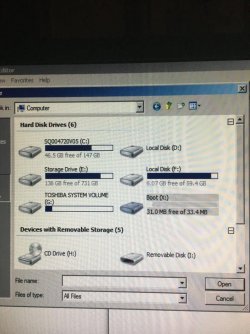
I'm working on that. Can I ask what I'm looking at for her system? Think she has a SSD and a terabyte HDD. What are the C, D, E, F, G, and X drives? Assume C is the SSD with Windows on it? G or I maybe the card reader?

Also, I've been doing the enabling. Thought the C was for Windows, but I didn't find a config folder under C's windows\system32, but I did find config under F drive's windows\system32. ??


IMG-5016.jpg
 
Last edited:

My Computer

Computer type
PC/Desktop
OS
WI

My Computers

System One System Two

2. Extract the Just Manager archive to a folder of your choice, for simplicity we’re using the root of C. The path to the executable is C:\JustManager\JustManager.exe.

How do I extract to a folder? Doesn't explain that. To a folder on the bad computer?
 

My Computer

Computer type
PC/Desktop
OS
WI
Don't see how to extract to a folder on the bad computer.
 

My Computer

Computer type
PC/Desktop
OS
WI
Holy cow I just booted to Safe Mode! Now what?

But it's limited. I can't open any of the programs! "The drive or network connection for that is unavailable."
Control Panel opens and some of the accessories. No Music, Documents.

Can't right click Start at all. Nothing appears in search box results.
 

My Computer

Computer type
PC/Desktop
OS
WI

My Computers

System One System Two

Back
Top