User registry handles leaked when shutting down Win 7 Ultimate

p23185

New member
Member
Local time
2:59 AM
Messages
46
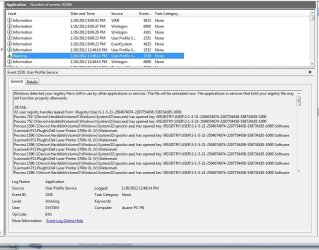
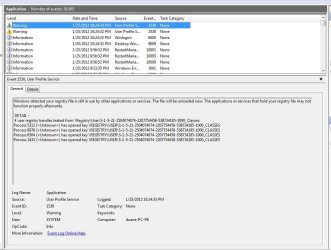
I have over 630 events logged in less than a year on my Win 7 Ultimate (64bit) which is basically turned one and off twice per day, all stating that my registry is leaking. Each shut down produces a 1530 event message like this below...

Windows detected your registry file is still in use by other applications or services. The file will be unloaded now. The applications or services that hold your registry file may not function properly afterwards.
Which is then followed by the number of leaks (from 3 to 45) but all relate to REGISTRY\USER\S-1-5-21-2504074074-2207754458-538734185-1000. When I seach for this reference on the C:\ drive it returns me three Roaming folders under App Data. There is only one user on this machine (excluding the administrator). If there is a guest user, it doesn't show up - it boots right to my desktop.

Question - can I somehow turn off this roaming?
I am not storing any destop or user profile on a network, why is this roaming thing needed?

I do not know where to find user profiles, I can only find user accounts in the control panel.
 

My Computer My Computer

At a glance

Windows 7 Ultimate x64i7-26008GbBFGgts250
Computer Manufacturer/Model Number
me/na
OS
Windows 7 Ultimate x64
CPU
i7-2600
Motherboard
Asus P8P67eluxe_i7-2600
Memory
8Gb
Graphics Card(s)
BFGgts250
Sound Card
mobo
Monitor(s) Displays
Acer P236H
Hard Drives
500Gb system Hitachi
1000Gb video Seagate 6.0 Gp/s SATA
1000Gb special project Seagate 3.0Gb/s SATA
PSU
thermaltake_600w
Case
Antec_900
Cooling
fans
No, one cannot turn this "roaming", because it is part of the system. That folder used to be Documents and Settings\$USER$\Application Data in Windows XP.

Some application causing this problem. More info is required. Screenshots would also be appreciated.
 

My Computer My Computer

At a glance

Windows 8.1 ; Windows 7 x86 (Dec2008-Jan2013)
Computer type
PC/Desktop
OS
Windows 8.1 ; Windows 7 x86 (Dec2008-Jan2013)
Other Info
"The scale icon at the top right of a post or tutorial is how you can give rep to the member."
No, one cannot turn this "roaming", because it is part of the system. That folder used to be Documents and Settings\$USER$\Application Data in Windows XP.

Some application causing this problem. More info is required. Screenshots would also be appreciated.

Not sure what sceen shots I should post. The devices that are leaking vary by description and the quantity of entries. It occurs at shutdown - know this by marking down the time I hit the shut down button and then reboot and look at the event viewer. Maybe this means nothing as it is only a warning and nothing else seems to have a problem.
 

Attachments

  • dell printer (012612).jpg
    dell printer (012612).jpg
    129.8 KB · Views: 174
  • unknown device (012512).jpg
    unknown device (012512).jpg
    85.3 KB · Views: 78

My Computer My Computer

At a glance

Windows 7 Ultimate x64i7-26008GbBFGgts250
Computer Manufacturer/Model Number
me/na
OS
Windows 7 Ultimate x64
CPU
i7-2600
Motherboard
Asus P8P67eluxe_i7-2600
Memory
8Gb
Graphics Card(s)
BFGgts250
Sound Card
mobo
Monitor(s) Displays
Acer P236H
Hard Drives
500Gb system Hitachi
1000Gb video Seagate 6.0 Gp/s SATA
1000Gb special project Seagate 3.0Gb/s SATA
PSU
thermaltake_600w
Case
Antec_900
Cooling
fans
"S-1-5-21-2504074074-2207754458-538734185-1000" is your user account. Windows uses SIDs to identify accounts.
 

My Computer My Computer

At a glance

Windows 10 Pro (x64)Intel Core i7-3930K (3.2GHz - 4.5GHz)4x Samsung 4GB PC3-12800 DDR3 (16GB 1600MHz)Nvidia Geforce GTX 690
Computer type
PC/Desktop
Computer Manufacturer/Model Number
Alienware Aurora ALX R4
OS
Windows 10 Pro (x64)
CPU
Intel Core i7-3930K (3.2GHz - 4.5GHz)
Motherboard
Alienware Aurora-R4 x79
Memory
4x Samsung 4GB PC3-12800 DDR3 (16GB 1600MHz)
Graphics Card(s)
Nvidia Geforce GTX 690
Sound Card
SteelSeries Siberia Elite
Monitor(s) Displays
Dell UltraSharp U3011
Screen Resolution
2560x1600
Hard Drives
Samsung 850 Pro 256 GB, Seagate 1TB Desktop Hybrid HDD, 2x Western Digital 4TB Green HDD
PSU
875W Some Dell PSU <.<
Case
Alienware Aurora ALX
Cooling
Custom Liquid Cooling (EK CPU & GPU blocks) dual EK 480RAD
Keyboard
Logitech G710+ Mechanical
Mouse
Logitech G700s
Internet Speed
Verizon Fios (50 mbps average)
Other Info
Server: Intel NUC D54250WYK: i5-4250U, 16GB, 256 GB mSATA, Windows Server 2012 R2
I see that one of the issues is related to printer spooler. Do you have an network printer?
I would try to re-install drivers, preferably from official manufacture's website.
 

My Computer My Computer

At a glance

Windows 8.1 ; Windows 7 x86 (Dec2008-Jan2013)
Computer type
PC/Desktop
OS
Windows 8.1 ; Windows 7 x86 (Dec2008-Jan2013)
Other Info
"The scale icon at the top right of a post or tutorial is how you can give rep to the member."
Back
Top