Solved 0 user registry handles leaked ?

bugsy2019

New member
Local time
5:15 AM
Messages
9
Hi Everyone,

Normally there is a thread or forum somewhere online i can figure out problems or solutions but this one has me stumped.

I have checked PC for malware etc and all has come up fine but i seem to get this error after every shutdown of my PC i have kind of ignored it a little as it doesn't show its leaking any program but there must be a cause to it as i don't have it on any other computer.

I tried doing a clean boot and the usual closing of programs etc but it still appears the only thing i noticed was if i created a new user when logging off or shutting down from new one it didnt appear but as soon as i copied my appdata folder from other over it appeared again so i am guessing its something probally in here but i cannot see anything.

Was wondering if there was anyone on here who had similar problem or could help.

Cheers

Mark

- <Event xmlns="http://schemas.microsoft.com/win/2004/08/events/event">
- <System>
<Provider Name="Microsoft-Windows-User Profiles Service" Guid="{89B1E9F0-5AFF-44A6-9B44-0A07A7CE5845}" />

<EventID>1530</EventID>

<Version>0</Version>

<Level>3</Level>

<Task>0</Task>

<Opcode>0</Opcode>

<Keywords>0x8000000000000000</Keywords>

<TimeCreated SystemTime="2019-01-08T14:16:28.934802700Z" />

<EventRecordID>38427</EventRecordID>

<Correlation />

<Execution ProcessID="688" ThreadID="1820" />

<Channel>Application</Channel>

<Computer>Mark-PC</Computer>

<Security UserID="S-1-5-18" />

</System>


- <EventData Name="EVENT_HIVE_LEAK">
<Data Name="Detail">0 user registry handles leaked from \Registry\User\S-1-5-21-4158718855-2632634187-736545407-1000_Classes:</Data>

</EventData>


</Event>
 

My Computer My Computer

At a glance

Win 7 64bit Proi724gbGtx 750Ti
Computer type
PC/Desktop
Computer Manufacturer/Model Number
Custom
OS
Win 7 64bit Pro
CPU
i7
Motherboard
Q77v Pro
Memory
24gb
Graphics Card(s)
Gtx 750Ti
PSU
750w
Cooling
Air
Antivirus
MS Essentials
Browser
Firefox

My Computer My Computer

At a glance

Windows 7 Pro SP1 64 bit8 GB
Computer type
Laptop
Computer Manufacturer/Model Number
Dell M6500 Precision Work Station
OS
Windows 7 Pro SP1 64 bit
Memory
8 GB
Screen Resolution
1920x
Internet Speed
30 Mbps
Antivirus
Norton Security
Browser
IE 11
Hi Mark,,

I know its only a warning - but thier annoying.

To get you a bit farther on -
Its usually a background task still running, after you've changed user.

As process ID's and threadID's are fluid you need upto date session info

IMMEDIATELY prior to closing down
open task manager - Services tab, copy paste the info
SHUTDOWN

then after you have rebooted check your 1530 event log for the PID


Roy
 

My Computer My Computer

At a glance

W7 home premium 32bit/W7HP 64bit/w10 tp insid...E5300 dual core3gbNvidia Geforce 7100 Nforce 630i
Computer type
PC/Desktop
Computer Manufacturer/Model Number
medionl/Aspire 6930G/acer x55a
OS
W7 home premium 32bit/W7HP 64bit/w10 tp insider ring
CPU
E5300 dual core
Motherboard
medion MS7366
Memory
3gb
Graphics Card(s)
Nvidia Geforce 7100 Nforce 630i
Monitor(s) Displays
avixc
Internet Speed
n (isp resticted to 72)
Antivirus
mse/pands
Browser
palemoon
Other Info
Belkin Fd7050 n USB using Railink RT2870 drivers, more upto date
In reply to wither 2 - Yeah i found this page also it was only one i could find that seemed to have the same problem but with no solutions all others that i found had 1 or more registry leaks and listed programs.


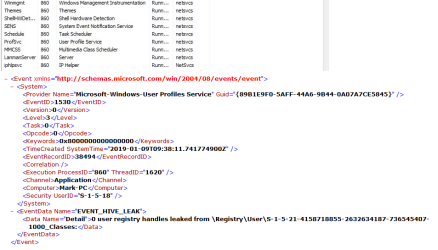
In reply to torchwood - I have attached a image below showing what processes it is linked to not sure if this will help at all gonna have a look into each one see if there's anything.
 

Attachments

  • Capture.png
    Capture.png
    41.5 KB · Views: 0

My Computer My Computer

At a glance

Win 7 64bit Proi724gbGtx 750Ti
Computer type
PC/Desktop
Computer Manufacturer/Model Number
Custom
OS
Win 7 64bit Pro
CPU
i7
Motherboard
Q77v Pro
Memory
24gb
Graphics Card(s)
Gtx 750Ti
PSU
750w
Cooling
Air
Antivirus
MS Essentials
Browser
Firefox
Does this problem occur before the user is logged off? Just asking because, if it's before log off, you might be able to get something from the event viewer.
 

My Computer My Computer

At a glance

Windows 7 Pro SP1 64 bit8 GB
Computer type
Laptop
Computer Manufacturer/Model Number
Dell M6500 Precision Work Station
OS
Windows 7 Pro SP1 64 bit
Memory
8 GB
Screen Resolution
1920x
Internet Speed
30 Mbps
Antivirus
Norton Security
Browser
IE 11
Nope it happens when i restart or shutdown but it must do it as its going off as the time it gives. The details above are also from event viewer.

I had a look at each process shown but none really give me any more light on what is happening it appears as if its just logging but there's nothing actually being closed as all other people with same problem it lists a application its never 0

Its certainly has me baffled at moment
 

My Computer My Computer

At a glance

Win 7 64bit Proi724gbGtx 750Ti
Computer type
PC/Desktop
Computer Manufacturer/Model Number
Custom
OS
Win 7 64bit Pro
CPU
i7
Motherboard
Q77v Pro
Memory
24gb
Graphics Card(s)
Gtx 750Ti
PSU
750w
Cooling
Air
Antivirus
MS Essentials
Browser
Firefox
I have that event in my Event Viewer, but in my case it seems that the culprit is Avast.
 

My Computer My Computer

At a glance

W7 Ultimate SP1, LM19.2 MATE, W10 Home 1703, ...AMD Phenom II x6 1100T, 3.3 GHz12GB DDR3 1333 G-Skill (4GB x 2), G-Skill (2G...NVIDIA GeForce GTX 660
Computer type
PC/Desktop
Computer Manufacturer/Model Number
n/a
OS
W7 Ultimate SP1, LM19.2 MATE, W10 Home 1703, W10 Pro 1703 VM, #All 64 bit
CPU
AMD Phenom II x6 1100T, 3.3 GHz
Motherboard
ASUS M4A88T-M/USB3 (AM3)
Memory
12GB DDR3 1333 G-Skill (4GB x 2), G-Skill (2GB x 2)
Graphics Card(s)
NVIDIA GeForce GTX 660
Sound Card
Realtek?
Monitor(s) Displays
Samsung S23B350
Screen Resolution
1920x1080
Hard Drives
WD Green 2TB (SATA), WD Green 3TB (SATA), WD Blue 4TB (SATA), WD Blue 6TB (SATA)
PSU
Cooler Master
Case
Antec GX300 Tower
Cooling
3x Antec TRICOOL 120mm Fans
Mouse
Wired Optical
Internet Speed
DSL
Antivirus
Avast
Browser
Pale Moon (64 bit)
Other Info
2018-12-27 Upgraded HDDs
2015-12-10 Upgraded case, graphics card, storage
2015-08-15 Upgraded motherboard & RAM
2015-07-15 Upgraded LM17.1 to LM17.2
Yeah Apparently avast and Kaspersky seem to cause the error for most from research but it will say minimum 1 memory leak or more where as this i get says 0 which seems to be extremely rare and unknown from what i can tell.

Also never used avast or Kaspersky always been ms essentials
 

My Computer My Computer

At a glance

Win 7 64bit Proi724gbGtx 750Ti
Computer type
PC/Desktop
Computer Manufacturer/Model Number
Custom
OS
Win 7 64bit Pro
CPU
i7
Motherboard
Q77v Pro
Memory
24gb
Graphics Card(s)
Gtx 750Ti
PSU
750w
Cooling
Air
Antivirus
MS Essentials
Browser
Firefox
When you ran the clean boot, did you shut the system down leaving it in the clean boot mode?
 

My Computer My Computer

At a glance

Windows 7 Pro SP1 64 bit8 GB
Computer type
Laptop
Computer Manufacturer/Model Number
Dell M6500 Precision Work Station
OS
Windows 7 Pro SP1 64 bit
Memory
8 GB
Screen Resolution
1920x
Internet Speed
30 Mbps
Antivirus
Norton Security
Browser
IE 11
I wasnt sure to be honest so ive just done that as i couldn't remember if i left it on after then restarting but i set it to clean boot left it on so it restarted to another clean boot and it still appears :confused:
 

My Computer My Computer

At a glance

Win 7 64bit Proi724gbGtx 750Ti
Computer type
PC/Desktop
Computer Manufacturer/Model Number
Custom
OS
Win 7 64bit Pro
CPU
i7
Motherboard
Q77v Pro
Memory
24gb
Graphics Card(s)
Gtx 750Ti
PSU
750w
Cooling
Air
Antivirus
MS Essentials
Browser
Firefox
OK Ive gotten a little bit further with this not stopped it but found what i hope to be cause except not sure if i can delete the file without losing stuff.


Ok so what i did was i set up another user account as it wasn't happening on a new one and kept copying folder by folder of my other user from the APPDATA folder till it happened it was a bit long and tedious but in the end it turned out to be


appdata/local/microsoft/windows/usrclass.dat


The other usrclass files in this folder didn't make a difference only this one seemed to bring it back on other user and when swapped back with it went away again.


So i guess question is could i delete this on the one that is going wrong and have no adverse effects? what does it actually do?


I have read a little saying it keeps user preferences etc in but not sure what or even if i can repair it as there's obviously something in it that is causing the error.
 

My Computer My Computer

At a glance

Win 7 64bit Proi724gbGtx 750Ti
Computer type
PC/Desktop
Computer Manufacturer/Model Number
Custom
OS
Win 7 64bit Pro
CPU
i7
Motherboard
Q77v Pro
Memory
24gb
Graphics Card(s)
Gtx 750Ti
PSU
750w
Cooling
Air
Antivirus
MS Essentials
Browser
Firefox
Hi Bugsy,

Once you have created that new User profile, bug free - just remove the offending one

User Account - Delete


You have now reicieved Sherlock Holmes's hat:geek:


Roy
 

My Computer My Computer

At a glance

W7 home premium 32bit/W7HP 64bit/w10 tp insid...E5300 dual core3gbNvidia Geforce 7100 Nforce 630i
Computer type
PC/Desktop
Computer Manufacturer/Model Number
medionl/Aspire 6930G/acer x55a
OS
W7 home premium 32bit/W7HP 64bit/w10 tp insider ring
CPU
E5300 dual core
Motherboard
medion MS7366
Memory
3gb
Graphics Card(s)
Nvidia Geforce 7100 Nforce 630i
Monitor(s) Displays
avixc
Internet Speed
n (isp resticted to 72)
Antivirus
mse/pands
Browser
palemoon
Other Info
Belkin Fd7050 n USB using Railink RT2870 drivers, more upto date
Yeah i know i can do that but i didnt want to lose how i had customized etc on other profile will mean i need to set up everything again in terms of personalisations would the usrclass.dat recreate if i deleted it?


Is there anyway to look into the usrclass.dat file.
 

My Computer My Computer

At a glance

Win 7 64bit Proi724gbGtx 750Ti
Computer type
PC/Desktop
Computer Manufacturer/Model Number
Custom
OS
Win 7 64bit Pro
CPU
i7
Motherboard
Q77v Pro
Memory
24gb
Graphics Card(s)
Gtx 750Ti
PSU
750w
Cooling
Air
Antivirus
MS Essentials
Browser
Firefox
The best way to find out is to rename that .dat file to something like usrclassold.dat and reboot. You might want to set a system recovery restore point before doing so in case there's a boot problem. On the other hand, if you ran into a boot problem, you could go into safe mode and change the folder name back to the original.
 

My Computer My Computer

At a glance

Windows 7 Pro SP1 64 bit8 GB
Computer type
Laptop
Computer Manufacturer/Model Number
Dell M6500 Precision Work Station
OS
Windows 7 Pro SP1 64 bit
Memory
8 GB
Screen Resolution
1920x
Internet Speed
30 Mbps
Antivirus
Norton Security
Browser
IE 11
Thanks for all your help everyone hopefully will be the fix below but wont know till tested for a while.


I have renamed old one too usrclass.old via another account i created and then logged back in to which it recreated the file and i dont have the error anymore the question will be if i see any changes to which the file would of stored info such as personalisations etc. Not noticed anything major as yet as ive even got all file associations same which i thought may be one of things that may of reset.

Will let you all know how i get on over coming days/weeks and if there isn't anything then its finally solved well in terms of fixing it but what caused it i will never know at present.:D
 

My Computer My Computer

At a glance

Win 7 64bit Proi724gbGtx 750Ti
Computer type
PC/Desktop
Computer Manufacturer/Model Number
Custom
OS
Win 7 64bit Pro
CPU
i7
Motherboard
Q77v Pro
Memory
24gb
Graphics Card(s)
Gtx 750Ti
PSU
750w
Cooling
Air
Antivirus
MS Essentials
Browser
Firefox
Great! Fingers crossed that everything will be okay.
 

My Computer My Computer

At a glance

Windows 7 Pro SP1 64 bit8 GB
Computer type
Laptop
Computer Manufacturer/Model Number
Dell M6500 Precision Work Station
OS
Windows 7 Pro SP1 64 bit
Memory
8 GB
Screen Resolution
1920x
Internet Speed
30 Mbps
Antivirus
Norton Security
Browser
IE 11
Right to update you all as its been over a week its not returned so i have solved this problem. I havent noticed anything in terms of personalisations that have changed but may vary for others.

So for those having similar problem here is what i did so that i could continue to use same user account without doing a new one.

1. Create another local user account i named one Temp
2. Log on to the new account you just created
3. Go to c:/users/your username that has error/appdata/local/microsoft/windows/
4. Rename usrclass.dat to usrclass.old
5. Reboot and log on as the user you had error with.
6. Check event log for the error if gone and everything ok with account delete temp user you created.


Note: You may get the odd new error in event log i think this is due to creating new usrclass.dat but they will be one offs and not on each boot.

Also this may cause some lost in personalisations for the user account for some however in my case i didn't notice any changes other than the error had gone. But i must warn you as we all have different setups make sure you don't just delete the file rename it to .old as backup just in case.

Thanks to all those helping on here was a tedious job to try and find but got there in the end and hopefully will help others who have this problem as its a very rare occurrence to have the 0 handles leak.
 

My Computer My Computer

At a glance

Win 7 64bit Proi724gbGtx 750Ti
Computer type
PC/Desktop
Computer Manufacturer/Model Number
Custom
OS
Win 7 64bit Pro
CPU
i7
Motherboard
Q77v Pro
Memory
24gb
Graphics Card(s)
Gtx 750Ti
PSU
750w
Cooling
Air
Antivirus
MS Essentials
Browser
Firefox
Back
Top